It is currently Thu Nov 19, 2026 5:50 am


All times are UTC - 5 hours [ DST ]


Post new topic Reply to topic  [ 10 posts ] 
Author Message
 Post subject: Signature of the week... My Second Entry...
PostPosted: Sun May 02, 2010 2:34 pm  (#1) 
Offline
GimpChat Member

Joined: Apr 24, 2010
Posts: 84
Okay so it's a new week.. The theme this week is... WATER

I just entered the contest with a basic but nice sig I guess..

I myself am a scuba diver

So I took the word "water" that way...

Image

Let me know what you think of it.. I like it..

Regards


Share on Facebook Share on Twitter Share on Orkut Share on Digg Share on MySpace Share on Delicious Share on Technorati
Top
 Post subject: Re: Signature of the week... My Second Entry...
PostPosted: Sun May 02, 2010 3:46 pm  (#2) 
Offline
GimpChat Member

Joined: Apr 11, 2010
Posts: 545
Location: In the mini-chat, saying silly things
I love the light source! It looks like the sun is shining from above. :bigthup


Why don't you try the under water script from that under water pearls thread molly posted? :)

_________________
Image


Top
 Post subject: Re: Signature of the week... My Second Entry...
PostPosted: Mon May 03, 2010 8:34 am  (#3) 
Offline
GimpChat Member
User avatar

Joined: Apr 07, 2010
Posts: 14182
yah, I think that would be cool......

_________________
Image


Top
 Post subject: Re: Signature of the week... My Second Entry...
PostPosted: Mon May 03, 2010 11:10 am  (#4) 
Offline
GimpChat Member

Joined: Apr 24, 2010
Posts: 84
Linky :bigthup /beg


Top
 Post subject: Re: Signature of the week... My Second Entry...
PostPosted: Mon May 03, 2010 11:17 am  (#5) 
Offline
GimpChat Member
User avatar

Joined: Apr 07, 2010
Posts: 14182
wave tank

This is a little tute Oregonian wrote out for me so here it is...
Using the Wave Tank script
1. Open a new transparent layer.
2. Fill the background layer with the silver environment map.
3. Make a new layer and fill it with blue or whatever color you want to use.
4. Set the layer mode to the one that looks best to you over your background.
5. Merge the color layer down to the background layer.
6. Make a new transparent layer and put the image or make text like you want.
7. Color the text how you want.
8. Bevel and dropshadow the text how you want.
9. Merge the text layer down to the dropshadow layer if you've made a dropshadow.
10. Make a new transparent layer and fill it with the same blue you used previously.
11. Lower the opacity until your text has the tint of blue you want.
12. Merge that layer down to your text layer.
13. Merge that layer down to the background layer.
14. Run the wave script. I used 25 frames in mine and left the rest of the settings default

_________________
Image


Last edited by molly on Mon May 03, 2010 11:25 am, edited 1 time in total.

Top
 Post subject: Re: Signature of the week... My Second Entry...
PostPosted: Mon May 03, 2010 11:20 am  (#6) 
Offline
GimpChat Member

Joined: Apr 11, 2010
Posts: 545
Location: In the mini-chat, saying silly things
viewtopic.php?f=9&t=177

search, or just looking through the recent threads works very well too. :bigthup

_________________
Image


Top
 Post subject: Re: Signature of the week... My Second Entry...
PostPosted: Mon May 03, 2010 11:22 am  (#7) 
Offline
GimpChat Member

Joined: Apr 24, 2010
Posts: 84
Jolie wrote:
http://gimpchat.com/viewtopic.php?f=9&t=177

search, or just looking through the recent threads works very well too. :bigthup


I'm lazy today :mrgreen: Sry


Top
 Post subject: Re: Signature of the week... My Second Entry...
PostPosted: Mon May 03, 2010 11:23 am  (#8) 
Offline
GimpChat Member

Joined: Apr 24, 2010
Posts: 84
Moving signatures are not allowed :(

I tried it anyway and It didn't realy work.. I applied the script then saved as .GIF and it doesn't move :(

What did I do wrong :cool


Top
 Post subject: Re: Signature of the week... My Second Entry...
PostPosted: Mon May 03, 2010 11:59 am  (#9) 
Offline
GimpChat Founder
User avatar

Joined: May 22, 2008
Posts: 5244
Location: Gimpville
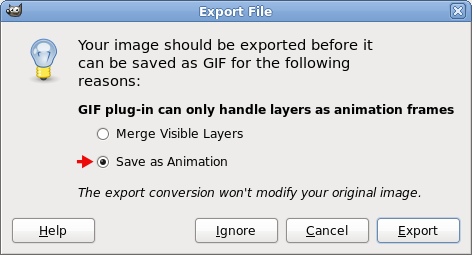
Did you save the gif as an animation or did you tell it to flatten? There is an option when saving to specify flattened image or animation.

_________________
Image


Top
 Post subject: Re: Signature of the week... My Second Entry...
PostPosted: Tue May 04, 2010 2:49 pm  (#10) 
Offline
Retired Staff
User avatar

Joined: May 22, 2008
Posts: 6946
Location: Somewhere in GIMP
Saving as an animation.

Image

_________________
Image
World War IV will be fought with sticks and stones. - Albert Einstein


Top
Post new topic Reply to topic  [ 10 posts ] 

All times are UTC - 5 hours [ DST ]


* Login  


Powered by phpBB3 © phpBB Group