It is currently Wed Oct 28, 2026 1:16 am


All times are UTC - 5 hours [ DST ]


Post new topic Reply to topic  [ 95 posts ]  Go to page Previous  1, 2, 3, 4, 5  Next
Author Message
 Post subject: Re: My monior is still shutting down every day [Unsolved]
PostPosted: Wed Sep 03, 2014 1:40 pm  (#61) 
Offline
GimpChat Founder
User avatar

Joined: May 22, 2008
Posts: 5241
Location: Gimpville
molly wrote:
Yes, I took it right out, then I went to monitor settings and changed it to DVI from VGA

I just finished my kindergarten techie course.

Hopefully, all will be well. :bigthup

_________________
“If you reach for the stars, you just might land on a decently sized hill.” - Stuart Hill


Top
 Post subject: Re: My monior is still shutting down every day [Unsolved]
PostPosted: Wed Sep 03, 2014 1:42 pm  (#62) 
Offline
GimpChat Member
User avatar

Joined: Apr 07, 2010
Posts: 14182
You guys are so great, I am overwhelmed with your techie knowledge.

_________________
Image


Top
 Post subject: Re: My monitor is still shutting down every day [hopefully solved]
PostPosted: Wed Sep 03, 2014 3:24 pm  (#63) 
Offline
Global Moderator
User avatar

Joined: Apr 01, 2012
Posts: 8492
Location: On the other side of your screen
Hope all stays well for you. Been watching this thread just incase I need this kind of help one day.

_________________
Image
Free Fun Photo Editing & resources
Poems from the Lord
Gimp Newby
Gimp version 3.2.6 and GMIC-Qt 4.0.2 OS :- Windows 10 Home 64


Top
 Post subject: Re: My monitor is still shutting down every day [hopefully solved]
PostPosted: Wed Sep 03, 2014 3:27 pm  (#64) 
Offline
GimpChat Member
User avatar

Joined: Apr 07, 2010
Posts: 14182
Thank you and I'll say we have some pretty smart technical guys here and I think we all appreciate them as much as I do. I am glad I posted this for other people to know what to do also, if it happens to them

_________________
Image


Top
 Post subject: Re: My monitor is still shutting down every day [hopefully solved]
PostPosted: Wed Sep 03, 2014 3:56 pm  (#65) 
Offline
Administrator
User avatar

Joined: Aug 10, 2012
Posts: 14250
Location: Native to NYC living in Arizona, Gimp 2.8 - 3.0, Win 11 PC.
molly wrote:
Thank you and I'll say we have some pretty smart technical guys here and I think we all appreciate them as much as I do. I am glad I posted this for other people to know what to do also, if it happens to them

My fingers are crossed. :mrgreen:

_________________
Image
"A wise man learns more from a foolish question than a fool can learn from a wise answer"
Image


Top
 Post subject: Re: My monitor is still shutting down every day [hopefully solved]
PostPosted: Wed Sep 03, 2014 4:41 pm  (#66) 
Offline
Script Coder
User avatar

Joined: Apr 23, 2010
Posts: 1553
Location: not from Guildford after all
I hope things continue to work. Have you turned your computer off, then on, to test power cycling yet?

Since you know (from switching monitors but not cables) that the original blue VGA cable is good, you should put it in one of your junk places. You might also want to put a label on the back of the monitor saying that the VGA input is faulty (and perhaps put a piece of electrical tape over the connector).

_________________
Any sufficiently primitive technology is indistinguishable from a rock.


Top
 Post subject: Re: My monitor is still shutting down every day [hopefully solved]
PostPosted: Wed Sep 03, 2014 4:49 pm  (#67) 
Offline
GimpChat Member
User avatar

Joined: Apr 07, 2010
Posts: 14182
I did turn my pc off and turned it back on again, but the test is usually when it is off longer, like over night. If it is still good in the morning when I boot up, I I will feel more positive.
I will keep the thread going until I know for sure. Thanks Saul for the help. I already labeled my old cable and put in back in a package.

_________________
Image


Top
 Post subject: Re: My monitor is still shutting down every day [hopefully solved]
PostPosted: Wed Sep 03, 2014 4:56 pm  (#68) 
Offline
GimpChat Member
User avatar

Joined: Sep 24, 2010
Posts: 12853
Good that you found the DVI cable Molly. You may or may not have noticed, but your image quality will be better especially if you use a resolution other then the monitor's default high rez setting. :)

_________________
Lyle

Psalm 109:8

Image


Top
 Post subject: Re: My monitor is still shutting down every day [hopefully solved]
PostPosted: Wed Sep 03, 2014 5:06 pm  (#69) 
Offline
GimpChat Member
User avatar

Joined: Apr 07, 2010
Posts: 14182
Lyle, would I also notice a difference in the forum or in my hotmail. I might be imagining it but everything including the text seems to look more crisp and clear.

_________________
Image


Top
 Post subject: Re: My monitor is still shutting down every day [hopefully solved]
PostPosted: Wed Sep 03, 2014 5:20 pm  (#70) 
Offline
Administrator
User avatar

Joined: Aug 10, 2012
Posts: 14250
Location: Native to NYC living in Arizona, Gimp 2.8 - 3.0, Win 11 PC.
molly wrote:
Lyle, would I also notice a difference in the forum or in my hotmail. I might be imagining it but everything including the text seems to look more crisp and clear.

I know you're asking Lyle, but...
VGA connectors transmit analog signals. The digital video signal received from the source is converted to analog to be transmitted via the cable. If the display device is an old CRT (Cathode Ray Tube) monitor, it accepts an analog signal. However, most display devices are now digital; so they convert the VGA connector's analog signal back to digital. This conversion from digital to analog and back results in a degradation of video quality for VGA connectors.

DVI is newer and offers better, sharper display compared to VGA, especially at higher resolutions. Like Lyle has explained.

_________________
Image
"A wise man learns more from a foolish question than a fool can learn from a wise answer"
Image


Top
 Post subject: Re: My monitor is still shutting down every day [hopefully solved]
PostPosted: Wed Sep 03, 2014 5:25 pm  (#71) 
Offline
GimpChat Member
User avatar

Joined: Sep 24, 2010
Posts: 12853
lylejk wrote:
Good that you found the DVI cable Molly. You may or may not have noticed, but your image quality will be better especially if you use a resolution other then the monitor's default high rez setting. :)


Yup; listen to Wallace. lol

We live in a digital age, so might as well go all digital (VGA is not, but usually, at hirez native, you won't see too much difference. The crux is most people don't use the hirez native for the monitor). DVI is good for all resolutions. Again, HDMI, I believe, is even better, but I have no way to compare that since my monitor's too old. :)

_________________
Lyle

Psalm 109:8

Image


Top
 Post subject: Re: My monitor is still shutting down every day [hopefully solved]
PostPosted: Wed Sep 03, 2014 5:45 pm  (#72) 
Offline
Administrator
User avatar

Joined: Aug 10, 2012
Posts: 14250
Location: Native to NYC living in Arizona, Gimp 2.8 - 3.0, Win 11 PC.
lylejk wrote:
lylejk wrote:
Good that you found the DVI cable Molly. You may or may not have noticed, but your image quality will be better especially if you use a resolution other then the monitor's default high rez setting. :)


Yup; listen to Wallace. lol

We live in a digital age, so might as well go all digital (VGA is not, but usually, at hirez native, you won't see too much difference. The crux is most people don't use the hirez native for the monitor). DVI is good for all resolutions. Again, HDMI, I believe, is even better, but I have no way to compare that since my monitor's too old. :)


I have all three connection on my monitor.
I'm currently using the HDMI connection. I was using VGA for some time, but switched when I got my new machine and installed a better graphics card.

_________________
Image
"A wise man learns more from a foolish question than a fool can learn from a wise answer"
Image


Top
 Post subject: Re: My monitor is still shutting down every day [hopefully solved]
PostPosted: Wed Sep 03, 2014 5:50 pm  (#73) 
Offline
GimpChat Founder
User avatar

Joined: May 22, 2008
Posts: 5241
Location: Gimpville
One big difference between HDMI and DVI is that HDMI also carries digital audio signals. DVI also doesn't support HDCP encryption, which is there to prevent you from copying HD sources (Blu-ray). This can be good or bad, depending on how you look at things. ;)

_________________
“If you reach for the stars, you just might land on a decently sized hill.” - Stuart Hill


Top
 Post subject: Re: My monitor is still shutting down every day [hopefully solved]
PostPosted: Wed Sep 03, 2014 6:00 pm  (#74) 
Offline
Administrator
User avatar

Joined: Aug 10, 2012
Posts: 14250
Location: Native to NYC living in Arizona, Gimp 2.8 - 3.0, Win 11 PC.
GnuTux wrote:
One big difference between HDMI and DVI is that HDMI also carries digital audio signals. DVI also doesn't support HDCP encryption, which is there to prevent you from copying HD sources (Blu-ray). This can be good or bad, depending on how you look at things. ;)


Yeah, I hook up an external audio source to be able to use my earphones with the sound from my PC, when connected using the HDMI cable.
I get no sound from the audio jack on my PC when using the HDMI cable, I guess my video-card has disabled the audio-out jack on the front of my PC.

_________________
Image
"A wise man learns more from a foolish question than a fool can learn from a wise answer"
Image


Top
 Post subject: Re: My monitor is still shutting down every day [hopefully solved]
PostPosted: Wed Sep 03, 2014 6:13 pm  (#75) 
Offline
GimpChat Founder
User avatar

Joined: May 22, 2008
Posts: 5241
Location: Gimpville
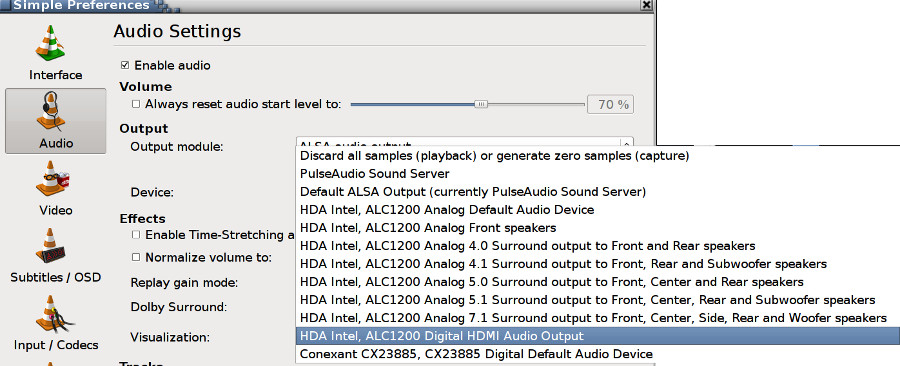
Normally, you should be able to selected the audio output device on a "per app" basis, at least in Linux you can. I assume this is also the case in Windows. For example, in VLC, I can specify the audio output device.

Image

_________________
“If you reach for the stars, you just might land on a decently sized hill.” - Stuart Hill


Top
 Post subject: Re: My monitor is still shutting down every day [hopefully solved]
PostPosted: Wed Sep 03, 2014 6:33 pm  (#76) 
Offline
Administrator
User avatar

Joined: Aug 10, 2012
Posts: 14250
Location: Native to NYC living in Arizona, Gimp 2.8 - 3.0, Win 11 PC.
GnuTux wrote:
Normally, you should be able to selected the audio output device on a "per app" basis, at least in Linux you can. I assume this is also the case in Windows. For example, in VLC, I can specify the audio output device.

[ Image ]


Yeah, I'm going to look into this.
I should be able to set the output to both HDMI and the earphone jack, I think.

I'm only able to use one device at a time, either I use the HDMI or earphone jack. I can't enable both at the same time.

_________________
Image
"A wise man learns more from a foolish question than a fool can learn from a wise answer"
Image


Top
 Post subject: Re: My monitor is still shutting down every day [hopefully solved]
PostPosted: Wed Sep 03, 2014 8:44 pm  (#77) 
Offline
Retired Staff
User avatar

Joined: May 22, 2008
Posts: 6946
Location: Somewhere in GIMP
Glad you got it fixed, Molly. WTG! :yes

_________________
Image
World War IV will be fought with sticks and stones. - Albert Einstein


Top
 Post subject: Re: My monitor is still shutting down every day [hopefully solved]
PostPosted: Wed Sep 03, 2014 9:09 pm  (#78) 
Offline
GimpChat Founder
User avatar

Joined: May 22, 2008
Posts: 5241
Location: Gimpville
Wallace wrote:
I'm only able to use one device at a time, either I use the HDMI or earphone jack. I can't enable both at the same time.

I guess I'm unclear as to your hardware setup. Do you currently have the sound going through a HDMI A/V receiver or just coming though the speakers in your monitor? If the latter, do you have headphone jacks on the monitor?

Where are you connecting the headphones?

_________________
“If you reach for the stars, you just might land on a decently sized hill.” - Stuart Hill


Top
 Post subject: Re: My monitor is still shutting down every day [hopefully solved]
PostPosted: Wed Sep 03, 2014 10:31 pm  (#79) 
Offline
Administrator
User avatar

Joined: Aug 10, 2012
Posts: 14250
Location: Native to NYC living in Arizona, Gimp 2.8 - 3.0, Win 11 PC.
GnuTux wrote:
I guess I'm unclear as to your hardware setup. Do you currently have the sound going through a HDMI A/V receiver or just coming though the speakers in your monitor? If the latter, do you have headphone jacks on the monitor?

Where are you connecting the headphones?


My headphones are connected to a speaker system that's plugged into the monitor's headphone jack. The speaker system has it's own volume control module with a headphone jack on it.
This may sound strange, but it works and there's no need to disable anything. Except when I need to use my headset with a microphone. I'm also able to use the subwoofer that's part of the speaker system, for killer bass. ;)

_________________
Image
"A wise man learns more from a foolish question than a fool can learn from a wise answer"
Image


Top
 Post subject: Re: My monitor is still shutting down every day [hopefully solved]
PostPosted: Thu Sep 04, 2014 5:57 am  (#80) 
Offline
GimpChat Member
User avatar

Joined: Apr 07, 2010
Posts: 14182
I used to have my pc hooked up to a surround sound dolby digital and when I turned that up it almost blasted me off the chair, it was and is very powerful. I decided I didn't need all that noise so I hooked it up to one of the TV's and got a real good set of stereo head phones for my pc and they work great.

Back to the topic, I booted up this morning and everything in the monitor dept. is working great and I will cross my fingers that it will stay that way. Thanks to all the help I received from everyone.

_________________
Image


Top
Post new topic Reply to topic  [ 95 posts ]  Go to page Previous  1, 2, 3, 4, 5  Next

All times are UTC - 5 hours [ DST ]


* Login  


Powered by phpBB3 © phpBB Group