It is currently Tue Oct 27, 2026 10:39 am


All times are UTC - 5 hours [ DST ]


Post new topic Reply to topic  [ 9 posts ] 
Author Message
 Post subject: Vertical lines gone
PostPosted: Fri Oct 03, 2014 4:15 am  (#1) 
Offline
GimpChat Member
User avatar

Joined: Apr 07, 2010
Posts: 14182
GIMP Version: 2.8.14
Operating System: Linux
GIMP Experience: Basic Level


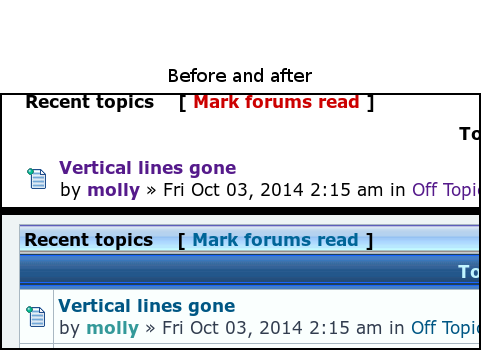
Yesterday, all the vertical and horizontal lines disappeared on my computer. I went to view and it still shows basic page style checked. Can someone tell me what I clicked by mistake or how I get the default back? Thanks in advance :oops:
Image

_________________
Image


Share on Facebook Share on Twitter Share on Orkut Share on Digg Share on MySpace Share on Delicious Share on Technorati
Top
 Post subject: Re: Vertical lines gone
PostPosted: Fri Oct 03, 2014 4:23 am  (#2) 
Offline
Administrator
User avatar

Joined: Aug 10, 2012
Posts: 14248
Location: Native to NYC living in Arizona, Gimp 2.8 - 3.0, Win 11 PC.
molly wrote:
GIMP Version: 2.8.14
Operating System: Linux
GIMP Experience: Basic Level


Yesterday, all the vertical lines disappeared on my computer. I went to view and it still shows basic page style checked. Can someone tell me what I clicked by mistake or how I get the default back? Thanks in advance :oops:
[ Image ]

Do you have a Zoom function that will make your web browser pages larger/smaller? Try that and see what happens by making the page larger/smaller.

_________________
Image
"A wise man learns more from a foolish question than a fool can learn from a wise answer"
Image


Top
 Post subject: Re: Vertical lines gone
PostPosted: Fri Oct 03, 2014 4:30 am  (#3) 
Offline
GimpChat Member
User avatar

Joined: Apr 07, 2010
Posts: 14182
No, that won't do it Wallace, even the members colors keep changing. One minute they are blue, next minute they are purple.

_________________
Image


Top
 Post subject: Re: Vertical lines gone
PostPosted: Fri Oct 03, 2014 6:12 am  (#4) 
Offline
Script Coder
User avatar

Joined: Oct 25, 2010
Posts: 4812
Purge your navigator cache or as a minimum force a true reload of the page the page (Ctrl-click the reload icon). A CSS file could have become corrupted.

_________________
Image


Top
 Post subject: Re: Vertical lines gone
PostPosted: Fri Oct 03, 2014 6:21 am  (#5) 
Offline
GimpChat Member
User avatar

Joined: Apr 07, 2010
Posts: 14182
Where do I find the re load icon?

_________________
Image


Top
 Post subject: Re: Vertical lines gone
PostPosted: Fri Oct 03, 2014 9:28 am  (#6) 
Offline
Script Coder
User avatar

Joined: Oct 25, 2010
Posts: 4812
In Firefox: a circle arc arrow at the end of the URL input field.
In Chrome: a circle arc arrow at the left of the URL input field.

_________________
Image


Top
 Post subject: Re: Vertical lines gone
PostPosted: Fri Oct 03, 2014 9:29 am  (#7) 
Offline
Retired Staff
User avatar

Joined: May 22, 2008
Posts: 6946
Location: Somewhere in GIMP
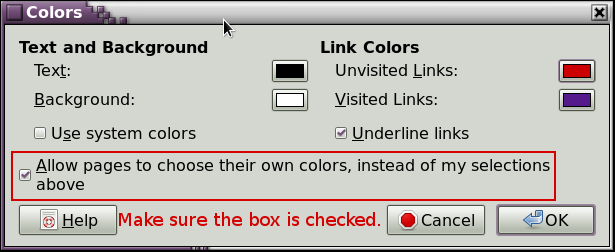
In Firefox, Edit / Preferences / Content / Colors. Make sure the box that says Allow pages to choose ... etc, is checked. See picture.

Image

Image

_________________
Image
World War IV will be fought with sticks and stones. - Albert Einstein


Top
 Post subject: Re: Vertical lines gone
PostPosted: Fri Oct 03, 2014 9:47 am  (#8) 
Offline
GimpChat Member
User avatar

Joined: Apr 07, 2010
Posts: 14182
That did it, thanks, I never had that prob before so that worked, hmmmmmm
It was making me crazy

_________________
Image


Top
 Post subject: Re: Vertical lines gone
PostPosted: Fri Oct 03, 2014 10:13 am  (#9) 
Offline
Retired Staff
User avatar

Joined: May 22, 2008
Posts: 6946
Location: Somewhere in GIMP
You're welcome. Image

_________________
Image
World War IV will be fought with sticks and stones. - Albert Einstein


Top
Post new topic Reply to topic  [ 9 posts ] 

All times are UTC - 5 hours [ DST ]


* Login  


Powered by phpBB3 © phpBB Group