It is currently Tue Oct 27, 2026 6:04 pm


All times are UTC - 5 hours [ DST ]


Post new topic Reply to topic  [ 27 posts ]  Go to page 1, 2  Next
Author Message
 Post subject: editing Wireless mouse in Fedora (Mate desktop)
PostPosted: Sat Oct 04, 2014 11:49 am  (#1) 
Offline
GimpChat Member
User avatar

Joined: Apr 07, 2010
Posts: 14182
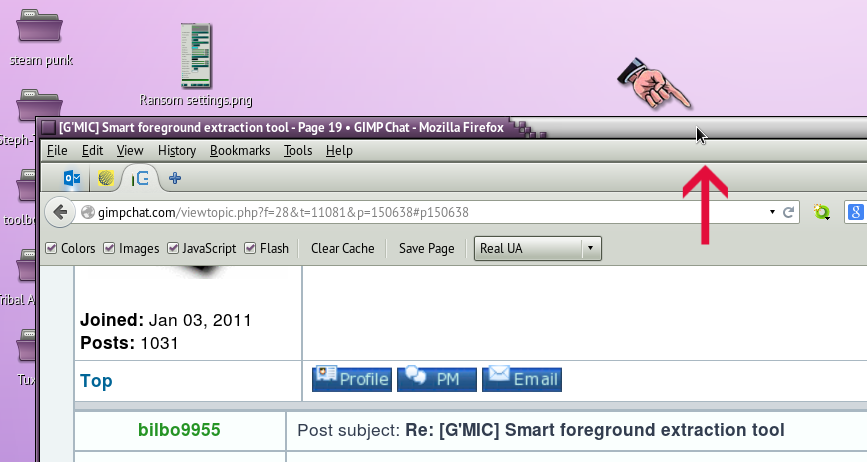
I have been having real problems with my window dragging and I have narrowed it down to my rechargable mouse. I tested it by using my Wacom pad with the the mouse that came with it and it works great. When I use my rechargeable mouse it is going crazy, I can't pull the sides or top in on the window without it going full size. As soon as I try to grab the top bar to move it, it goes full screen.
The small arrow in the screen grab below shows where I grab the window to move it to one side or resize it by pulling the sides in.
Image


My question is, can I edit the mouse using some kind of software in Fedora with MATE desktop. Or do I go and buy a new cordless or heaven forbid a cord mouse.
Thanks in advance.

_________________
Image


Share on Facebook Share on Twitter Share on Orkut Share on Digg Share on MySpace Share on Delicious Share on Technorati
Top
 Post subject: Re: editing rechargable mouse in Fedora (Mate desktop)
PostPosted: Sat Oct 04, 2014 12:11 pm  (#2) 
Offline
Retired Staff
User avatar

Joined: May 22, 2008
Posts: 6946
Location: Somewhere in GIMP
I have Fedora 20 with the Mate desktop. I don't have a rechargeable mouse but mine has batteries and is wireless.

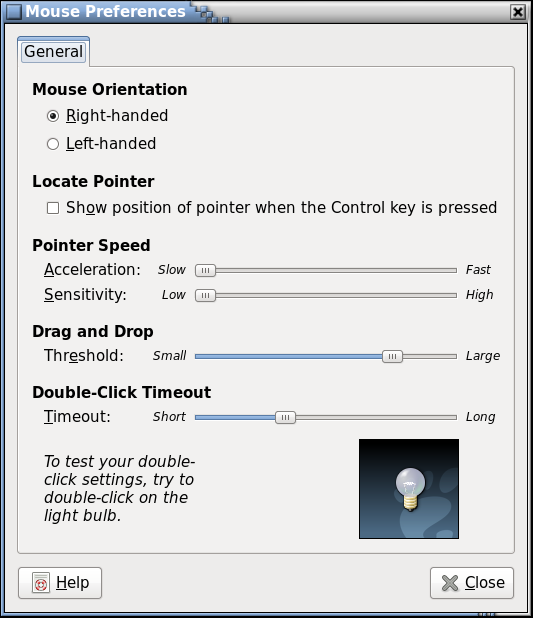
On the Fedora desktop menu at the top: System / Preferences / Hardware / Mouse. In there are some settings you may wish to experiment with; you should take a screen shot of your settings as a backup and save it before changing any of them. Below is an image of my settings. You may want to try them out.

Image

_________________
Image
World War IV will be fought with sticks and stones. - Albert Einstein


Top
 Post subject: Re: editing rechargable mouse in Fedora (Mate desktop)
PostPosted: Sat Oct 04, 2014 12:25 pm  (#3) 
Offline
GimpChat Member
User avatar

Joined: Apr 07, 2010
Posts: 14182
Thanks, I just couldn't find the settings for the mouse since I switched to Mate instead of that other desktop I had, Gnome3, which I didn't like. Anyway, I changed the threshold down a bit and I will try that to see if there is a difference.
I was spending more time trying to grab that top bar than I did with anything else. It always went to full screen.
BTW, I meant cordless, not rechargeable, just the batteries are that.

_________________
Image


Top
 Post subject: Re: editing rechargable mouse in Fedora (Mate desktop)
PostPosted: Sat Oct 04, 2014 3:27 pm  (#4) 
Offline
Retired Staff
User avatar

Joined: May 22, 2008
Posts: 6946
Location: Somewhere in GIMP
... and here I had you pictured settling your mouse down for the night in its recharger. :hehe

Image

_________________
Image
World War IV will be fought with sticks and stones. - Albert Einstein


Top
 Post subject: Re: editing rechargable mouse in Fedora (Mate desktop)
PostPosted: Sat Oct 04, 2014 3:52 pm  (#5) 
Offline
Administrator
User avatar

Joined: Aug 10, 2012
Posts: 14250
Location: Native to NYC living in Arizona, Gimp 2.8 - 3.0, Win 11 PC.
I haven't had much luck with cordless mice. I've had 2 expensive ones, one rechargeable the other batteries, both had issues one way or another.
Needless to say... about $150 bucks later, I'm not using them and both are stuffed in one of my desk draws.
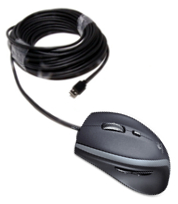
I went with a $30 Logitech M500 corded mouse instead, haven't had a single issue since.
Image :hehe 150 foot cord.

_________________
Image
"A wise man learns more from a foolish question than a fool can learn from a wise answer"
Image


Top
 Post subject: Re: editing rechargable mouse in Fedora (Mate desktop)
PostPosted: Sat Oct 04, 2014 4:47 pm  (#6) 
Offline
GimpChat Member
User avatar

Joined: Apr 07, 2010
Posts: 14182
Now what would you need a 150' cord for.
My cordless is a Logtech and it was also $30. If I get it so it won't make my window go full size, I will be happy. I turned the threshold away down to the left so I will see how it goes once I turn my pc off for the night.

_________________
Image


Top
 Post subject: Re: editing rechargable mouse in Fedora (Mate desktop)
PostPosted: Sat Oct 04, 2014 4:48 pm  (#7) 
Offline
GimpChat Member
User avatar

Joined: Apr 07, 2010
Posts: 14182
Oregonian wrote:
... and here I had you pictured settling your mouse down for the night in its recharger. :hehe

[ Image ]

Never could splain meself well.

_________________
Image


Top
 Post subject: Re: editing rechargable mouse in Fedora (Mate desktop)
PostPosted: Sat Oct 04, 2014 4:51 pm  (#8) 
Offline
Administrator
User avatar

Joined: Aug 10, 2012
Posts: 14250
Location: Native to NYC living in Arizona, Gimp 2.8 - 3.0, Win 11 PC.
molly wrote:
Now what would you need a 150' cord for.
My cordless is a Logtech and it was also $30. If I get it so it won't make my window go full size, I will be happy. I turned the threshold away down to the left so I will see how it goes once I turn my pc off for the night.

The cord was a joke that I added to the mouse image. It has a standard size USB cord for a mouse.
Good luck, hope you find a solution.

_________________
Image
"A wise man learns more from a foolish question than a fool can learn from a wise answer"
Image


Top
 Post subject: Re: editing rechargable mouse in Fedora (Mate desktop)
PostPosted: Sat Oct 04, 2014 5:05 pm  (#9) 
Offline
Script Coder
User avatar

Joined: Oct 25, 2010
Posts: 4812
Never had any such problem with my cordless mouses(*), at least none that I could not fix by putting fresh batteries in them. I have also had a mouse failing after a few months but that's what the warranty is for.

(*) I need a new mouse every two-three years, due to death of the left button..

_________________
Image


Top
 Post subject: Re: editing rechargable mouse in Fedora (Mate desktop)
PostPosted: Sat Oct 04, 2014 5:07 pm  (#10) 
Offline
GimpChat Member
User avatar

Joined: Apr 07, 2010
Posts: 14182
lol, yanno that if there is anything that can go wrong, it will I me who is the target

_________________
Image


Top
 Post subject: Re: editing rechargable mouse in Fedora (Mate desktop)
PostPosted: Sat Oct 04, 2014 5:16 pm  (#11) 
Offline
GimpChat Member
User avatar

Joined: Apr 07, 2010
Posts: 14182
Wallace wrote:
molly wrote:
Now what would you need a 150' cord for.
My cordless is a Logtech and it was also $30. If I get it so it won't make my window go full size, I will be happy. I turned the threshold away down to the left so I will see how it goes once I turn my pc off for the night.

The cord was a joke that I added to the mouse image. It has a standard size USB cord for a mouse.
Good luck, hope you find a solution.

I owe y'all one Wally... I actually believed you, see how trusting I am? :oops: :oops: :oops:

_________________
Image


Top
 Post subject: Re: editing rechargable mouse in Fedora (Mate desktop)
PostPosted: Sat Oct 04, 2014 5:38 pm  (#12) 
Offline
Script Coder
User avatar

Joined: Apr 23, 2010
Posts: 1553
Location: not from Guildford after all
Two possibilities come immediately to mind: your mouse may be faulty or you have the wrong input driver for it installed.

I don't know how one changes the mouse driver in Fedora but I doubt you have to do it the old fashioned way of editing your xorg.conf file (Slackware provides a utility called 'mouseconfig'). Once you figure out what program to use, try changing the configuration: if currently set to 'ps2' then try 'usb' and vice versa. If that does not work, try 'imps2'.

If the preceding does not work, you may have a faulty mouse. Try using it on a different machine or a different distro/operating system (even a Live disk of Fedora).

You could also try using a nice debugging program called 'xev' that will present a little square window with a black background and display a text description of all key and mouse button events that occur while in the window.

Alternate between clicking a mouse button and pressing a key, checking that for each mouse click there is only one button press event and one button release event reported (pressing a key on the keyboard is only done to separate the events from a mouse click). If more than one pair of mouse events occur per click then your mouse is most likely faulty (or at least its battery is).

_________________
Any sufficiently primitive technology is indistinguishable from a rock.


Top
 Post subject: Re: editing rechargable mouse in Fedora (Mate desktop)
PostPosted: Sat Oct 04, 2014 5:41 pm  (#13) 
Offline
Administrator
User avatar

Joined: Aug 10, 2012
Posts: 14250
Location: Native to NYC living in Arizona, Gimp 2.8 - 3.0, Win 11 PC.
molly wrote:
Wallace wrote:
molly wrote:
Now what would you need a 150' cord for.
My cordless is a Logtech and it was also $30. If I get it so it won't make my window go full size, I will be happy. I turned the threshold away down to the left so I will see how it goes once I turn my pc off for the night.

The cord was a joke that I added to the mouse image. It has a standard size USB cord for a mouse.
Good luck, hope you find a solution.

I owe y'all one Wally... I actually believed you, see how trusting I am? :oops: :oops: :oops:

:rofl

_________________
Image
"A wise man learns more from a foolish question than a fool can learn from a wise answer"
Image


Top
 Post subject: Re: editing rechargable mouse in Fedora (Mate desktop)
PostPosted: Sat Oct 04, 2014 5:47 pm  (#14) 
Offline
GimpChat Member
User avatar

Joined: Apr 07, 2010
Posts: 14182
saulgoode wrote:
Two possibilities come immediately to mind: your mouse may be faulty or you have the wrong input driver for it installed.

I don't know how one changes the mouse driver in Fedora but I doubt you have to do it the old fashioned way of editing your xorg.conf file (Slackware provides a utility called 'mouseconfig'). Once you figure out what program to use, try changing the configuration: if currently set to 'ps2' then try 'usb' and vice versa. If that does not work, try 'imps2'.

If the preceding does not work, you may have a faulty mouse. Try using it on a different machine or a different distro/operating system (even a Live disk of Fedora).

You could also try using a nice debugging program called 'xev' that will present a little square window with a black background and display a text description of all key and mouse button events that occur while in the window.

Alternate between clicking a mouse button and pressing a key, checking that for each mouse click there is only one button press event and one button release event reported (pressing a key on the keyboard is only done to separate the events from a mouse click). If more than one pair of mouse events occur per click then your mouse is most likely faulty (or at least its battery is).

Thank you very much Saul, I will try that first thing tomorrow morning when my patience is fresh. I will try it in reverse, I will take the other mouse that is the same that is being used on another computer, and switch without telling, lol shhhhhh.

_________________
Image


Top
 Post subject: Re: editing rechargable mouse in Fedora (Mate desktop)
PostPosted: Tue Oct 07, 2014 6:11 am  (#15) 
Offline
GimpChat Member
User avatar

Joined: Apr 07, 2010
Posts: 14182
I don't know much or anything about drivers for the mouse, I just plug in the little thing that comes with it into my USB port. Anyway, I got tired of trying to grab the top bar without it going full size every time, so I switched over to a regular mouse, with the cord. Thanks for the suggestions Saul.
I also didn't know what program to use to try those things you suggested.

_________________
Image


Top
 Post subject: Re: editing rechargable mouse in Fedora (Mate desktop)
PostPosted: Tue Oct 07, 2014 1:58 pm  (#16) 
Offline
Administrator
User avatar

Joined: Aug 10, 2012
Posts: 14250
Location: Native to NYC living in Arizona, Gimp 2.8 - 3.0, Win 11 PC.
molly wrote:
I don't know much or anything about drivers for the mouse, I just plug in the little thing that comes with it into my USB port. Anyway, I got tired of trying to grab the top bar without it going full size every time, so I switched over to a regular mouse, with the cord. Thanks for the suggestions Saul.
I also didn't know what program to use to try those things you suggested.

I think that you'll have better luck with a corded mouse anyway. From my experience, I will always go with the corded mouse from now on.

_________________
Image
"A wise man learns more from a foolish question than a fool can learn from a wise answer"
Image


Top
 Post subject: Re: editing Wireless mouse in Fedora (Mate desktop)
PostPosted: Tue Oct 07, 2014 2:05 pm  (#17) 
Offline
GimpChat Member
User avatar

Joined: Apr 07, 2010
Posts: 14182
I think you are right Wallace. It worked fine before but this version of FF or Fedora is touchy when I move the mouse too fast, everything maximizes, I never work with a maximized window, I like to pull it around and work with windows beside or below it.

_________________
Image


Top
 Post subject: Re: editing Wireless mouse in Fedora (Mate desktop)
PostPosted: Tue Oct 07, 2014 2:30 pm  (#18) 
Offline
GimpChat Founder
User avatar

Joined: May 22, 2008
Posts: 5241
Location: Gimpville
Double clicking on the title bar of an app in MATE is the same as clicking the Restore Window button. Image. It toggles between windowed and full screen mode.

It sounds to me like your Logitech mouse is double clicking when it should be single clicking. This is a known problem with the Logitec mouse, as the microswitch they use is not very reliable. It's commonly referred to as the "Infamous Logitech Mouse Double Click Problem". Here are several examples I found on the web.

http://www.kaibader.de/logitech-m705-ho ... se-button/

http://forums.logitech.com/t5/Mice-and- ... d-p/243999

Has to fix it every 6 months...
http://www.instructables.com/id/Repair- ... k-problem/

You tube video on how to fix//
https://www.youtube.com/watch?v=V66Cd2Y4IPs

The fact that it works fine with another mouse also suggests your Logitech mouse button is failing. Dragging becomes impossible when this happens because you can never really hold down the button. Holding it down registers as multiple clicks because of the failing switch. The solution would be to fix or replace the Logitech mouse.

_________________
“If you reach for the stars, you just might land on a decently sized hill.” - Stuart Hill


Top
 Post subject: Re: editing Wireless mouse in Fedora (Mate desktop)
PostPosted: Tue Oct 07, 2014 3:35 pm  (#19) 
Offline
GimpChat Member
User avatar

Joined: Apr 07, 2010
Posts: 14182
Thank you Tux, I will keep using the mouse with the long tail until I try the other one the same around here some place. I will read all the links you posted. :teeth

_________________
Image


Top
 Post subject: Re: editing Wireless mouse in Fedora (Mate desktop)
PostPosted: Tue Oct 07, 2014 6:19 pm  (#20) 
Offline
Administrator
User avatar

Joined: Aug 10, 2012
Posts: 14250
Location: Native to NYC living in Arizona, Gimp 2.8 - 3.0, Win 11 PC.
The “Emptying Capacitors” fix to drain any static buildup, seems like an interesting idea that my be worth a try.
Here's a link to the post. Below that is the actual post of what's involved in this fix.
http://forums.logitech.com/t5/Mice-and- ... m-p/711968

jlohnes
Retired Logitech Employee / Moderator (Inactive)
jlohnes
Posts: 414
Registered: ‎11-17-2010
Solution! Re: Erratic MX performance mouse issues
Options
‎10-20-2011 08:49 AM

Hello Igoe,

This can be caused by static energy trapped inside the capacitors in the mouse. To drain this static energy, please plug the USB receiver into a different USB port and follow this procedure:

1. Shut off the mouse and remove the battery.
2. Press all the buttons repeatedly for 30 seconds. This will drain all the static energy that may be trapped in the mouse.
3. Put the battery back in the mouse and turn it on.
4. Wait a few seconds for it to re-connect and test the button.

If your battery LED does not light on top of the mouse for a few seconds after you turn on the mouse, you should replace your battery and try again.

If this does not fix your issue, please contact the customer support team in your region for more assistance, including a possible warranty replacement.

Regards,

_________________
Image
"A wise man learns more from a foolish question than a fool can learn from a wise answer"
Image


Top
Post new topic Reply to topic  [ 27 posts ]  Go to page 1, 2  Next

All times are UTC - 5 hours [ DST ]


* Login  


Powered by phpBB3 © phpBB Group