It is currently Thu Aug 13, 2026 4:52 am


All times are UTC - 5 hours [ DST ]


Post new topic Reply to topic  [ 15 posts ] 
Author Message
 Post subject: Couple Photos
PostPosted: Wed Nov 19, 2014 2:08 am  (#1) 
Offline
Global Moderator
User avatar

Joined: Apr 01, 2012
Posts: 8457
Location: On the other side of your screen
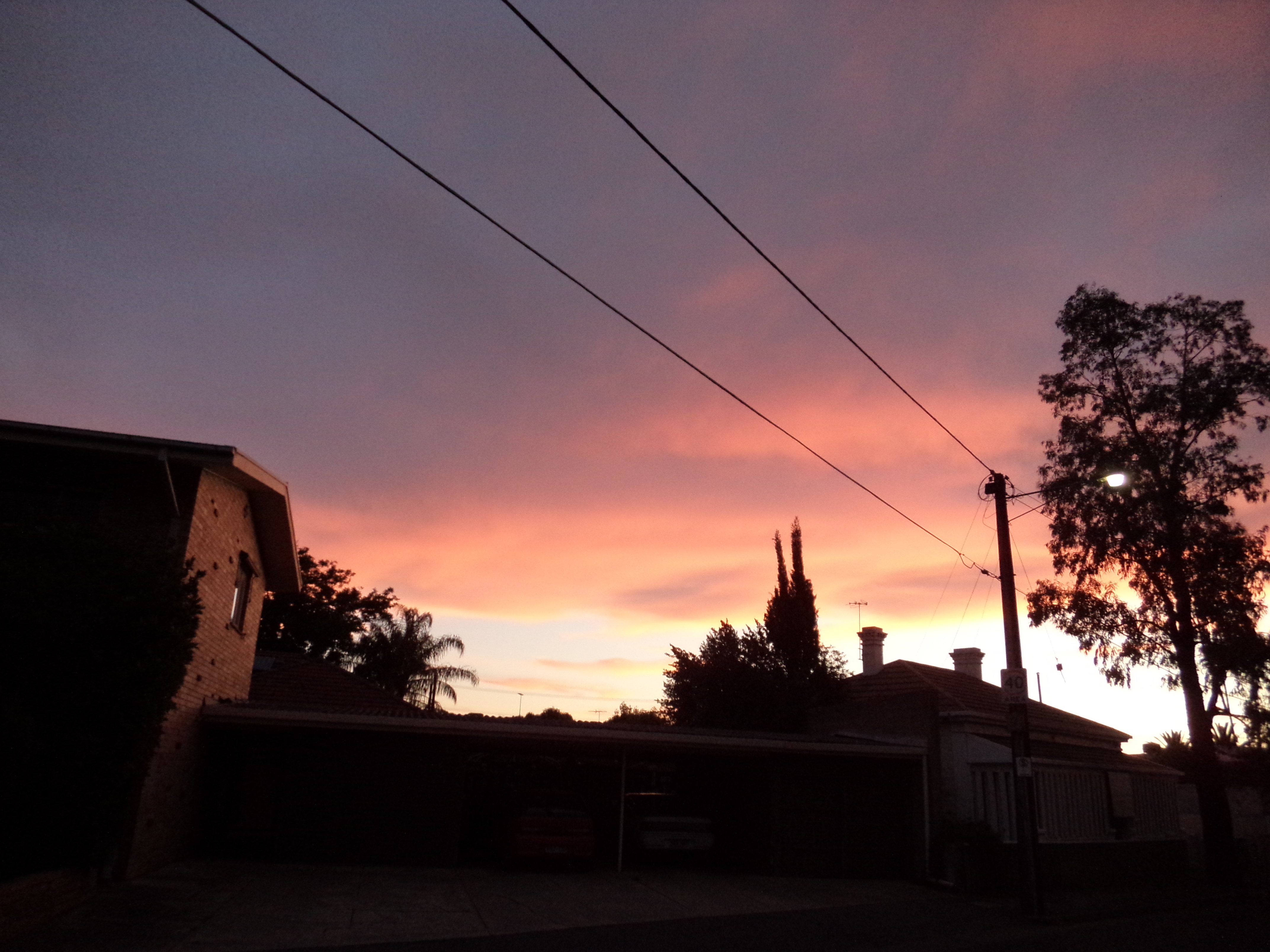
Same night couple minutes apart. I didn't have the flash on because I wanted to catch the sky but areas that were in the shade then became very dark.
Image
retouched in Lightzone
Image

Image
retouched in autoHDR
Image
I couldn't get any good results with gimp. Well I probably could if I spent a good while on them. If someone can lighten the darker areas up in gimp I would like to now how you did/would do, it please.

_________________
Image
Free Fun Photo Editing & resources
Poems from the Lord
Gimp Newby
Gimp version 3.2.4 and GMIC-Qt 4.0.2 OS :- Windows 10 Home 64


Share on Facebook Share on Twitter Share on Orkut Share on Digg Share on MySpace Share on Delicious Share on Technorati
Top
 Post subject: Re: Couple Photos
PostPosted: Wed Nov 19, 2014 3:30 am  (#2) 
Offline
GimpChat Member
User avatar

Joined: Jan 20, 2013
Posts: 14831
Location: roma, italy
one way, among many:
Advanced Tone Mapping (I used 3 as "copies of merged layers")
Attachment:
1831_PB180019_ATM3.JPG
1831_PB180019_ATM3.JPG [ 871.3 KiB | Viewed 6320 times ]

Attachment:
1831_PB180020_ATM3.JPG
1831_PB180020_ATM3.JPG [ 868.76 KiB | Viewed 6320 times ]


I had to scale-down the images, otherwise my Gimp crashes

_________________
"Where am I ?"


Top
 Post subject: Re: Couple Photos
PostPosted: Wed Nov 19, 2014 3:41 am  (#3) 
Offline
Global Moderator
User avatar

Joined: Apr 01, 2012
Posts: 8457
Location: On the other side of your screen
Thank you dinasset, I was hoping you would have a go. :)

_________________
Image
Free Fun Photo Editing & resources
Poems from the Lord
Gimp Newby
Gimp version 3.2.4 and GMIC-Qt 4.0.2 OS :- Windows 10 Home 64


Top
 Post subject: Re: Couple Photos
PostPosted: Wed Nov 19, 2014 4:18 am  (#4) 
Offline
GimpChat Member
User avatar

Joined: Mar 01, 2014
Posts: 14124
Location: Spain, Aragón
I like your photos Sallyanne (thanks for sharing). The wonderful sky colours encouraged me to do a try. I had to scale-down the images as Dinasset did. Then I adjusted colour levels and applied tone mapping and smoothsky. Duplicated the layer and overlay mode. (At the first photo)
At the second photo, I applied tone mapping and some of noise reduction.
I know I am light years from Dinasset's outcomes but I try it. hehe


Attachments:
1831_PB180019adjust colour balance+tonemapping+smoothsky.jpg
1831_PB180019adjust colour balance+tonemapping+smoothsky.jpg [ 456.69 KiB | Viewed 6311 times ]
1831_PB180020tonemapping+noisereduction.jpg
1831_PB180020tonemapping+noisereduction.jpg [ 496.18 KiB | Viewed 6311 times ]

_________________
Image

Gimp 2.10.30(samj) portable _ OS Windows 10 Home_ 64bits
Don’t be afraid to start over. It’s a new chance to rebuild what you want.
Top
 Post subject: Re: Couple Photos
PostPosted: Wed Nov 19, 2014 4:27 am  (#5) 
Offline
GimpChat Member
User avatar

Joined: Jan 20, 2013
Posts: 14831
Location: roma, italy
they are nice photos, but very difficult to manipulate

2nd attempt: using GMIC equalize shadow
Attachment:
1831_PB180019_2000_GMICeqsh.JPG
1831_PB180019_2000_GMICeqsh.JPG [ 690.78 KiB | Viewed 6307 times ]

Attachment:
1831_PB180020_2000_GMICeqsh.JPG
1831_PB180020_2000_GMICeqsh.JPG [ 662.12 KiB | Viewed 6307 times ]

_________________
"Where am I ?"


Top
 Post subject: Re: Couple Photos
PostPosted: Wed Nov 19, 2014 4:37 am  (#6) 
Offline
GimpChat Member
User avatar

Joined: Jan 20, 2013
Posts: 14831
Location: roma, italy
3rd attempt, using GIMP Colours:
a)Levels set mid point to 1.5
b)Saturation set +30
Attachment:
1831_PB180019_2000_Lev+Sat.JPG
1831_PB180019_2000_Lev+Sat.JPG [ 759.27 KiB | Viewed 6307 times ]

Attachment:
1831_PB180020_2000_Lev+Sat.JPG
1831_PB180020_2000_Lev+Sat.JPG [ 787.67 KiB | Viewed 6307 times ]

_________________
"Where am I ?"


Top
 Post subject: Re: Couple Photos
PostPosted: Wed Nov 19, 2014 4:51 am  (#7) 
Offline
GimpChat Member
User avatar

Joined: Jan 20, 2013
Posts: 14831
Location: roma, italy
and finally...two experiments "Issabella-style"!
she remembers for sure the old experiments we made together on her photos, called "Canontonemap" (parms:114,160)
(not easy to describe, SallyAnne...)
Attachment:
1831_PB180019_2000_Issa-style.JPG
1831_PB180019_2000_Issa-style.JPG [ 809.83 KiB | Viewed 6305 times ]

Attachment:
1831_PB180020_2000_Issa-style.JPG
1831_PB180020_2000_Issa-style.JPG [ 814.93 KiB | Viewed 6305 times ]


...not really "moderate" but somehow attractive

_________________
"Where am I ?"


Top
 Post subject: Re: Couple Photos
PostPosted: Wed Nov 19, 2014 5:33 am  (#8) 
Offline
Global Moderator
User avatar

Joined: Apr 01, 2012
Posts: 8457
Location: On the other side of your screen
Wow Isabella, No matter how hard I tried, I couldn't get green back into it. Great stuff!

_________________
Image
Free Fun Photo Editing & resources
Poems from the Lord
Gimp Newby
Gimp version 3.2.4 and GMIC-Qt 4.0.2 OS :- Windows 10 Home 64


Top
 Post subject: Re: Couple Photos
PostPosted: Wed Nov 19, 2014 4:53 pm  (#9) 
Offline
GimpChat Member
User avatar

Joined: Nov 15, 2014
Posts: 875
A quick crude attempt from the new boy.
My first answer to contrast problems - a contrast mask - duplicate layer, desaturate, invert, overlay mode, gaussian blur 10-30 pixels.
I can always add to this with curve adjustments to the base layer or mask layer and adjust the opacity.
(I have downscaled the results because my internet speed is very low tonight.)

david.


Attachments:
1831_PB180020a.JPG
1831_PB180020a.JPG [ 2.26 MiB | Viewed 6240 times ]
1831_PB180019a.JPG
1831_PB180019a.JPG [ 2.32 MiB | Viewed 6240 times ]
Top
 Post subject: Re: Couple Photos
PostPosted: Wed Nov 19, 2014 4:54 pm  (#10) 
Offline
GimpChat Member

Joined: Aug 30, 2013
Posts: 63
Here's my try:

1. Make a duplicate layer.
2. On the dupe, run G'MIC Colors-Zone System: raise the shadows zone to 5.

3. Mask this lightened layer to affect only the dark area at the bottom of the image (I tried a luminosity mask but didn't like the result -- next I tried Colors-Threshold on a dupe of the original layer and this worked pretty well. I used a soft brush to refine the mask edges. I brushed out most of the trees because the Zone effect just didn't look natural there.)

4. New layer from visible, apply Curves to make a slight S-curve for contrast. The Zone System filter in Step #2 often needs this adjustment or else the image has no BLACK pixels and looks unnatural. We need some black, just not as much as we started with.

5. G'MIC Repair - Ian's Noise Reduction.

6. Highpass sharpen.

I left the colors alone, although you could certainly adjust them. Arguably, this is a better photo if you leave the foreground in silhouette and all the attention on the sky. But it's a good opportunity for us to share ways to brighten shadows, even if ultimately we decide not to ;-)

Image

Hmm... I should have masked out those chimneys and toned down the roof.

P.S. It makes me sad to hear GC users say they can't handle a file this size. This is the file size you get from today's cameras. If GIMP doesn't work on on a 4200x3200 pixel image, then GIMP is no good for photographers. I happen to know that's not the case, thank goodness! Unless you're trying to run Dream Smoothing...

And now I see that GC won't let me upload the full-sized file. I understand that server space is not infinite. But anyone who is serious about photography will not be able to compare editing methods by looking at a severely downsized image. Do we have a good workaround for posting large images?


Top
 Post subject: Re: Couple Photos
PostPosted: Wed Nov 19, 2014 10:42 pm  (#11) 
Offline
Global Moderator
User avatar

Joined: Apr 01, 2012
Posts: 8457
Location: On the other side of your screen
Thank you Acmespace

_________________
Image
Free Fun Photo Editing & resources
Poems from the Lord
Gimp Newby
Gimp version 3.2.4 and GMIC-Qt 4.0.2 OS :- Windows 10 Home 64


Top
 Post subject: Re: Couple Photos
PostPosted: Mon Nov 24, 2014 6:11 pm  (#12) 
Offline
GimpChat Member
User avatar

Joined: Jan 12, 2012
Posts: 178
Location: Mobile, AL USA
Couldn't help a quick play.
Luminosity mask.
Dup base layer, apply DDD mask.
Bump gamma to 1.2-3
Wavelet sharpen.

Attachment:
gc.jpg
gc.jpg [ 617.02 KiB | Viewed 3421 times ]

_________________
patdavid.net
Image
PIXLS.US F/OSS Photography


Top
 Post subject: Re: Couple Photos
PostPosted: Mon Nov 24, 2014 8:52 pm  (#13) 
Offline
Global Moderator
User avatar

Joined: Apr 01, 2012
Posts: 8457
Location: On the other side of your screen
Thank you Pat.
I have still not worked out gamma.

_________________
Image
Free Fun Photo Editing & resources
Poems from the Lord
Gimp Newby
Gimp version 3.2.4 and GMIC-Qt 4.0.2 OS :- Windows 10 Home 64


Top
 Post subject: Re: Couple Photos
PostPosted: Mon Nov 24, 2014 9:26 pm  (#14) 
Offline
GimpChat Member
User avatar

Joined: Nov 16, 2011
Posts: 5127
Location: Metro Vancouver, BC
A different look.
Image

_________________
Image
Gimp 2.8.18, Linux, median user
Gimp Chat Tutorials Index
Spirit Bear (Kermode)


Top
 Post subject: Re: Couple Photos
PostPosted: Mon Nov 24, 2014 9:29 pm  (#15) 
Offline
Global Moderator
User avatar

Joined: Apr 01, 2012
Posts: 8457
Location: On the other side of your screen
Brilliant!

_________________
Image
Free Fun Photo Editing & resources
Poems from the Lord
Gimp Newby
Gimp version 3.2.4 and GMIC-Qt 4.0.2 OS :- Windows 10 Home 64


Top
Post new topic Reply to topic  [ 15 posts ] 

All times are UTC - 5 hours [ DST ]


* Login  


Powered by phpBB3 © phpBB Group