It is currently Tue Oct 27, 2026 5:05 pm


All times are UTC - 5 hours [ DST ]


Post new topic Reply to topic  [ 18 posts ] 
Author Message
 Post subject: A bit of an odd request....
PostPosted: Mon Jan 12, 2015 11:46 am  (#1) 
Offline
GimpChat Member
User avatar

Joined: Aug 28, 2012
Posts: 3060
Location: Idk where I am.
Does anyone here have the ability to record music off their soundcard? I can't and I'm using game-maker to compose music via timeline so I can't export it as an mp3. If I can get it finished is anybody able to download a small exe to record the sound and save as an mp3 for me? Kinda an ambitious request I know! And I understand if nobody wants to go through all that hassle! xD

I'll make somekinda something for anyone who helps me, not sure what but I'll try and custom fit it to whoever (if anyone) can help! And I'll alias-credit whoever did it as a helper in Game-Information.


Thanks either way!


~ God Bless ~

~ Moko


P.S: If somebody does this, if you could tell me the program you use to record/save the sound as so I can credit you properly and put in the programs used section of the game information that would be nice!

_________________
Image
Reality is a lovely place...But I wouldn't wanna live there.


Share on Facebook Share on Twitter Share on Orkut Share on Digg Share on MySpace Share on Delicious Share on Technorati
Top
 Post subject: Re: A bit of an odd request....
PostPosted: Mon Jan 12, 2015 12:24 pm  (#2) 
Offline
Script Coder
User avatar

Joined: Jun 22, 2010
Posts: 1171
Location: Here and there
I'd be willing to give it a go.

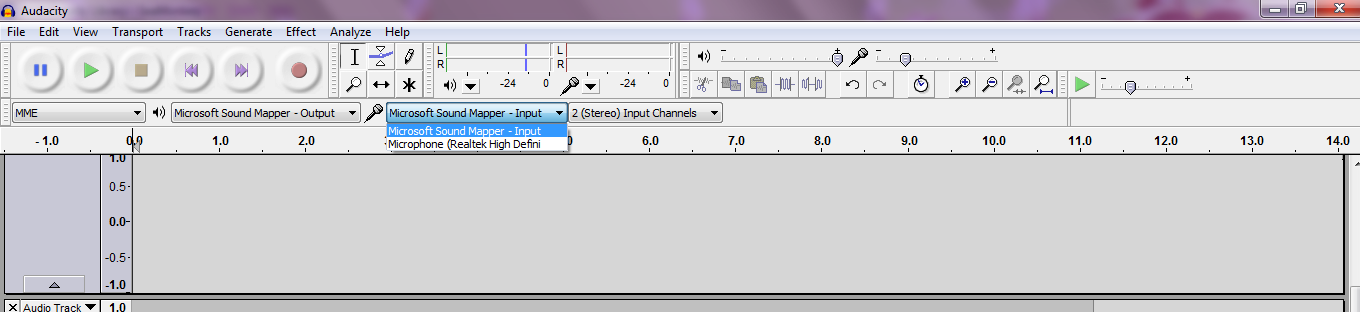
Although I'm sure that you could use Audacity to do the job yourself.

Kevin


Top
 Post subject: Re: A bit of an odd request....
PostPosted: Mon Jan 12, 2015 12:41 pm  (#3) 
Offline
Script Coder
User avatar

Joined: Oct 25, 2010
Posts: 4812
+1

Everybody uses Audacity these days... What are you trying to do that it wouldn't do?

_________________
Image


Top
 Post subject: Re: A bit of an odd request....
PostPosted: Mon Jan 12, 2015 12:54 pm  (#4) 
Offline
GimpChat Member
User avatar

Joined: Aug 28, 2012
Posts: 3060
Location: Idk where I am.
ofnuts wrote:
+1

Everybody uses Audacity these days... What are you trying to do that it wouldn't do?


It's not the programs that's the problem, it's the fact this computer doesn't record sound unless it's imput (like a mic).

_________________
Image
Reality is a lovely place...But I wouldn't wanna live there.


Top
 Post subject: Re: A bit of an odd request....
PostPosted: Mon Jan 12, 2015 1:37 pm  (#5) 
Offline
Script Coder
User avatar

Joined: Jun 22, 2010
Posts: 1171
Location: Here and there
With the right Audio host selected (here Window WASAP) I find I can record from the speakers output:
Attachment:
Untitled.png
Untitled.png [ 50.59 KiB | Viewed 4108 times ]


Anyway the offer to record it for you still stands.

Kevin

p.s. I just rather pointlessly visually Rick-Rolled you ;)


Top
 Post subject: Re: A bit of an odd request....
PostPosted: Mon Jan 12, 2015 5:21 pm  (#6) 
Offline
GimpChat Member
User avatar

Joined: Oct 10, 2014
Posts: 60
Hi Mokonafan Twit.Tv has a live chatroom that might be of some help. they used to have a #helpdesk, not sure if they still do. some smart computer people there


Top
 Post subject: Re: A bit of an odd request....
PostPosted: Mon Jan 12, 2015 8:57 pm  (#7) 
Offline
Script Coder
User avatar

Joined: Jul 14, 2010
Posts: 697
Or the analog-hole solution...
Image

-Rob A>

_________________
Image
Fantasy Cartography and Mapping by RobA


Top
 Post subject: Re: A bit of an odd request....
PostPosted: Mon Jan 12, 2015 9:55 pm  (#8) 
Offline
GimpChat Member
User avatar

Joined: Nov 16, 2011
Posts: 5127
Location: Metro Vancouver, BC
FYI, Rob A's solution is called a "loopback" cable.

_________________
Image
Gimp 2.8.18, Linux, median user
Gimp Chat Tutorials Index
Spirit Bear (Kermode)


Top
 Post subject: Re: A bit of an odd request....
PostPosted: Mon Jan 12, 2015 10:26 pm  (#9) 
Offline
GimpChat Member
User avatar

Joined: Apr 08, 2010
Posts: 5420
Location: Northwest Ohio
I used to use a audio grab program that made mp3 out of whatever came out of the sound card. I don't remember it's name as it was on the old computer, but at least there are programs out there that can do it. It was free, too.

I think this was the program I used... http://www.audio-tool.net/products/audi ... rfree.html


Top
 Post subject: Re: A bit of an odd request....
PostPosted: Mon Jan 12, 2015 11:10 pm  (#10) 
Offline
GimpChat Member
User avatar

Joined: Nov 16, 2011
Posts: 5127
Location: Metro Vancouver, BC
2-ton wrote:
I used to use a audio grab program that made mp3 out of whatever came out of the sound card. I don't remember it's name as it was on the old computer, but at least there are programs out there that can do it. It was free, too.

I think this was the program I used... http://www.audio-tool.net/products/audi ... rfree.html
Do you use or did you test this program? I don't mean to be a killjoy but Audacity (already mentioned) is a safe download and one of the best audio editor and recorders available. The reason I'm asking is because of my recent post about downloading software.

_________________
Image
Gimp 2.8.18, Linux, median user
Gimp Chat Tutorials Index
Spirit Bear (Kermode)


Top
 Post subject: Re: A bit of an odd request....
PostPosted: Tue Jan 13, 2015 11:47 am  (#11) 
Offline
GimpChat Member
User avatar

Joined: Apr 08, 2010
Posts: 5420
Location: Northwest Ohio
I used it (assuming it is the same one I had, the interface does look similar but it was several years ago). I never had any problem with it, it was very basic but simple to use. It merely recorded off of the sound card. I agree that you have to be very careful about where you download from, even good programs can be downloaded from bad sites, and you can get stuck with extra toolbars at the very least. It's a scary world out there these days.


Top
 Post subject: Re: A bit of an odd request....
PostPosted: Tue Jan 13, 2015 2:08 pm  (#12) 
Offline
GimpChat Member
User avatar

Joined: Aug 28, 2012
Posts: 3060
Location: Idk where I am.
paynekj wrote:
With the right Audio host selected (here Window WASAP) I find I can record from the speakers output:
Attachment:
Untitled.png


Anyway the offer to record it for you still stands.

Kevin

p.s. I just rather pointlessly visually Rick-Rolled you ;)


I looked and unless I'm blind (which is totally possible! LOL D:)I don't have that...Which is what I've been trying to tell everyone! I can't record from anything but a mic or input (like that pluggy that was posted) and what I am recording isn't from speakers because I have headphones on and it's a timeline in gamemaker which wasn't designed for musical composition and isn't recording anything but rather I make a timeline going 1 note at a time making music because that's the only way I can figure out how...I tried arranging music in other programs and it's not good with my brain.... :gaah :gaah

Image

_________________
Image
Reality is a lovely place...But I wouldn't wanna live there.


Top
 Post subject: Re: A bit of an odd request....
PostPosted: Tue Jan 13, 2015 2:44 pm  (#13) 
Offline
Administrator
User avatar

Joined: Aug 10, 2012
Posts: 14250
Location: Native to NYC living in Arizona, Gimp 2.8 - 3.0, Win 11 PC.
You may need to go into Edit>Preferences and set the Device to Windows WASAPI and set the Channels to 2 (Stereo), also be sure that the Software Playthrough box is unchecked.
Here is a link to a gif image showing what was explained above. Download and watch the gif image.
https://www.dropbox.com/s/3s57v0l5ugiqm ... p.gif?dl=0

_________________
Image
"A wise man learns more from a foolish question than a fool can learn from a wise answer"
Image


Top
 Post subject: Re: A bit of an odd request....
PostPosted: Tue Jan 13, 2015 3:10 pm  (#14) 
Offline
GimpChat Member
User avatar

Joined: Aug 28, 2012
Posts: 3060
Location: Idk where I am.
I don't have that option I just looked! :(

_________________
Image
Reality is a lovely place...But I wouldn't wanna live there.


Top
 Post subject: Re: A bit of an odd request....
PostPosted: Tue Jan 13, 2015 3:52 pm  (#15) 
Offline
Administrator
User avatar

Joined: Aug 10, 2012
Posts: 14250
Location: Native to NYC living in Arizona, Gimp 2.8 - 3.0, Win 11 PC.
Mokonafan wrote:
I don't have that option I just looked! :(

Which option don't you have?

_________________
Image
"A wise man learns more from a foolish question than a fool can learn from a wise answer"
Image


Top
 Post subject: Re: A bit of an odd request....
PostPosted: Tue Jan 13, 2015 3:58 pm  (#16) 
Offline
GimpChat Member
User avatar

Joined: Aug 28, 2012
Posts: 3060
Location: Idk where I am.
Wallace wrote:
Mokonafan wrote:
I don't have that option I just looked! :(

Which option don't you have?

Device to Windows WASAPI

_________________
Image
Reality is a lovely place...But I wouldn't wanna live there.


Top
 Post subject: Re: A bit of an odd request....
PostPosted: Tue Jan 13, 2015 4:32 pm  (#17) 
Offline
Administrator
User avatar

Joined: Aug 10, 2012
Posts: 14250
Location: Native to NYC living in Arizona, Gimp 2.8 - 3.0, Win 11 PC.
Mokonafan wrote:
Wallace wrote:
Mokonafan wrote:
I don't have that option I just looked! :(

Which option don't you have?

Device to Windows WASAPI

Well, that's how I do it with windows 7.
I'm sorry Mokonafan, I don't think I can suggest anything more on the issue. :(

_________________
Image
"A wise man learns more from a foolish question than a fool can learn from a wise answer"
Image


Top
 Post subject: Re: A bit of an odd request....
PostPosted: Tue Jan 13, 2015 5:47 pm  (#18) 
Offline
GimpChat Member
User avatar

Joined: Nov 16, 2011
Posts: 5127
Location: Metro Vancouver, BC
Read these, Recording audio in Sound Recorder: frequently asked questions

Moko, Are you on a laptop?

_________________
Image
Gimp 2.8.18, Linux, median user
Gimp Chat Tutorials Index
Spirit Bear (Kermode)


Top
Post new topic Reply to topic  [ 18 posts ] 

All times are UTC - 5 hours [ DST ]


cron

* Login  


Powered by phpBB3 © phpBB Group