It is currently Sun Oct 04, 2026 2:11 am


All times are UTC - 5 hours [ DST ]


Post new topic Reply to topic  [ 91 posts ]  Go to page Previous  1, 2, 3, 4, 5  Next
Author Message
 Post subject: Re: Any idea to do this in Gimp?
PostPosted: Wed Jan 21, 2015 12:23 pm  (#41) 
Offline
GimpChat Member
User avatar

Joined: Apr 07, 2010
Posts: 14182
Thanks for the brush wallace

_________________
Image


Top
 Post subject: Re: Any idea to do this in Gimp?
PostPosted: Wed Jan 21, 2015 12:26 pm  (#42) 
Offline
Administrator
User avatar

Joined: Aug 10, 2012
Posts: 14227
Location: Native to NYC living in Arizona, Gimp 2.8 - 3.0, Win 11 PC.
molly wrote:
Thanks for the brush wallace

Sure thing Molly. ;)
I'm thinking of making another brush, but this time including many more letters and numbers.

_________________
Image
"A wise man learns more from a foolish question than a fool can learn from a wise answer"
Image


Top
 Post subject: Re: Any idea to do this in Gimp?
PostPosted: Wed Jan 21, 2015 12:37 pm  (#43) 
Offline
GimpChat Member
User avatar

Joined: Apr 07, 2010
Posts: 14182
cool

_________________
Image


Top
 Post subject: Re: Any idea to do this in Gimp?
PostPosted: Wed Jan 21, 2015 1:08 pm  (#44) 
Offline
Administrator
User avatar

Joined: Aug 10, 2012
Posts: 14227
Location: Native to NYC living in Arizona, Gimp 2.8 - 3.0, Win 11 PC.
molly wrote:
cool

Yes Molly and here is that animated brush, with 34 different letters and number. I made these images below using it. It's still not perfect though, but it's close enough.
I used Rod's image for here, http://gimpchat.com/viewtopic.php?f=12&t=1491#p18270 to help me create both animated letter brushes.
Image
Image

You can get the new updated Letters and Numbers brush from here. viewtopic.php?f=22&t=11860&p=160537#p160537

_________________
Image
"A wise man learns more from a foolish question than a fool can learn from a wise answer"
Image


Last edited by Wallace on Thu Jan 22, 2015 1:50 pm, edited 1 time in total.

Top
 Post subject: Re: Any idea to do this in Gimp?
PostPosted: Wed Jan 21, 2015 3:14 pm  (#45) 
Offline
GimpChat Member
User avatar

Joined: Sep 24, 2010
Posts: 12850
Much better job with this set then I did Wallace; thanks for the brush. :)


Attachments:
L1000147_DAP_U32_Colorful_Letters.jpg
L1000147_DAP_U32_Colorful_Letters.jpg [ 2.67 MiB | Viewed 2456 times ]

_________________
Lyle

Psalm 109:8

Image
Top
 Post subject: Re: Any idea to do this in Gimp?
PostPosted: Wed Jan 21, 2015 3:30 pm  (#46) 
Offline
Administrator
User avatar

Joined: Aug 10, 2012
Posts: 14227
Location: Native to NYC living in Arizona, Gimp 2.8 - 3.0, Win 11 PC.
lylejk wrote:
Much better job with this set then I did Wallace; thanks for the brush. :)
You're welcome Lyle and thanks. The biggest issue I had was how I was going to create all those angled letters, but thanks to Rod I didn't have to. ;)

_________________
Image
"A wise man learns more from a foolish question than a fool can learn from a wise answer"
Image


Top
 Post subject: Re: Any idea to do this in Gimp?
PostPosted: Wed Jan 21, 2015 5:42 pm  (#47) 
Offline
Script Coder
User avatar

Joined: Jun 22, 2010
Posts: 1171
Location: Here and there
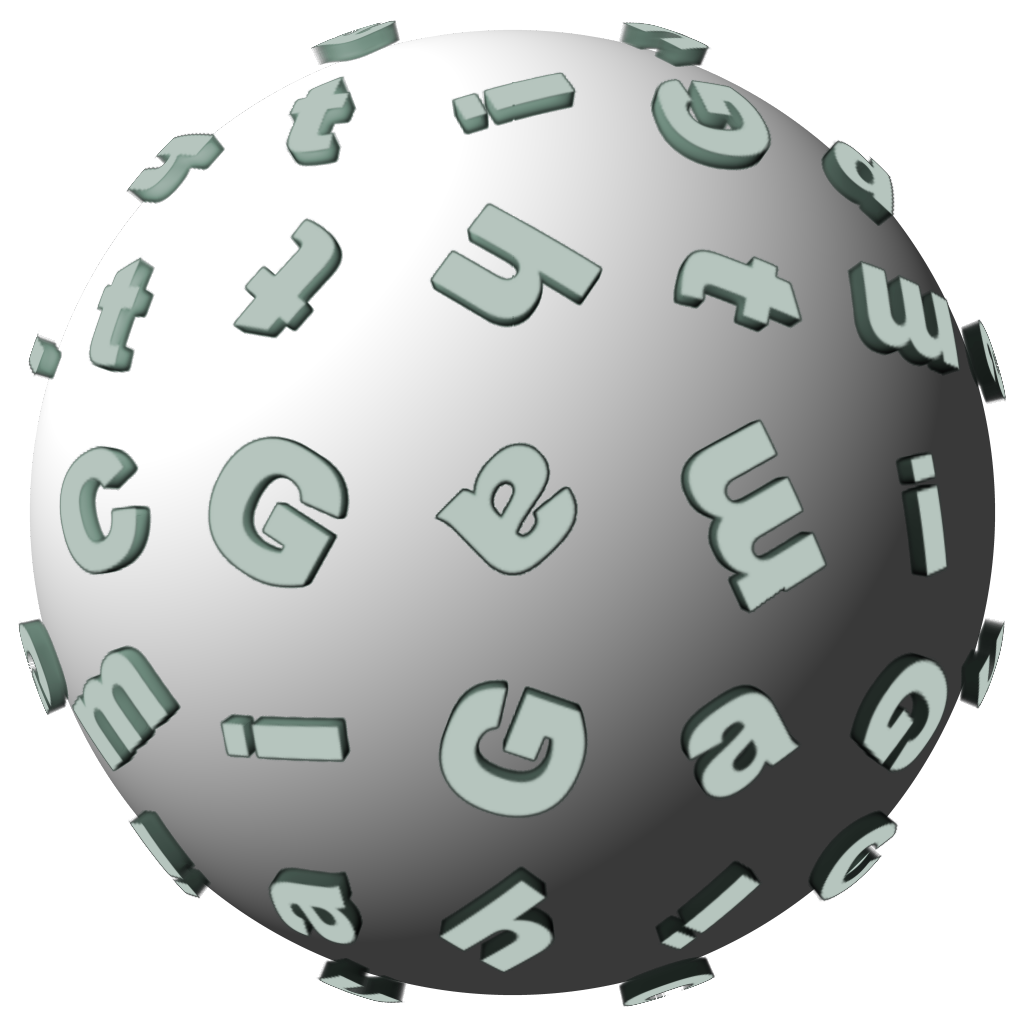
This is fun (if not entirely relevant to a GIMP forum)
Attachment:
letter_sphere.png
letter_sphere.png [ 144.72 KiB | Viewed 2436 times ]


Top
 Post subject: Re: Any idea to do this in Gimp?
PostPosted: Wed Jan 21, 2015 6:39 pm  (#48) 
Offline
Administrator
User avatar

Joined: Aug 10, 2012
Posts: 14227
Location: Native to NYC living in Arizona, Gimp 2.8 - 3.0, Win 11 PC.
paynekj wrote:
This is fun (if not entirely relevant to a GIMP forum)
Attachment:
letter_sphere.png

How about you save some of the really nice side angled letters as png image with transparency and post them for us?

_________________
Image
"A wise man learns more from a foolish question than a fool can learn from a wise answer"
Image


Top
 Post subject: Re: Any idea to do this in Gimp?
PostPosted: Wed Jan 21, 2015 8:29 pm  (#49) 
Offline
GimpChat Member
User avatar

Joined: Sep 24, 2010
Posts: 12850
paynekj wrote:
This is fun (if not entirely relevant to a GIMP forum)
Attachment:
letter_sphere.png


Show off (but I definitely like it Kevin). lol

:)

_________________
Lyle

Psalm 109:8

Image


Top
 Post subject: Re: Any idea to do this in Gimp?
PostPosted: Thu Jan 22, 2015 3:52 am  (#50) 
Offline
Script Coder
User avatar

Joined: Jun 22, 2010
Posts: 1171
Location: Here and there
Wallace wrote:
How about you save some of the really nice side angled letters as png image with transparency and post them for us?


I'd certainly be willing to, but I'd need some sort of requirements before doing so.

What angles do you want to view them from?
Where do you want the light source relative to the letters?
What font?
Which characters? (A-Z a-z 0-9 any accented characters, üéÅ etc?)

I'd presume you want the letters to be a neutral colour so that they can easily be colourized later.

Kevin


Top
 Post subject: Re: Any idea to do this in Gimp?
PostPosted: Thu Jan 22, 2015 3:59 am  (#51) 
Offline
GimpChat Member
User avatar

Joined: Mar 01, 2014
Posts: 14198
Location: Spain, Aragón
Thank you paynekj, really outstanding! :jumpclap
Wallace, where should I install your brush? I can't find it in my tool brush. Thank you so much. :tyspin

_________________
Image

Gimp 2.10.36 (samj) portable _ OS Windows 10 Home_ 64bits
Don’t be afraid to start over. It’s a new chance to rebuild what you want.


Top
 Post subject: Re: Any idea to do this in Gimp?
PostPosted: Thu Jan 22, 2015 4:54 am  (#52) 
Offline
Administrator
User avatar

Joined: Aug 10, 2012
Posts: 14227
Location: Native to NYC living in Arizona, Gimp 2.8 - 3.0, Win 11 PC.
paynekj wrote:
Wallace wrote:
How about you save some of the really nice side angled letters as png image with transparency and post them for us?


I'd certainly be willing to, but I'd need some sort of requirements before doing so.

What angles do you want to view them from?
Where do you want the light source relative to the letters?
What font?
Which characters? (A-Z a-z 0-9 any accented characters, üéÅ etc?)

I'd presume you want the letters to be a neutral colour so that they can easily be colourized later.

Kevin

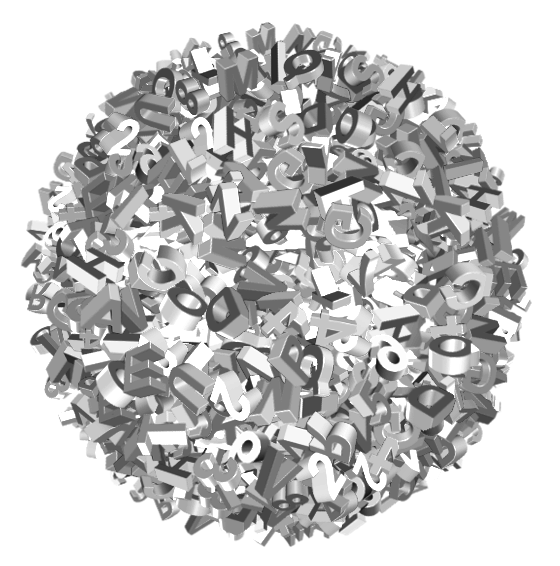
See the blue letters in this image below. These are some of the angles I was referring to. Also the font can be something similar to what is in the image. You're spot on with color, but I really haven't any idea as to the light source.
Image

Issabella wrote:
Thank you paynekj, really outstanding! :jumpclap
Wallace, where should I install your brush? I can't find it in my tool brush. Thank you so much. :tyspin

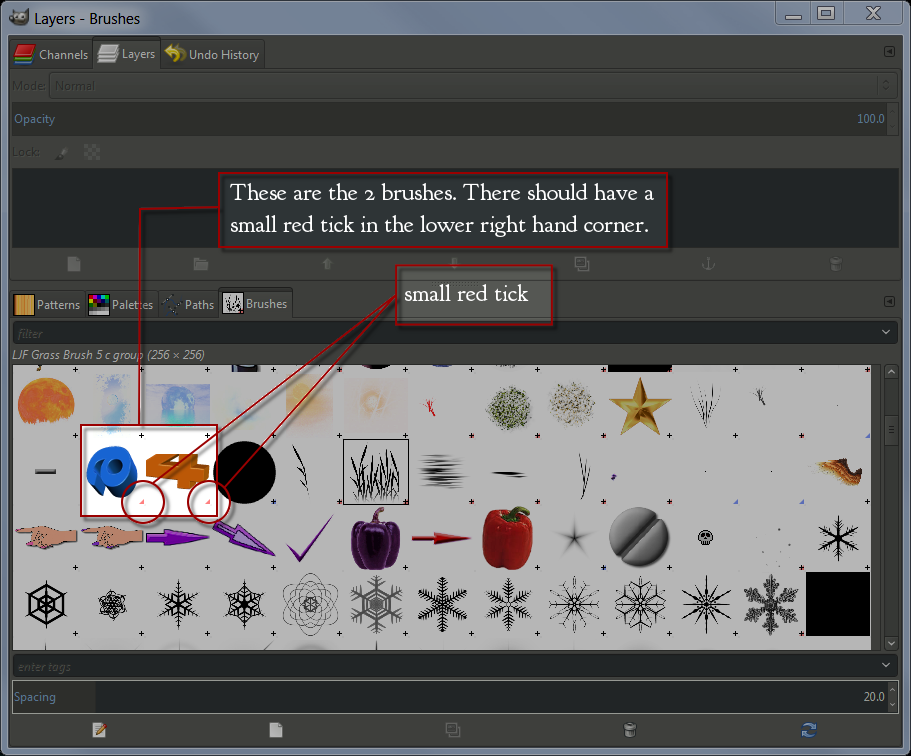
Place the brushes in you Gimp user brushes folder.
Image
The small red tick denotes animated brushes.

_________________
Image
"A wise man learns more from a foolish question than a fool can learn from a wise answer"
Image


Top
 Post subject: Re: Any idea to do this in Gimp?
PostPosted: Thu Jan 22, 2015 6:19 am  (#53) 
Offline
GimpChat Member
User avatar

Joined: Aug 30, 2012
Posts: 2174
Only got time to play about creating one layer of text, but here are the results. I'll add a file at the end that includes my xcf and gimp chat brush.

Image


Attachments:
Text Globe 01.zip [1.09 MiB]
Downloaded 106 times

_________________
Image
Top
 Post subject: Re: Any idea to do this in Gimp?
PostPosted: Thu Jan 22, 2015 6:28 am  (#54) 
Offline
Administrator
User avatar

Joined: Aug 10, 2012
Posts: 14227
Location: Native to NYC living in Arizona, Gimp 2.8 - 3.0, Win 11 PC.
he4rty wrote:
Only got time to play about creating one layer of text, but here are the results. I'll add a file at the end that includes my xcf and gimp chat brush.

[ Image ]

That look like a good start. ;)

_________________
Image
"A wise man learns more from a foolish question than a fool can learn from a wise answer"
Image


Top
 Post subject: Re: Any idea to do this in Gimp?
PostPosted: Thu Jan 22, 2015 6:33 am  (#55) 
Offline
GimpChat Member
User avatar

Joined: Apr 07, 2010
Posts: 14182
great he4rty, the letters really stick out nicely

_________________
Image


Top
 Post subject: Re: Any idea to do this in Gimp?
PostPosted: Thu Jan 22, 2015 7:12 am  (#56) 
Offline
Global Moderator
User avatar

Joined: May 16, 2010
Posts: 16193
Nice teamwork folks! I think we have this one licked.

Wallace and he4rty thank you both for the brushes.


Top
 Post subject: Re: Any idea to do this in Gimp?
PostPosted: Thu Jan 22, 2015 9:25 am  (#57) 
Offline
GimpChat Member
User avatar

Joined: Mar 01, 2014
Posts: 14198
Location: Spain, Aragón
Thank you so much Wallace, I'd installed other thing by mistake. Thank you for your brushes. :tyspin :coolthup
He4rty, I'll use yours too. Thank you. :tyspin

_________________
Image

Gimp 2.10.36 (samj) portable _ OS Windows 10 Home_ 64bits
Don’t be afraid to start over. It’s a new chance to rebuild what you want.


Top
 Post subject: Re: Any idea to do this in Gimp?
PostPosted: Thu Jan 22, 2015 1:47 pm  (#58) 
Offline
Administrator
User avatar

Joined: Aug 10, 2012
Posts: 14227
Location: Native to NYC living in Arizona, Gimp 2.8 - 3.0, Win 11 PC.
Issabella wrote:
Thank you so much Wallace, I'd installed other thing by mistake. Thank you for your brushes. :tyspin :coolthup
He4rty, I'll use yours too. Thank you. :tyspin

Sure thing Issabella. :bigthup

I have noticed a few inconsistencies in my latest animated brush and have corrected them.

Here is the new updated Letters and Number brush.
Attachment:
Letters and Numbers II.zip [154.1 KiB]
Downloaded 117 times

_________________
Image
"A wise man learns more from a foolish question than a fool can learn from a wise answer"
Image


Top
 Post subject: Re: Any idea to do this in Gimp?
PostPosted: Thu Jan 22, 2015 2:15 pm  (#59) 
Offline
GimpChat Member
User avatar

Joined: Mar 01, 2014
Posts: 14198
Location: Spain, Aragón
Thank you Wallace, you so perfectionist. Great job my friend. :clap

_________________
Image

Gimp 2.10.36 (samj) portable _ OS Windows 10 Home_ 64bits
Don’t be afraid to start over. It’s a new chance to rebuild what you want.


Top
 Post subject: Re: Any idea to do this in Gimp?
PostPosted: Thu Jan 22, 2015 2:19 pm  (#60) 
Offline
Administrator
User avatar

Joined: Aug 10, 2012
Posts: 14227
Location: Native to NYC living in Arizona, Gimp 2.8 - 3.0, Win 11 PC.
Issabella wrote:
Thank you Wallace, you so perfectionist. Great job my friend. :clap

Thanks again Issabella. :hi5

_________________
Image
"A wise man learns more from a foolish question than a fool can learn from a wise answer"
Image


Top
Post new topic Reply to topic  [ 91 posts ]  Go to page Previous  1, 2, 3, 4, 5  Next

All times are UTC - 5 hours [ DST ]


* Login  


Powered by phpBB3 © phpBB Group