It is currently Sun Nov 22, 2026 10:57 am


All times are UTC - 5 hours [ DST ]


Post new topic Reply to topic  [ 51 posts ]  Go to page Previous  1, 2, 3  Next
Author Message
 Post subject: Re: Sharing pictures on monasteries
PostPosted: Fri Jun 12, 2015 10:18 am  (#21) 
Offline
GimpChat Member
User avatar

Joined: Jan 20, 2013
Posts: 14835
Location: roma, italy
another attempt on 6919

Attachment:
IMG_6919-dn2.JPG
IMG_6919-dn2.JPG [ 933.27 KiB | Viewed 2291 times ]


hopefully better than the previous one

_________________
"Where am I ?"


Top
 Post subject: Re: Sharing pictures on monasteries
PostPosted: Fri Jun 12, 2015 10:59 am  (#22) 
Offline
Global Moderator
User avatar

Joined: Apr 01, 2012
Posts: 8510
Location: On the other side of your screen
looks good Lyle. I think they are all nice dinasset. :) :)

_________________
Image
Free Fun Photo Editing & resources
Poems from the Lord
Gimp Newby
Gimp version 3.2.8 and GMIC-Qt 4.0.2 OS :- Windows 10 Home 64


Top
 Post subject: Re: Sharing pictures on monasteries
PostPosted: Fri Jun 12, 2015 11:02 am  (#23) 
Offline
Script Coder
User avatar

Joined: Dec 27, 2014
Posts: 508
Image


Top
 Post subject: Re: Sharing pictures on monasteries
PostPosted: Fri Jun 12, 2015 11:23 am  (#24) 
Offline
GimpChat Member
User avatar

Joined: Nov 15, 2014
Posts: 878
Issabella,

The originals are beautiful photographs taken under difficult lighting conditions (very high contrast).

I have had a go at one photograph - I don't think it is any better than the original but it allowed me to practice.
Saulgoode Luminosity masks to limit the contrast slightly and an adjustment of perspective using Hugin.

david.


Attachments:
0953.jpg
0953.jpg [ 474.39 KiB | Viewed 2286 times ]
Top
 Post subject: Re: Sharing pictures on monasteries
PostPosted: Fri Jun 12, 2015 11:30 am  (#25) 
Offline
GimpChat Member
User avatar

Joined: Nov 15, 2014
Posts: 878
dinasset,

Did you steal the car from behind the monastery???

Great result and the perspective corrected.

david.


Top
 Post subject: Re: Sharing pictures on monasteries
PostPosted: Fri Jun 12, 2015 12:50 pm  (#26) 
Offline
GimpChat Member
User avatar

Joined: Nov 16, 2011
Posts: 5127
Location: Metro Vancouver, BC
Nice one on the hallway jontait2.

_________________
Image
Gimp 2.8.18, Linux, median user
Gimp Chat Tutorials Index
Spirit Bear (Kermode)


Top
 Post subject: Re: Sharing pictures on monasteries
PostPosted: Fri Jun 12, 2015 12:54 pm  (#27) 
Offline
Script Coder
User avatar

Joined: Dec 27, 2014
Posts: 508
Thank you, Odin.
BTW I think the term is "cloister" .. see https://en.wikipedia.org/wiki/Cloister


Top
 Post subject: Re: Sharing pictures on monasteries
PostPosted: Fri Jun 12, 2015 2:41 pm  (#28) 
Offline
GimpChat Member
User avatar

Joined: Mar 01, 2014
Posts: 14261
Location: Spain, Aragón
Lyle I like your transformation a lot.
Dinasset your last try is great because you have got to give it more perspective and depth to the whole photo.
Jontait2, I like the tone and atmosphere given to the cloister. Good!
David your try is very nice and more balanced in light. as you say, the original photos have too contrast. Thanks.

_________________
Image

Gimp 2.10.36 (samj) portable _ OS Windows 10 Home_ 64bits
Don’t be afraid to start over. It’s a new chance to rebuild what you want.


Top
 Post subject: Re: Sharing pictures on monasteries
PostPosted: Fri Jun 12, 2015 2:46 pm  (#29) 
Offline
GimpChat Member
User avatar

Joined: Nov 16, 2011
Posts: 5127
Location: Metro Vancouver, BC
jontait2 wrote:
Thank you, Odin.
BTW I think the term is "cloister" .. see https://en.wikipedia.org/wiki/Cloister
Thank you jontait2 I couldn't think of the proper word and I wouldn't have got cloister. :oops:

_________________
Image
Gimp 2.8.18, Linux, median user
Gimp Chat Tutorials Index
Spirit Bear (Kermode)


Top
 Post subject: Re: Sharing pictures on monasteries
PostPosted: Fri Jun 12, 2015 7:54 pm  (#30) 
Offline
Global Moderator
User avatar

Joined: Oct 02, 2014
Posts: 5099
Location: Sydney Australia
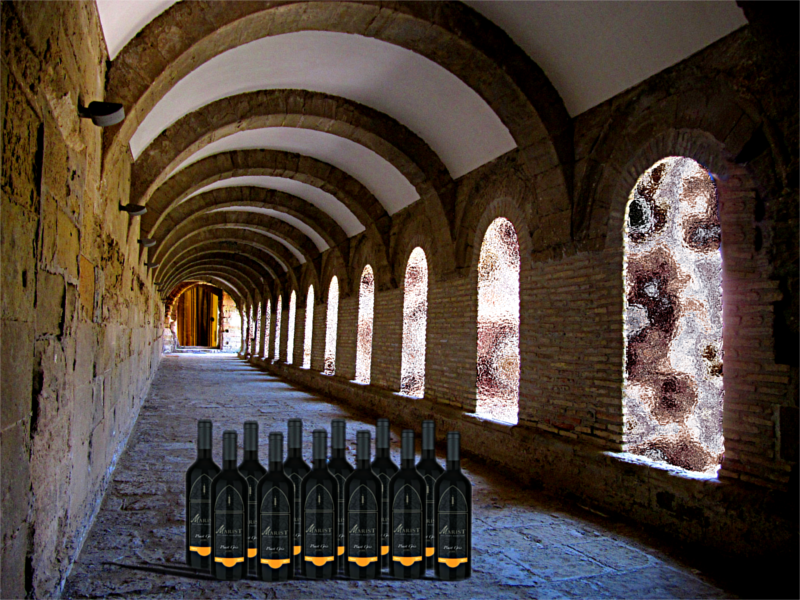
I also visit monasteries for 'cultural' reasons, especially the Marist Brothers not far away in our Southern Highlands, where I have contributed significantly to their funds by buying the products of their particular 'culture', viticulture that is :) .... some of the of the best Pinot Gris and Pinot Noir I have ever tasted ...

Image

_________________
Image

Respect should be offered freely but hard earned


Top
 Post subject: Re: Sharing pictures on monasteries
PostPosted: Fri Jun 12, 2015 8:02 pm  (#31) 
Offline
GimpChat Member
User avatar

Joined: Sep 24, 2010
Posts: 12865
Thanks for the comments folks; just a little bit of my madness creeping out again. lol

:)

_________________
Lyle

Psalm 109:8

Image


Top
 Post subject: Re: Sharing pictures on monasteries
PostPosted: Sat Jun 13, 2015 1:45 am  (#32) 
Offline
GimpChat Member
User avatar

Joined: Nov 15, 2014
Posts: 878
I have had a try at some of the other photographs.
img_6884 I attempted to balance the brightness and saturation inside and outside the arch.
img_3087 tried to bring out detail in the brickwork of the arches and in the vaulting (if that is the correct term).
img_2957 again an attempt to balance brightness and saturation. I also tried to change the perspective but failed and gave up!

Others can judge if the results are better or worse!

david.


Attachments:
img_2957.jpg
img_2957.jpg [ 564.32 KiB | Viewed 3174 times ]
img_3087.jpg
img_3087.jpg [ 479.25 KiB | Viewed 3174 times ]
img_6884.jpg
img_6884.jpg [ 1.78 MiB | Viewed 3174 times ]
Top
 Post subject: Re: Sharing pictures on monasteries
PostPosted: Sat Jun 13, 2015 2:09 am  (#33) 
Offline
GimpChat Member
User avatar

Joined: Mar 01, 2014
Posts: 14261
Location: Spain, Aragón
OMG, thanks for your input always creative and attractive, too. :bigthup
David, I find the last ones much better, you have become the photos much more balanced. The sunny areas are corrected perfectly. :bigthup

_________________
Image

Gimp 2.10.36 (samj) portable _ OS Windows 10 Home_ 64bits
Don’t be afraid to start over. It’s a new chance to rebuild what you want.


Top
 Post subject: Re: Sharing pictures on monasteries
PostPosted: Sat Jun 13, 2015 2:55 am  (#34) 
Offline
Global Moderator
User avatar

Joined: Apr 01, 2012
Posts: 8510
Location: On the other side of your screen
Jontait. very good, would like to know how you did it?
Very nice OMG.
Nice David

_________________
Image
Free Fun Photo Editing & resources
Poems from the Lord
Gimp Newby
Gimp version 3.2.8 and GMIC-Qt 4.0.2 OS :- Windows 10 Home 64


Top
 Post subject: Re: Sharing pictures on monasteries
PostPosted: Sat Jun 13, 2015 3:39 am  (#35) 
Offline
GimpChat Member
User avatar

Joined: Jan 20, 2013
Posts: 14835
Location: roma, italy
Issabella wrote:
Lyle I like your transformation a lot.
Dinasset your last try is great because you have got to give it more perspective and depth to the whole photo.
....

I have to thank Ofnuts and his critiques on the previous versions, if this one looks better; hopefully he too likes this one a bit more

_________________
"Where am I ?"


Top
 Post subject: Re: Sharing pictures on monasteries
PostPosted: Sat Jun 13, 2015 3:55 am  (#36) 
Offline
GimpChat Member
User avatar

Joined: Jan 20, 2013
Posts: 14835
Location: roma, italy
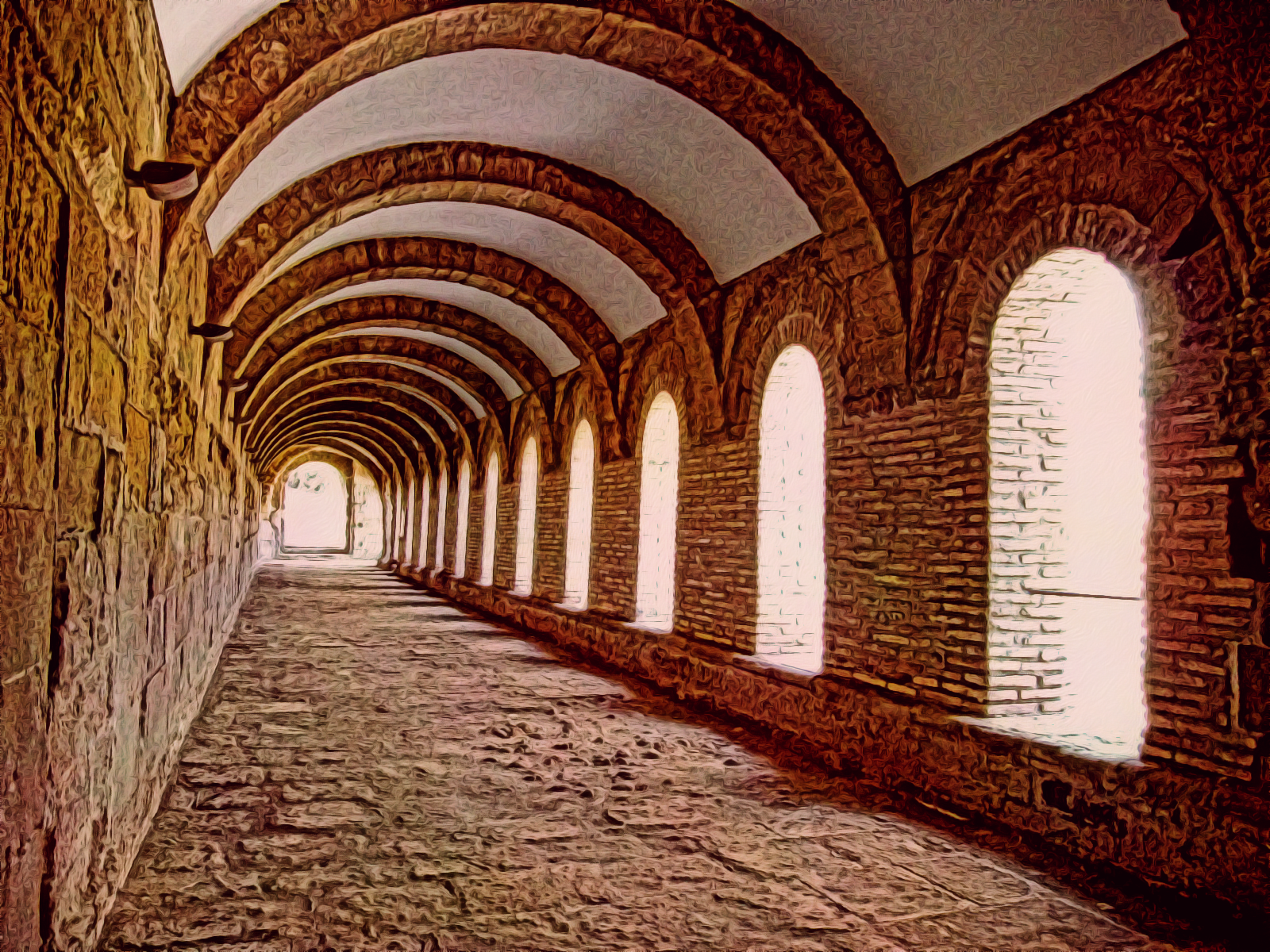
a new "free" interpretation of the kloister
"the sun is rising...."
Attachment:
IMG_3087-dn2.JPG
IMG_3087-dn2.JPG [ 1.11 MiB | Viewed 3167 times ]

_________________
"Where am I ?"


Top
 Post subject: Re: Sharing pictures on monasteries
PostPosted: Sat Jun 13, 2015 4:52 am  (#37) 
Offline
Script Coder
User avatar

Joined: Dec 27, 2014
Posts: 508
sallyanne wrote:
Jontait. very good, would like to know how you did it?

This is a quarter-scale copy of the XCF (original was 1600x1200):
Attachment:
IMG_3087_try1_400px.xcf [2.77 MiB]
Downloaded 164 times
Most of it is self-explanatory except:
- first step to remove blue tinge (probably caused by camera saturation in bright light), for which I used Select-by-Colour tool (mode=Select by: hue) with large threshold (about 30-40) and large feather (about 40-50px) and then Colors>Map>Rotate colors... to map the bluish tinge to brick colors;
- ACE = Adaptive Contrast Enhancement (Gimp plugin);
- last step to lighten the ceiling sections: ..the previous steps discolored the ceiling with too much texture, so I fuzzy-selected the pristine ceiling sections in the original image, pasted to a new layer and blended.


Top
 Post subject: Re: Sharing pictures on monasteries
PostPosted: Sat Jun 13, 2015 5:26 am  (#38) 
Offline
Global Moderator
User avatar

Joined: Apr 01, 2012
Posts: 8510
Location: On the other side of your screen
Thanks a lot. I have seen this blue tinge in photos before with bright light. Must remember your steps in future

_________________
Image
Free Fun Photo Editing & resources
Poems from the Lord
Gimp Newby
Gimp version 3.2.8 and GMIC-Qt 4.0.2 OS :- Windows 10 Home 64


Top
 Post subject: Re: Sharing pictures on monasteries
PostPosted: Fri Jun 19, 2015 3:35 am  (#39) 
Offline
GimpChat Member
User avatar

Joined: Mar 01, 2014
Posts: 14261
Location: Spain, Aragón
Thank you so much for your contributions, which is source for me to learn enhancement of photos.
Here I have a very difficult photo of a fresco. This was behind a huge door in the monastery, which I saw by chance. There are two shadows which I would like to remove or at least to get them soften. Can it be done? Treating only the two zones affected I note a marked line on it. So I don't know how to do that.
Thanks for your invaluable help. :tyspin


Attachments:
IMG_3102.JPG
IMG_3102.JPG [ 553.02 KiB | Viewed 3006 times ]
IMG_3102-Fresco.JPG
IMG_3102-Fresco.JPG [ 756.07 KiB | Viewed 3006 times ]

_________________
Image

Gimp 2.10.36 (samj) portable _ OS Windows 10 Home_ 64bits
Don’t be afraid to start over. It’s a new chance to rebuild what you want.
Top
 Post subject: Re: Sharing pictures on monasteries
PostPosted: Fri Jun 19, 2015 3:54 am  (#40) 
Offline
GimpChat Member
User avatar

Joined: Jan 20, 2013
Posts: 14835
Location: roma, italy
my attempt
Attachment:
IMG_3102-dn1.JPG
IMG_3102-dn1.JPG [ 2.27 MiB | Viewed 3003 times ]


first step was retinex-low to get rid as much as possible of the shadows
then other filters you know

edit: reduced saturation
Attachment:
IMG_3102-dn2.JPG
IMG_3102-dn2.JPG [ 2.02 MiB | Viewed 3001 times ]

_________________
"Where am I ?"


Top
Post new topic Reply to topic  [ 51 posts ]  Go to page Previous  1, 2, 3  Next

All times are UTC - 5 hours [ DST ]


* Login  


Powered by phpBB3 © phpBB Group