It is currently Wed Oct 28, 2026 2:31 am


All times are UTC - 5 hours [ DST ]


Post new topic Reply to topic  [ 2 posts ] 
Author Message
 Post subject: Help with G'MIC, Layers, Blend (Seamless)
PostPosted: Wed Nov 04, 2015 9:30 pm  (#1) 
Offline
New Member

Joined: Nov 04, 2015
Posts: 1
Hi-

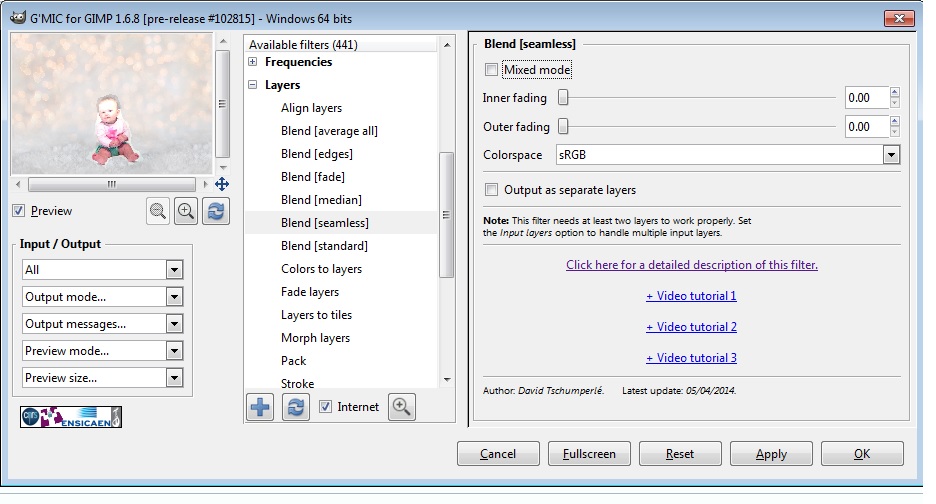
I am new to this so please bear with me. When I open G'MIC to use the function "blend (seamless)" it pulls up a screen that says "inner fading, outer fading, colorspace" etc.

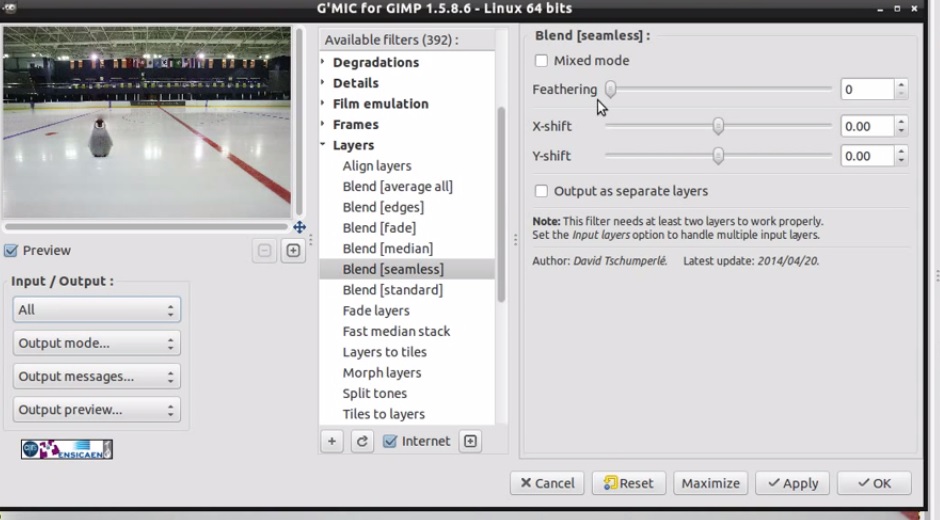
When I was watching the video on the tutorial on how to use this function it had a different screen saying "feathering, x-shift, y-shift" etc.

Did something change? My layer didn't blend near as good as what the tutorial shows. What am I doing wrong? How can I make my layer blend better? Please see attachments below.

Thank you!


Attachments:
gimp2.jpg
gimp2.jpg [ 107.31 KiB | Viewed 3145 times ]
gimp1.jpg
gimp1.jpg [ 132.82 KiB | Viewed 3145 times ]
Share on Facebook Share on Twitter Share on Orkut Share on Digg Share on MySpace Share on Delicious Share on Technorati
Top
 Post subject: Re: Help with G'MIC, Layers, Blend (Seamless)
PostPosted: Thu Nov 05, 2015 6:35 am  (#2) 
Offline
Global Moderator
User avatar

Joined: May 16, 2010
Posts: 16213
You probably need to update G'MIC. Also after updating begin to refresh (two blue arrows) click that button and all the filters will refresh. This adds new filters also.


Top
Post new topic Reply to topic  [ 2 posts ] 

All times are UTC - 5 hours [ DST ]


* Login  


Powered by phpBB3 © phpBB Group