It is currently Wed Sep 23, 2026 6:45 pm


All times are UTC - 5 hours [ DST ]


Post new topic Reply to topic  [ 1444 posts ]  Go to page Previous  1 ... 6, 7, 8, 9, 10, 11, 12 ... 73  Next
Author Message
 Post subject: Re: For lovers of photography
PostPosted: Sat May 07, 2016 8:42 am  (#161) 
Offline
GimpChat Member
User avatar

Joined: Jan 20, 2013
Posts: 14835
Location: roma, italy
Twelfth inage.
On this one I wanted to play a little bit, to give a curious interpretation....
Steps:
1-a bit of Curves to improve the overall balance of colours
2-duplicated layer on SoftLight
3-duplicated the last and applied LumaInvert, then desaturated Luma (layer still on Softlight mode)
4-new from visible
5-used on that the Gimp filter Distort/Apply lens (value to 2.5) and darkened the surrounding (B -127)

Here the outcome.

Attachment:
IMG_2983-dn1.JPG
IMG_2983-dn1.JPG [ 4.73 MiB | Viewed 1983 times ]


A bit funny and ready to be named "...who is there on my way?"

_________________
"Where am I ?"


Top
 Post subject: Re: For lovers of photography
PostPosted: Sat May 07, 2016 9:24 am  (#162) 
Offline
GimpChat Member
User avatar

Joined: Nov 15, 2014
Posts: 875
OMG,

Sorry the vandals have been at work!

After seeing what dinasset did with the train photo, I just had to have another go!

david.


Attachments:
vandals.jpg
vandals.jpg [ 367.65 KiB | Viewed 1982 times ]
train.JPG
train.JPG [ 2.12 MiB | Viewed 1982 times ]
Top
 Post subject: Re: For lovers of photography
PostPosted: Sat May 07, 2016 9:27 am  (#163) 
Offline
GimpChat Member
User avatar

Joined: Jan 20, 2013
Posts: 14835
Location: roma, italy
Thirteenth image.
I played also with this one, being a mistery the "ufo" (a drop of gel on the camera lens?).
A few steps:
1-applied a beige-oliva nuance (defined as RGB 144,132,53) on the image
2-added a layer with a "bird of prey"


Here the outcome

Attachment:
IMG_0429-dn1.JPG
IMG_0429-dn1.JPG [ 3.43 MiB | Viewed 1982 times ]


The scene is still ...mysterious/fascinating/worrying .....

_________________
"Where am I ?"


Top
 Post subject: Re: For lovers of photography
PostPosted: Sat May 07, 2016 9:57 am  (#164) 
Offline
GimpChat Member
User avatar

Joined: Jan 20, 2013
Posts: 14835
Location: roma, italy
Fourteenth Image (Sallyanne's).

A nice composition, for me it was difficult to enhance it.
Tried to get a bit more luminosity and colour contrast, according to my taste.
Steps (simple):
1-duplicated and applied AutoEqualize; set mode to Dodge and opacity to 50%
2-added a layer mask to not have dodge effect on the sky
Here the outcome

Attachment:
Richmond031RAW-dn1.jpg
Richmond031RAW-dn1.jpg [ 3.16 MiB | Viewed 1979 times ]


note: image has been downscaled

_________________
"Where am I ?"


Top
 Post subject: Re: For lovers of photography
PostPosted: Sat May 07, 2016 1:54 pm  (#165) 
Offline
GimpChat Member
User avatar

Joined: Mar 12, 2016
Posts: 198
Location: Illinois, USA
Thanks sallyanne, not a lot can be done in the owl picture but dinasset gave me the idea to cut the owl out make a new layer and then use lab mixer and use difference on the layer. :gimp


Attachments:
IMG_1822_3.JPG
IMG_1822_3.JPG [ 633.82 KiB | Viewed 1966 times ]

_________________
Image
Top
 Post subject: Re: For lovers of photography
PostPosted: Sat May 07, 2016 2:01 pm  (#166) 
Offline
GimpChat Member
User avatar

Joined: Mar 01, 2014
Posts: 14198
Location: Spain, Aragón
Serious Tom, your result is good as the owl is much more visible, but at the same time there is a visible contour around it and it's a pity as it seems to be as if you had added it. :(
We all have here a great challenge. :roll:

_________________
Image

Gimp 2.10.36 (samj) portable _ OS Windows 10 Home_ 64bits
Don’t be afraid to start over. It’s a new chance to rebuild what you want.


Top
 Post subject: Re: For lovers of photography
PostPosted: Sat May 07, 2016 4:29 pm  (#167) 
Offline
GimpChat Member
User avatar

Joined: Mar 12, 2016
Posts: 198
Location: Illinois, USA
Issabella wrote:
Serious Tom, your result is good as the owl is much more visible, but at the same time there is a visible contour around it and it's a pity as it seems to be as if you had added it. :(
We all have here a great challenge. :roll:

I can see what you are saying, maybe I should have cut the owl out with more sky and it would have blended back in better.

_________________
Image


Top
 Post subject: Re: For lovers of photography
PostPosted: Sat May 07, 2016 5:37 pm  (#168) 
Offline
GimpChat Member
User avatar

Joined: Nov 15, 2014
Posts: 875
SeriousTom,

I had a couple of tries at your owl picture but nowhere near as good as yours.
Did you feather the selection when you cut it out? That usually helps disguise the transition.

david.


Top
 Post subject: Re: For lovers of photography
PostPosted: Sat May 07, 2016 5:43 pm  (#169) 
Offline
GimpChat Member
User avatar

Joined: Nov 15, 2014
Posts: 875
It is time I put another photograph for everyone to play with - dinasset is gaining on us - he will soon catch up!
This is a picture of the church in my village in North Wales (actually a panorama of three photographs stitched together).

david.


Attachments:
church.jpg
church.jpg [ 1.02 MiB | Viewed 1951 times ]
Top
 Post subject: Re: For lovers of photography
PostPosted: Sat May 07, 2016 6:52 pm  (#170) 
Offline
Global Moderator
User avatar

Joined: Oct 02, 2014
Posts: 5050
Location: Sydney Australia
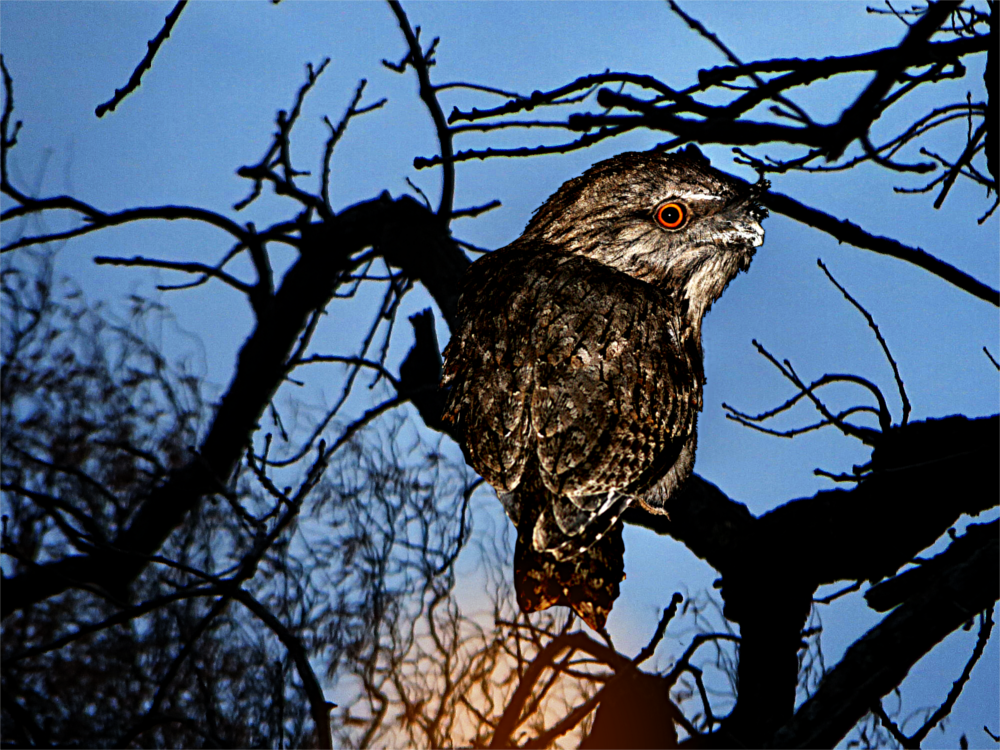
After seeing my previous photo attempt 'vandalised' ( :hehe ) by that admittedly aging vandal David, I thought I wouild also try the owl photo.

I decided to turn it into a evening/dusk photo of a Tawny Frogmouth caught by surprise by the camera flash ...

Image

_________________
Image

Respect should be offered freely but hard earned


Top
 Post subject: Re: For lovers of photography
PostPosted: Sun May 08, 2016 3:41 am  (#171) 
Offline
GimpChat Member
User avatar

Joined: Nov 15, 2014
Posts: 875
OMG,

I like the Tawny Frogmouth!
And, perhaps, I shall try to be a good boy and not vandalise any more of your pictures.

david.


Top
 Post subject: Re: For lovers of photography
PostPosted: Sun May 08, 2016 4:11 am  (#172) 
Offline
GimpChat Member
User avatar

Joined: Mar 01, 2014
Posts: 14198
Location: Spain, Aragón
Serious Tom, my tries on the owl are terribly bad. Yours is quite good, the only thing it's to get no so strong silhouette. :)
David, nice photo and perfect about joining the parts in it. I did my try on it. :)


Attachments:
church-Stretch-ToneMap-Freaky details-Issa.jpg
church-Stretch-ToneMap-Freaky details-Issa.jpg [ 1.29 MiB | Viewed 1965 times ]

_________________
Image

Gimp 2.10.36 (samj) portable _ OS Windows 10 Home_ 64bits
Don’t be afraid to start over. It’s a new chance to rebuild what you want.
Top
 Post subject: Re: For lovers of photography
PostPosted: Sun May 08, 2016 5:09 am  (#173) 
Offline
GimpChat Member
User avatar

Joined: Nov 15, 2014
Posts: 875
Issabella,

You got some nice warm colours in the picture of the church. You removed the wooden post and the telephone cables, as well as the two people sat in the corner of the cricket field!
It was stitched together using Hugin, which is superb for making panoramas - and it is free open-source software.

A little background information, if it is of interest to anyone:
There is evidence of a church in Northop since the 6th century. It is said that Eurgain, a niece of Saint Asaph, passed through Northop and founded the church here on a Celtic mound. There was a stone church erected here during the 12th century, the tower being completed to its 98-foot height in 1571. It was extensively rebuilt during 1840, with further alterations in 1877.
The building on the left is the old grammar school, opened in 1608.

Now my version.
david.


Attachments:
church.jpg
church.jpg [ 1.07 MiB | Viewed 1956 times ]
Top
 Post subject: Re: For lovers of photography
PostPosted: Sun May 08, 2016 6:21 am  (#174) 
Offline
GimpChat Member
User avatar

Joined: Jan 20, 2013
Posts: 14835
Location: roma, italy
Fifteenth Image.
A bit of enhancement plus ... an interpretation of the host dog !

1-remove unwanted objects using g'mic inpaint (patch)
2-on a dup layer strecth RGB, set opacity to 50%
3-new from visible
4-on a dup layer apply g'mic mixer lab (contrast to 2 for both A and B), set opacity to 80%
5-add...the invitation text (Alpha-flowers)

The outcome

Attachment:
IMG_1054-dn1.JPG
IMG_1054-dn1.JPG [ 2.77 MiB | Viewed 1952 times ]

_________________
"Where am I ?"


Top
 Post subject: Re: For lovers of photography
PostPosted: Sun May 08, 2016 6:34 am  (#175) 
Offline
GimpChat Member
User avatar

Joined: Jan 20, 2013
Posts: 14835
Location: roma, italy
Sixteenth Image (David's)

A few steps:
1-g'mic mighty details
2-on a dup layer applied a nuance "bronzo antico" (RGB=117,102,63), mode to hardlight, opacity to 90%

Here the outcome

Attachment:
old_house-dn1.jpg
old_house-dn1.jpg [ 2.58 MiB | Viewed 1951 times ]

_________________
"Where am I ?"


Top
 Post subject: Re: For lovers of photography
PostPosted: Sun May 08, 2016 11:10 am  (#176) 
Offline
GimpChat Member
User avatar

Joined: Jan 20, 2013
Posts: 14835
Location: roma, italy
Seventeenth Image.
Interesting light.
Forced this aspect.
Steps:
1-added nuance of "rosa-arancio" (defined as RGB = 255,153,102)
2-added a Gradient Flare:
x=3250, y=1010, radius=max, rotation=-180, hue=0.0, vector angle=0, vector lenght=900
That's it.

Here the outcome:

Attachment:
IMG_3068-dn1.JPG
IMG_3068-dn1.JPG [ 5.03 MiB | Viewed 1932 times ]

_________________
"Where am I ?"


Top
 Post subject: Re: For lovers of photography
PostPosted: Sun May 08, 2016 11:22 am  (#177) 
Offline
GimpChat Member
User avatar

Joined: Jan 20, 2013
Posts: 14835
Location: roma, italy
Eighteenth image.
Also nice for the light.
On this one I made these simple steps:
1-g'mic freaky details
2-nuance "oro", defined as RGB=255,215,0

Here the outcome:

Attachment:
IMG_2947-dn1.JPG
IMG_2947-dn1.JPG [ 5.52 MiB | Viewed 1931 times ]


image a bit downscaled

_________________
"Where am I ?"


Top
 Post subject: Re: For lovers of photography
PostPosted: Sun May 08, 2016 12:08 pm  (#178) 
Offline
GimpChat Member
User avatar

Joined: Mar 12, 2016
Posts: 198
Location: Illinois, USA
I like both of those :coolthup
Thought I would try something different on the owl.
I made a duplicate and the made a pencil sketch with mask and alpha color to white so I only had the black left'
On the layer made changed it to burn.
I think that's enough of the old owl for me.
The church picture inpaint didn't do real well on the car but I haven't used it alot.


Attachments:
church.jpg
church.jpg [ 1.17 MiB | Viewed 1927 times ]
Finished_Owl.jpg
Finished_Owl.jpg [ 4.95 MiB | Viewed 1927 times ]

_________________
Image
Top
 Post subject: Re: For lovers of photography
PostPosted: Sun May 08, 2016 12:49 pm  (#179) 
Offline
GimpChat Member
User avatar

Joined: Jan 20, 2013
Posts: 14835
Location: roma, italy
Nineteenth image.
Brrrr....
Winter is now definitely over, in this part of the earth, so we can see its beauty without fearing its cold.
I "forced" a bit the sensation of cold with a "verde menta" nuance.
Here the sequence of steps:
1-applied nuance "verde menta", defined as RGB=152,255,152
2-applied g'mic freaky details
3-set opacity to 80%, mode to hardlight, flatten
4-used g'mic inpaint (patch) to remove the top part of the dog head, in the bottom right angle
Here the outcome:

Attachment:
IMG_3772-dn1.JPG
IMG_3772-dn1.JPG [ 5.23 MiB | Viewed 1921 times ]

_________________
"Where am I ?"


Top
 Post subject: Re: For lovers of photography
PostPosted: Sun May 08, 2016 1:16 pm  (#180) 
Offline
GimpChat Member
User avatar

Joined: Jan 20, 2013
Posts: 14835
Location: roma, italy
Twentieth image.
I really took freedoms with this one: a divertissement.
Used twice the plasma effect (with very low turbolence), one layer in hardlight mode, the second one in multiply mode.
A funny outcome.
Here it is:
Attachment:
IMG_3848-dn1.JPG
IMG_3848-dn1.JPG [ 1.38 MiB | Viewed 1917 times ]

_________________
"Where am I ?"


Top
Post new topic Reply to topic  [ 1444 posts ]  Go to page Previous  1 ... 6, 7, 8, 9, 10, 11, 12 ... 73  Next

All times are UTC - 5 hours [ DST ]


* Login  


Powered by phpBB3 © phpBB Group