It is currently Thu Sep 24, 2026 1:39 am


All times are UTC - 5 hours [ DST ]


Post new topic Reply to topic  [ 21 posts ]  Go to page 1, 2  Next
Author Message
 Post subject: What are your 'go-to' scripts?
PostPosted: Tue May 10, 2016 9:21 am  (#1) 
Offline
GimpChat Member
User avatar

Joined: Apr 08, 2010
Posts: 5420
Location: Northwest Ohio
I have found some old photos of my family, some are not in the best shape. What are your favorite scripts, plug-ins, and processes to make old photos look nicer? I'm not too worried about fixing scratches and stuff like that, they pics just need to look crisper or more defined. And I'm also looking for some not-too-complicated scripts/processes to make skin look better, in both newer and older photos, slightly less wrinkled and more even-colored. I'm not looking for full tutorials, just some general hints and scripts to work with.


Share on Facebook Share on Twitter Share on Orkut Share on Digg Share on MySpace Share on Delicious Share on Technorati
Top
 Post subject: Re: What are your 'go-to' scripts?
PostPosted: Tue May 10, 2016 9:36 am  (#2) 
Offline
GimpChat Member
User avatar

Joined: Jan 20, 2013
Posts: 14835
Location: roma, italy
did you have a look at the thread For lovers of photography ?
There are many processing detailed for different situations, maybe you will find in there those good for your cases

_________________
"Where am I ?"


Top
 Post subject: Re: What are your 'go-to' scripts?
PostPosted: Tue May 10, 2016 9:59 am  (#3) 
Offline
GimpChat Member
User avatar

Joined: Apr 08, 2010
Posts: 5420
Location: Northwest Ohio
Thanks, I will look through that. My main concern is that I have not found an easy and somewhat "fool-proof" way to make skin look improved and less wrinkled but not too fake.


Top
 Post subject: Re: What are your 'go-to' scripts?
PostPosted: Tue May 10, 2016 10:11 am  (#4) 
Offline
GimpChat Member
User avatar

Joined: Mar 12, 2016
Posts: 198
Location: Illinois, USA
The Beautify Plugin has a section just for skin tones but has lots of other neat stuff, you should try it. You just need to reset it after seeing the diffferent results.
Very easy to use.

_________________
Image


Top
 Post subject: Re: What are your 'go-to' scripts?
PostPosted: Tue May 10, 2016 10:27 am  (#5) 
Offline
GimpChat Member
User avatar

Joined: Jan 20, 2013
Posts: 14835
Location: roma, italy
2-ton wrote:
Thanks, I will look through that. My main concern is that I have not found an easy and somewhat "fool-proof" way to make skin look improved and less wrinkled but not too fake.

My recommendation for that problem is G'MIC Repair nlsmeans.
Post one of your images, I can try to find the best setup

_________________
"Where am I ?"


Top
 Post subject: Re: What are your 'go-to' scripts?
PostPosted: Tue May 10, 2016 5:34 pm  (#6) 
Offline
Administrator
User avatar

Joined: Aug 10, 2012
Posts: 14207
Location: Native to NYC living in Arizona, Gimp 2.8 - 3.0, Win 11 PC.
I often use my Easy Image Enhancement technique to sharpen images.
There was a script made of this effect, but I can't seem to find it.

Here's a link to the short tutorial I made about this technique.

Easy Image Enhancement

Image

I was able to find the script after all...
Wallace style deblur

Image

Here is the download to the New and Improved Deblur/Easy Image Enhancement Script.

Improved Deblur/Easy Image Enhancement Script

_________________
Image
"A wise man learns more from a foolish question than a fool can learn from a wise answer"
Image


Top
 Post subject: Re: What are your 'go-to' scripts?
PostPosted: Tue May 10, 2016 9:53 pm  (#7) 
Offline
GimpChat Member
User avatar

Joined: Apr 08, 2010
Posts: 5420
Location: Northwest Ohio
dinasset wrote:
2-ton wrote:
Thanks, I will look through that. My main concern is that I have not found an easy and somewhat "fool-proof" way to make skin look improved and less wrinkled but not too fake.

My recommendation for that problem is G'MIC Repair nlsmeans.
Post one of your images, I can try to find the best setup

OK, here is a pic where I would like to make the skin look more even toned and show less of the tiny little wrinkles around the eyes.


Attachments:
Randy_Badass_portrait.jpg
Randy_Badass_portrait.jpg [ 3.3 MiB | Viewed 6966 times ]
Top
 Post subject: Re: What are your 'go-to' scripts?
PostPosted: Tue May 10, 2016 10:11 pm  (#8) 
Offline
Administrator
User avatar

Joined: Aug 10, 2012
Posts: 14207
Location: Native to NYC living in Arizona, Gimp 2.8 - 3.0, Win 11 PC.
2-ton wrote:
dinasset wrote:
2-ton wrote:
Thanks, I will look through that. My main concern is that I have not found an easy and somewhat "fool-proof" way to make skin look improved and less wrinkled but not too fake.

My recommendation for that problem is G'MIC Repair nlsmeans.
Post one of your images, I can try to find the best setup

OK, here is a pic where I would like to make the skin look more even toned and show less of the tiny little wrinkles around the eyes.

You can give the G'Mic filter Repair><Smooth[skin] a try.
This is my attempt,
using this filter on a selection of his face and a layer mask to remove some unwanted stuff...
Image
Image

_________________
Image
"A wise man learns more from a foolish question than a fool can learn from a wise answer"
Image


Top
 Post subject: Re: What are your 'go-to' scripts?
PostPosted: Wed May 11, 2016 1:33 am  (#9) 
Offline
GimpChat Member
User avatar

Joined: Jan 20, 2013
Posts: 14835
Location: roma, italy
2-ton wrote:
dinasset wrote:
2-ton wrote:
Thanks, I will look through that. My main concern is that I have not found an easy and somewhat "fool-proof" way to make skin look improved and less wrinkled but not too fake.

My recommendation for that problem is G'MIC Repair nlsmeans.
Post one of your images, I can try to find the best setup

OK, here is a pic where I would like to make the skin look more even toned and show less of the tiny little wrinkles around the eyes.

here is my outcome, after many trials.
Used G'MIC Testing/Iain/Ms nlmeans with the following values: 8,6,0,0,1.2,1.6,1,10,5,8,7,10
cut the image (you are not interested in the BG, are you?), applied a mask not to have the effect on the hair
Attachment:
Randy_Badass_portrait-cut_dn1_ms nlmeans c noise 8,6,0,0,1.2,1.6,1,10,5,8.jpg
Randy_Badass_portrait-cut_dn1_ms nlmeans c noise 8,6,0,0,1.2,1.6,1,10,5,8.jpg [ 2.45 MiB | Viewed 6947 times ]

this tool does not give a "plastic" effect, but it's very slow

_________________
"Where am I ?"


Top
 Post subject: Re: What are your 'go-to' scripts?
PostPosted: Wed May 11, 2016 4:00 am  (#10) 
Offline
GimpChat Member
User avatar

Joined: Jan 03, 2011
Posts: 1656
To retouch skin with GIMP, I suggest you look at this wonderful article from Pat David :

https://pixls.us/articles/skin-retouchi ... decompose/

You'll find everything important in it.


Top
 Post subject: Re: What are your 'go-to' scripts?
PostPosted: Fri May 13, 2016 8:33 am  (#11) 
Offline
GimpChat Member
User avatar

Joined: Apr 08, 2010
Posts: 5420
Location: Northwest Ohio
Thanks, both attempts look good, and I am going to go over the article by Pat David.


Top
 Post subject: Re: What are your 'go-to' scripts?
PostPosted: Fri May 13, 2016 8:36 am  (#12) 
Offline
Administrator
User avatar

Joined: Aug 10, 2012
Posts: 14207
Location: Native to NYC living in Arizona, Gimp 2.8 - 3.0, Win 11 PC.
2-ton wrote:
Thanks, both attempts look good, and I am going to go over the article by Pat David.

Good luck 2-ton and happy Gimping. :bigthup

_________________
Image
"A wise man learns more from a foolish question than a fool can learn from a wise answer"
Image


Top
 Post subject: Re: What are your 'go-to' scripts?
PostPosted: Fri May 13, 2016 9:12 am  (#13) 
Offline
GimpChat Member
User avatar

Joined: Apr 08, 2010
Posts: 5420
Location: Northwest Ohio
Well, the best outcome I had was this one, I used the convolve brush and manually smoothed the skin. I need to do a lot of practice to figure out how to use the other methods.
Image


Top
 Post subject: Re: What are your 'go-to' scripts?
PostPosted: Sat May 14, 2016 8:50 am  (#14) 
Offline
Global Moderator
User avatar

Joined: Apr 01, 2012
Posts: 8471
Location: On the other side of your screen
My favourite under Repair is the 'smooth [thin brush]'

_________________
Image
Free Fun Photo Editing & resources
Poems from the Lord
Gimp Newby
Gimp version 3.2.4 and GMIC-Qt 4.0.2 OS :- Windows 10 Home 64


Top
 Post subject: Re: What are your 'go-to' scripts?
PostPosted: Sat May 14, 2016 1:04 pm  (#15) 
Offline
Administrator
User avatar

Joined: Aug 10, 2012
Posts: 14207
Location: Native to NYC living in Arizona, Gimp 2.8 - 3.0, Win 11 PC.
2-ton wrote:
Well, the best outcome I had was this one,
I used the convolve brush and manually smoothed the skin.
I need to do a lot of practice to figure out how to use the other methods.

You did a fine job 2-ton.
It look very natural. :bigthup

_________________
Image
"A wise man learns more from a foolish question than a fool can learn from a wise answer"
Image


Top
 Post subject: Re: What are your 'go-to' scripts?
PostPosted: Tue May 17, 2016 11:26 am  (#16) 
Offline
GimpChat Member
User avatar

Joined: Apr 08, 2010
Posts: 5420
Location: Northwest Ohio
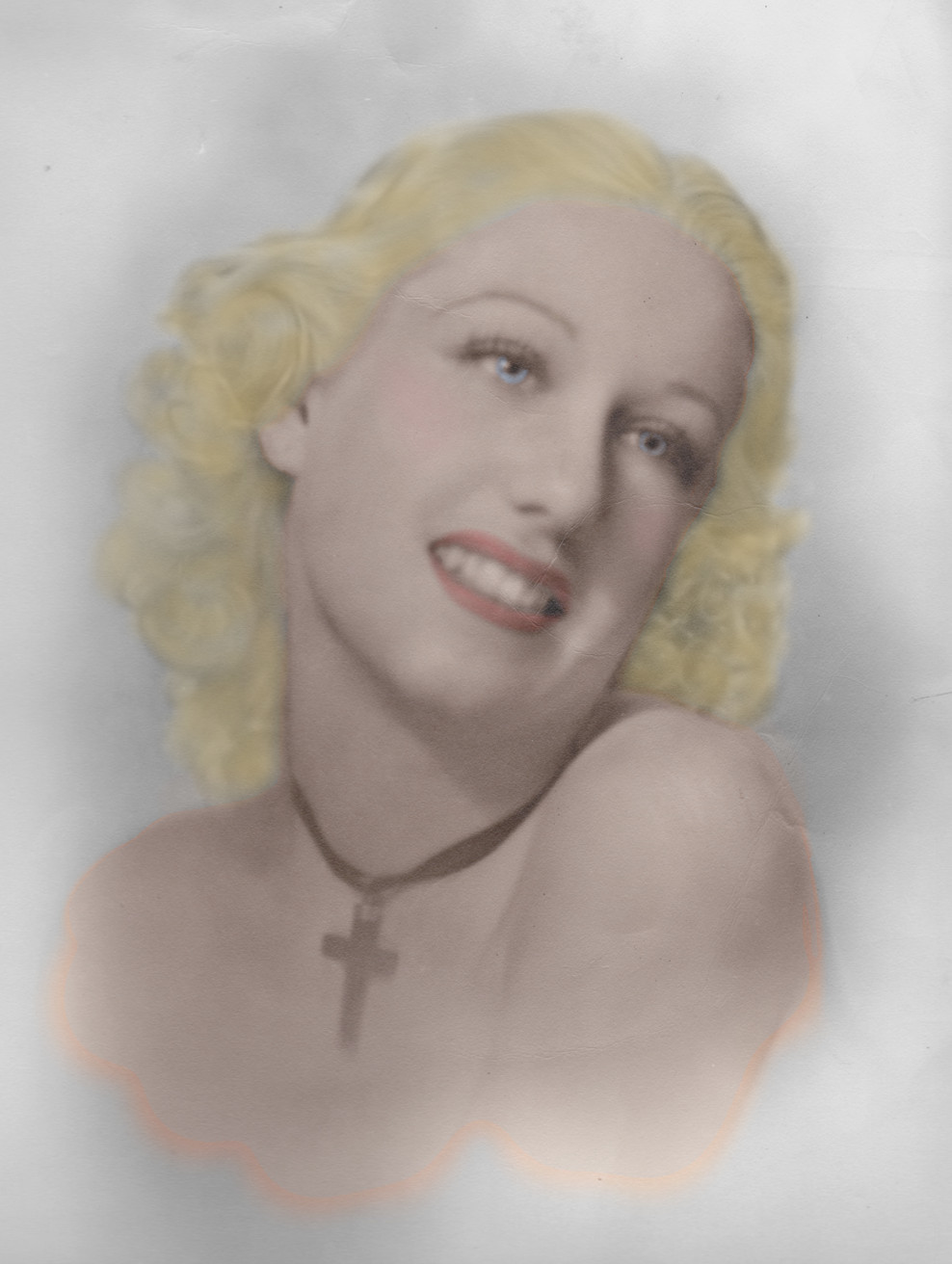
Tried my hand at coloring an old photo. I didn't take the time to look up any tutorials, just used layers and brushes, and I couldn't find a good color for the hair, it came out much too yellow. So much I need to practice on, so little time.

original.
Image

colored
Image


Top
 Post subject: Re: What are your 'go-to' scripts?
PostPosted: Tue May 17, 2016 11:50 am  (#17) 
Offline
Administrator
User avatar

Joined: Aug 10, 2012
Posts: 14207
Location: Native to NYC living in Arizona, Gimp 2.8 - 3.0, Win 11 PC.
2-ton wrote:
Tried my hand at coloring an old photo. I didn't take the time to look up any tutorials, just used layers and brushes, and I couldn't find a good color for the hair, it came out much too yellow. So much I need to practice on, so little time.

original.
Image

colored
Image

It looks nice 2-ton. :bigthup

_________________
Image
"A wise man learns more from a foolish question than a fool can learn from a wise answer"
Image


Top
 Post subject: Re: What are your 'go-to' scripts?
PostPosted: Tue May 17, 2016 12:23 pm  (#18) 
Offline
GimpChat Member
User avatar

Joined: Jan 20, 2013
Posts: 14835
Location: roma, italy
my limited (manual) colorization

Attachment:
147_Mom2-dn1.jpg
147_Mom2-dn1.jpg [ 1.14 MiB | Viewed 3717 times ]


very nice mom !

_________________
"Where am I ?"


Top
 Post subject: Re: What are your 'go-to' scripts?
PostPosted: Tue May 17, 2016 9:16 pm  (#19) 
Offline
GimpChat Member
User avatar

Joined: Apr 08, 2010
Posts: 5420
Location: Northwest Ohio
That looks great Diss, The hair is much more natural looking.


Top
 Post subject: Re: What are your 'go-to' scripts?
PostPosted: Tue May 17, 2016 11:07 pm  (#20) 
Offline
Administrator
User avatar

Joined: Aug 10, 2012
Posts: 14207
Location: Native to NYC living in Arizona, Gimp 2.8 - 3.0, Win 11 PC.
I gave it a shot, but I think I may have gone a bit to far with it.
What do you think?
Image

_________________
Image
"A wise man learns more from a foolish question than a fool can learn from a wise answer"
Image


Top
Post new topic Reply to topic  [ 21 posts ]  Go to page 1, 2  Next

All times are UTC - 5 hours [ DST ]


* Login  


Powered by phpBB3 © phpBB Group