It is currently Sat Oct 03, 2026 10:47 am


All times are UTC - 5 hours [ DST ]


Post new topic Reply to topic  [ 1444 posts ]  Go to page Previous  1 ... 20, 21, 22, 23, 24, 25, 26 ... 73  Next
Author Message
 Post subject: Re: For lovers of photography
PostPosted: Sat Jun 11, 2016 7:58 am  (#441) 
Offline
GimpChat Member
User avatar

Joined: Mar 01, 2014
Posts: 14198
Location: Spain, Aragón
David, thanks one more time for your help to understand about ways to enhance a photo. :tyspin
I am missing many people in this thread and specially my friend Dinasset. I hope they have their contribution soon and with their results all of us will be able to learn and enjoy them. :)

_________________
Image

Gimp 2.10.36 (samj) portable _ OS Windows 10 Home_ 64bits
Don’t be afraid to start over. It’s a new chance to rebuild what you want.


Top
 Post subject: Re: For lovers of photography
PostPosted: Sun Jun 12, 2016 1:56 am  (#442) 
Offline
GimpChat Member
User avatar

Joined: Jan 20, 2013
Posts: 14835
Location: roma, italy
thanks, my friend, but David is doing an excellent job.
anyhow, I did my tries too
-------------------------------------------------------------
a) freaky details
b) duplicated, set to multiply, 90%
c) duplicated, luma-invert, set to soft-light, 80%
Attachment:
forest_path-dn1.jpg
forest_path-dn1.jpg [ 2.01 MiB | Viewed 1356 times ]

............................................................................
(same flow)
a) freaky details
b) duplicated, set to multiply, 80%
c) duplicated, luma-invert, set to soft-light, 60%
Attachment:
Flores%20silvestres%20-%20Moncayo-dn1.jpg
Flores%20silvestres%20-%20Moncayo-dn1.jpg [ 582.88 KiB | Viewed 1356 times ]

_________________
"Where am I ?"


Top
 Post subject: Re: For lovers of photography
PostPosted: Sun Jun 12, 2016 2:56 am  (#443) 
Offline
GimpChat Member
User avatar

Joined: Nov 15, 2014
Posts: 875
dinasset,
Good to see you on this thread again - you have been missed!

Now for my try at my forest_path photograph. I added a new sky to make it more interesting and adjusted various areas using masks.
Two screenshots attached (better than my attempts at explanation!)

david.


Attachments:
add_sky_and_mask.png
add_sky_and_mask.png [ 2.96 MiB | Viewed 1353 times ]
adjust_dark_area.png
adjust_dark_area.png [ 2.66 MiB | Viewed 1353 times ]
forest_path.jpg
forest_path.jpg [ 2.23 MiB | Viewed 1353 times ]
Top
 Post subject: Re: For lovers of photography
PostPosted: Sun Jun 12, 2016 7:17 am  (#444) 
Offline
Script Coder
User avatar

Joined: Oct 25, 2010
Posts: 4812
Attachment:
FlowerCircles.jpg
FlowerCircles.jpg [ 1.29 MiB | Viewed 1341 times ]

_________________
Image


Top
 Post subject: Re: For lovers of photography
PostPosted: Sun Jun 12, 2016 8:44 am  (#445) 
Offline
GimpChat Member
User avatar

Joined: Mar 01, 2014
Posts: 14198
Location: Spain, Aragón
Thanks Ofnuts for your contribution. Nice effect on the photo. :bigthup
Happy you are back in the thread Dinasset. Very good results on the photos. I'm still trying to manage with Luminosity Masks. :)
David, your last photo is rather difficult for me to enhance it properly. Your result and Dinasset's are really good. :clap

_________________
Image

Gimp 2.10.36 (samj) portable _ OS Windows 10 Home_ 64bits
Don’t be afraid to start over. It’s a new chance to rebuild what you want.


Top
 Post subject: Re: For lovers of photography
PostPosted: Sun Jun 12, 2016 10:16 am  (#446) 
Offline
GimpChat Member
User avatar

Joined: Nov 15, 2014
Posts: 875
ofnuts,

What filter did you use to get the effect on FlowerCircles?
It is very good. I have searched through all my filters and been unable to find it.

david.


Top
 Post subject: Re: For lovers of photography
PostPosted: Sun Jun 12, 2016 11:18 am  (#447) 
Offline
Script Coder
User avatar

Joined: Oct 25, 2010
Posts: 4812
david wrote:
ofnuts,

What filter did you use to get the effect on FlowerCircles?
It is very good. I have searched through all my filters and been unable to find it.

david.


- Take the red channel
- Apply this with suitable tiles
- Add the original image
- Set original image to hard-light mode (IIRC)

_________________
Image


Top
 Post subject: Re: For lovers of photography
PostPosted: Sun Jun 12, 2016 2:40 pm  (#448) 
Offline
GimpChat Member
User avatar

Joined: Jan 20, 2013
Posts: 14835
Location: roma, italy
a "vague" approach to Ofnuts' technique by a lazy guy:
user a PS filter thru PSPI : dsb flux / Bubbles

Attachment:
flowers-using-PSfilter-DSB-bubble.jpg
flowers-using-PSfilter-DSB-bubble.jpg [ 2.08 MiB | Viewed 1317 times ]

_________________
"Where am I ?"


Top
 Post subject: Re: For lovers of photography
PostPosted: Sun Jun 12, 2016 3:00 pm  (#449) 
Offline
GimpChat Member
User avatar

Joined: Jan 20, 2013
Posts: 14835
Location: roma, italy
having that set of filters at hand, I played with some other one
this outcome used the dsb flux / psychedelic

Attachment:
flowers-using-PSfilter-DSB-psychedelic.jpg
flowers-using-PSfilter-DSB-psychedelic.jpg [ 1.73 MiB | Viewed 1313 times ]

_________________
"Where am I ?"


Top
 Post subject: Re: For lovers of photography
PostPosted: Sun Jun 12, 2016 3:05 pm  (#450) 
Offline
GimpChat Member
User avatar

Joined: Jan 20, 2013
Posts: 14835
Location: roma, italy
...and this one "spider web"

Attachment:
flowers-using-PSfilter-DSB-spiderweb.jpg
flowers-using-PSfilter-DSB-spiderweb.jpg [ 1.72 MiB | Viewed 1312 times ]

_________________
"Where am I ?"


Top
 Post subject: Re: For lovers of photography
PostPosted: Sun Jun 12, 2016 3:17 pm  (#451) 
Offline
GimpChat Member
User avatar

Joined: Jan 20, 2013
Posts: 14835
Location: roma, italy
now I put here one of my last photos (untouched), for your "interpretations"
pls consider what my most recent camera is now broken, this one was taken with my older camera (dated 2006)

Attachment:
P1040749.JPG
P1040749.JPG [ 1.63 MiB | Viewed 1397 times ]

_________________
"Where am I ?"


Top
 Post subject: Re: For lovers of photography
PostPosted: Sun Jun 12, 2016 3:29 pm  (#452) 
Offline
GimpChat Member
User avatar

Joined: Mar 01, 2014
Posts: 14198
Location: Spain, Aragón
I come here late again. But it took me long time to get a more or less nice I think. I used a luminosity mask and contrast. Also freaky details in GMIC.
I like your new effects on photos Dinasset. :bigthup


Attachments:
forest_path-my try-Issa.jpg
forest_path-my try-Issa.jpg [ 1.42 MiB | Viewed 1397 times ]

_________________
Image

Gimp 2.10.36 (samj) portable _ OS Windows 10 Home_ 64bits
Don’t be afraid to start over. It’s a new chance to rebuild what you want.
Top
 Post subject: Re: For lovers of photography
PostPosted: Mon Jun 13, 2016 1:22 am  (#453) 
Offline
GimpChat Member
User avatar

Joined: Mar 01, 2014
Posts: 14198
Location: Spain, Aragón
No late this time. :)


Attachments:
P1040749-L.M.wavelet sharpen-try-Issa.JPG
P1040749-L.M.wavelet sharpen-try-Issa.JPG [ 1.1 MiB | Viewed 1383 times ]

_________________
Image

Gimp 2.10.36 (samj) portable _ OS Windows 10 Home_ 64bits
Don’t be afraid to start over. It’s a new chance to rebuild what you want.
Top
 Post subject: Re: For lovers of photography
PostPosted: Mon Jun 13, 2016 2:15 am  (#454) 
Offline
GimpChat Member
User avatar

Joined: Nov 15, 2014
Posts: 875
dinasset,

Two tries at your photograph. The gas cylinder (?) had to go!!!
First: various layer masks to try and pull information from parts of the picture, followed by wavelet sharpening.
Second: I have stolen an idea from you! Nuance "rosa arancio", grain merge, hard light, 43% opacity.

david.


Attachments:
scene1.JPG
scene1.JPG [ 1.96 MiB | Viewed 1379 times ]
scene2.JPG
scene2.JPG [ 2.16 MiB | Viewed 1379 times ]
Top
 Post subject: Re: For lovers of photography
PostPosted: Mon Jun 13, 2016 2:44 am  (#455) 
Offline
Administrator
User avatar

Joined: Aug 10, 2012
Posts: 14224
Location: Native to NYC living in Arizona, Gimp 2.8 - 3.0, Win 11 PC.
Here's my attempt.
Attachment:
wallace P1040749.png
wallace P1040749.png [ 7.15 MiB | Viewed 1377 times ]

_________________
Image
"A wise man learns more from a foolish question than a fool can learn from a wise answer"
Image


Top
 Post subject: Re: For lovers of photography
PostPosted: Mon Jun 13, 2016 4:14 am  (#456) 
Offline
GimpChat Member
User avatar

Joined: Jan 20, 2013
Posts: 14835
Location: roma, italy
Many thanks Issabella, David, Wallace for your partecipation to the game.
Nice outcomes.

_________________
"Where am I ?"


Top
 Post subject: Re: For lovers of photography
PostPosted: Mon Jun 13, 2016 4:38 am  (#457) 
Offline
GimpChat Member
User avatar

Joined: Mar 01, 2014
Posts: 14198
Location: Spain, Aragón
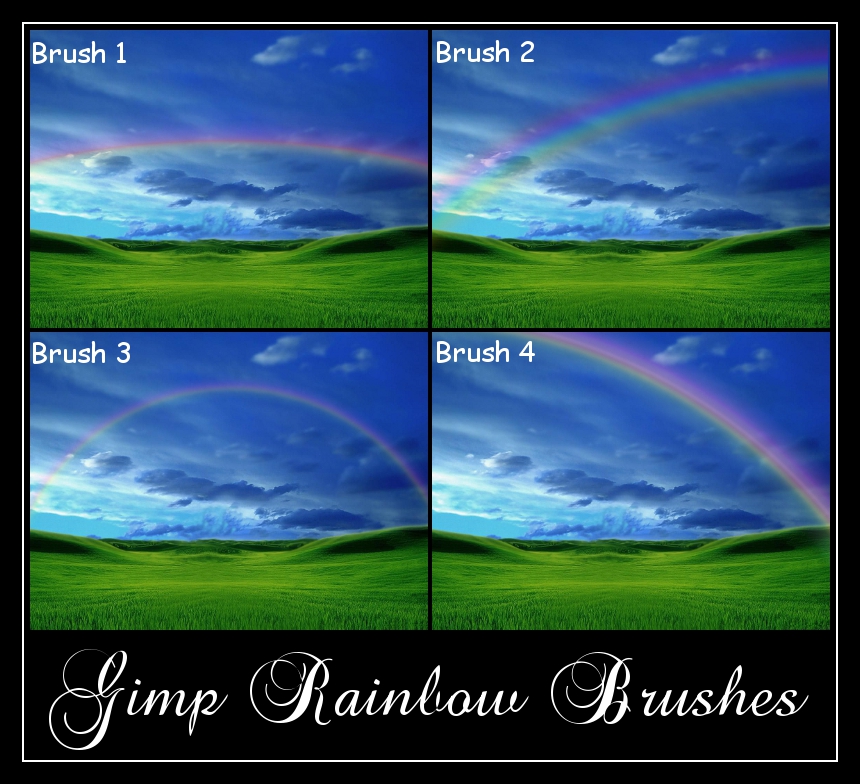
Wallace, how did you add the rainbow so good?
David, the rosa arancio you added gives to the picture a very nice warm look.


Attachments:
DSC_0030.JPG
DSC_0030.JPG [ 687.9 KiB | Viewed 1364 times ]

_________________
Image

Gimp 2.10.36 (samj) portable _ OS Windows 10 Home_ 64bits
Don’t be afraid to start over. It’s a new chance to rebuild what you want.
Top
 Post subject: Re: For lovers of photography
PostPosted: Mon Jun 13, 2016 5:22 am  (#458) 
Offline
Administrator
User avatar

Joined: Aug 10, 2012
Posts: 14224
Location: Native to NYC living in Arizona, Gimp 2.8 - 3.0, Win 11 PC.
Issabella wrote:
Wallace, how did you add the rainbow so good?

I just used one of my rainbow brushes and set the layer to grain merge.
Image
Attachment:
Rainbow Brushes.zip [3.03 MiB]
Downloaded 77 times

Then used a layer-mask to remove any of the unwanted rainbow.

_________________
Image
"A wise man learns more from a foolish question than a fool can learn from a wise answer"
Image


Top
 Post subject: Re: For lovers of photography
PostPosted: Mon Jun 13, 2016 5:27 am  (#459) 
Offline
GimpChat Member
User avatar

Joined: Mar 01, 2014
Posts: 14198
Location: Spain, Aragón
Thank you so much for your quick answer and also thanks for such beautiful brushes yours. :tyspin :bigthup I'll use them for sure. :)

_________________
Image

Gimp 2.10.36 (samj) portable _ OS Windows 10 Home_ 64bits
Don’t be afraid to start over. It’s a new chance to rebuild what you want.


Top
 Post subject: Re: For lovers of photography
PostPosted: Mon Jun 13, 2016 5:30 am  (#460) 
Offline
Administrator
User avatar

Joined: Aug 10, 2012
Posts: 14224
Location: Native to NYC living in Arizona, Gimp 2.8 - 3.0, Win 11 PC.
Issabella wrote:
Thank you so much for your quick answer and also thanks for such beautiful brushes yours. :tyspin :bigthup
I'll use them for sure. :)

No problem Issabella. ;)

PS... The brushes are very large.

_________________
Image
"A wise man learns more from a foolish question than a fool can learn from a wise answer"
Image


Top
Post new topic Reply to topic  [ 1444 posts ]  Go to page Previous  1 ... 20, 21, 22, 23, 24, 25, 26 ... 73  Next

All times are UTC - 5 hours [ DST ]


* Login  


Powered by phpBB3 © phpBB Group