It is currently Thu Oct 08, 2026 6:46 am


All times are UTC - 5 hours [ DST ]


Post new topic Reply to topic  [ 1444 posts ]  Go to page Previous  1 ... 34, 35, 36, 37, 38, 39, 40 ... 73  Next
Author Message
 Post subject: Re: For lovers of photography
PostPosted: Thu Jul 07, 2016 3:38 am  (#721) 
Offline
GimpChat Member
User avatar

Joined: Mar 28, 2016
Posts: 312
Location: Netherlands
Oldmangrumpy, I like the atmosphere of your one. A little bit gloomy and dark.

Serious Tom, I think that you did a great job.

David, actually your first one is very nice. Your first picture does show gold and looks natural. I appreciate the colder look of your gold. My first try lost all gold color on the bottom and has no natural look, although it was a kind of experiment.

Your second try is more saturated, more yellow, so the bottom part has more gold. And the same thing happend as with my second try; The gold lit painting. I think we can conclude that this is very difficult.

David, your pictures are a little bit grainy. What procedure causes most noise? Don't you like noise reduction? Too much noise reduction can give the image a "plastic" look (for example, my try with the fisher boat has maybe too much noise reduction) , but a little bit noise reduction can be nice.

If, after noise reduction a picture has too much "plastic", you can add some artificial noise. But that's two times a degradating method (1. noise reduction and 2. adding artificial noise). Of course this is all a matter of taste.

David, I wish you a good holiday. Don't forget your camera!


Top
 Post subject: Re: For lovers of photography
PostPosted: Thu Jul 07, 2016 3:57 am  (#722) 
Offline
GimpChat Member
User avatar

Joined: Nov 15, 2014
Posts: 876
iarga,

Thank you for your comments - they are much appreciated.
My second attempt at the church photograph, I was trying to get a warmer gold colour, but consistent from top to bottom without distorting the colour of the marble too much.
You are quite right about the excessive noise, it is caused by too much high-frequency sharpening. I shall try to be more restrained in the future!

david.


Top
 Post subject: Re: For lovers of photography
PostPosted: Thu Jul 07, 2016 4:14 am  (#723) 
Offline
GimpChat Member
User avatar

Joined: Mar 28, 2016
Posts: 312
Location: Netherlands
David, with all technic matters, there are advantages and disadvantages. With noise reduction, the specular highlights quickly dissapear, then the gold shine is less. So your (more grainy) images have more specular highlights, thus more gold shine. :)


Top
 Post subject: Re: For lovers of photography
PostPosted: Thu Jul 07, 2016 6:53 am  (#724) 
Offline
GimpChat Member
User avatar

Joined: Nov 15, 2014
Posts: 876
iarga,

I have used anisotropic smoothing (default values) on my previous result. This has suppressed the noise without, I hope, affecting the image negatively.
Comments welcome!
I should have said in my previous reply, that to try and correct the colour temperature change, I first tried a blue layer with a gradient. This I felt made the gold and the marble look too cold.

david.


Attachments:
church4.JPG
church4.JPG [ 772.33 KiB | Viewed 1385 times ]
Top
 Post subject: Re: For lovers of photography
PostPosted: Thu Jul 07, 2016 7:25 am  (#725) 
Offline
GimpChat Member
User avatar

Joined: Mar 28, 2016
Posts: 312
Location: Netherlands
David, :bigthup


Top
 Post subject: Re: For lovers of photography
PostPosted: Thu Jul 07, 2016 9:37 am  (#726) 
Offline
GimpChat Member
User avatar

Joined: Mar 01, 2014
Posts: 14204
Location: Spain, Aragón
Good result David, on your last try. I like it.
iarga your comments about how to treat images are very appreciated. That helps.
Here we have such great relevant experts helping us that we really have learnt quite a lot in this thread. Thanks.
David, we are going to miss you a lot, but we wish you a deserved wonderful summer holiday. :) :yes

_________________
Image

Gimp 2.10.36 (samj) portable _ OS Windows 10 Home_ 64bits
Don’t be afraid to start over. It’s a new chance to rebuild what you want.


Top
 Post subject: Re: For lovers of photography
PostPosted: Fri Jul 08, 2016 7:43 am  (#727) 
Offline
GimpChat Member
User avatar

Joined: Mar 01, 2014
Posts: 14204
Location: Spain, Aragón
I post here new photos if you want to play on them. Anyway, feel free if you wish to go back on any previous picture in this thread. :)


Attachments:
IMG_0897.JPG
IMG_0897.JPG [ 568.97 KiB | Viewed 1338 times ]
IMG_2958.JPG
IMG_2958.JPG [ 2.22 MiB | Viewed 1338 times ]

_________________
Image

Gimp 2.10.36 (samj) portable _ OS Windows 10 Home_ 64bits
Don’t be afraid to start over. It’s a new chance to rebuild what you want.
Top
 Post subject: Re: For lovers of photography
PostPosted: Fri Jul 08, 2016 1:25 pm  (#728) 
Offline
GimpChat Member
User avatar

Joined: Nov 15, 2014
Posts: 876
You've not got rid of me quite yet!!! :hehe
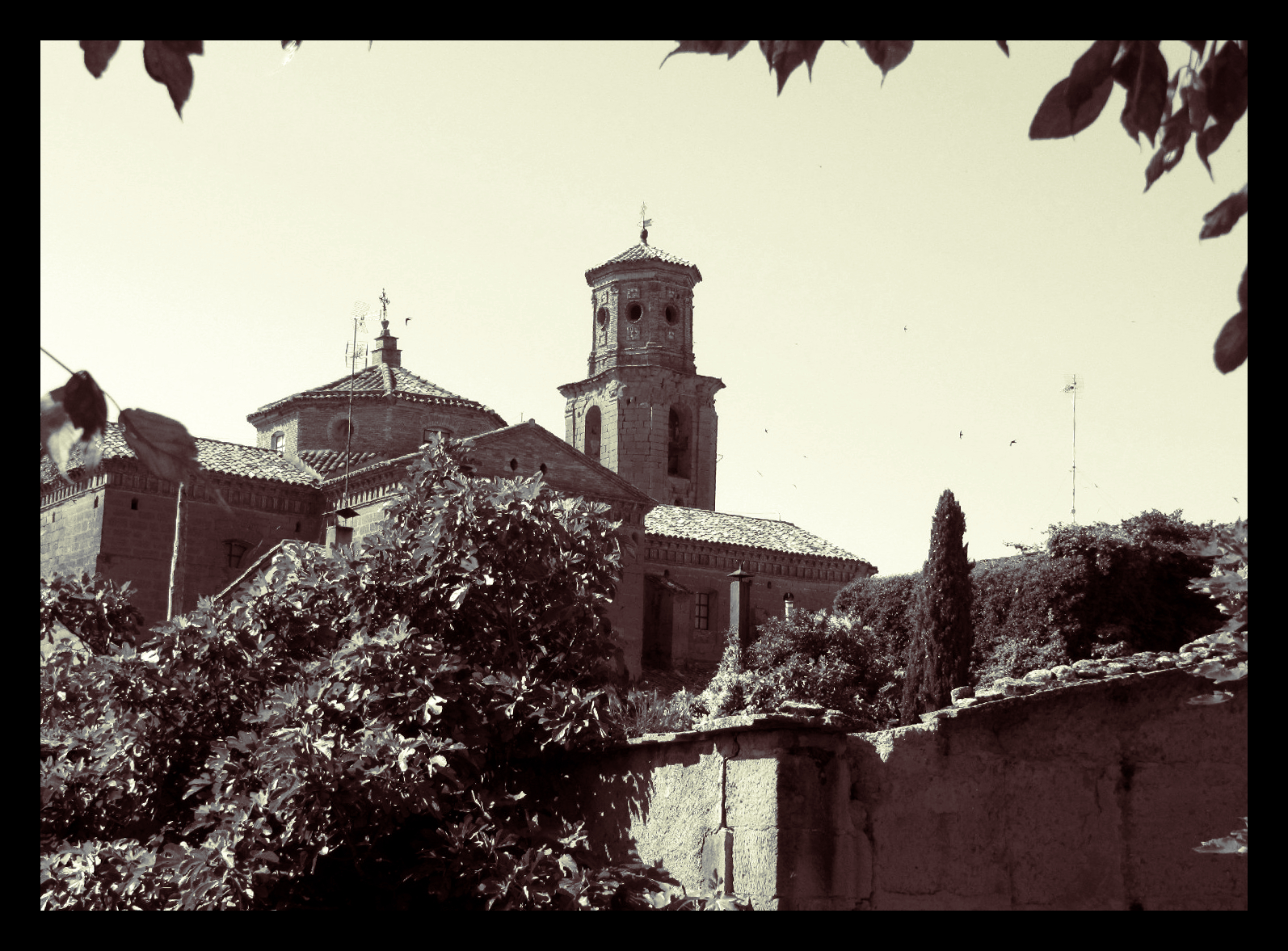
Two more lovely photographs. I particularly like the way the first one is framed by the leaves at the top.
The television aerials had to go!

First one: Luminosity Mask DDD to bring out a few small very dark areas. LM D to lighten the stone work where it is in shadow. LM M to increase contrast in the mid--range. Slight intensification of colours and sharpened.

Second one: Painted mask to reduce brightness of foreground area. Luminosity Mask M with an "S" curve to increase mid-range contrast slightly - sharpened. (Scaled.)

david.


Attachments:
old_church1.JPG
old_church1.JPG [ 685.17 KiB | Viewed 1317 times ]
old_church2.JPG
old_church2.JPG [ 1.17 MiB | Viewed 1317 times ]
Top
 Post subject: Re: For lovers of photography
PostPosted: Fri Jul 08, 2016 1:49 pm  (#729) 
Offline
GimpChat Member
User avatar

Joined: Jun 30, 2016
Posts: 16
David. You and I had the same thought. "Get those towers outta here!" I did some cropping, too.
Also, with some red, green, and blue channel level adjustment and some unsharp masking.


Attachments:
Tower.jpg
Tower.jpg [ 1.16 MiB | Viewed 1315 times ]
Top
 Post subject: Re: For lovers of photography
PostPosted: Fri Jul 08, 2016 2:42 pm  (#730) 
Offline
GimpChat Member
User avatar

Joined: Jan 20, 2013
Posts: 14835
Location: roma, italy
my try on one of the two pictures
- ambra nuance
- colored frame
- no cleaning (TV antenna still there...)

Attachment:
IMG_0897-dn1.JPG
IMG_0897-dn1.JPG [ 626.91 KiB | Viewed 1310 times ]

_________________
"Where am I ?"


Top
 Post subject: Re: For lovers of photography
PostPosted: Fri Jul 08, 2016 3:46 pm  (#731) 
Offline
GimpChat Member
User avatar

Joined: Mar 01, 2014
Posts: 14204
Location: Spain, Aragón
David, nice you can still participate in the thread. I like your outcomes. I removed aerials too, but not the storks. :)
AKMusician, Nice result, too. I think you did a good decision cropping the ugly part of the photo. :)
Dinasset, you rule nuances and effects, which are always so novel and effective. :bigthup
My humble results.


Attachments:
IMG_2958-aerials out-corrección contrast-freaky details.JPG
IMG_2958-aerials out-corrección contrast-freaky details.JPG [ 3.37 MiB | Viewed 1270 times ]
IMG_0897-removed aerials-L.M. DDD-unsharp mask.JPG
IMG_0897-removed aerials-L.M. DDD-unsharp mask.JPG [ 740.66 KiB | Viewed 1270 times ]

_________________
Image

Gimp 2.10.36 (samj) portable _ OS Windows 10 Home_ 64bits
Don’t be afraid to start over. It’s a new chance to rebuild what you want.
Top
 Post subject: Re: For lovers of photography
PostPosted: Fri Jul 08, 2016 5:42 pm  (#732) 
Offline
GimpChat Member
User avatar

Joined: Nov 15, 2014
Posts: 876
dinasset,
A very, how can I describe it(?), elegant result.

Issabella,
You may have to suffer me for another week!!!
And your results are never humble!

david.


Top
 Post subject: Re: For lovers of photography
PostPosted: Fri Jul 08, 2016 6:08 pm  (#733) 
Offline
GimpChat Member
User avatar

Joined: Mar 12, 2016
Posts: 198
Location: Illinois, USA
Nice results !
In my try, I lost the nice blue sky every time I tried something and couldn't get it back just right.
So I wound up going with a LOMO.


Attachments:
IMG_0897.JPG
IMG_0897.JPG [ 877.97 KiB | Viewed 1262 times ]

_________________
Image
Top
 Post subject: Re: For lovers of photography
PostPosted: Fri Jul 08, 2016 6:46 pm  (#734) 
Offline
Script Coder
User avatar

Joined: May 07, 2014
Posts: 4561
Location: Canada
Image

_________________
Image
Visualize your and others dreams coming true.


Top
 Post subject: Re: For lovers of photography
PostPosted: Sat Jul 09, 2016 12:33 am  (#735) 
Offline
GimpChat Member

Joined: May 12, 2015
Posts: 4693
Adjusted color brightness in different segments. Rid of pole and birds in sky. Smoothed sky, adjusted hue. Unsharp mask.
Attachment:
.pngIMG_0897.jpg
.pngIMG_0897.jpg [ 281.26 KiB | Viewed 1242 times ]


Top
 Post subject: Re: For lovers of photography
PostPosted: Sat Jul 09, 2016 1:01 am  (#736) 
Offline
GimpChat Member
User avatar

Joined: Jan 20, 2013
Posts: 14835
Location: roma, italy
good idea to give a different feeling to the image, but the selection of the sky area has been unfortunately inexact, so you see fringes here and there.
I know very well this problem, I'm often in those troubles too.

_________________
"Where am I ?"


Top
 Post subject: Re: For lovers of photography
PostPosted: Sat Jul 09, 2016 2:15 am  (#737) 
Offline
GimpChat Member
User avatar

Joined: Nov 15, 2014
Posts: 876
A quick experiment to see the change in impact by cropping the first old_church image (whilst retaining the bordering leaves).
I think it gives more emphasis to the building.

david.


Attachments:
old_church1a.JPG
old_church1a.JPG [ 705.15 KiB | Viewed 1236 times ]
Top
 Post subject: Re: For lovers of photography
PostPosted: Sat Jul 09, 2016 2:50 am  (#738) 
Offline
GimpChat Member
User avatar

Joined: Mar 01, 2014
Posts: 14204
Location: Spain, Aragón
You all so active while I sleep. :) David, thanks for your nice comment. Definitely it's a good idea to crop the picture. :) One more week before your holidays, it's great.
Tom, you gave it a nice effect when sky lost its blue colour.
Tran, I'm happy to see your contribution too.
Pat, you and me are here learning a lot among our experts friends of us. Your applied it a good colourful effect.
Dinasset, thanks for your great apportations with outcomes and comments. :bigthup
I enjoy all your results. :tyspin

_________________
Image

Gimp 2.10.36 (samj) portable _ OS Windows 10 Home_ 64bits
Don’t be afraid to start over. It’s a new chance to rebuild what you want.


Top
 Post subject: Re: For lovers of photography
PostPosted: Sat Jul 09, 2016 8:05 am  (#739) 
Offline
GimpChat Member
User avatar

Joined: Nov 15, 2014
Posts: 876
The difficulty of selecting, in this case the sky, made me think that I should experiment. Particularly since I find it difficult to draw masks accurately I need to be able to automate the process as far as possible.

I started with my last try on the photograph of the old church.
Select by Colour, but setting the lower drop-down to select by blue. (I tried select by hue, but using blue gave me a better transition at the edges of the area I wanted to select.)
Changing the threshold value up or down and re-selecting on the image will find the setting with the best transition.
(See screen-shot.)
I grew the selection by 1 pixel, to make certain that the edge of the selection was not within the sky. Feathered by 5 pixels and Select/Save to Channel. Then Select/None.

I clicked on the eyeball of my image, so that it became invisible. Opened the Channels menu and made my (speckly!) channel visible and active.
With a small hard-edged brush I started to paint with black on the white speckles close to the edge.
(See screen-shot.)


Attachments:
old_church1b.JPG
old_church1b.JPG [ 714.64 KiB | Viewed 1225 times ]
select_by_colour.png
select_by_colour.png [ 2.44 MiB | Viewed 1227 times ]
mask_before_paint.png
mask_before_paint.png [ 596.54 KiB | Viewed 1227 times ]


Last edited by david on Sat Jul 09, 2016 8:19 am, edited 1 time in total.
Top
 Post subject: Re: For lovers of photography
PostPosted: Sat Jul 09, 2016 8:17 am  (#740) 
Offline
GimpChat Member
User avatar

Joined: Nov 15, 2014
Posts: 876
Part two.
Having painted close to the edge, enlarge the brush and quickly paint in the remainder
(another screen-shot!)
Switch off the visibility of the channel, return to the layers menu, make your image visible and duplicate it.
Add your painted channel as a layer mask, select the image (it will get a white border when selected) and adjust the sky.
(the last screen-shot!)
And now the final image, with the adjustment highly exaggerated for demonstration purposes.

This method works for me, but I am always open to better suggestions!

david.


Attachments:
mask_after_paint.png
mask_after_paint.png [ 380.64 KiB | Viewed 1225 times ]
adjust_colour.png
adjust_colour.png [ 2.32 MiB | Viewed 1225 times ]
old_church1c.JPG
old_church1c.JPG [ 715.86 KiB | Viewed 1225 times ]
Top
Post new topic Reply to topic  [ 1444 posts ]  Go to page Previous  1 ... 34, 35, 36, 37, 38, 39, 40 ... 73  Next

All times are UTC - 5 hours [ DST ]


* Login  


Powered by phpBB3 © phpBB Group