It is currently Thu Nov 26, 2026 2:33 am


All times are UTC - 5 hours [ DST ]


Post new topic Reply to topic  [ 144 posts ]  Go to page Previous  1 ... 4, 5, 6, 7, 8  Next
Author Message
 Post subject: Re: 3D text using my paths scripts
PostPosted: Sun Jul 17, 2016 6:23 pm  (#121) 
Offline
Administrator
User avatar

Joined: Aug 10, 2012
Posts: 14287
Location: Native to NYC living in Arizona, Gimp 2.8 - 3.0, Win 11 PC.
Sasquatch wrote:
On a related note,
is there a script to rotate the starting point of a closed path?
I screwed up and started one of my paired paths at the wrong point.
The only option I had was to delete one of the paths and start again at the right spot.
It would have been very handy to have been able to tell a script,
"rotate the starting point one node counter-clockwise".


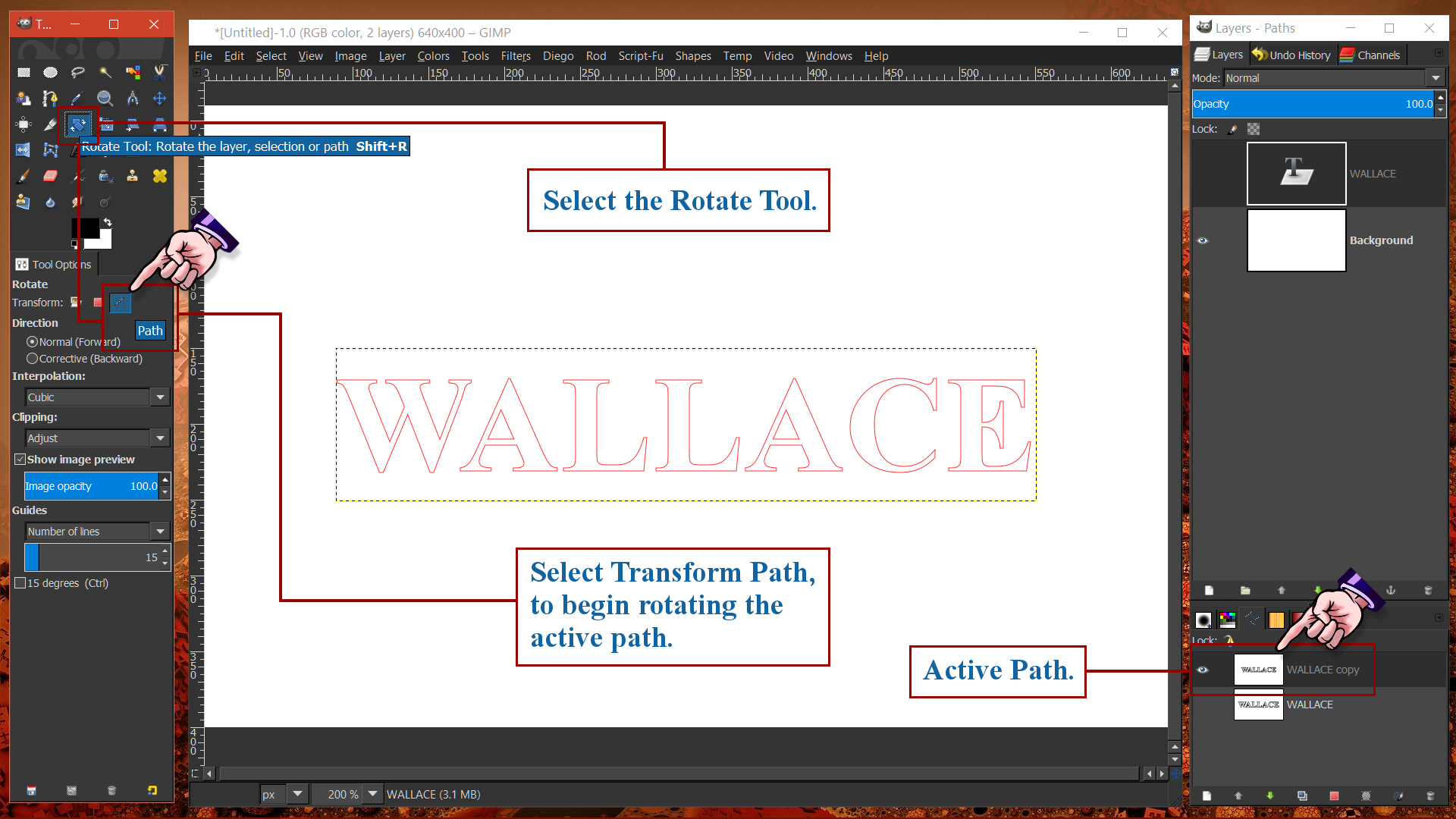
If you need to rotate a path.
You can use the Rotate Tool to do so.

Image

_________________
Image
"A wise man learns more from a foolish question than a fool can learn from a wise answer"
Image


Top
 Post subject: Re: 3D text using my paths scripts
PostPosted: Sun Jul 17, 2016 7:28 pm  (#122) 
Offline
GimpChat Member

Joined: Jul 17, 2016
Posts: 293
Location: Arlington, TX
Wallace wrote:
Sasquatch wrote:
On a related note,
is there a script to rotate the starting point of a closed path?


If you need to rotate a path.
You can use the Rotate Tool to do so.

[ Image ]


Rotating the path isn't what I needed. I needed to rotate the order of the anchors. Basically, I had put the first anchor in the 1-o'clock position when it needed to be the anchor at the 12-o'clock corner. So when I did the in-betweener script the in-between paths did a pretty spiral instead of going straight. It wasn't a huge deal to redo the path I screwed up since it was only a dozen or so anchors. It just would have been nice to have something similar to the "reverse path" script to change the order of the anchors instead of redrawing the path.

_________________
Just a short while ago I was a complete idiot when it comes to GIMP. Today, after many hours of practice, reading, and watching tutorials, I am proud to say I am an incomplete idiot.

Image


Top
 Post subject: Re: 3D text using my paths scripts
PostPosted: Sun Jul 17, 2016 7:58 pm  (#123) 
Offline
Administrator
User avatar

Joined: Aug 10, 2012
Posts: 14287
Location: Native to NYC living in Arizona, Gimp 2.8 - 3.0, Win 11 PC.
Sasquatch wrote:

Rotating the path isn't what I needed. I needed to rotate the order of the anchors. Basically, I had put the first anchor in the 1-o'clock position when it needed to be the anchor at the 12-o'clock corner. So when I did the in-betweener script the in-between paths did a pretty spiral instead of going straight. It wasn't a huge deal to redo the path I screwed up since it was only a dozen or so anchors. It just would have been nice to have something similar to the "reverse path" script to change the order of the anchors instead of redrawing the path.


Do you think if you reversed the path stroke that would work for you?

The link below is a direct download for the reverse-strokes-0.3.py.

https://sourceforge.net/projects/gimp-p ... y/download

This link is to all of Ofnuts' Path Tools.
https://sourceforge.net/projects/gimp-p ... s/scripts/

_________________
Image
"A wise man learns more from a foolish question than a fool can learn from a wise answer"
Image


Top
 Post subject: Re: 3D text using my paths scripts
PostPosted: Sun Jul 17, 2016 8:08 pm  (#124) 
Offline
GimpChat Member

Joined: Jul 17, 2016
Posts: 293
Location: Arlington, TX
Wallace wrote:
Do you think if you reversed the path stroke that would work for you?

I don't know. My guess would be not. Wouldn't reversing the path mean I'd have one path going clockwise and the other counter-clockwise? I really wish GIMP made it clear where a closed path started and which way it went. It seems the result of every path script depends on the first anchor and the direction of a path. But you can't look at a path and tell where it starts or which way it goes. This is especially problematic when the path was generated by "selection to path" or something similar where you have no idea which anchor was first.

At any rate, it's not a huge issue. I fixed the path I screwed up. I just need to be a bit more particular in the future about how I create paths. That's one of the many things I still have to learn.

_________________
Just a short while ago I was a complete idiot when it comes to GIMP. Today, after many hours of practice, reading, and watching tutorials, I am proud to say I am an incomplete idiot.

Image


Top
 Post subject: Re: 3D text using my paths scripts
PostPosted: Sun Jul 17, 2016 8:48 pm  (#125) 
Offline
GimpChat Member

Joined: Jul 17, 2016
Posts: 293
Location: Arlington, TX
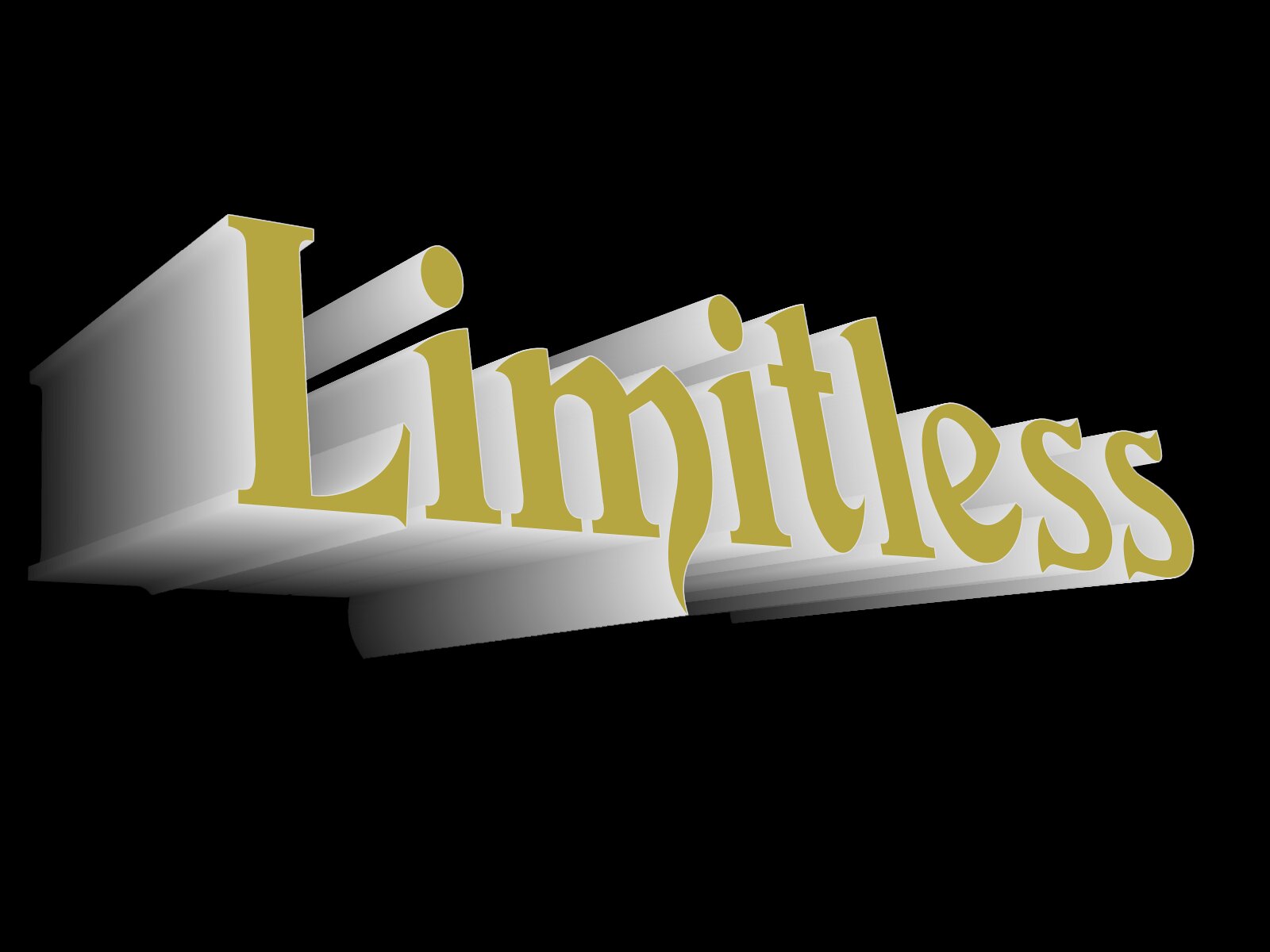
Here's the picture I'm working on. I have to say, the scripts do a great job even at this scale. Although I may have to redo some of the letters towards the far end since the edges look a bit sawtooth at fullsize. Even 320 in-between paths weren't enough to get a smooth finish.

The colors are just placeholders. I used a regular FG/BG gradient to stroke the paths. The gradient went from near-black to near-white. I figured a grayscale would allow me to build on top rather than being stuck with a particular color from the start.
Image

_________________
Just a short while ago I was a complete idiot when it comes to GIMP. Today, after many hours of practice, reading, and watching tutorials, I am proud to say I am an incomplete idiot.

Image


Top
 Post subject: Re: 3D text using my paths scripts
PostPosted: Sun Jul 17, 2016 8:58 pm  (#126) 
Offline
Administrator
User avatar

Joined: Aug 10, 2012
Posts: 14287
Location: Native to NYC living in Arizona, Gimp 2.8 - 3.0, Win 11 PC.
Sasquatch wrote:
Here's the picture I'm working on. I have to say, the scripts do a great job even at this scale. Although I may have to redo some of the letters towards the far end since the edges look a bit sawtooth at fullsize. Even 320 in-between paths weren't enough to get a smooth finish.

The colors are just placeholders. I used a regular FG/BG gradient to stroke the paths. The gradient went from near-black to near-white. I figured a grayscale would allow me to build on top rather than being stuck with a particular color from the start.
[ Image ]

That looks really good and I see what you're saying about the edges.

Have you tried using a softer brush to stoke the paths with?

_________________
Image
"A wise man learns more from a foolish question than a fool can learn from a wise answer"
Image


Top
 Post subject: Re: 3D text using my paths scripts
PostPosted: Sun Jul 17, 2016 9:08 pm  (#127) 
Offline
GimpChat Member

Joined: Jul 17, 2016
Posts: 293
Location: Arlington, TX
Wallace wrote:
That looks really good and I see what you're saying about the edges.

Have you tried using a softer brush to stoke the paths with?

Thanks. It looks much better now because of ofnuts' scripts than it did with the way I was trying before.

I hadn't thought about a softer brush. I went with the directions provided and used the pixel brush. I worry that a softer brush would also soften the crisp edges though. So I'll probably just redo the few questionable letters with more in-between paths. The longest gap I have to fill is about 467 pixels. I tried it with 320 in-between paths. I think I may get by with just 360 or so. It may be wasted effort since there's a chance I'll add a rough texture to the letters anyhow. But I haven't really decided exactly where I'm going yet.

_________________
Just a short while ago I was a complete idiot when it comes to GIMP. Today, after many hours of practice, reading, and watching tutorials, I am proud to say I am an incomplete idiot.

Image


Top
 Post subject: Re: 3D text using my paths scripts
PostPosted: Mon Jul 18, 2016 5:31 am  (#128) 
Offline
Script Coder
User avatar

Joined: Oct 25, 2010
Posts: 4812
Sasquatch wrote:
This thread and the accompanying scripts have greatly simplified one of my current projects. Thank you very much for that. I do, however, have a suggestion for a minor improvement to the in-betweener script. Could you tweak it so that the starting path is not also available as an option for the ending path? That way goofs like me who overlook the setting in the drop-down menu don't have to sit and wait for the script to produce 220 duplicates of a path before erasing them and doing it over. Outside of that, the in-betweener and stroke-visible scripts work beautifully. I can't wait to finish this project so I can share it.

On a related note, is there a script to rotate the starting point of a closed path? I screwed up and started one of my paired paths at the wrong point. The only option I had was to delete one of the paths and start again at the right spot. It would have been very handy to have been able to tell a script, "rotate the starting point one node counter-clockwise".


1) Can't do, the selector is Gimp's and shows all paths. I could add a check that start and end are different, once I'm convinced that being able to duplicate a path 20 times is not useful.

2) Easily done:
- Open the path between the two nodes that you want to become the new ends: ctrl-shift-click on the segment)
- Close the path again: select one of the open nodes, and ctrl-click the other (order is indifferent, the direction will remain unchanged, as far as I can tell)

_________________
Image


Top
 Post subject: Re: 3D text using my paths scripts
PostPosted: Mon Jul 18, 2016 6:29 am  (#129) 
Offline
GimpChat Member
User avatar

Joined: Jan 13, 2011
Posts: 2648
Location: Poland
I am very interested:
I could add a check that start and end are different

_________________
Image


Top
 Post subject: Re: 3D text using my paths scripts
PostPosted: Mon Jul 18, 2016 7:44 am  (#130) 
Offline
GimpChat Member

Joined: Jul 17, 2016
Posts: 293
Location: Arlington, TX
ofnuts wrote:
1) Can't do, the selector is Gimp's and shows all paths. I could add a check that start and end are different, once I'm convinced that being able to duplicate a path 20 times is not useful.

2) Easily done:
- Open the path between the two nodes that you want to become the new ends: ctrl-shift-click on the segment)
- Close the path again: select one of the open nodes, and ctrl-click the other (order is indifferent, the direction will remain unchanged, as far as I can tell)

1) I see. Does the selector have to default to the last path used? Or could it be set to default to null so you have to pick each time? That way you could still duplicate a path 20 times if needed but you'd be significantly less likely to do so accidentally. Or, as I did several times while producing the picture above, extrude to the wrong path because you forgot to pick the new one. Granted, this is probably only an issue for folks as absent-minded as me. And it really isn't a huge issue even for me. Please don't think I'm bashing the script or anything. I just thought it could be a useful tweak.

2) Thanks for that tip. I'll experiment with that when I get home this evening. Seems the best plan would be to do that trick on both paths to make sure they were in sync. But I came up with a solution that avoids the problem altogether. I now create the first path then duplicate it and move/modify the copy as needed to produce the other path. That makes it impossible for the paths to be out of sync.

_________________
Just a short while ago I was a complete idiot when it comes to GIMP. Today, after many hours of practice, reading, and watching tutorials, I am proud to say I am an incomplete idiot.

Image


Top
 Post subject: Re: 3D text using my paths scripts
PostPosted: Tue Jul 19, 2016 10:54 am  (#131) 
Offline
GimpChat Member
User avatar

Joined: Jul 04, 2010
Posts: 2253
Location: Retired Moderator Slowly Returning to the Living.
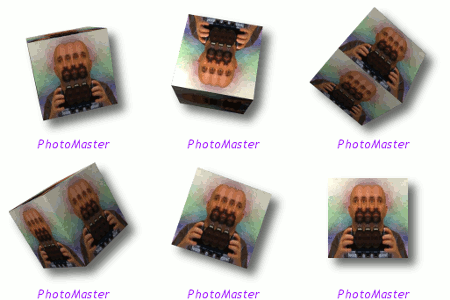
Experimental GC!

Attachment:
GC Experiment.png
GC Experiment.png [ 482.61 KiB | Viewed 3333 times ]

_________________
Artists aren't crazy! We're eccentric! ~G.M. Ross

Image

My Sigs = My Photos
Check out my work at http://www.flickr.com/photos/photomastergreg.


Top
 Post subject: Re: 3D text using my paths scripts
PostPosted: Tue Jul 19, 2016 11:31 am  (#132) 
Offline
GimpChat Member

Joined: Jul 17, 2016
Posts: 293
Location: Arlington, TX
Interesting result.
Looks like with some clever design work you could use this script to create all sorts of conduits, wires, pipes, etc. Maybe even 3D frames.

I've discovered that it takes more intermediate paths than you might expect to smoothly fill gaps. I used 400 intermediates to fill a 550-pixel gap and still got a sawtooth edge. On a related note, it takes a fairly long time for the script to produce 400 127-point, 12-stroke paths. :D The bad part is that it was wasted time. The result is perfectly acceptable. But having all the strokes on one layer makes it impossible to do the shading and effects between the strokes. So I need to redo the entire process one path at a time.

_________________
Just a short while ago I was a complete idiot when it comes to GIMP. Today, after many hours of practice, reading, and watching tutorials, I am proud to say I am an incomplete idiot.

Image


Top
 Post subject: Re: 3D text using my paths scripts
PostPosted: Tue Jul 19, 2016 2:32 pm  (#133) 
Offline
Script Coder
User avatar

Joined: Oct 25, 2010
Posts: 4812
Sasquatch wrote:
But having all the strokes on one layer makes it impossible to do the shading and effects between the strokes. So I need to redo the entire process one path at a time.


My stroke-visible-path script will stroke the path using a gradient (hence, automatic shading) and can stroke each path on its own layer (meant for animations, but can be put to other uses)

_________________
Image


Top
 Post subject: Re: 3D text using my paths scripts
PostPosted: Tue Jul 19, 2016 3:42 pm  (#134) 
Offline
GimpChat Member

Joined: Jul 17, 2016
Posts: 293
Location: Arlington, TX
ofnuts wrote:
My stroke-visible-path script will stroke the path using a gradient (hence, automatic shading) and can stroke each path on its own layer (meant for animations, but can be put to other uses)

Yes, I used a gradient when I ran the "stroke visible" script. It works beautifully... when I remember to set the right brush. But that doesn't help with the shading needed to fit the letters into the environment. I need, for example, to have the "i" and "t" on different layers so I can put a shadow layer between them to create depth. I could probably add the shadow by careful masking. But it is so much easier to simply slap a gradient between two separate layers.

The separate layers generated by your script wouldn't help in this case because they are cross-sections whereas I'm working on faces. In other words, I need "L", "i", "m", etc to each be stroked on their own layer, but the "stroke visible" script will give me X-hundred variations of "Limited" on X-hundred layers. That's certainly ideal for animation and I expect I'll be exploring that aspect in the near future. The only way I see to get the result I need now, though, is for each letter to be its own path so it can be stroked on its own layer. Which is what I did with the version of this picture I posted above.

I think I may be misusing the term "stroke". As I understand it, a stroke in a path is any continuous line. It could be open or closed. So the "Limited" in my picture is a single path with twelve strokes, nine for the main bodies of the letters and three more for the dots on the "i"s and the eye of the "e". Is that correct? I had the letters separate to start, but merged them so I could use the perspective tool to transform "Limited". Now I should just need to decompose "Limited" to get the individual letters back, right? Then I can rerun the scripts and get everything rolling along.

How does the script choose the color for each intermediate path? It seems to produce a much smoother, softer gradient than simply using the blend tool. It's quite appealing. Or maybe that's just the result of the fact that I went from near-black to near-white instead of pure B-W.

Anyhow, enough rambling for now. The short story is that I love the scripts and I just need to figure out how to best work with them to get the results I'm after.

_________________
Just a short while ago I was a complete idiot when it comes to GIMP. Today, after many hours of practice, reading, and watching tutorials, I am proud to say I am an incomplete idiot.

Image


Top
 Post subject: Re: 3D text using my paths scripts
PostPosted: Tue Jul 19, 2016 5:01 pm  (#135) 
Offline
Script Coder
User avatar

Joined: Oct 25, 2010
Posts: 4812
See my decompose-strokes script to decompose a path into its individual strokes. You will have to manually "recompose" the letters that have more than one stroke but this is a lot faster than decomposing by hand.

There is a function to get the color at X% in a gradient, so when when the script is doing path #X of N total, it just gets the color at X/N in the gradient.

_________________
Image


Top
 Post subject: Re: 3D text using my paths scripts
PostPosted: Tue Jul 19, 2016 6:10 pm  (#136) 
Offline
GimpChat Member

Joined: Jul 17, 2016
Posts: 293
Location: Arlington, TX
ofnuts wrote:
See my decompose-strokes script to decompose a path into its individual strokes. You will have to manually "recompose" the letters that have more than one stroke but this is a lot faster than decomposing by hand.

There is a function to get the color at X% in a gradient, so when when the script is doing path #X of N total, it just gets the color at X/N in the gradient.
Interesting note about the decompose script. It worked, no problems. But it did kick back an error message. Something about leaving things in an undo state or something. I don't know why, everything seems to be fine. There aren't any goofy issues like I've seen other times I've gotten that message. But it did decompose the paths. Then it was a simple matter of merging the dots with their "i"s and the "e" with its eye.

Now I'm back to extruding the letters. It takes a while to produce 500 intermediate paths. But not nearly as long as I originally thought it would.

I have some other experiments I'm anxious to try with these scripts. But I need to focus on this project for now.

_________________
Just a short while ago I was a complete idiot when it comes to GIMP. Today, after many hours of practice, reading, and watching tutorials, I am proud to say I am an incomplete idiot.

Image


Top
 Post subject: Re: 3D text using my paths scripts
PostPosted: Wed Jul 20, 2016 2:29 am  (#137) 
Offline
Script Coder
User avatar

Joined: Oct 25, 2010
Posts: 4812
Sasquatch wrote:
Interesting note about the decompose script. It worked, no problems. But it did kick back an error message. Something about leaving things in an undo state or something. I don't know why, everything seems to be fine.


This could still be a bug that impact others more than you. Can you make a copy of the image, remove everything but the path, and run the script? And if this happens again, give me the image with the path? (attach here, or PM a URL)

_________________
Image


Top
 Post subject: Re: 3D text using my paths scripts
PostPosted: Wed Jul 20, 2016 4:12 pm  (#138) 
Offline
GimpChat Member

Joined: Jul 17, 2016
Posts: 293
Location: Arlington, TX
ofnuts wrote:
Sasquatch wrote:
Interesting note about the decompose script. It worked, no problems. But it did kick back an error message. Something about leaving things in an undo state or something. I don't know why, everything seems to be fine.


This could still be a bug that impact others more than you. Can you make a copy of the image, remove everything but the path, and run the script? And if this happens again, give me the image with the path? (attach here, or PM a URL)

It did it again. If my internet ever comes back online I'll attach the file you requested. Can't send it over my phone.

_________________
Just a short while ago I was a complete idiot when it comes to GIMP. Today, after many hours of practice, reading, and watching tutorials, I am proud to say I am an incomplete idiot.

Image


Top
 Post subject: Re: 3D text using my paths scripts
PostPosted: Wed Jul 20, 2016 4:58 pm  (#139) 
Offline
GimpChat Member

Joined: Jul 17, 2016
Posts: 293
Location: Arlington, TX
Okay, got online again. Here's the xcf with the path in question. I don't know what's going on, everything looks fine. But the error message is about a problem with the undo state. So it may only affect my ability to backtrack. Since I never make mistakes, that's not really a problem. :hehe


Attachments:
File comment: Misbehaving path.
PathError.xcf [69.58 KiB]
Downloaded 121 times

_________________
Just a short while ago I was a complete idiot when it comes to GIMP. Today, after many hours of practice, reading, and watching tutorials, I am proud to say I am an incomplete idiot.

Image
Top
 Post subject: Re: 3D text using my paths scripts
PostPosted: Wed Jul 20, 2016 6:22 pm  (#140) 
Offline
Script Coder
User avatar

Joined: Oct 25, 2010
Posts: 4812
OK, terribly stupid, but completely benign bug, will fix but no emergency. Thanks for being the first to report a bug that has been affecting everybody, every time for over four years :)

_________________
Image


Top
Post new topic Reply to topic  [ 144 posts ]  Go to page Previous  1 ... 4, 5, 6, 7, 8  Next

All times are UTC - 5 hours [ DST ]


cron

* Login  


Powered by phpBB3 © phpBB Group