It is currently Wed Aug 12, 2026 6:21 pm


All times are UTC - 5 hours [ DST ]


Post new topic Reply to topic  [ 82 posts ]  Go to page Previous  1, 2, 3, 4, 5  Next
Author Message
 Post subject: Re: Introducing Gimp 2.7.3
PostPosted: Sun May 01, 2011 10:37 am  (#21) 
Offline
GimpChat Member

Joined: Apr 12, 2010
Posts: 5870
thinking better.... i never tried the single window mode maybe i am too used to the old way.

_________________
My 3D Gallery on Deviantart http://photocomix2.deviantart.com/
Main gallery http://www.flickriver.com/photos/photocomix-mandala/
Mandala and simmetry http://www.flickriver.com/photos/photocomix_mandala/

Image

Mrs Wilbress


Top
 Post subject: Re: Introducing Gimp 2.7.3
PostPosted: Sun May 01, 2011 10:38 am  (#22) 
Offline
GimpChat Member
User avatar

Joined: Mar 02, 2011
Posts: 1850
Location: Michigan
PhotoComix wrote:
thinking better.... i never tried the single window mode maybe i am too used to the old way.

I hate the old look now
I have to use Single Window mode lol

_________________
Image
I'm back I think


Top
 Post subject: Re: Introducing Gimp 2.7.3
PostPosted: Sun May 01, 2011 11:49 am  (#23) 
Offline
GimpChat Member

Joined: Apr 11, 2010
Posts: 545
Location: In the mini-chat, saying silly things
Willy wrote:
Jolie wrote:
postive post. I feel like I'm just complaining. :oops:

Love the new features :mrgreen: , just struggling with the text editor right now.

I did for a while too, the way I get around that bit of a mistake by Devs, is having the Move tool on Move Active Layer (not default option), then just switching to it to move text when it is needed.
Kind of a Pain but it works


I hope they fix it before the final release or leave an option to disable on canvas editing and using the old way. I really do. They added a lot of great new features, like tagging brushes etc and layer groups, rotating brushes and all the new features that come along with the text tool.

_________________
Image


Top
 Post subject: Re: Introducing Gimp 2.7.3
PostPosted: Sun May 01, 2011 12:06 pm  (#24) 
Offline
GimpChat Member
User avatar

Joined: Apr 08, 2010
Posts: 5420
Location: Northwest Ohio
lol, I am just getting used to 2.6 on my mac (had 2.4 on the pc until December), and ya'll are jumping into 2.7 already! If it's ever compiled for mac, I'm on it! I just wish I knew something about programming/compiling so I could do it.


Top
 Post subject: Re: Introducing Gimp 2.7.3
PostPosted: Sun May 01, 2011 12:36 pm  (#25) 
Offline
GimpChat Member
User avatar

Joined: Apr 30, 2010
Posts: 1937
Location: Missouri
I've been trying the portable version for two days now, it's been doing wonderfully.

_________________
Image
The last time I kept an open mind,
my brain fell out and the dog grabbed it.
Now it's full of dirt, toothmarks, and dog slobber.
No more open minds or dogs for me.


Top
 Post subject: Re: Introducing Gimp 2.7.3
PostPosted: Sun May 01, 2011 4:02 pm  (#26) 
Offline
GimpChat Member
User avatar

Joined: Apr 30, 2010
Posts: 1937
Location: Missouri
if i install this will it overwrite my existing 2.6? if it does, it's not a problem I just don't like surprises.

_________________
Image
The last time I kept an open mind,
my brain fell out and the dog grabbed it.
Now it's full of dirt, toothmarks, and dog slobber.
No more open minds or dogs for me.


Top
 Post subject: Re: Introducing Gimp 2.7.3
PostPosted: Sun May 01, 2011 4:05 pm  (#27) 
Offline
Global Moderator
User avatar

Joined: May 16, 2010
Posts: 16158
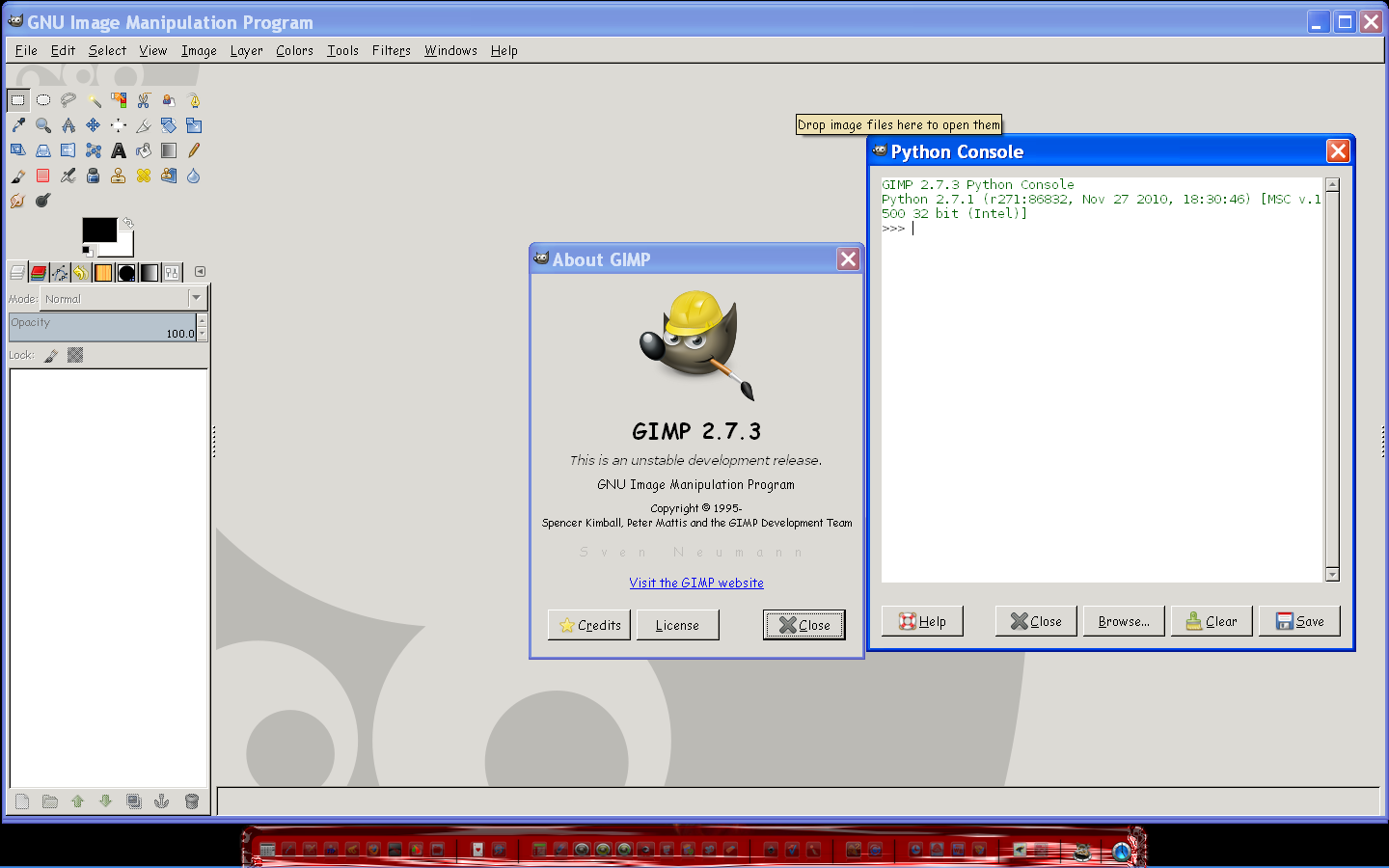
Excellent Partha here are some screen shots of the Gimp-2.7.3 Install version for windows 32 bit.

Immediately after install before i put my touch on preferences :lol

Image

After my preferences setup

Image

One showing the 2.7.3 about screen and the python console.Python is indeed working excellently in this install. :bigthup

Image

Great job on the compile and installer Partha.
I am very happy with it.
Not to mention this install can be installed in Programs without an un-install of 2.6 versions.
That's a big plus for testing purposes.

Ill add some more things such as themes and give you a heads up Partha.

Thanks again!

_________________
Image


Top
 Post subject: Re: Introducing Gimp 2.7.3
PostPosted: Sun May 01, 2011 5:41 pm  (#28) 
Offline
GimpChat Member

Joined: Mar 14, 2011
Posts: 998
Gms9810 wrote:
if i install this will it overwrite my existing 2.6? if it does, it's not a problem I just don't like surprises.

Hi,

I don't the answer to your question. However, as Rod has mentioned, you don't need to uninstall 2.6. You also have the option to use the installer for the hard drive installation.

Thanks,
Partha


Top
 Post subject: Re: Introducing Gimp 2.7.3
PostPosted: Sun May 01, 2011 5:46 pm  (#29) 
Offline
GimpChat Member

Joined: Mar 14, 2011
Posts: 998
Thanks Rod. I am happy to see that it is working for you!

Let me know if you run into any issues. My next priority is to look into MathMap.

Partha
www.partha.com


Top
 Post subject: Re: Introducing Gimp 2.7.3
PostPosted: Sun May 01, 2011 5:59 pm  (#30) 
Offline
GimpChat Member
User avatar

Joined: Sep 24, 2010
Posts: 12829
Do you have a 64-bit installer. Also, if you do, do you know if I need to use 64-bit python with it (have 32-bit python now since I currently use 32-bit GIMP 2.6.11)? Still reluctant to beta test (not going to elaborate, but have been burned in the past but still not opposed to beta testing and am currently beta testing Oloneo's HDR program which the test period will end on May 15; just wish they would have made it less expensive, but I can't justify paying for it unfortunately). :)

_________________
Lyle

Psalm 109:8

Image


Top
 Post subject: Re: Introducing Gimp 2.7.3
PostPosted: Sun May 01, 2011 6:23 pm  (#31) 
Offline
GimpChat Member

Joined: Mar 14, 2011
Posts: 998
lylejk wrote:
Do you have a 64-bit installer. Also, if you do, do you know if I need to use 64-bit python with it (have 32-bit python now since I currently use 32-bit GIMP 2.6.11)? Still reluctant to beta test (not going to elaborate, but have been burned in the past but still not opposed to beta testing and am currently beta testing Oloneo's HDR program which the test period will end on May 15; just wish they would have made it less expensive, but I can't justify paying for it unfortunately). :)

Hi,

Yes, I have a 64-bit installer also, and you don't need any separate python. It is built in.

Give it a whirl, and if you don't like it, just uninstall from the Control Panel. Of course, if you have any problems, leave me a message here or on my website.

Thanks,
Partha


Top
 Post subject: Re: Introducing Gimp 2.7.3
PostPosted: Sun May 01, 2011 6:37 pm  (#32) 
Offline
GimpChat Member
User avatar

Joined: Sep 24, 2010
Posts: 12829
Now that's cool that you managed to integrate Python as part of your build Partha. Downloading the 64-bit version as I type this and will do so for the plugins link that you have too. Not sure I'm going to like it (now that I'm finally happy with 2.6.11; lol). I need Python for the XNShell plugin mainly (but for a few other cool python plugins that I have too). :)

_________________
Lyle

Psalm 109:8

Image


Top
 Post subject: Re: Introducing Gimp 2.7.3
PostPosted: Sun May 01, 2011 7:30 pm  (#33) 
Offline
GimpChat Member
User avatar

Joined: Sep 24, 2010
Posts: 12829
OK; 2.6 integration caused me a lot of grief. lol

I uninstalled 2.7, temporarily renamed .gimp2.6 to gimp2.6 and then re-installed. All's now well. Copied my brushes from 2.6 to 2.7 and they were there, so happy thus far. I now need to find a few more plugins (PSPI, Mathmap, and G'MIC for starters) and hopefully these plugins will work in 2.7. Don't like the way you have to dock (confusing at first; like the old way better) but got my docks the way I like them finally too. Don't like the DOS prompt Window requirement, but assume it is necessary for now; sure 2.8 won't have this (at least I hope not). I still got a lot to figure out with the new interface; am happy thus far on how fast the 64-bit version launches an runs. Thanks a heap Partha for doing this for us coder challenged Windows users. :)

_________________
Lyle

Psalm 109:8

Image


Top
 Post subject: Re: Introducing Gimp 2.7.3
PostPosted: Sun May 01, 2011 7:55 pm  (#34) 
Offline
GimpChat Member

Joined: Mar 14, 2011
Posts: 998
lylejk wrote:
OK; 2.6 integration caused me a lot of grief. lol

I uninstalled 2.7, temporarily renamed .gimp2.6 to gimp2.6 and then re-installed. All's now well. Copied my brushes from 2.6 to 2.7 and they were there, so happy thus far. I now need to find a few more plugins (PSPI, Mathmap, and G'MIC for starters) and hopefully these plugins will work in 2.7. Don't like the way you have to dock (confusing at first; like the old way better) but got my docks the way I like them finally too. Don't like the DOS prompt Window requirement, but assume it is necessary for now; sure 2.8 won't have this (at least I hope not). I still got a lot to figure out with the new interface; am happy thus far on how fast the 64-bit version launches an runs. Thanks a heap Partha for doing this for us coder challenged Windows users. :)

Thanks, glad you like it. Before you get disappointed, MathMap is on my TODO list for 64-bit. G'MIC does not exist for 64-bit either. I tried contacting the author for some help but they didn't respond.

Thanks,
Partha


Top
 Post subject: Re: Introducing Gimp 2.7.3
PostPosted: Sun May 01, 2011 8:49 pm  (#35) 
Offline
GimpChat Member
User avatar

Joined: Sep 24, 2010
Posts: 12829
I found this site, but userfilter didn't work (Turing plugin did though). Mathmap would definitely be cool. I think G'MIC might be a lost cause though, but I did post a thread at G'MIC's Flickr. Can't find a PSPI plugin compiled for 64-bit either (only reason I would like this is for GML Matting plugin). :)

_________________
Lyle

Psalm 109:8

Image


Top
 Post subject: Re: Introducing Gimp 2.7.3
PostPosted: Mon May 02, 2011 4:43 am  (#36) 
Offline
GimpChat Member

Joined: Apr 12, 2010
Posts: 5870
I donìt think Gmic could be a lost cause, there is not a 64 bit vesrsion only because4 david has not a 64 bit Windows machine to test it, now he may be taking some Easter holydays , but i bet he will happy to help .

Quote:
OK; 2.6 integration caused me a lot of grief. lol

I uninstalled 2.7, temporarily renamed .gimp2.6 to gimp2.6 and then re-installed. All's now well. Copied my brushes from 2.6 to 2.7 and they were there, so happy thus far. I now need to find a few more plugins (PSPI, Mathmap, and G'MIC for starters) and hopefully these plugins will work in 2.7


Did you overlook the portable 64bit version ? Because with that integration should be totally painless

Actually i have several gimp running (2.6.11, gimppainter, the 64 bit portable)without need of sandbox or use virtual machines

_________________
My 3D Gallery on Deviantart http://photocomix2.deviantart.com/
Main gallery http://www.flickriver.com/photos/photocomix-mandala/
Mandala and simmetry http://www.flickriver.com/photos/photocomix_mandala/

Image

Mrs Wilbress


Top
 Post subject: Re: Introducing Gimp 2.7.3
PostPosted: Mon May 02, 2011 5:37 am  (#37) 
Offline
GimpChat Member

Joined: Mar 14, 2011
Posts: 998
PhotoComix wrote:
I donìt think Gmic could be a lost cause, there is not a 64 bit vesrsion only because4 david has not a 64 bit Windows machine to test it, now he may be taking some Easter holydays , but i bet he will happy to help .

...

Hi PC,

I hope you can reach him. I did send an email and did not get a respond. I will be happy to test G'MIC 64-bit or compile and provide back. I needed some pointers on the configure script provided.

Thanks for everything!
Partha

PS: Did you see my message about providing the patches for large preview? :) . If you are too busy, I will take
a look at what you already provided me to see if I can create the patch.


Top
 Post subject: Re: Introducing Gimp 2.7.3
PostPosted: Mon May 02, 2011 6:18 am  (#38) 
Offline
GimpChat Member

Joined: Apr 12, 2010
Posts: 5870
I didn't see the message, ...i still don't see it !

I just send you a PM , i am working on keep integrated from user's point of view, but well separate from the gimp source code all possible add on and modifications

the huge plugin windows were not in that list, just because i can't imagine any advantage to revert to the original.
But sure in case someone may prefer the old microscopic preview a patch would be useful, just i will like to know if somebody had problems with the huge preview

In this case, still talking about the huge-preview hack, i still hope someone may feel pushed to provide a better solution:
as copy from some other plugin the snippet of code relate to a good, preview that may be panned,zoomed ,disabled or enabled and enlarged by enlarging the filter gui
...and merge down the code.

I hope will be done , in the while i think the changes derived by my trivial hack still much better then actual behaviour

Anyway i believe changes of default or hardcoded values are seldom considereted be relevant change in the code

_________________
My 3D Gallery on Deviantart http://photocomix2.deviantart.com/
Main gallery http://www.flickriver.com/photos/photocomix-mandala/
Mandala and simmetry http://www.flickriver.com/photos/photocomix_mandala/

Image

Mrs Wilbress


Top
 Post subject: Re: Introducing Gimp 2.7.3
PostPosted: Mon May 02, 2011 6:55 am  (#39) 
Offline
Global Moderator
User avatar

Joined: May 16, 2010
Posts: 16158
I have decided not to bloat my Gimp-2.7.3 with a lot of other filters.Shellout is the only thing i will be adding to it.
As i can pretty much reach out and touch any area of graphics with that filter. :lol

_________________
Image


Top
 Post subject: Re: Introducing Gimp 2.7.3
PostPosted: Mon May 02, 2011 7:42 am  (#40) 
Offline
GimpChat Member

Joined: Apr 12, 2010
Posts: 5870
add the tcl libraries needed may be more simple,
are the same for all mm-mike plugins ?

_________________
My 3D Gallery on Deviantart http://photocomix2.deviantart.com/
Main gallery http://www.flickriver.com/photos/photocomix-mandala/
Mandala and simmetry http://www.flickriver.com/photos/photocomix_mandala/

Image

Mrs Wilbress


Top
Post new topic Reply to topic  [ 82 posts ]  Go to page Previous  1, 2, 3, 4, 5  Next

All times are UTC - 5 hours [ DST ]


* Login  


Powered by phpBB3 © phpBB Group