It is currently Mon Aug 24, 2026 7:20 am


All times are UTC - 5 hours [ DST ]


Post new topic Reply to topic  [ 39 posts ]  Go to page 1, 2  Next
Author Message
 Post subject: rippling water
PostPosted: Tue Mar 21, 2017 8:56 pm  (#1) 
Offline
GimpChat Member
User avatar

Joined: Apr 08, 2010
Posts: 5420
Location: Northwest Ohio
I have been looking via the search box for a script on how to make it look like water is moving but so far no luck. It seems to me that there is a script or filter that does this, but I am not finding anything. I am making a picture and wanted the water area to look like it's gently wavy.


Share on Facebook Share on Twitter Share on Orkut Share on Digg Share on MySpace Share on Delicious Share on Technorati
Top
 Post subject: Re: rippling water
PostPosted: Tue Mar 21, 2017 9:42 pm  (#2) 
Offline
Administrator
User avatar

Joined: Aug 10, 2012
Posts: 14171
Location: Native to NYC living in Arizona, Gimp 2.8 - 3.0, Win 11 PC.
2-ton wrote:
I have been looking via the search box for a script on how to make it look like water is moving but so far no luck. It seems to me that there is a script or filter that does this, but I am not finding anything. I am making a picture and wanted the water area to look like it's gently wavy.

Have you looked into the,
Filter>Distorts>Ripple effect?

You can also check out,
Filter>Animation>Rippling

Image

_________________
Image
"A wise man learns more from a foolish question than a fool can learn from a wise answer"
Image


Top
 Post subject: Re: rippling water
PostPosted: Tue Mar 21, 2017 10:27 pm  (#3) 
Offline
GimpChat Member
User avatar

Joined: Apr 08, 2010
Posts: 5420
Location: Northwest Ohio
I didn't try filters>distorts>ripple because I didn't think it would have movement. I did try the animation one but not sure how to make it only work on the water part of the pic. I think I have to finish the picture first, then figure out how to make only the water animated on the finished jpg or png.


Top
 Post subject: Re: rippling water
PostPosted: Tue Mar 21, 2017 10:43 pm  (#4) 
Offline
Administrator
User avatar

Joined: Aug 10, 2012
Posts: 14171
Location: Native to NYC living in Arizona, Gimp 2.8 - 3.0, Win 11 PC.
2-ton wrote:
I didn't try filters>distorts>ripple because I didn't think it would have movement. I did try the animation one but not sure how to make it only work on the water part of the pic. I think I have to finish the picture first, then figure out how to make only the water animated on the finished jpg or png.

You can do the animation on the entire image.

Then place a copy of the image on top of all the layers and use a layer mask.
To mask out the water.

After the masking is done and applied to the top layer/image.

Move it all the way to the bottom and use,
Filter>Animation>Overlay Background.

Delete the this bottom most layer,
to finish the animation.

That's how I did this image below...

Image


PS,
I know, I know...
the waves are going in the wrong direction.
:oops:

_________________
Image
"A wise man learns more from a foolish question than a fool can learn from a wise answer"
Image


Top
 Post subject: Re: rippling water
PostPosted: Tue Mar 21, 2017 11:23 pm  (#5) 
Offline
GimpChat Member
User avatar

Joined: Apr 08, 2010
Posts: 5420
Location: Northwest Ohio
Argh, can't get it to work right. on the layer mask, when the white is at the bottom, the top part doesn't show, all you see is the water rippling, when the white is at the top, the top shows but it's also rippling while the water is hidden. grrrr.


Top
 Post subject: Re: rippling water
PostPosted: Tue Mar 21, 2017 11:26 pm  (#6) 
Offline
GimpChat Member
User avatar

Joined: Apr 08, 2010
Posts: 5420
Location: Northwest Ohio
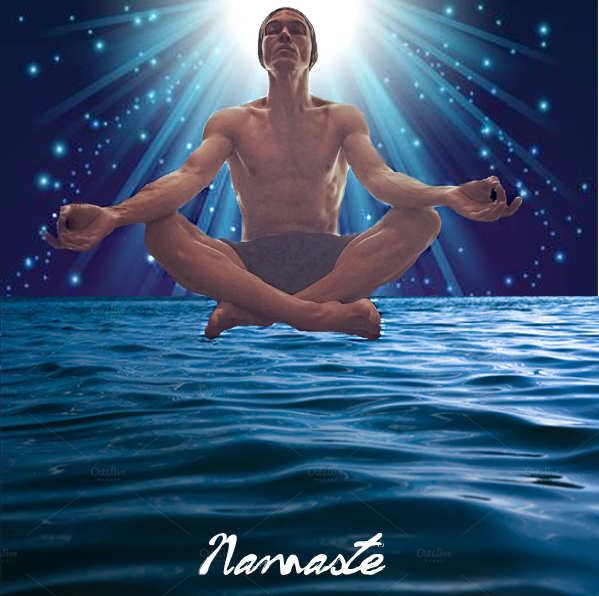
This is the picture I'm working on...I just want to know how to get a gentle wave action on the water. I was also thinking about adding his reflection in the water but that seems to be too much to deal with, lol.

***edit...never mind, I finally got it! Thanks so much Wallace, I could have never figured it out without your instructions! But, heh heh, now I have to figure out saving as an animation.

Image

testing...

Image


Last edited by 2-ton on Tue Mar 21, 2017 11:45 pm, edited 1 time in total.

Top
 Post subject: Re: rippling water
PostPosted: Tue Mar 21, 2017 11:44 pm  (#7) 
Offline
Administrator
User avatar

Joined: Aug 10, 2012
Posts: 14171
Location: Native to NYC living in Arizona, Gimp 2.8 - 3.0, Win 11 PC.
2-ton wrote:
This is the picture I'm working on...I just want to know how to get a gentle wave action on the water. I was also thinking about adding his reflection in the water but that seems to be too much to deal with, lol.

***edit...never mind, I finally got it! Thanks so much Wallace, I could have never figured it out without your instructions! But, heh heh, now I have to figure out saving as an animation.

[ Image ]

You mean like this?
Image

_________________
Image
"A wise man learns more from a foolish question than a fool can learn from a wise answer"
Image


Top
 Post subject: Re: rippling water
PostPosted: Tue Mar 21, 2017 11:47 pm  (#8) 
Offline
GimpChat Member
User avatar

Joined: Apr 08, 2010
Posts: 5420
Location: Northwest Ohio
I saved as .gif...it was the only thing I could think of. I love your water, is that animation waves? What settings? And the reflection! Do you have that in the full size and can I have it? Lol.


Top
 Post subject: Re: rippling water
PostPosted: Tue Mar 21, 2017 11:51 pm  (#9) 
Offline
Administrator
User avatar

Joined: Aug 10, 2012
Posts: 14171
Location: Native to NYC living in Arizona, Gimp 2.8 - 3.0, Win 11 PC.
2-ton wrote:
This is the picture I'm working on...I just want to know how to get a gentle wave action on the water. I was also thinking about adding his reflection in the water but that seems to be too much to deal with, lol.

***edit...never mind, I finally got it! Thanks so much Wallace, I could have never figured it out without your instructions! But, heh heh, now I have to figure out saving as an animation.

[ Image ]

testing...

[ Image ]

That's it!

The image I made had 129 layers,
with a disposal of 125 per frame.

The "Rippling Strength",
was left at the default.
The number of frames was 129.

Attachment:
Screenshot (51).png
Screenshot (51).png [ 887.23 KiB | Viewed 11769 times ]


It was to many MB to upload,
so I shrunk it down.

_________________
Image
"A wise man learns more from a foolish question than a fool can learn from a wise answer"
Image


Top
 Post subject: Re: rippling water
PostPosted: Tue Mar 21, 2017 11:54 pm  (#10) 
Offline
Administrator
User avatar

Joined: Aug 10, 2012
Posts: 14171
Location: Native to NYC living in Arizona, Gimp 2.8 - 3.0, Win 11 PC.
2-ton wrote:
I saved as .gif...it was the only thing I could think of. I love your water, is that animation waves? What settings? And the reflection! Do you have that in the full size and can I have it? Lol.

I didn't save it in the original size,
but I did have it in it's original size.
I can make you another one,
but it's too many megabits and can't be simply uploaded to Gimp Chat? :(

_________________
Image
"A wise man learns more from a foolish question than a fool can learn from a wise answer"
Image


Top
 Post subject: Re: rippling water
PostPosted: Wed Mar 22, 2017 12:06 am  (#11) 
Offline
Administrator
User avatar

Joined: Aug 10, 2012
Posts: 14171
Location: Native to NYC living in Arizona, Gimp 2.8 - 3.0, Win 11 PC.
Here's a link to my Dropbox account where you can download the animated image.

https://www.dropbox.com/s/uvxd7ta3fye09 ... 3.gif?dl=0

_________________
Image
"A wise man learns more from a foolish question than a fool can learn from a wise answer"
Image


Top
 Post subject: Re: rippling water
PostPosted: Wed Mar 22, 2017 1:03 am  (#12) 
Offline
GimpChat Member
User avatar

Joined: Apr 08, 2010
Posts: 5420
Location: Northwest Ohio
No problem, with your graphic I can work on it, but with all those layers, no wonder it's a huge file!
Oh just saw the next post! Thanks, I'll grab it in the morning.


Top
 Post subject: Re: rippling water
PostPosted: Wed Mar 22, 2017 6:57 am  (#13) 
Offline
GimpChat Member
User avatar

Joined: Nov 15, 2014
Posts: 875
@2-ton,

I just couldn't resist having a try!!!
I used liquid rescale to make a bit more room for the reflection and thought that the title should not, perhaps, be wavy.

david.


Attachments:
animation.gif
animation.gif [ 1.02 MiB | Viewed 5924 times ]
Top
 Post subject: Re: rippling water
PostPosted: Wed Mar 22, 2017 7:07 am  (#14) 
Offline
GimpChat Member
User avatar

Joined: Dec 15, 2014
Posts: 185
Location: France
hello 2-ton and Wallace.

It's an interesting technique and I work on a gif image too. Do you have a fonction which allow to copy as a layer mask ? If you have 30 frames and need to mask some area of the gif it would be some help. Or may be there's another solution ?

link : https://1drv.ms/i/s!Atg92nFyqRGCg2784mKrcEVVBXJo

_________________
Image


Top
 Post subject: Re: rippling water
PostPosted: Wed Mar 22, 2017 8:53 am  (#15) 
Offline
GimpChat Member
User avatar

Joined: Apr 08, 2010
Posts: 5420
Location: Northwest Ohio
These are some nice effects! Is there any other file type that allows the animation? I notice that .gif makes it sort of like a poster.


Top
 Post subject: Re: rippling water
PostPosted: Wed Mar 22, 2017 10:57 am  (#16) 
Offline
GimpChat Member
User avatar

Joined: Nov 15, 2014
Posts: 875
Filters>Animation>Waves will work within a selection. For my attempt I used Wavelength=60 and Amplitude=1
It is a pity that when saved as a .GIF that posterisation occurs - right up to that point the quality is excellent.

david.


Top
 Post subject: Re: rippling water
PostPosted: Wed Mar 22, 2017 11:10 am  (#17) 
Offline
Administrator
User avatar

Joined: Aug 10, 2012
Posts: 14171
Location: Native to NYC living in Arizona, Gimp 2.8 - 3.0, Win 11 PC.
2-ton wrote:
These are some nice effects! Is there any other file type that allows the animation?
I notice that .gif makes it sort of like a poster.

Animated png or APNG https://en.wikipedia.org/wiki/APNG
They can be made in GIMP with the APNG Plug-in,
but animated Gif's really are the main one out there - flash kinda took over though,
but that isn't really an image per se.

Also,
other alternatives from the same wikipedia page:
The MNG file format is a more powerful alternative to APNG,
although is a more complex format and has less web browser support.

The GIF file format has better application and browser support than APNG,
but it is limited to 256 colors per frame and supports only 1 bit alpha transparency,
by mapping one of the palette colors to transparent.

The story is basically,
there are two animated PNG formats: one is officially endorsed,
but too complex to be widely implemented (MNG).
The other,
which is simple to implement,
but is not officially endorsed (APNG).
Both have fatal flaws and it seems the existence of each,
has prevented the other from fixing those flaws.

_________________
Image
"A wise man learns more from a foolish question than a fool can learn from a wise answer"
Image


Top
 Post subject: Re: rippling water
PostPosted: Wed Mar 22, 2017 1:18 pm  (#18) 
Offline
GimpChat Member
User avatar

Joined: Apr 08, 2010
Posts: 5420
Location: Northwest Ohio
so does this mean that I cannot save this animation as a video? My computer doesn't support apng.


Top
 Post subject: Re: rippling water
PostPosted: Wed Mar 22, 2017 2:40 pm  (#19) 
Offline
Administrator
User avatar

Joined: Aug 10, 2012
Posts: 14171
Location: Native to NYC living in Arizona, Gimp 2.8 - 3.0, Win 11 PC.
2-ton wrote:
so does this mean that I cannot save this animation as a video?
My computer doesn't support apng.

Saving an image as a video.
Is an entirely different matter altogether.

I've never done this and wouldn't be able to give any kind of instructions on how to do so.

I'm sure there's a way that this can be done.
However,
I don't know how to do this.
Sorry 2-ton
.
:oops:

www.youtube.com Video from : www.youtube.com

_________________
Image
"A wise man learns more from a foolish question than a fool can learn from a wise answer"
Image


Top
 Post subject: Re: rippling water
PostPosted: Wed Mar 22, 2017 8:35 pm  (#20) 
Offline
GimpChat Member
User avatar

Joined: Apr 08, 2010
Posts: 5420
Location: Northwest Ohio
If I have time, I think I will try to redo the project and add the reflection. IIRC, there is a script somewhere to add a reflection in water.


Top
Post new topic Reply to topic  [ 39 posts ]  Go to page 1, 2  Next

All times are UTC - 5 hours [ DST ]


* Login  


Powered by phpBB3 © phpBB Group