It is currently Tue Aug 18, 2026 1:21 pm


All times are UTC - 5 hours [ DST ]


Post new topic Reply to topic  [ 40 posts ]  Go to page Previous  1, 2
Author Message
 Post subject: Re: Release of G'MIC 2.0.0
PostPosted: Wed May 31, 2017 12:31 pm  (#21) 
Offline
GimpChat Member
User avatar

Joined: Sep 24, 2010
Posts: 12832
Maybe a bit much from the wiki, mackenzieh, but QT is a universal cross platform environment which should allow third party entities to easily integrate G'MIC into their own programs. More details about QT from wiki. :)

https://en.wikipedia.org/wiki/Qt_%28software%29

_________________
Lyle

Psalm 109:8

Image


Top
 Post subject: Re: Release of G'MIC 2.0.0
PostPosted: Wed May 31, 2017 4:14 pm  (#22) 
Offline
GimpChat Member
User avatar

Joined: Jul 06, 2013
Posts: 2662
Location: California
lylejk wrote:
Maybe a bit much from the wiki, mackenzieh, but QT is a universal cross platform environment which should allow third party entities to easily integrate G'MIC into their own programs. More details about QT from wiki. :)

https://en.wikipedia.org/wiki/Qt_%28software%29


Thanks Lyle for the simple explanation. :)


Top
 Post subject: Re: Release of G'MIC 2.0.0
PostPosted: Thu Jun 01, 2017 11:44 am  (#23) 
Offline
GimpChat Member

Joined: Aug 10, 2016
Posts: 29
Hey everyone, long time since I posted. :/
Well installed new version and got 3 versions working, GTK 2.0 and 1.7.9 alongside with QT 2.0. :)
I was trying the filters and I really don't know how to switch the light leak used by default.
Any help please?


Top
 Post subject: Re: Release of G'MIC 2.0.0
PostPosted: Thu Jun 01, 2017 12:29 pm  (#24) 
Offline
GimpChat Member

Joined: Mar 04, 2011
Posts: 2613
havilson wrote:
Hey everyone, long time since I posted. :/
Well installed new version and got 3 versions working, GTK 2.0 and 1.7.9 alongside with QT 2.0. :)
I was trying the filters and I really don't know how to switch the light leak used by default.
Any help please?


If you have not used filters that require external data before, then you need to be connected to the internet in order to download some files.

Example, I do not have no. 13 so it is downloading.

Attachment:
lightleaks.jpg
lightleaks.jpg [ 134.05 KiB | Viewed 3385 times ]


Next time you start up g'mic in Gimp look in the g'mic menu About -> Download external data for details.


Top
 Post subject: Re: Release of G'MIC 2.0.0
PostPosted: Thu Jun 01, 2017 3:28 pm  (#25) 
Offline
GimpChat Member

Joined: Aug 10, 2016
Posts: 29
Hi rich2005 thanks for you reply. I got no idea where to look into. :(
I found it, just like you showed. :D
I've downloaded all the external data in order to use it offline.


Top
 Post subject: Re: Release of G'MIC 2.0.0
PostPosted: Sat Jun 03, 2017 12:32 am  (#26) 
Offline
Global Moderator
User avatar

Joined: Oct 02, 2014
Posts: 5018
Location: Sydney Australia
Now I am totally confused - I run GMIC 1.7.9 which after clicking the update icon, now tells me in a new red labelled tab that an update to version 2 is now available. A link to that update is provided.

Clicking that link delivers the following error message -'The requested URL /files/latest/gmic_gimp_qt_win64.exe was not found on this server'.

So I go to the GMIC download page and see the Qt version as the now recommended zipped download.

So I download and install it manually in the normal fashion i.e. delete old GMIC 1.7.9 version files from 'plugins', load new Qt version GMIC files into plugins.

I restart GIMP, click on GMIC and up comes the old 1.7.9 GMIC with the same version 2 update message. :?

_________________
Image

Respect should be offered freely but hard earned


Top
 Post subject: Re: Release of G'MIC 2.0.0
PostPosted: Mon Jun 05, 2017 4:56 am  (#27) 
Offline
GimpChat Member

Joined: Oct 11, 2014
Posts: 82
Why there is not the reset button in the filters params in qt4?
like in gtk?


Sorry i'm an idiot ...

:)


Top
 Post subject: Re: Release of G'MIC 2.0.0
PostPosted: Mon Jun 05, 2017 1:07 pm  (#28) 
Offline
GimpChat Member
User avatar

Joined: Jun 06, 2016
Posts: 1033
If you left the old 1.79 exe in the plugins folder it may be finding that one. It will still run
with the new dlls. The new exe file doesn't overwrite the old one. Maybe in filters you show 2 versions of G'mic?


Top
 Post subject: Re: Release of G'MIC 2.0.0
PostPosted: Mon Jun 05, 2017 4:52 pm  (#29) 
Offline
Global Moderator
User avatar

Joined: Oct 02, 2014
Posts: 5018
Location: Sydney Australia
Animicule - thank you for your response as it made me start to think a bit deeper. I have been using GMIC with an extra plugin installed way way back, that puts GMIC on the top menu, just after Help. I cannot even remember what that plugin is called.

Once I went and had a look in GIMP>Filters menu, there was QT at the bottom, along with GMIC 1.7.9. So now I appear to have both running side by side!!

_________________
Image

Respect should be offered freely but hard earned


Top
 Post subject: Re: Release of G'MIC 2.0.0
PostPosted: Mon Jun 05, 2017 5:46 pm  (#30) 
Offline
GimpChat Member
User avatar

Joined: Jun 06, 2016
Posts: 1033
The each have separate update files, and only the 2.0 qt version will get new updates.
Nice to have both versions for now, lot of scripts haven't been updated yet, and the calls are
different in the QT version, the calls from the scripts tell which version to run when you have both.


Top
 Post subject: Re: Release of G'MIC 2.0.0
PostPosted: Thu Jun 08, 2017 9:06 pm  (#31) 
Offline
Global Moderator
User avatar

Joined: Oct 02, 2014
Posts: 5018
Location: Sydney Australia
Question 1 - Why no 'Reset' button in Qt version? I miss it.

Question 2 - Why do The 'input/outout' parameters need to be reset in Qt version each time I start Gimp?

_________________
Image

Respect should be offered freely but hard earned


Top
 Post subject: Re: Release of G'MIC 2.0.0
PostPosted: Thu Jun 08, 2017 11:10 pm  (#32) 
Offline
GimpChat Member
User avatar

Joined: Sep 24, 2010
Posts: 12832
All presets can be reset (include custom presets to your predefined fav defaults). I'm actually glad that G'MIC now retains your last setting as well; to each his (or her) own. I sort of agree with you as far as default layer verses multiple layer setting after GIMP restart, but that's no biggy either. 99% of the time I have G'MIC at default layer selection setting anyway and only once, when I needed multiple layers, I forgot to change it back was was surprised that G'MIC retained this setting after GIMP restart. :)


Attachments:
pre_reset.png
pre_reset.png [ 230.23 KiB | Viewed 3807 times ]

_________________
Lyle

Psalm 109:8

Image
Top
 Post subject: Re: Release of G'MIC 2.0.0
PostPosted: Thu Jun 08, 2017 11:39 pm  (#33) 
Offline
Global Moderator
User avatar

Joined: Oct 02, 2014
Posts: 5018
Location: Sydney Australia
Lyle - thank you for pointing that out. I obviously did not look far enough for the 'reset' function. The older I get, now past three score and ten, the more I find change is difficult to assess/handle. :roll:

_________________
Image

Respect should be offered freely but hard earned


Top
 Post subject: Re: Release of G'MIC 2.0.0
PostPosted: Fri Jun 09, 2017 10:20 am  (#34) 
Offline
Script Coder
User avatar

Joined: May 07, 2014
Posts: 4527
Location: Canada
I installed GTK using installer.
Then I unzipped Qt folder into my GIMP's /plug-ins/ folder and it asked if wanted to overwrite 8 or 9 files and i said yes to all.
And now I have GTK and and Qt working.
and changed my Freaky Details Script to have versions for GTK and Qt G'MIC.
They all seem to work fine.
Thank you for G'MIC.

_________________
TinT


Top
 Post subject: Re: Release of G'MIC 2.0.0
PostPosted: Sat Jun 10, 2017 11:50 pm  (#35) 
Offline
Global Moderator
User avatar

Joined: Apr 01, 2012
Posts: 8457
Location: On the other side of your screen
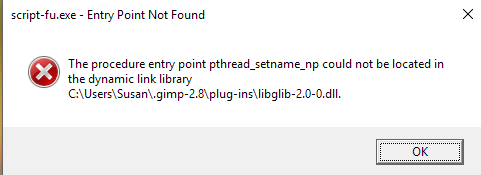
Just downloaded and installed the QT 2.0.0 32 bit and when I finally got gimp open I had no Script-fu ?
Image

EDIT:-

Restarted my computer and shut it down and opened up again without any change.
I have other versions of GMIC on my computer, could that be the reason?
Also I could only see the 1.7.9 in programs not the 2 beta


All good now. I deleted all GMIC programs I could find. Downloaded and installed the zip QT and now I have SF back with no error messages.

_________________
Image
Free Fun Photo Editing & resources
Poems from the Lord
Gimp Newby
Gimp version 3.2.4 and GMIC-Qt 4.0.2 OS :- Windows 10 Home 64


Top
 Post subject: Re: Release of G'MIC 2.0.0
PostPosted: Mon Jun 12, 2017 3:53 am  (#36) 
Offline
GimpChat Member

Joined: Oct 11, 2014
Posts: 82
gmic_gimp_qt_linux64 on Debian GNU/Linux 9.0 (stretch)

mc@dhcppc1:~/share/gmic_gimp_qt_linux64$ ldd /home/mc/share/gmic_gimp_qt_linux64/gmic_gimp_qt  | grep 'not found'
        libpng12.so.0 => not found


Attachment:
libpng.jpg
libpng.jpg [ 44.74 KiB | Viewed 3668 times ]

libpng12 not available.


This is my build 64bit for gimp 2.8:

mc@dhcppc1:~/develop-deb/gimp-git/plugin/gmicqt$ ldd /home/mc/develop-deb/gimp-git/plugin/gmicqt/gmic_gimp_qt-201
        linux-vdso.so.1 (0x00007ffd0ab84000)
        libfftw3_threads.so.3 => /usr/lib/x86_64-linux-gnu/libfftw3_threads.so.3 (0x00007f19753e8000)
        libfftw3.so.3 => /usr/lib/x86_64-linux-gnu/libfftw3.so.3 (0x00007f1974feb000)
        libz.so.1 => /lib/x86_64-linux-gnu/libz.so.1 (0x00007f1974dd1000)
        libpng16.so.16 => /usr/lib/x86_64-linux-gnu/libpng16.so.16 (0x00007f1974b9e000)
        libcurl-gnutls.so.4 => /usr/lib/x86_64-linux-gnu/libcurl-gnutls.so.4 (0x00007f197491f000)
        libgimp-2.0.so.0 => /usr/lib/libgimp-2.0.so.0 (0x00007f19746d4000)
        libgimpmath-2.0.so.0 => /usr/lib/libgimpmath-2.0.so.0 (0x00007f19744ce000)
        libgimpconfig-2.0.so.0 => /usr/lib/libgimpconfig-2.0.so.0 (0x00007f19742bd000)
        libgimpcolor-2.0.so.0 => /usr/lib/libgimpcolor-2.0.so.0 (0x00007f19740af000)
        libgimpbase-2.0.so.0 => /usr/lib/libgimpbase-2.0.so.0 (0x00007f1973e95000)
        libgdk_pixbuf-2.0.so.0 => /usr/lib/x86_64-linux-gnu/libgdk_pixbuf-2.0.so.0 (0x00007f1973c72000)
        libgobject-2.0.so.0 => /usr/lib/x86_64-linux-gnu/libgobject-2.0.so.0 (0x00007f1973a1d000)
        libglib-2.0.so.0 => /lib/x86_64-linux-gnu/libglib-2.0.so.0 (0x00007f1973709000)
        libcairo.so.2 => /usr/lib/x86_64-linux-gnu/libcairo.so.2 (0x00007f19733f5000)
        libX11.so.6 => /usr/lib/x86_64-linux-gnu/libX11.so.6 (0x00007f19730b5000)
        libQt5Widgets.so.5 => /usr/lib/x86_64-linux-gnu/libQt5Widgets.so.5 (0x00007f1972a52000)
        libQt5Gui.so.5 => /usr/lib/x86_64-linux-gnu/libQt5Gui.so.5 (0x00007f1972519000)
        libQt5Network.so.5 => /usr/lib/x86_64-linux-gnu/libQt5Network.so.5 (0x00007f19723a7000)
        libQt5Core.so.5 => /usr/lib/x86_64-linux-gnu/libQt5Core.so.5 (0x00007f1971ed8000)
        libGL.so.1 => /usr/lib/x86_64-linux-gnu/libGL.so.1 (0x00007f1971c34000)
        libpthread.so.0 => /lib/x86_64-linux-gnu/libpthread.so.0 (0x00007f1971a17000)
        libstdc++.so.6 => /usr/lib/x86_64-linux-gnu/libstdc++.so.6 (0x00007f1971695000)
        libm.so.6 => /lib/x86_64-linux-gnu/libm.so.6 (0x00007f1971391000)
        libgomp.so.1 => /usr/lib/x86_64-linux-gnu/libgomp.so.1 (0x00007f1971162000)
        libgcc_s.so.1 => /lib/x86_64-linux-gnu/libgcc_s.so.1 (0x00007f1970f4b000)
        libc.so.6 => /lib/x86_64-linux-gnu/libc.so.6 (0x00007f1970bad000)
        libnghttp2.so.14 => /usr/lib/x86_64-linux-gnu/libnghttp2.so.14 (0x00007f1970987000)
        libidn2.so.0 => /usr/lib/x86_64-linux-gnu/libidn2.so.0 (0x00007f1970765000)
        librtmp.so.1 => /usr/lib/x86_64-linux-gnu/librtmp.so.1 (0x00007f1970548000)
        libssh2.so.1 => /usr/lib/x86_64-linux-gnu/libssh2.so.1 (0x00007f197031a000)
        libpsl.so.5 => /usr/lib/x86_64-linux-gnu/libpsl.so.5 (0x00007f197010c000)
        libnettle.so.6 => /usr/lib/x86_64-linux-gnu/libnettle.so.6 (0x00007f196fed5000)
        libgnutls.so.30 => /usr/lib/x86_64-linux-gnu/libgnutls.so.30 (0x00007f196fb3c000)
        libgssapi_krb5.so.2 => /usr/lib/x86_64-linux-gnu/libgssapi_krb5.so.2 (0x00007f196f8f1000)
        libkrb5.so.3 => /usr/lib/x86_64-linux-gnu/libkrb5.so.3 (0x00007f196f617000)
        libk5crypto.so.3 => /usr/lib/x86_64-linux-gnu/libk5crypto.so.3 (0x00007f196f3e2000)
        libcom_err.so.2 => /lib/x86_64-linux-gnu/libcom_err.so.2 (0x00007f196f1de000)
        liblber-2.4.so.2 => /usr/lib/x86_64-linux-gnu/liblber-2.4.so.2 (0x00007f196efcf000)
        libldap_r-2.4.so.2 => /usr/lib/x86_64-linux-gnu/libldap_r-2.4.so.2 (0x00007f196ed7e000)
        libgthread-2.0.so.0 => /usr/lib/x86_64-linux-gnu/libgthread-2.0.so.0 (0x00007f196eb7c000)
        libgio-2.0.so.0 => /usr/lib/x86_64-linux-gnu/libgio-2.0.so.0 (0x00007f196e7e4000)
        libgmodule-2.0.so.0 => /usr/lib/x86_64-linux-gnu/libgmodule-2.0.so.0 (0x00007f196e5e0000)
        libffi.so.6 => /usr/lib/x86_64-linux-gnu/libffi.so.6 (0x00007f196e3d7000)
        libpcre.so.3 => /lib/x86_64-linux-gnu/libpcre.so.3 (0x00007f196e164000)
        libpixman-1.so.0 => /usr/lib/x86_64-linux-gnu/libpixman-1.so.0 (0x00007f196debd000)
        libfontconfig.so.1 => /usr/lib/x86_64-linux-gnu/libfontconfig.so.1 (0x00007f196dc7f000)
        libfreetype.so.6 => /usr/lib/x86_64-linux-gnu/libfreetype.so.6 (0x00007f196d9ce000)
        libxcb-shm.so.0 => /usr/lib/x86_64-linux-gnu/libxcb-shm.so.0 (0x00007f196d7ca000)
        libxcb.so.1 => /usr/lib/x86_64-linux-gnu/libxcb.so.1 (0x00007f196d5a2000)
        libxcb-render.so.0 => /usr/lib/x86_64-linux-gnu/libxcb-render.so.0 (0x00007f196d394000)
        libXrender.so.1 => /usr/lib/x86_64-linux-gnu/libXrender.so.1 (0x00007f196d18a000)
        libXext.so.6 => /usr/lib/x86_64-linux-gnu/libXext.so.6 (0x00007f196cf78000)
        librt.so.1 => /lib/x86_64-linux-gnu/librt.so.1 (0x00007f196cd6e000)
        libdl.so.2 => /lib/x86_64-linux-gnu/libdl.so.2 (0x00007f196cb6a000)
        libharfbuzz.so.0 => /usr/lib/x86_64-linux-gnu/libharfbuzz.so.0 (0x00007f196c8d5000)
        libproxy.so.1 => /usr/lib/x86_64-linux-gnu/libproxy.so.1 (0x00007f196c6b4000)
        libicui18n.so.57 => /usr/lib/x86_64-linux-gnu/libicui18n.so.57 (0x00007f196c23a000)
        libicuuc.so.57 => /usr/lib/x86_64-linux-gnu/libicuuc.so.57 (0x00007f196be90000)
        libpcre16.so.3 => /usr/lib/x86_64-linux-gnu/libpcre16.so.3 (0x00007f196bc27000)
        libdouble-conversion.so.1 => /usr/lib/x86_64-linux-gnu/libdouble-conversion.so.1 (0x00007f196ba16000)
        /lib64/ld-linux-x86-64.so.2 (0x0000555c80a75000)
        libGLX.so.0 => /usr/lib/x86_64-linux-gnu/libGLX.so.0 (0x00007f196b7e6000)
        libGLdispatch.so.0 => /usr/lib/x86_64-linux-gnu/libGLdispatch.so.0 (0x00007f196b518000)
        libunistring.so.0 => /usr/lib/x86_64-linux-gnu/libunistring.so.0 (0x00007f196b1ff000)
        libhogweed.so.4 => /usr/lib/x86_64-linux-gnu/libhogweed.so.4 (0x00007f196afca000)
        libgmp.so.10 => /usr/lib/x86_64-linux-gnu/libgmp.so.10 (0x00007f196ad47000)
        libgcrypt.so.20 => /lib/x86_64-linux-gnu/libgcrypt.so.20 (0x00007f196aa38000)
        libp11-kit.so.0 => /usr/lib/x86_64-linux-gnu/libp11-kit.so.0 (0x00007f196a7d3000)
        libidn.so.11 => /lib/x86_64-linux-gnu/libidn.so.11 (0x00007f196a59f000)
        libtasn1.so.6 => /usr/lib/x86_64-linux-gnu/libtasn1.so.6 (0x00007f196a38a000)
        libkrb5support.so.0 => /usr/lib/x86_64-linux-gnu/libkrb5support.so.0 (0x00007f196a17e000)
        libkeyutils.so.1 => /lib/x86_64-linux-gnu/libkeyutils.so.1 (0x00007f1969f7a000)
        libresolv.so.2 => /lib/x86_64-linux-gnu/libresolv.so.2 (0x00007f1969d63000)
        libsasl2.so.2 => /usr/lib/x86_64-linux-gnu/libsasl2.so.2 (0x00007f1969b48000)
        libselinux.so.1 => /lib/x86_64-linux-gnu/libselinux.so.1 (0x00007f196991e000)
        libmount.so.1 => /lib/x86_64-linux-gnu/libmount.so.1 (0x00007f19696d0000)
        libexpat.so.1 => /lib/x86_64-linux-gnu/libexpat.so.1 (0x00007f19694a6000)
        libXau.so.6 => /usr/lib/x86_64-linux-gnu/libXau.so.6 (0x00007f19692a2000)
        libXdmcp.so.6 => /usr/lib/x86_64-linux-gnu/libXdmcp.so.6 (0x00007f196909c000)
        libgraphite2.so.3 => /usr/lib/x86_64-linux-gnu/libgraphite2.so.3 (0x00007f1968e6d000)
        libicudata.so.57 => /usr/lib/x86_64-linux-gnu/libicudata.so.57 (0x00007f19673f0000)
        libgpg-error.so.0 => /lib/x86_64-linux-gnu/libgpg-error.so.0 (0x00007f19671dc000)
        libblkid.so.1 => /lib/x86_64-linux-gnu/libblkid.so.1 (0x00007f1966f96000)
        libbsd.so.0 => /lib/x86_64-linux-gnu/libbsd.so.0 (0x00007f1966d80000)
        libuuid.so.1 => /lib/x86_64-linux-gnu/libuuid.so.1 (0x00007f1966b79000)


Attachments:
gmic_gimp_qt-201.zip [3.01 MiB]
Downloaded 146 times
Top
 Post subject: Re: Release of G'MIC 2.0.0
PostPosted: Mon Jun 12, 2017 4:21 am  (#37) 
Offline
GimpChat Member
User avatar

Joined: Nov 04, 2015
Posts: 1465
Hi telperion.
Did you compile gmic-qt with libpng12 or was it an unmet dependency?


Top
 Post subject: Re: Release of G'MIC 2.0.0
PostPosted: Mon Jun 12, 2017 4:35 am  (#38) 
Offline
GimpChat Member

Joined: Oct 11, 2014
Posts: 82
Tas_mania wrote:
Hi telperion.
Did you compile gmic-qt with libpng12 or was it an unmet dependency?


compiled with libpng16-16

libpng16.so.16 => /usr/lib/x86_64-linux-gnu/libpng16.so.16 (0x00007f1974b9e000)


Top
 Post subject: Re: Release of G'MIC 2.0.0
PostPosted: Tue Jun 13, 2017 4:21 am  (#39) 
Offline
GimpChat Member
User avatar

Joined: Nov 04, 2015
Posts: 1465
Hi telperion, I tried that file on Ubuntu but no go. I already have gmic-qt but a pre-release version. I realize it was intended for Debian but I like to experiment.


Top
 Post subject: Re: Release of G'MIC 2.0.0
PostPosted: Fri Jun 16, 2017 3:11 am  (#40) 
Offline
GimpChat Member

Joined: Oct 11, 2014
Posts: 82
gmic-gimp-qt debian stretch 64
for gimp 2.8
202pre-2017-06-16

Attachment:
202.jpg
202.jpg [ 60.99 KiB | Viewed 3574 times ]


Attachments:
gmic_gimp_qt-202-20170616-debian-stretch-64.tar.gz [3.09 MiB]
Downloaded 146 times
Top
Post new topic Reply to topic  [ 40 posts ]  Go to page Previous  1, 2

All times are UTC - 5 hours [ DST ]


* Login  


Powered by phpBB3 © phpBB Group