It is currently Wed Nov 25, 2026 9:55 am


All times are UTC - 5 hours [ DST ]


Post new topic Reply to topic  [ 83 posts ]  Go to page Previous  1, 2, 3, 4, 5  Next
Author Message
 Post subject: Re: Spinning Gimp Coin
PostPosted: Thu May 12, 2011 9:09 am  (#41) 
Offline
GimpChat Member

Joined: Apr 12, 2010
Posts: 5870
O
cool result remind me a lot the Doctor Who title...
i would insert some opacity (i.e a white layer with that exact shape and very low opacity ) between the script and the reversed script

the difference would not be big on white BG but should become evident with a colored bg
And for a Doctor Who style rotating script a similar BG may be adapt

http://fence-post.deviantart.com/art/An ... -152176333
http://fence-post.deviantart.com/art/GI ... -152176009

_________________
My 3D Gallery on Deviantart http://photocomix2.deviantart.com/
Main gallery http://www.flickriver.com/photos/photocomix-mandala/
Mandala and simmetry http://www.flickriver.com/photos/photocomix_mandala/

Image

Mrs Wilbress


Top
 Post subject: Re: Spinning Gimp Coin
PostPosted: Thu May 12, 2011 10:48 am  (#42) 
Offline
Retired Staff
User avatar

Joined: May 22, 2008
Posts: 6946
Location: Somewhere in GIMP
ccbarr wrote:

I've got another idea to add to this mix. Imagine the lettering having a sparkle animation added to it, so we get spinning and sparkling all in one fun animation. Adding a sparkle effect would require more work (and probably greatly increase the processing time too). However, I think a reasonable compromise can be done by using the Map Object Box instead of the Cylinder. I would adjust the box dimensions to be a thin box, have my lettering on the front and back, have a blank transparent layer for the top and bottom of the box and use a layer on the sides that would make it look like a thin strip is holding the front and back together. I think it would take less processing time.

Thank you.

I'm looking forward to your results with the box and sparkles.

Why, oh, why does a ticked, Layer Selection [All visible (ignore pattern)] not leave the layers visible in the Frames to Image results?

_________________
Image
World War IV will be fought with sticks and stones. - Albert Einstein


Top
 Post subject: Re: Spinning Gimp Coin
PostPosted: Thu May 12, 2011 10:52 am  (#43) 
Offline
Retired Staff
User avatar

Joined: May 22, 2008
Posts: 6946
Location: Somewhere in GIMP
PhotoComix wrote:
i would insert some opacity (i.e a white layer with that exact shape and very low opacity ) between the script and the reversed script

the difference would not be big on white BG but should become evident with a colored bg
And for a Doctor Who style rotating script a similar BG may be adapt


Thanks PhotoComix.

I was wanting to see what happened with transparent backgrounds, and I do agree with you about having something between the scripts. It was experimental and your suggestion is a good one.

_________________
Image
World War IV will be fought with sticks and stones. - Albert Einstein


Top
 Post subject: Re: Spinning Gimp Coin
PostPosted: Wed Jun 12, 2013 10:32 pm  (#44) 
Offline
GimpChat Member
User avatar

Joined: Jun 02, 2013
Posts: 2090
Awesome result. Will give this one a go in the near future.

_________________
Image


Top
 Post subject: Re: Spinning Gimp Coin
PostPosted: Sat Jun 24, 2017 1:43 pm  (#45) 
Offline
GimpChat Member
User avatar

Joined: May 17, 2014
Posts: 1579
I tried this tutorial over and over again. There must be something I always do wrong.
I think it's the part of adding the ridged layer to the transparent background with the move path.
Can somebody help me with that?

_________________
Ella's gallery - YouTube


Top
 Post subject: Re: Spinning Gimp Coin
PostPosted: Sun Jun 25, 2017 10:09 am  (#46) 
Offline
GimpChat Member

Joined: Oct 11, 2014
Posts: 82
something is wrong in the pdf.


www.youtube.com Video from : www.youtube.com


Top
 Post subject: Re: Spinning Gimp Coin
PostPosted: Sun Jun 25, 2017 10:45 am  (#47) 
Offline
GimpChat Member
User avatar

Joined: May 17, 2014
Posts: 1579
telperion, thank you very much for the message.
That was the same result I always got.
Thought I was doing something wrong.

Ella

_________________
Ella's gallery - YouTube


Top
 Post subject: Re: Spinning Gimp Coin
PostPosted: Sun Jun 25, 2017 12:22 pm  (#48) 
Offline
GimpChat Member
User avatar

Joined: May 10, 2013
Posts: 1443
Location: Finland
Telperion, I think in your video at 2:12 You are supposed to use the function button in same window after changing the frames to 1-30?
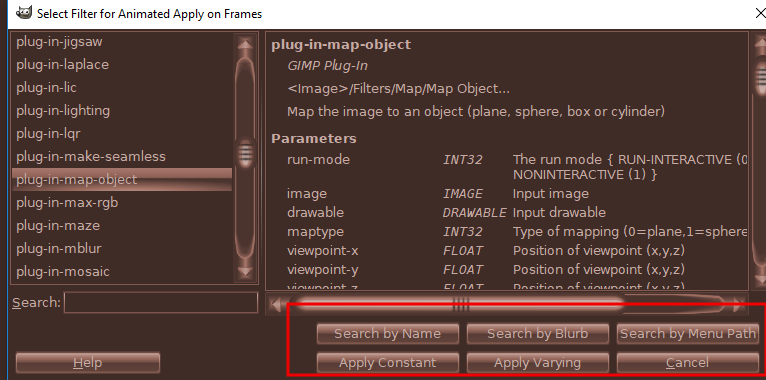
Also you don't seem to have "apply varying" button when you modify frames.
I had GAP 2.7 earlier installed and it does not have the "apply varying", version 2.6 has.
The steps at page 3 are bit confusing, there's no mention when to hit OK etc. I'll try this too but last time I tried GAP I had no success.

edit: But I was told that GAP might be buggy, I got 60 frames alright but only 2 of them were coins layer 1 & 31.

Image


Top
 Post subject: Re: Spinning Gimp Coin
PostPosted: Sun Jun 25, 2017 12:44 pm  (#49) 
Offline
GimpChat Member

Joined: Oct 11, 2014
Posts: 82
found a way

www.youtube.com Video from : www.youtube.com


additional notes

First, you always have open your parts.xcf image. That is the one with the parts you will bcoin, the Wilber layer, the "Gimp Chat" layer (flipped vertically and horizontally as I mentioridged side wall layer.
Open a 400x400 (if that is the size you are using) square image with a Transparent BackName that background_000001.xcf.

Use Duplicate Frames to make 29 more duplicates, giving a total of 30 frames.


Use Move Path to add in the 400x400 ridged side wall layer. Make sure when adding the ridged side wall layer you are using a Step Mode of None.

frame to image - all visible (ignore pattern)

Click on the Function button, select Apply Filter on Layer(s)

In the dialog that opens, select Map Object and click the Apply Button.
In the Options Tab, set Transparent Background, Map To Cylinder.
In The Light Tab, select No Light.
In The Cylinder Tab, leave the Radius at it's default value. Change the Length to 0.03.
For the Top Cap select your Wilber Layer. For the Bottom Cap, select the "Gimp Chat" Layer.
In The Orientation Tab set the X Rotation Value to 90.0 degrees. Leave the Z Rotation Value at 0.0 degrees.
Click OK.

Map Object processes the first frame.

A little Continue Dialog comes up, just click on Continue.

Map Object will reopen for you. The only adjustment you need to make the rest of the time is the Z Rotation value. No other values need to be adjusted. Now make the Z Rotation value 174.0 degrees. Click OK.

Map Object will process frame 30.

Continue dialog opens again, click Continue.

Then Map Object will creates tweens for frames 2 through 29 (it already did frames 1 and 30).

Save the part1.xcf and close.

Select background_000001.xcf again.

frame to image - all visible (ignore pattern)

Select Map Object in the dialog that opens, and click the Apply Button.

Map Object opens. Change the Z Rotation value to -180.0 degrees. Note the minus sign here. Click OK.

Map Object creates frame 1.

IContinue Dialog opens, click Continue.

Map Object opens again. This time change the Z Rotation value to -6.0 degrees. Click OK.
Map Object creates frame 30.

Continue Dialog opens, click Continue.
Map Object creates for frames 2 through 29

Save the part2.xcf and close.

Open part1.xcf then open as layes part2.xcf

Done.

For add background: animstack plugin.

I don't know if is a right way, gap is powerfull and so misteriuous.

Attachment:

out.gif
out.gif [ 544.91 KiB | Viewed 3857 times ]


Top
 Post subject: Re: Spinning Gimp Coin
PostPosted: Sun Jun 25, 2017 2:10 pm  (#50) 
Offline
GimpChat Member
User avatar

Joined: May 10, 2013
Posts: 1443
Location: Finland
Gee that looks so nice and I can't get it to woooork!!
*watches the video again* filters/filter all layers? Where did this entry come from? Gonna give another try.
No luck, everything goes well to the point where you get the window:
non-interactive call of plug-in-map-object (for all layers between). After clicking continue, it does not start to process the layers.


Top
 Post subject: Re: Spinning Gimp Coin
PostPosted: Sun Jun 25, 2017 4:15 pm  (#51) 
Offline
GimpChat Member

Joined: Oct 11, 2014
Posts: 82
Nidhogg wrote:
Gee that looks so nice and I can't get it to woooork!!
*watches the video again* filters/filter all layers? Where did this entry come from? Gonna give another try.
No luck, everything goes well to the point where you get the window:
non-interactive call of plug-in-map-object (for all layers between). After clicking continue, it does not start to process the layers.


filter all layers (gimp-gap filter):
Attachment:
filters.jpg
filters.jpg [ 102.6 KiB | Viewed 3570 times ]


Nidhogg wrote:

[ Image ]


with this setting frames method work.
Another video incoming....

I need understand how gap work...


Last edited by telperion on Mon Jun 26, 2017 12:18 am, edited 1 time in total.

Top
 Post subject: Re: Spinning Gimp Coin
PostPosted: Sun Jun 25, 2017 5:15 pm  (#52) 
Offline
GimpChat Member

Joined: Oct 11, 2014
Posts: 82
Ok this way work with frames:

www.youtube.com Video from : www.youtube.com


Thank's Nidhogg for the tip.


Last edited by telperion on Sun Jun 25, 2017 5:57 pm, edited 1 time in total.

Top
 Post subject: Re: Spinning Gimp Coin
PostPosted: Sun Jun 25, 2017 5:55 pm  (#53) 
Offline
GimpChat Member

Joined: Oct 11, 2014
Posts: 82
add some zoom
cylinder radius 0.25 (frame1) 0.40 (frame 30) 0.40 (frame 31) 0.25 (frame 60)

Attachment:
out2.gif
out2.gif [ 872.52 KiB | Viewed 3558 times ]


Top
 Post subject: Re: Spinning Gimp Coin
PostPosted: Mon Jun 26, 2017 1:24 am  (#54) 
Offline
GimpChat Member

Joined: Oct 11, 2014
Posts: 82
My 2 cents .. 1 euro :hehe

Attachment:
euro.gif
euro.gif [ 736.31 KiB | Viewed 3544 times ]


I know, the back side is upside down, only a fast try... (no so fast map object is very slowwwww )


euro images from pixabay.com
CC0 Public Domain


Top
 Post subject: Re: Spinning Gimp Coin
PostPosted: Mon Jun 26, 2017 2:16 am  (#55) 
Offline
GimpChat Member
User avatar

Joined: May 17, 2014
Posts: 1579
telperion, thank you for all the work you've done.
But I still have the same result as the very first time.
Only 2 coins, the front and the back, the rest are just backgrounds.
When I go to "modify frames.." and then "map object" I don't see a button with only "apply" on it.
I have a different window

Image

I use "aplly varying".
Maybe I have an other version of GAP.

_________________
Ella's gallery - YouTube


Top
 Post subject: Re: Spinning Gimp Coin
PostPosted: Mon Jun 26, 2017 3:15 am  (#56) 
Offline
GimpChat Member

Joined: Oct 11, 2014
Posts: 82
Ella Louise wrote:
telperion, thank you for all the work you've done.
But I still have the same result as the very first time.
Only 2 coins, the front and the back, the rest are just backgrounds.
When I go to "modify frames.." and then "map object" I don't see a button with only "apply" on it.
I have a different window

[ Image ]

I use "aplly varying".
Maybe I have an other version of GAP.


I'm using gimp 2.8.22 and gimp gap 2.7.0, could be you have an old gimp and gap version?
The original tutorial is dated 2011, so i think, should work in any case.


Top
 Post subject: Re: Spinning Gimp Coin
PostPosted: Mon Jun 26, 2017 4:17 am  (#57) 
Offline
GimpChat Member
User avatar

Joined: May 17, 2014
Posts: 1579
My version of Gimp is 2.8.18, GAP I don't find witch version.
But in your video I see running a loading bar when mapping the object.
When I do mapping the object, I don't see that.

Just to study a little more I guess.

_________________
Ella's gallery - YouTube


Top
 Post subject: Re: Spinning Gimp Coin
PostPosted: Mon Jun 26, 2017 4:26 am  (#58) 
Offline
GimpChat Member

Joined: Oct 11, 2014
Posts: 82
Ella Louise wrote:
My version of Gimp is 2.8.18, GAP I don't find witch version.
But in your video I see running a loading bar when mapping the object.
When I do mapping the object, I don't see that.

Just to study a little more I guess.


Seem to be the same problem of Nidhogg
viewtopic.php?f=23&t=1715&start=40#p217240
Quote:
edit: But I was told that GAP might be buggy


Top
 Post subject: Re: Spinning Gimp Coin
PostPosted: Mon Jun 26, 2017 4:58 am  (#59) 
Offline
GimpChat Member

Joined: Oct 11, 2014
Posts: 82
Ok last experiment:

Attachment:
euro2.gif
euro2.gif [ 777.67 KiB | Viewed 3522 times ]


same settings of tutorial except:
light
x rotation 75.0 (very slow)

attached xcf file.


Attachments:
euro.xcf [1.18 MiB]
Downloaded 116 times
Top
 Post subject: Re: Spinning Gimp Coin
PostPosted: Mon Jun 26, 2017 5:36 am  (#60) 
Offline
GimpChat Member

Joined: Oct 11, 2014
Posts: 82
some info
gimp gap "stable" 2.6.0
https://git.gnome.org/browse/gimp-gap/tag/?h=GAP_2_6_0
2009-06-06 (jurassic era)

why nobody (distributors) build the last git?
https://git.gnome.org/browse/gimp-gap/log/
there are many changes from the jurassic.
If someone need a deb package for Debian Stretch 64 bit of GAP 2.7.0
ask me.

UPDATE
i removed my gap package. and install the 2.6.0 from the distribution.
2.6.0 is broken, modify frame - apply filter on layers don't create the in-between files, only start and end, so filters - filter all layers.
Don't waste time, you are not stupid, gap 2.6.0 is broken...


Last edited by telperion on Mon Jun 26, 2017 9:53 am, edited 1 time in total.

Top
Post new topic Reply to topic  [ 83 posts ]  Go to page Previous  1, 2, 3, 4, 5  Next

All times are UTC - 5 hours [ DST ]


* Login  


Powered by phpBB3 © phpBB Group