It is currently Tue Aug 25, 2026 6:15 am


All times are UTC - 5 hours [ DST ]


Post new topic Reply to topic  [ 13 posts ] 
Author Message
 Post subject: Request for Matrix Animation Action
PostPosted: Sun Sep 03, 2017 5:23 am  (#1) 
Offline
GimpChat Member

Joined: Jun 16, 2016
Posts: 137
Hello,
I'm looking for a script or plug-in like this Photoshop
tool but for Gimp. Does someone know something like that?

- Matrix Animation -

Many greetings Hardy


Share on Facebook Share on Twitter Share on Orkut Share on Digg Share on MySpace Share on Delicious Share on Technorati
Top
 Post subject: Re: Request for Matrix Animation Action
PostPosted: Sun Sep 03, 2017 6:14 am  (#2) 
Offline
Global Moderator
User avatar

Joined: May 16, 2010
Posts: 16167
hardy111 wrote:
Hello,
I'm looking for a script or plug-in like this Photoshop
tool but for Gimp. Does someone know something like that?

- Matrix Animation -

Many greetings Hardy

Maybe Graechans script "Animation Workshop" could be utilized for this?

viewtopic.php?f=9&t=8082

_________________
Image


Top
 Post subject: Re: Request for Matrix Animation Action
PostPosted: Sun Sep 03, 2017 6:36 am  (#3) 
Offline
Global Moderator
User avatar

Joined: May 16, 2010
Posts: 16167
Image

Image

I imagine making the effect percentage higher than 40% would make the scrolling effect faster. Not sure though.
And of course you could dress up the text to glow more , use thinner text or font face. Maybe displace each layer to your image? Hope that helps.

_________________
Image


Top
 Post subject: Re: Request for Matrix Animation Action
PostPosted: Sun Sep 03, 2017 9:05 am  (#4) 
Offline
Global Moderator
User avatar

Joined: May 16, 2010
Posts: 16167
This may also help for displacement. Thanks to Fencepost wherever he may be. ;)

Attachment:
Fitting Text to Uneven Surfaces.pdf [451.39 KiB]
Downloaded 202 times

_________________
Image


Top
 Post subject: Re: Request for Matrix Animation Action
PostPosted: Sun Sep 03, 2017 9:41 am  (#5) 
Offline
GimpChat Member
User avatar

Joined: Apr 15, 2017
Posts: 1837
Thanks for the link to Animation Workshop. I never knew about that one...

To speed up the animation, just select a faster delay time. Here I set it to 60ms:

Attachment:
scroll.gif
scroll.gif [ 209.71 KiB | Viewed 4062 times ]


Top
 Post subject: Re: Request for Matrix Animation Action
PostPosted: Sun Sep 03, 2017 9:47 am  (#6) 
Offline
GimpChat Member
User avatar

Joined: May 10, 2013
Posts: 1436
Location: Finland
Quick test
1. create matrix layer, use seamless advanced script, then Art's move layer script to create downwards scroll (50 layers).
The move layer script allows you to make angled movements too.
2. run the displacement on all matrix layers, thanks for the pdf Rod.
3. use selection tool for the face, feather 50px, invert selection, clear layers: visible (ofnuts plugin clear-layers-0.2.py)
4. edit attributes of layers (overlay), script by Daniel Bates, except for the background obviously.
5. combine background by SaulGoode

This was just a quick test to see roughly how it works, as you can see the matrix layer is quite ugly, didn't do any tweaking and used default timings.
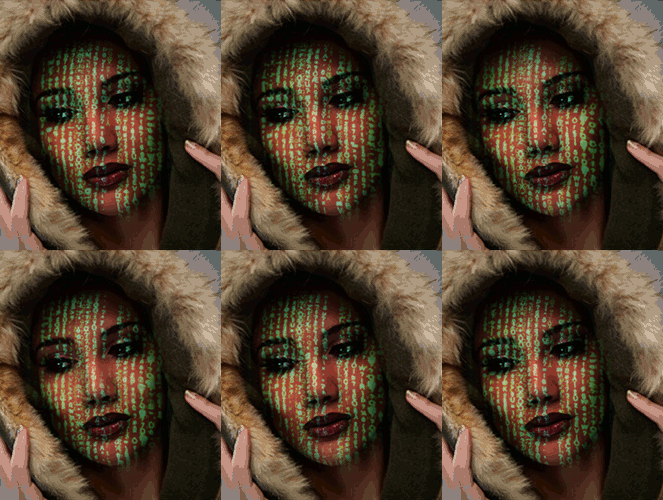
Image

There is a matrix script, so you could use that to create the animation and then use displace mapping and merge it with the background
with combine background or animation merge script. There's usually multiple ways to reach the goal in graphics.
Attached the matrix script if you wanna try it, it's old and not so nice and makes only random numbers.


Attachments:
matrix.scm [7.71 KiB]
Downloaded 175 times
Top
 Post subject: Re: Request for Matrix Animation Action
PostPosted: Sun Sep 03, 2017 9:56 am  (#7) 
Offline
Global Moderator
User avatar

Joined: May 16, 2010
Posts: 16167
Nidhogg wrote:
Quick test
1. create matrix layer, use seamless advanced script, then Art's move layer script to create downwards scroll (50 layers).
The move layer script allows you to make angled movements too.
2. run the displacement on all matrix layers, thanks for the pdf Rod.
3. use selection tool for the face, feather 50px, invert selection, clear layers: visible (ofnuts plugin clear-layers-0.2.py)
4. edit attributes of layers (overlay), script by Daniel Bates, except for the background obviously.
5. combine background by SaulGoode

This was just a quick test to see roughly how it works, as you can see the matrix layer is quite ugly, didn't do any tweaking and used default timings.

[ Image ]

There is a matrix script, so you could use that to create the animation and then use displace mapping and merge it with the background
with combine background or animation merge script. There's usually multiple ways to reach the goal in graphics.
Attached the matrix script if you wanna try it, it's old and not so nice and makes only random numbers.

A good start though! :bigthup

_________________
Image


Top
 Post subject: Re: Request for Matrix Animation Action
PostPosted: Sun Sep 03, 2017 12:48 pm  (#8) 
Offline
GimpChat Member
User avatar

Joined: Apr 15, 2017
Posts: 1837
I do like this filter...

Attachment:
earth.gif
earth.gif [ 2.34 MiB | Viewed 4037 times ]


Top
 Post subject: Re: Request for Matrix Animation Action
PostPosted: Mon Sep 04, 2017 1:24 am  (#9) 
Offline
GimpChat Member

Joined: Jun 16, 2016
Posts: 137
Hello,
many thanks for your help. I
will be experimenting.

Many greetings Hardy


Top
 Post subject: Re: Request for Matrix Animation Action
PostPosted: Mon Sep 04, 2017 1:43 am  (#10) 
Offline
GimpChat Member
User avatar

Joined: Jul 04, 2010
Posts: 2253
Location: Retired Moderator Slowly Returning to the Living.
Nidhogg, That is a seriously awesome animation!!

_________________
Artists aren't crazy! We're eccentric! ~G.M. Ross

Image

My Sigs = My Photos
Check out my work at http://www.flickr.com/photos/photomastergreg.


Top
 Post subject: Re: Request for Matrix Animation Action
PostPosted: Mon Sep 04, 2017 10:45 am  (#11) 
Offline
GimpChat Member
User avatar

Joined: May 10, 2013
Posts: 1436
Location: Finland
Thank you for the compliment PhotoMaster. Will give another go when have time, I believe it has potential to be better and the letters/numbers don't look good at all.
The displace tutorial helped a lot.


Top
 Post subject: Re: Request for Matrix Animation Action
PostPosted: Mon Sep 04, 2017 11:18 am  (#12) 
Offline
GimpChat Member
User avatar

Joined: Sep 24, 2010
Posts: 12837
Pretty darn cool result, Nidhogg. :)

_________________
Lyle

Psalm 109:8

Image


Top
 Post subject: Re: Request for Matrix Animation Action
PostPosted: Tue Sep 05, 2017 7:46 am  (#13) 
Offline
Global Moderator
User avatar

Joined: May 16, 2010
Posts: 16167
Yes sadly Graechan and Fencepost have been awol for quite some time. Do hope they are both well.

_________________
Image


Top
Post new topic Reply to topic  [ 13 posts ] 

All times are UTC - 5 hours [ DST ]


* Login  


Powered by phpBB3 © phpBB Group