Hallo,
I got a question on a German forum:
If you arrange pictures in a circle partially over the other the last one is
over the first and over the last but one picture:
To get it OK one can use "alpha to selection" and Ctrl-X on the (correct) layer.
My question is now: what are the Python commands to be able to automate this action I tried something like this
pdb.gimp_image_set_active_layer(img, img.layers[-2])
pdb.gimp_image_select_item(img, 1, img.layers[0])
layer -1 is the background layer -2 the first picture and naturally layer 0 is the last
one overlapping TWO picture, but it should do so only with ONE.
What Python command(s) could be used in place of Ctrl-X ???
Attachment:
File comment: one picture not OK
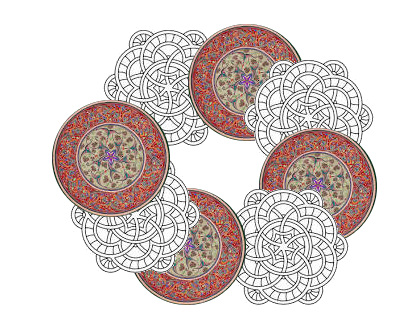 ueberlappen_1t.png [ 183.03 KiB | Viewed 3766 times ]
The upper grey Mandela-picture should be over the left one picture.
Creating from two (or more) pictures a Ring like this is done in the Python console.
Only the two commands, possible in the Gimp-window "alpha to selection" and what Ctrl-X (on the right layer) would solve my problem

Your wisdom for me would make (grandfather) Peter happy
 Login
Login Register
 Tweets
 FAQ
FAQ Advanced Search


