It is currently Wed Aug 26, 2026 10:55 am


All times are UTC - 5 hours [ DST ]


Post new topic Reply to topic  [ 75 posts ]  Go to page 1, 2, 3, 4  Next
Author Message
 Post subject: Fox in the Woods
PostPosted: Sat Jun 23, 2018 1:29 am  (#1) 
Offline
GimpChat Member
User avatar

Joined: May 13, 2018
Posts: 270
Location: Oregon, USA
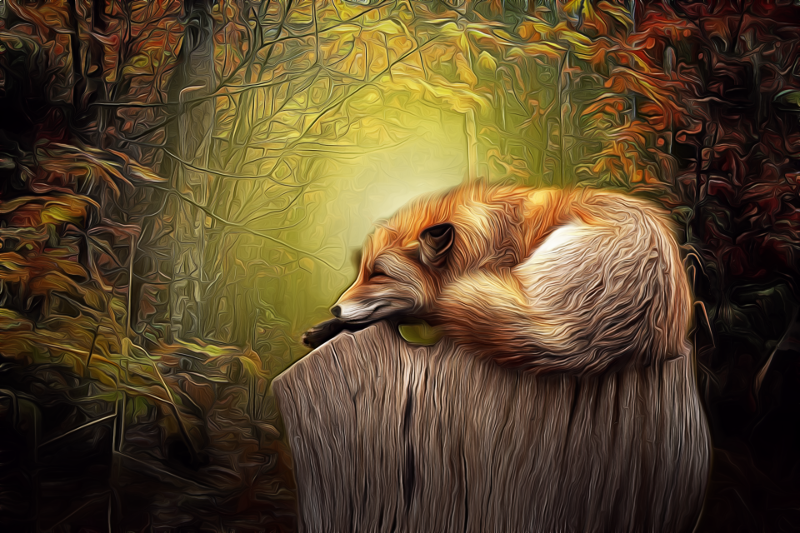
Image

Red Fox Tutorial/Workflow (With Video Download Link)

_________________
Image


Share on Facebook Share on Twitter Share on Orkut Share on Digg Share on MySpace Share on Delicious Share on Technorati
Top
 Post subject: Re: Fox in the Woods
PostPosted: Sat Jun 23, 2018 4:10 pm  (#2) 
Offline
GimpChat Member
User avatar

Joined: Apr 15, 2017
Posts: 1837
I'm guessing you like G'Mic's "Brushify" filter? Nice result and I too like the "Brushify" filter for various images...

Attachment:
donkey.JPG
donkey.JPG [ 543.46 KiB | Viewed 7544 times ]


Top
 Post subject: Re: Fox in the Woods
PostPosted: Sat Jun 23, 2018 4:15 pm  (#3) 
Offline
GimpChat Member
User avatar

Joined: May 13, 2018
Posts: 270
Location: Oregon, USA
@ racer-x: I've never used "Brushify." I'll have to take a look at it.

_________________
Image


Top
 Post subject: Re: Fox in the Woods
PostPosted: Sat Jun 23, 2018 11:49 pm  (#4) 
Offline
GimpChat Member
User avatar

Joined: Sep 24, 2010
Posts: 12838
Nicely done, Peter. :)

_________________
Lyle

Psalm 109:8

Image


Top
 Post subject: Re: Fox in the Woods
PostPosted: Sun Jun 24, 2018 11:32 am  (#5) 
Offline
GimpChat Member
User avatar

Joined: Mar 12, 2016
Posts: 198
Location: Illinois, USA
I'm curious as to how you did this, I assumed it was with G'Mic's "Brushify" filter also.

_________________
Image


Top
 Post subject: Re: Fox in the Woods
PostPosted: Sun Jun 24, 2018 4:40 pm  (#6) 
Offline
GimpChat Member
User avatar

Joined: Apr 15, 2017
Posts: 1837
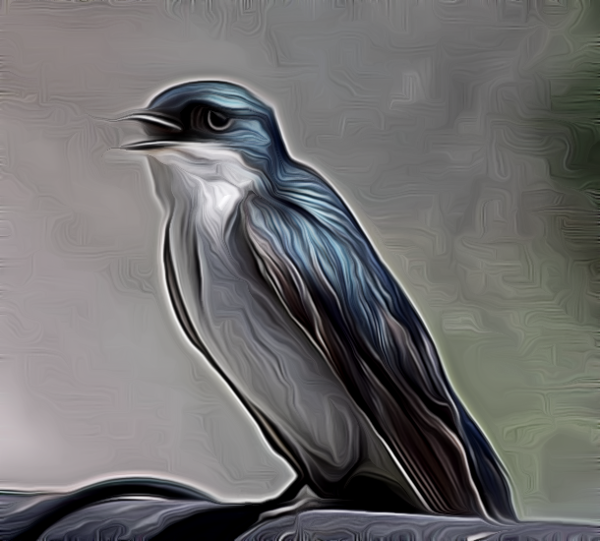
My bad, you likely used G'mic's "DreamSmoothing" filter for the task. I like that one too. Here is an example on an image of a swallow I shot today...

Attachment:
DreamSmoothing.gif
DreamSmoothing.gif [ 346.45 KiB | Viewed 7488 times ]


Top
 Post subject: Re: Fox in the Woods
PostPosted: Sun Jun 24, 2018 5:05 pm  (#7) 
Offline
GimpChat Member
User avatar

Joined: May 13, 2018
Posts: 270
Location: Oregon, USA
@Lyle: Thanks for the comment.
@racer-x: I don't have a "brushify" filter in my version of G'MIC. My version 1.6.3.1
Also, I like your swallow. My technique is listed below by request from Serious Tom.
@Serious Tom: Here's my technique.

First Step Before G'MIC:
1. Filters/Enhance/Unsharp mask.
In G'MIC: New Layer. Put steps 2-5 all on this new layer.
2. Details/Freaky Details/Apply
3. ...then “sharpen deblur”/Apply
4. ...then “texture enhance”/Apply
5. ...then “dynamic range increase (bring up “detail strength" to suite your taste).
Click “OK.”

Note: The idea of steps 2-5 is to add grain to the image so that Dream Smooth has something to work with.

6. Right click the layer and click on "New from visible" to put all the visible layers into one new layer. Then Apply “Dream Smooth” to this new layer.
Bring “iterations” down to “1,” all other settings are
default settings.
7. Use G'mic again and go to Light & Shadows/Dodge & Burn/Click “OK.”

After "Dream Smooth," Make a "visible" layer.
Make a duplicate layer of step 1 and put it under the "visible" layer.
Go back to the "visible" layer and add a white "layer mask."
Use a soft brush and reduce the opacity of the brush to approx. 30%.
Use the brush to bring back the details of the face that are too blurred by the Dream Smoothing.

That's about it. It took me a little under a year to fine tune all these steps. Let me see your results.
I hope all this makes sense. Did the best I could. It's kind of complicated.

Here's a tutorial video that should help.
http://www.mediafire.com/file/4cx5kkp58 ... l.mp4/file


@racer-x: I'd like to see what your swallow would look like if you did it with these steps. Just a thought. Also, I would like to see what this swallow would look like with "brushify."

_________________
Image


Last edited by Peter on Sun Jan 27, 2019 8:57 pm, edited 3 times in total.

Top
 Post subject: Re: Fox in the Woods
PostPosted: Mon Jun 25, 2018 3:53 am  (#8) 
Offline
GimpChat Member
User avatar

Joined: Apr 15, 2017
Posts: 1837
Well have at it. Here it is as shot and cropped down. Below that is with Brushify at default settings.

Attachment:
swallow.JPG
swallow.JPG [ 572.95 KiB | Viewed 7460 times ]


Attachment:
swallow_brushify.JPG
swallow_brushify.JPG [ 539.56 KiB | Viewed 7458 times ]


Top
 Post subject: Re: Fox in the Woods
PostPosted: Mon Jun 25, 2018 11:04 am  (#9) 
Offline
GimpChat Member
User avatar

Joined: May 13, 2018
Posts: 270
Location: Oregon, USA
racer-x wrote:
Well have at it. Here it is as shot and cropped down. Below that is with Brushify at default settings.

Attachment:
swallow.JPG


Attachment:
swallow_brushify.JPG

Thanks for showing me the brushify version racer,

Here's my version of the swallow.
Image

_________________
Image


Top
 Post subject: Re: Fox in the Woods
PostPosted: Mon Jun 25, 2018 12:53 pm  (#10) 
Offline
GimpChat Member
User avatar

Joined: Mar 12, 2016
Posts: 198
Location: Illinois, USA
Thanks a lot for sharing Peter, I love this technique !
On step 6 the Dream Smoothing "iterations only allow me to set it as 1.
:tyspin


Attachments:
collie.jpg
collie.jpg [ 746.56 KiB | Viewed 7434 times ]

_________________
Image
Top
 Post subject: Re: Fox in the Woods
PostPosted: Mon Jun 25, 2018 10:06 pm  (#11) 
Offline
GimpChat Member
User avatar

Joined: May 13, 2018
Posts: 270
Location: Oregon, USA
SeriousTom wrote:
Thanks a lot for sharing Peter, I love this technique !
On step 6 the Dream Smoothing "iterations only allow me to set it as 1.
:tyspin

What a great picture... I totally love this. You did a great job.
You're right about "iterations." Can only go to 1.
Again, I absolutely love what you did with this picture. I'd like to see more of what you do with this.

_________________
Image


Top
 Post subject: Re: Fox in the Woods
PostPosted: Thu Jun 28, 2018 12:03 am  (#12) 
Offline
Script Coder
User avatar

Joined: May 07, 2014
Posts: 4528
Location: Canada
Wow, nice effect!

_________________
TinT


Top
 Post subject: Re: Fox in the Woods
PostPosted: Thu Jun 28, 2018 11:55 am  (#13) 
Offline
GimpChat Member

Joined: May 12, 2015
Posts: 4693
These images are really nice! I will try this method. Thank you for instructions.


Top
 Post subject: Re: Fox in the Woods
PostPosted: Tue Jul 17, 2018 6:28 am  (#14) 
Offline
GimpChat Member
User avatar

Joined: May 17, 2014
Posts: 1568
Had to try this also...


Attachments:
fox_dream_smoothing.jpg
fox_dream_smoothing.jpg [ 2.59 MiB | Viewed 3091 times ]

_________________
Ella's gallery - YouTube
Top
 Post subject: Re: Fox in the Woods
PostPosted: Tue Jul 17, 2018 8:25 am  (#15) 
Offline
GimpChat Member
User avatar

Joined: Apr 09, 2016
Posts: 580
Location: Sheffield UK
Nice foxes Peter and Ella. Thankyou for sharing your technique Peter, really appreciate that.

_________________
Image


Top
 Post subject: Re: Fox in the Woods
PostPosted: Tue Jul 17, 2018 11:46 am  (#16) 
Offline
GimpChat Member
User avatar

Joined: May 13, 2018
Posts: 270
Location: Oregon, USA
@RKJD:
You're welcome. Always glad to share.
@Ella:
This turned out beautiful Ella. Hope you do more.
I'm loving all the texture in the fur which is what
I was going for when I came up with this technique.
Don't know if you've seen my GIMP "splash screen"
images but those images bring out the fur as well.
I would put a link here but haven't figured out how
to do that in this website yet.
Keep up the good work.

_________________
Image


Top
 Post subject: Re: Fox in the Woods
PostPosted: Tue Jul 17, 2018 1:21 pm  (#17) 
Offline
GimpChat Member
User avatar

Joined: Apr 09, 2016
Posts: 580
Location: Sheffield UK
My play...
Attachment:
Polar_cub_PeterGC.jpg
Polar_cub_PeterGC.jpg [ 295.15 KiB | Viewed 3082 times ]

_________________
Image


Top
 Post subject: Re: Fox in the Woods
PostPosted: Tue Jul 17, 2018 1:33 pm  (#18) 
Offline
GimpChat Member
User avatar

Joined: May 13, 2018
Posts: 270
Location: Oregon, USA
@RKJD:
This is really excellent. :coolthup
Keep it up you guys. :kpix
I'm collecting all these pictures.
Do any of you post your work anywhere on line?
Like devIANT Art or something?

_________________
Image


Top
 Post subject: Re: Fox in the Woods
PostPosted: Tue Jul 17, 2018 3:21 pm  (#19) 
Offline
GimpChat Member
User avatar

Joined: May 17, 2014
Posts: 1568
Peter wrote:
@Ella:
This turned out beautiful Ella. Hope you do more.
I'm loving all the texture in the fur which is what
I was going for when I came up with this technique.
Don't know if you've seen my GIMP "splash screen"
images but those images bring out the fur as well.
I would put a link here but haven't figured out how
to do that in this website yet.
Keep up the good work.


@Peter
Thank you for your kind comment.
Here on GC I saw your splash screen with the fox.
When I clicked the download link I got a warning from my Windows Defender.
Couldn't do anything with my computer anymore
Had to ask for help on a computer help forum and had to clean my laptop.
Now it's OK again.


Peter wrote:
I'm collecting all these pictures.
Do any of you post your work anywhere on line?
Like devIANT Art or something?


There is another Gimp forum where I post my work.
A few years back this site was down for a while. A GC member started that other forum then.
I also have a blog where I post some of my work.

_________________
Ella's gallery - YouTube


Top
 Post subject: Re: Fox in the Woods
PostPosted: Tue Jul 17, 2018 4:11 pm  (#20) 
Offline
Global Moderator
User avatar

Joined: Oct 02, 2014
Posts: 5025
Location: Sydney Australia
Peter - a hairy nosed wombat for you; thanks very much for the 'tutorial' on your method. I really like it and will try some more experiments on our unique fauna.

Like Ella I used to be a GC regular but after its temporary demise I now post most of my work at Gimp Learn, but have also thought about DeviantArt.


Attachments:
wombat_ex_Peter.png
wombat_ex_Peter.png [ 968.8 KiB | Viewed 3072 times ]

_________________
Image

Respect should be offered freely but hard earned
Top
Post new topic Reply to topic  [ 75 posts ]  Go to page 1, 2, 3, 4  Next

All times are UTC - 5 hours [ DST ]


* Login  


Powered by phpBB3 © phpBB Group