It is currently Tue Nov 17, 2026 1:23 pm


All times are UTC - 5 hours [ DST ]


Post new topic Reply to topic  [ 86 posts ]  Go to page Previous  1, 2, 3, 4, 5  Next
Author Message
 Post subject: Re: Paint.net
PostPosted: Wed Jul 11, 2018 12:28 am  (#41) 
Offline
Global Moderator
User avatar

Joined: Oct 02, 2014
Posts: 5095
Location: Sydney Australia
Peter - I am following your posts (here and at DeviantArt) with interest, and therefore I wish to add something in support of the great filter BRL as espoused by racer-x above. There are many terrific examples of its use in this forum and I have shown a glass and gold example below, that I quickly knocked up with some new gold gradients, hopefully to stimulate your interest further ...


Attachments:
GC_peter_gold_brl.png
GC_peter_gold_brl.png [ 855.46 KiB | Viewed 3394 times ]

_________________
Image

Respect should be offered freely but hard earned
Top
 Post subject: Re: Paint.net
PostPosted: Wed Jul 11, 2018 10:04 am  (#42) 
Offline
GimpChat Member
User avatar

Joined: May 13, 2018
Posts: 270
Location: Oregon, USA
@oldmangrumpy:
Thanks for your input. This forum has renewed my interest in PdN in regards to making gold rings. I'm keenly interested in this process and would like to learn more about it because it would help in what I'm doing in GIMP. I'm not fully understanding what racer-x is referring to but I want to pursue it. It looks like I need a couple of new filters for PdN so I will be looking into that.
Again, thanks for your input, and any info you can provide is greatly appreciated.

_________________
Image


Top
 Post subject: Re: Paint.net
PostPosted: Wed Jul 11, 2018 10:45 am  (#43) 
Offline
GimpChat Member
User avatar

Joined: May 13, 2018
Posts: 270
Location: Oregon, USA
Here's a sampling of the Gold Rings I've made in PdN.
https://www.deviantart.com/peterpawn/ga ... Gold-Rings

_________________
Image


Top
 Post subject: Re: Paint.net
PostPosted: Wed Jul 11, 2018 12:39 pm  (#44) 
Offline
GimpChat Member
User avatar

Joined: May 13, 2018
Posts: 270
Location: Oregon, USA
Got the BLM script installed but my computer is a laptop and the bottom of the BLM dialog box doesn't show the "ok" button. The dialog box won't adjust to a smaller size.

_________________
Image


Top
 Post subject: Re: Paint.net
PostPosted: Wed Jul 11, 2018 4:50 pm  (#45) 
Offline
GimpChat Member
User avatar

Joined: Apr 15, 2017
Posts: 1837
What I do, is hold down the Alt key and drag the settings window anywhere I want. I read somewhere that this doesn't work in Windows. I can't confirm because I run Linux.

Attachment:
Alt_Move.gif
Alt_Move.gif [ 589.15 KiB | Viewed 3345 times ]


Top
 Post subject: Re: Paint.net
PostPosted: Wed Jul 11, 2018 7:19 pm  (#46) 
Offline
GimpChat Member

Joined: May 12, 2015
Posts: 4693
Peter, you might try this script to allow for a scroll bar. It is for Script fu. Still works in my 2.8.22. I do not know if it works in 2.10 or if needed in that version.


Attachments:
SF-Scrolling-InterfaceV1.1-For-GIMP-2.8.14-Win_x64 (3).zip [76.32 KiB]
Downloaded 165 times
Top
 Post subject: Re: Paint.net
PostPosted: Wed Jul 11, 2018 10:19 pm  (#47) 
Offline
GimpChat Member
User avatar

Joined: May 13, 2018
Posts: 270
Location: Oregon, USA
@racer-x @pat625:
Thanks for helping guys but neither method worked.
So I'm wondering, what does a person do that has this problem with Windows operating system?
Guess I'm outta luck so far. I'm open to any other suggestions.
I'd sure like to use this script.

_________________
Image


Top
 Post subject: Re: Paint.net
PostPosted: Thu Jul 12, 2018 10:32 am  (#48) 
Offline
GimpChat Member
User avatar

Joined: May 13, 2018
Posts: 270
Location: Oregon, USA
Update:
With the help of others in this community, I managed to get everything working.
@racer-x: Wanted to give you a special thanks for the extremely helpful video clip.
It was more helpful than you realize.

_________________
Image


Top
 Post subject: Re: Paint.net
PostPosted: Thu Jul 12, 2018 5:48 pm  (#49) 
Offline
GimpChat Member

Joined: May 12, 2015
Posts: 4693
Would you share with us what you did to make it work? Others may be having the same problem?


Top
 Post subject: Re: Paint.net
PostPosted: Thu Jul 12, 2018 10:44 pm  (#50) 
Offline
GimpChat Member
User avatar

Joined: May 13, 2018
Posts: 270
Location: Oregon, USA
@Pat365
Yes, I will share that info soon.
I have to organize my thoughts
on that one, it was sort of a bumpy road.

_________________
Image


Top
 Post subject: Re: Paint.net
PostPosted: Thu Jul 12, 2018 11:48 pm  (#51) 
Offline
GimpChat Member
User avatar

Joined: May 13, 2018
Posts: 270
Location: Oregon, USA
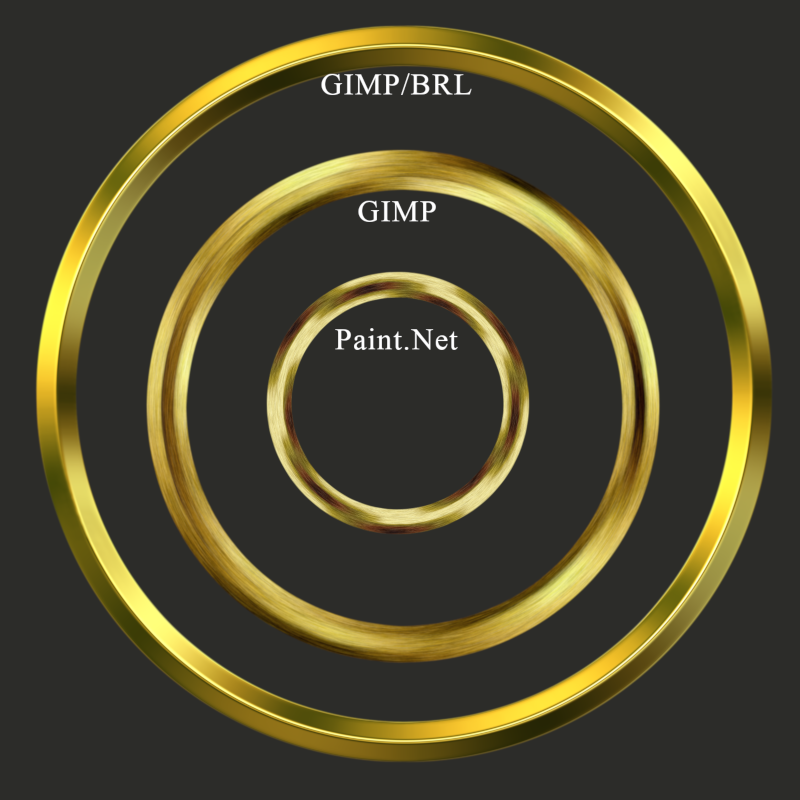
Three Gold Rings
The smallest ring, made in PdN, has always been a personal favorite because I've always liked the "brushed" gold look.
See my avatar.
When I started using GIMP it took me quite a while to figure out the GIMP process to achieve the same result but I'm pleased with it.
Then finally, there's the "BRL" method for the "shiny" look.
I used the "BRL" to update my signature.
I'm still learning the "BRL" thing. Haven't figured out how to use "E-Maps" yet.
Thanks to everyone here for the great discussions and help on this topic.

Image

_________________
Image


Top
 Post subject: Re: Paint.net
PostPosted: Fri Jul 13, 2018 10:44 am  (#52) 
Offline
GimpChat Member
User avatar

Joined: May 10, 2013
Posts: 1443
Location: Finland
I don't play much with metals or bevel but tried quickly
Canvas 700x700, Stipe shapepath, circle radius 300px, stroke path: 30px.

Script-fu Bevel reflect logo: run interactive.
Flat: Smoothing 22, Depth: 10.10
Reflection Color: Spherical Map: dark-gold-metal.png (from the spherical maps thread)
Specularity: 0.9

Brushed surface effect...kind of, looks real ugly but it was quick idea.

Filters: Noise, RGB noise. Red 0.20, Green 0.20, Blue 0.
Filters: Blur, Motion blur, radial. Center x: 350, y: 350. Angle: 2.
Filters: Enhance, sharpen: 44.
(auto-crop)

Image

I like the additional render plugins in paint.net, and the halftone by Ed Harvey.


Top
 Post subject: Re: Paint.net
PostPosted: Fri Jul 13, 2018 12:00 pm  (#53) 
Offline
GimpChat Member
User avatar

Joined: May 13, 2018
Posts: 270
Location: Oregon, USA
@nidhogg: Give yourself a little credit. That looks pretty good.

_________________
Image


Top
 Post subject: Re: Paint.net
PostPosted: Fri Jul 13, 2018 12:59 pm  (#54) 
Offline
GimpChat Member
User avatar

Joined: May 10, 2013
Posts: 1443
Location: Finland
Thanks Peter, your paint.net ring is real nice.
I've always done bevels in GImp with the layerfx.py, as it has more surface contour options like half-ring, and the live preview makes things easier.
Don't seem to get round shape with bevel reflect logo, but you get nice outcomes using custom spherical maps.
There's also the selection bevel plugin by dd.


Top
 Post subject: Re: Paint.net
PostPosted: Fri Jul 13, 2018 4:06 pm  (#55) 
Offline
Global Moderator
User avatar

Joined: Oct 02, 2014
Posts: 5095
Location: Sydney Australia
Peter - there are many variable options with BRL (e.g contour type, depth smoothing, e-maps, gradient style etc) and it took me quite a while to work out my preferred options for any given output. Even now after four years using it I still get surprises!

I posted this over at GL yesterday - it uses some new gold gradients I made up originally for curve emphasis in a spiral outcome -


Attachments:
olympic_rings_gold.png
olympic_rings_gold.png [ 1.54 MiB | Viewed 3564 times ]

_________________
Image

Respect should be offered freely but hard earned
Top
 Post subject: Re: Paint.net
PostPosted: Fri Jul 13, 2018 4:34 pm  (#56) 
Offline
GimpChat Member
User avatar

Joined: May 13, 2018
Posts: 270
Location: Oregon, USA
@oldmangrumpy
WOW!!! This absolutely beautiful.
I'm super impressed. :paint
What a terrific job you did.
This image shows me, I've got a lot to learn.

_________________
Image


Top
 Post subject: Re: Paint.net
PostPosted: Fri Jul 13, 2018 7:29 pm  (#57) 
Offline
GimpChat Member
User avatar

Joined: Apr 15, 2017
Posts: 1837
A quick gold ring using BRL.

Attachment:
goldring.jpg
goldring.jpg [ 124.42 KiB | Viewed 3554 times ]


Top
 Post subject: Re: Paint.net
PostPosted: Sat Jul 14, 2018 12:22 am  (#58) 
Offline
GimpChat Member
User avatar

Joined: May 13, 2018
Posts: 270
Location: Oregon, USA
@racer-x
That's pretty good, I like it.

_________________
Image


Top
 Post subject: Re: Paint.net
PostPosted: Sat Jul 14, 2018 12:44 am  (#59) 
Offline
GimpChat Member
User avatar

Joined: May 13, 2018
Posts: 270
Location: Oregon, USA
Here's my personally styled ring that I've made for years with a brushed gold look and Elvin font.
This one's made in PdN. It is sooo much easier to do circular lettering in PdN.
The final image was completed in GIMP and posted in GIMP-ART.
Hope you like it.
Image

_________________
Image


Top
 Post subject: Re: Paint.net
PostPosted: Sat Jul 14, 2018 1:37 am  (#60) 
Offline
Global Moderator
User avatar

Joined: Oct 02, 2014
Posts: 5095
Location: Sydney Australia
Peter - are you aware of Ofnuts excellent path tools (plugins) for GIMP, one of which facilitates text along a path (and the path can be circular). If not and you want to check it out here is a link. Also a quick example of text on a golden glass ring is below.

https://sourceforge.net/projects/gimp-p ... s/scripts/


Attachments:
Peter_circ_text.png
Peter_circ_text.png [ 844.4 KiB | Viewed 3537 times ]

_________________
Image

Respect should be offered freely but hard earned
Top
Post new topic Reply to topic  [ 86 posts ]  Go to page Previous  1, 2, 3, 4, 5  Next

All times are UTC - 5 hours [ DST ]


* Login  


Powered by phpBB3 © phpBB Group