It is currently Wed Aug 26, 2026 2:24 pm


All times are UTC - 5 hours [ DST ]


Post new topic Reply to topic  [ 15 posts ] 
Author Message
 Post subject: Importing/reading ASL files?
PostPosted: Sun Dec 09, 2018 12:15 am  (#1) 
Offline
GimpChat Member

Joined: Nov 14, 2018
Posts: 45
How do I get GIMP 2.10.8 to import or read an ASL (Photoshop Style) file? I found some pattern files I want to use, but they're in ASL format. Barring that, can someone point me to high-quality, realistic gold (metallic) patterns I can download, or as a last resort, a tutorial on how to create my own?


Share on Facebook Share on Twitter Share on Orkut Share on Digg Share on MySpace Share on Delicious Share on Technorati
Top
 Post subject: Re: Importing/reading ASL files?
PostPosted: Sun Dec 09, 2018 1:42 am  (#2) 
Offline
Administrator
User avatar

Joined: Aug 10, 2012
Posts: 14175
Location: Native to NYC living in Arizona, Gimp 2.8 - 3.0, Win 11 PC.
enxio27 wrote:
How do I get GIMP 2.10.8 to import or read an ASL (Photoshop Style) file? I found some pattern files I want to use, but they're in ASL format. Barring that, can someone point me to high-quality, realistic gold (metallic) patterns I can download, or as a last resort, a tutorial on how to create my own?

Would you like to post the ASL files in a zip folder,
or some similar type of folder?
I could put them in Photoshop,
to see if I can covert them into a pattern,
or something usable with Gimp.

_________________
Image
"A wise man learns more from a foolish question than a fool can learn from a wise answer"
Image


Top
 Post subject: Re: Importing/reading ASL files?
PostPosted: Sun Dec 09, 2018 10:24 am  (#3) 
Offline
GimpChat Member

Joined: Nov 14, 2018
Posts: 45
Wallace wrote:
Would you like to post the ASL files in a zip folder,
or some similar type of folder?
I could put them in Photoshop,
to see if I can covert them into a pattern,
or something usable with Gimp.

I appreciate your kind offer, although that's not a good long-term solution. Here are the links (which is where I got them) for the files I want to convert:

https://orig00.deviantart.net/25b8/f/20 ... ight3r.rar

https://orig00.deviantart.net/8646/f/20 ... mildak.zip

https://orig00.deviantart.net/8c31/f/20 ... jen_ni.rar

Is there no plugin or utility for GIMP to be able to read or convert these files?


Top
 Post subject: Re: Importing/reading ASL files?
PostPosted: Sun Dec 09, 2018 10:56 am  (#4) 
Offline
GimpChat Member
User avatar

Joined: May 10, 2013
Posts: 1436
Location: Finland
I haven't heard of such utility.
The best way I can think of, is to check out the detailed LayerFX settings of the ASL in PS.
And then create comparable settings with Gimp, they aren't that different.
A plugin (preferably) or a script can then be written, by someone who is able to do it.

I think a similar gold script exists for Gimp, like Mildak or Jen, but I can't seem to find it.
2 of the ASL files included lots of styles btw. Jen had 70 and the GhostFight3r ASL 35 or so.

Image


Top
 Post subject: Re: Importing/reading ASL files?
PostPosted: Sun Dec 09, 2018 12:53 pm  (#5) 
Offline
Administrator
User avatar

Joined: Aug 10, 2012
Posts: 14175
Location: Native to NYC living in Arizona, Gimp 2.8 - 3.0, Win 11 PC.
Nidhogg is correct,
about there not being a way of handling ASL file within Gimp.
There are many styles included,
within the ASL file you provided.

However,
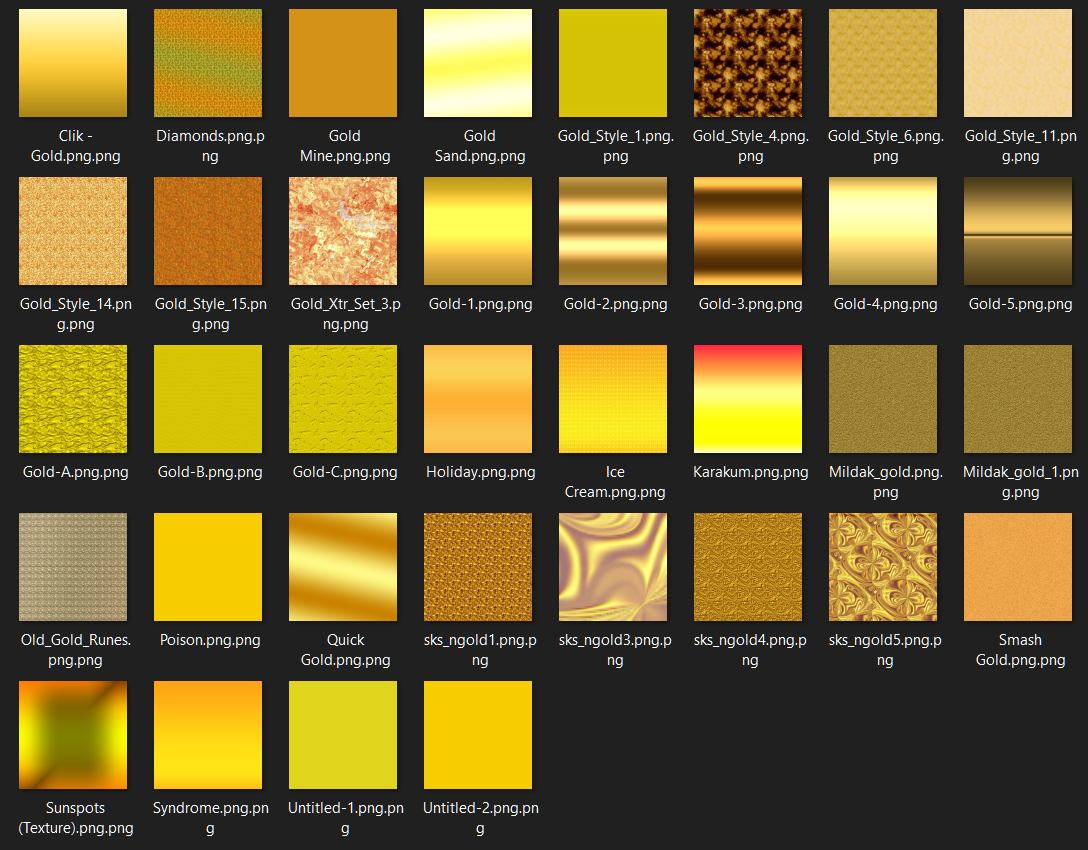
I went through some of them and put these PNG image together.
Of some of the styles.

Image

Attachment:
PS_Styles_Gold.zip [8.15 MiB]
Downloaded 800 times


If you can point out some of the styles,
that your most interested in and post a screenshot, or something.

I probably can put them together for you,
as PNG images.

_________________
Image
"A wise man learns more from a foolish question than a fool can learn from a wise answer"
Image


Top
 Post subject: Re: Importing/reading ASL files?
PostPosted: Sun Dec 09, 2018 1:47 pm  (#6) 
Offline
GimpChat Member

Joined: Nov 14, 2018
Posts: 45
Nidhogg wrote:
I haven't heard of such utility.
The best way I can think of, is to check out the detailed LayerFX settings of the ASL in PS.
And then create comparable settings with Gimp, they aren't that different.
A plugin (preferably) or a script can then be written, by someone who is able to do it.

That's what I'm hoping. I'm new to GIMP and have no access to PS, so I certainly don't have the know-how to do it.


Top
 Post subject: Re: Importing/reading ASL files?
PostPosted: Sun Dec 09, 2018 2:08 pm  (#7) 
Offline
GimpChat Member
User avatar

Joined: May 10, 2013
Posts: 1436
Location: Finland
@enxio27, I have done only basic scripting but I will investigate and try out something. Will get back to this topic asap.
Thanks for the textures Wallace :bigthup


Top
 Post subject: Re: Importing/reading ASL files?
PostPosted: Sun Dec 09, 2018 7:31 pm  (#8) 
Offline
GimpChat Member

Joined: Nov 14, 2018
Posts: 45
Nidhogg wrote:
@enxio27, I have done only basic scripting but I will investigate and try out something. Will get back to this topic asap.

I appreciate your help with this! I'm sure others will benefit, as well.

The project that triggered this discussion is this: I have a black brush image of a Christmas ornament (simple ball with collar and hanging loop). I plan to use the ball part as a mask with several background papers to make the ornaments, but I want to make the collar and hanging loop a shiny gold color, like you would see on a real ornament. I was hoping to do that with a pattern fill, which is why I was hoping to convert the ASL files to PAT files.

I just went through the tutorial at https://www.youtube.com/watch?v=AnpOawbt1HQ , but so far I only wrote down the steps; I haven't actually tried it on my image yet.


Top
 Post subject: Re: Importing/reading ASL files?
PostPosted: Sun Dec 09, 2018 8:12 pm  (#9) 
Offline
Administrator
User avatar

Joined: Aug 10, 2012
Posts: 14175
Location: Native to NYC living in Arizona, Gimp 2.8 - 3.0, Win 11 PC.
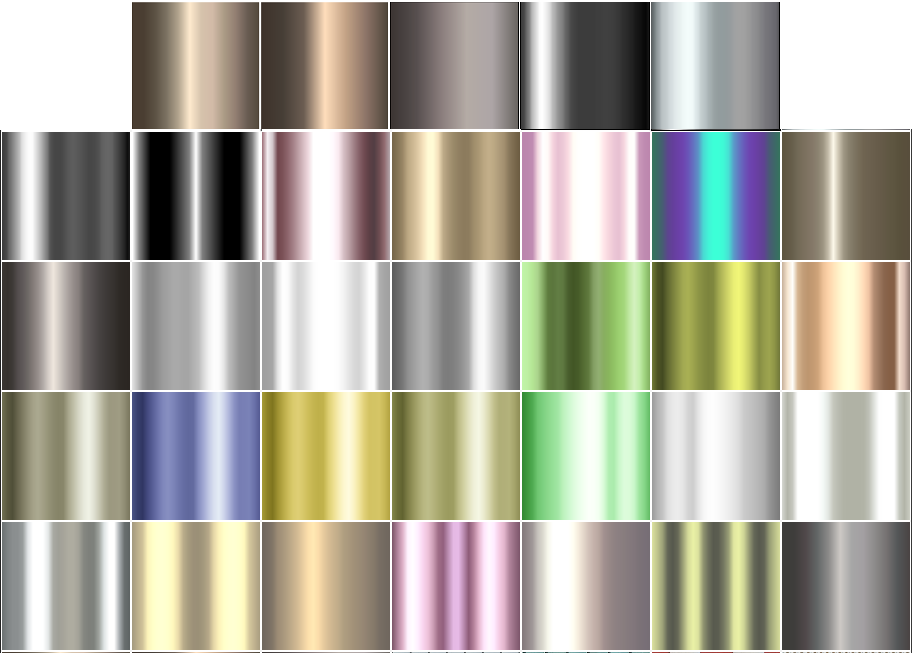
You could try using gradients.
I have a few metallic looking one,
that you might be able to use.

Once a gradient has been put down.
It's color can be changes however you like.

Image
Attachment:
Metallic_Gradients.7z [116.97 KiB]
Downloaded 438 times

_________________
Image
"A wise man learns more from a foolish question than a fool can learn from a wise answer"
Image


Top
 Post subject: Re: Importing/reading ASL files?
PostPosted: Sun Dec 09, 2018 8:53 pm  (#10) 
Offline
GimpChat Member

Joined: Nov 14, 2018
Posts: 45
Wallace wrote:
You could try using gradients.
I have a few metallic looking one,
that you might be able to use.

Thanks! I see one that I think is just what I'm looking for.

I tried the tutorial I mentioned earlier, but it didn't work, probably because I started with an all-black image. I've spent the past couple of hours beating my head against various tutorials on how to create golden textures and patterns, but I've gotten nowhere (mainly because I'm just too new at this, and I don't even know where to start with them).


Top
 Post subject: Re: Importing/reading ASL files?
PostPosted: Sun Dec 09, 2018 9:03 pm  (#11) 
Offline
Administrator
User avatar

Joined: Aug 10, 2012
Posts: 14175
Location: Native to NYC living in Arizona, Gimp 2.8 - 3.0, Win 11 PC.
enxio27 wrote:
Wallace wrote:
You could try using gradients.
I have a few metallic looking one,
that you might be able to use.

Thanks! I see one that I think is just what I'm looking for.

I tried the tutorial I mentioned earlier, but it didn't work, probably because I started with an all-black image. I've spent the past couple of hours beating my head against various tutorials on how to create golden textures and patterns, but I've gotten nowhere (mainly because I'm just too new at this, and I don't even know where to start with them).

If you know how to use the Blend/Gradient Tool.
:blend
You should be able to get very close to a good metal look.

Note:
Be sure to download the 7zip folder I posted,
with all the gradient files,
because I changes the attached folder,
From a Windows Zip,
to a 7zip,
that includes a few more gradient file then the windows zip did.


_________________
Image
"A wise man learns more from a foolish question than a fool can learn from a wise answer"
Image


Top
 Post subject: Re: Importing/reading ASL files?
PostPosted: Mon Dec 10, 2018 1:30 am  (#12) 
Offline
GimpChat Member

Joined: Nov 14, 2018
Posts: 45
Wallace wrote:
If you know how to use the Blend/Gradient Tool.
:blend
You should be able to get very close to a good metal look.

I will have to play around with that tool some more.

Quote:
Be sure to download the 7zip folder I posted,
with all the gradient files,
because I changes the attached folder,

I did get the newer one, thanks!

Here's what I created with it:

Image


Top
 Post subject: Re: Importing/reading ASL files?
PostPosted: Mon Dec 10, 2018 2:02 am  (#13) 
Offline
Administrator
User avatar

Joined: Aug 10, 2012
Posts: 14175
Location: Native to NYC living in Arizona, Gimp 2.8 - 3.0, Win 11 PC.
enxio27 wrote:
Wallace wrote:
If you know how to use the Blend/Gradient Tool.
:blend
You should be able to get very close to a good metal look.

I will have to play around with that tool some more.

Quote:
Be sure to download the 7zip folder I posted,
with all the gradient files,
because I changes the attached folder,

I did get the newer one, thanks!

Here's what I created with it:

[ Image ]

That's pretty good.
:bigthup

Here's one I just made.
The metal part is of course one of the gradients I posted.
Matter of fact I think we used the same one.

Attachment:
Pink_Ornament.png
Pink_Ornament.png [ 177.52 KiB | Viewed 4672 times ]

_________________
Image
"A wise man learns more from a foolish question than a fool can learn from a wise answer"
Image


Top
 Post subject: Re: Importing/reading ASL files?
PostPosted: Mon Dec 10, 2018 11:13 am  (#14) 
Offline
GimpChat Member
User avatar

Joined: May 10, 2013
Posts: 1436
Location: Finland
Oh well it was about Christmas balls! And look at you, already made one, that's nice.
And surely better method than trying to mimic the ASL files for this kind of project. I thought it was about text.
Those layer styles are created mainly for text if I'm correct, though many can be used for other purposes as well.
I tried the Mildrek Gold and got decent result, but not really satisfied, the outer bevel does not work like in PS,
and changing the layer order did not help.

If you want more realism and depth to your balls, load your texture and use Filters/Map/Map object/Sphere.
Here's a good tutorial how to get them look correct.

viewtopic.php?f=23&t=6015

Let us see the chain next!

Most of the chains I remember in my Xmas balls are similar to those in sink plug, so I made a simple golden ball brush with 100 spacing.


Attachments:
Goldball.gbr [64.04 KiB]
Downloaded 110 times
Top
 Post subject: Re: Importing/reading ASL files?
PostPosted: Sat Feb 09, 2019 9:49 am  (#15) 
Offline
GimpChat Member

Joined: Nov 14, 2018
Posts: 45
I apologize--I didn't realize that anyone else had replied after I posted my result.

Nidhogg wrote:
Oh well it was about Christmas balls! And look at you, already made one, that's nice.
And surely better method than trying to mimic the ASL files for this kind of project. I thought it was about text.
Those layer styles are created mainly for text if I'm correct, though many can be used for other purposes as well.

From what I've seen, at least relating to digital scrapbooking, they're often used for special effects (such as photo tinting, etc.). I've finally figured out that the ASL files are comparable to our scripts, and now I know why GIMP couldn't import them.

Quote:
If you want more realism and depth to your balls, load your texture and use Filters/Map/Map object/Sphere.
Here's a good tutorial how to get them look correct.

viewtopic.php?f=23&t=6015

Thanks! I'll take a look.

Quote:
Let us see the chain next!

Most of the chains I remember in my Xmas balls are similar to those in sink plug, so I made a simple golden ball brush with 100 spacing.

Actually, I used a string instead of a chain for my page, but I'll have to give a chain a try. Here is the page I made:

Image


Top
Post new topic Reply to topic  [ 15 posts ] 

All times are UTC - 5 hours [ DST ]


* Login  


Powered by phpBB3 © phpBB Group