It is currently Thu Aug 27, 2026 6:40 pm


All times are UTC - 5 hours [ DST ]


Post new topic Reply to topic  [ 122 posts ]  Go to page Previous  1, 2, 3, 4, 5, 6, 7  Next
Author Message
 Post subject: Re: Peter's Gallery
PostPosted: Fri Jan 18, 2019 8:03 am  (#61) 
Offline
GimpChat Member
User avatar

Joined: May 17, 2014
Posts: 1568
Thank you, Peter. I learned a lot from the tutorial and I love the effect :)

Attachment:
LittleFox.DreamSmooth.jpg
LittleFox.DreamSmooth.jpg [ 1.02 MiB | Viewed 2610 times ]

_________________
Ella's gallery - YouTube


Top
 Post subject: Re: Peter's Gallery
PostPosted: Fri Jan 18, 2019 12:52 pm  (#62) 
Offline
GimpChat Member
User avatar

Joined: May 13, 2018
Posts: 270
Location: Oregon, USA
Ella Louise:
Yes, my image does have an alpha channel.
Also: I absolutely love your fox image. You did a great job.

_________________
Image


Top
 Post subject: Re: Peter's Gallery
PostPosted: Fri Jan 18, 2019 1:30 pm  (#63) 
Offline
GimpChat Member
User avatar

Joined: May 17, 2014
Posts: 1568
Sorry your problem isn't solved. Maybe Issabella knows something about it.

Thank you for your comment, Peter.
I think this outcome is a bit better.
The foxes chest and the tree color are a bit the same.
Now I painted the tree with a brush with less opacity.

Attachment:
Fox.2.jpg
Fox.2.jpg [ 1.27 MiB | Viewed 2595 times ]

_________________
Ella's gallery - YouTube


Top
 Post subject: Re: Peter's Gallery
PostPosted: Fri Jan 18, 2019 9:57 pm  (#64) 
Offline
GimpChat Member
User avatar

Joined: May 13, 2018
Posts: 270
Location: Oregon, USA
Ella Louise:
As long as you're happy with the image, that's all that matters.
I think it's an OUTSTANDING picture.
I'm just glad that my video helped you.
It's the first video I've ever made so it wasn't perfect.
Keep it up, you're doing great.

_________________
Image


Top
 Post subject: Re: Peter's Gallery
PostPosted: Sat Jan 19, 2019 1:41 am  (#65) 
Offline
GimpChat Member

Joined: May 12, 2015
Posts: 4693
Peter, did you solve your Bevel Reflect Logo problem? If so you may need a copy that might have been altered slightly. I use 2.10.8 and the Bevel Reflect Logo has been working OK.

Also do you have the ML Bevel Reflect Plug_in? It is needed for the BRL to work.
Attachment:
bevel-reflect-logo.zip [9.05 KiB]
Downloaded 111 times

Attachment:
MLBevelReflect.zip [15.53 KiB]
Downloaded 97 times


Top
 Post subject: Re: Peter's Gallery
PostPosted: Sat Jan 19, 2019 3:41 am  (#66) 
Offline
GimpChat Member
User avatar

Joined: May 17, 2014
Posts: 1568
Still not completely satisfied with the fox, Peter. But indeed, your tutorial was very helpful, can't almost believe it was your first one. And I'll keep on practicing :)
I'll post my latest outcome here and then I let it be your beautiful thread. My other works I will post in "My Island" :)

Attachment:
Puppy.2.png
Puppy.2.png [ 2.83 MiB | Viewed 2552 times ]

_________________
Ella's gallery - YouTube


Top
 Post subject: Re: Peter's Gallery
PostPosted: Sat Jan 19, 2019 6:19 pm  (#67) 
Offline
GimpChat Member
User avatar

Joined: May 13, 2018
Posts: 270
Location: Oregon, USA
Pat625 wrote:
Peter, did you solve your Bevel Reflect Logo problem? If so you may need a copy that might have been altered slightly. I use 2.10.8 and the Bevel Reflect Logo has been working OK.

Also do you have the ML Bevel Reflect Plug_in? It is needed for the BRL to work.
Attachment:
bevel-reflect-logo.zip

Attachment:
MLBevelReflect.zip

I downloaded your plugins and no matter how many different ways I try,
I can't get them to work on the portable.
I'm totally frustrated with it.
I got BRL to work on my PC so I'll just have to use the PC if I
want to use that filter.
Thanks anyway Pat. I really appreciate your help.

_________________
Image


Last edited by Peter on Sat Jan 19, 2019 7:19 pm, edited 1 time in total.

Top
 Post subject: Re: Peter's Gallery
PostPosted: Sat Jan 19, 2019 6:22 pm  (#68) 
Offline
GimpChat Member
User avatar

Joined: May 13, 2018
Posts: 270
Location: Oregon, USA
Ella-Louise:
Absolutely love this pic of the King Charles Spaniel.
One of my favorite breed of dogs and this is a beautiful
picture indeed.

_________________
Image


Top
 Post subject: Re: Peter's Gallery
PostPosted: Sun Jan 20, 2019 4:20 pm  (#69) 
Offline
GimpChat Member
User avatar

Joined: May 13, 2018
Posts: 270
Location: Oregon, USA
Man With No Name

Image

_________________
Image


Top
 Post subject: Re: Peter's Gallery
PostPosted: Sun Jan 20, 2019 8:29 pm  (#70) 
Offline
Global Moderator
User avatar

Joined: Oct 02, 2014
Posts: 5026
Location: Sydney Australia
Peter - nice change of pace with this one and another case of great minds think alike ( ;) )

My image comes from a photo I took of the Sandeman vineyards on the Douro River in Portugal and uses Tin Trans's fabulous lined paths plug-in.


Attachments:
sandeman_lined_paths.png
sandeman_lined_paths.png [ 1.27 MiB | Viewed 2489 times ]

_________________
Image

Respect should be offered freely but hard earned
Top
 Post subject: Re: Peter's Gallery
PostPosted: Mon Jan 21, 2019 11:13 pm  (#71) 
Offline
GimpChat Member
User avatar

Joined: May 13, 2018
Posts: 270
Location: Oregon, USA
Interesting affects OMG.

_________________
Image


Top
 Post subject: Re: Peter's Gallery
PostPosted: Tue Jan 22, 2019 11:09 am  (#72) 
Offline
GimpChat Member
User avatar

Joined: Mar 01, 2014
Posts: 14154
Location: Spain, Aragón
Peter, I'm so sorry for my delay to see your thread and it's just now that I have seen your request. Yes, I have portable gimp. and I hope my attachment can help you. Please, let me know if so.
This has to be installed in scripts folder.


Attachments:
bevel logos-LOGOS&ALPHA_bevel-reflect-logo.zip [8.83 KiB]
Downloaded 105 times

_________________
Image

Gimp 2.10.30(samj) portable _ OS Windows 10 Home_ 64bits
Don’t be afraid to start over. It’s a new chance to rebuild what you want.
Top
 Post subject: Re: Peter's Gallery
PostPosted: Tue Jan 22, 2019 11:11 am  (#73) 
Offline
GimpChat Member
User avatar

Joined: Mar 01, 2014
Posts: 14154
Location: Spain, Aragón
I love your outcomes. Also the new ones posted of you all. :clap

_________________
Image

Gimp 2.10.30(samj) portable _ OS Windows 10 Home_ 64bits
Don’t be afraid to start over. It’s a new chance to rebuild what you want.


Top
 Post subject: Re: Peter's Gallery
PostPosted: Tue Jan 22, 2019 11:50 pm  (#74) 
Offline
GimpChat Member
User avatar

Joined: May 13, 2018
Posts: 270
Location: Oregon, USA
Issabella wrote:
Peter, I'm so sorry for my delay to see your thread and it's just now that I have seen your request. Yes, I have portable gimp. and I hope my attachment can help you. Please, let me know if so.
This has to be installed in scripts folder.

Issabella:
Thank you so much for this help. I put your attachment into my scripts folder and still no success.
I have the MLBevelReflect.exe in the plugins folder so I don't understand why it doesn't work.
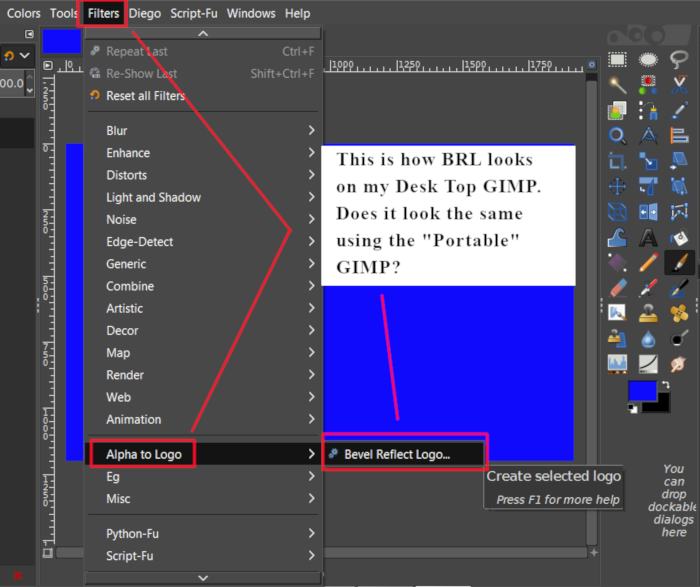
Here's a screenshot of my desktop GIMP.

Image

I'm assuming this is what I'm supposed to see on the portable version, yes?
Thanks again for helping me.

_________________
Image


Top
 Post subject: Re: Peter's Gallery
PostPosted: Wed Jan 23, 2019 1:55 am  (#75) 
Offline
GimpChat Member
User avatar

Joined: Mar 01, 2014
Posts: 14154
Location: Spain, Aragón
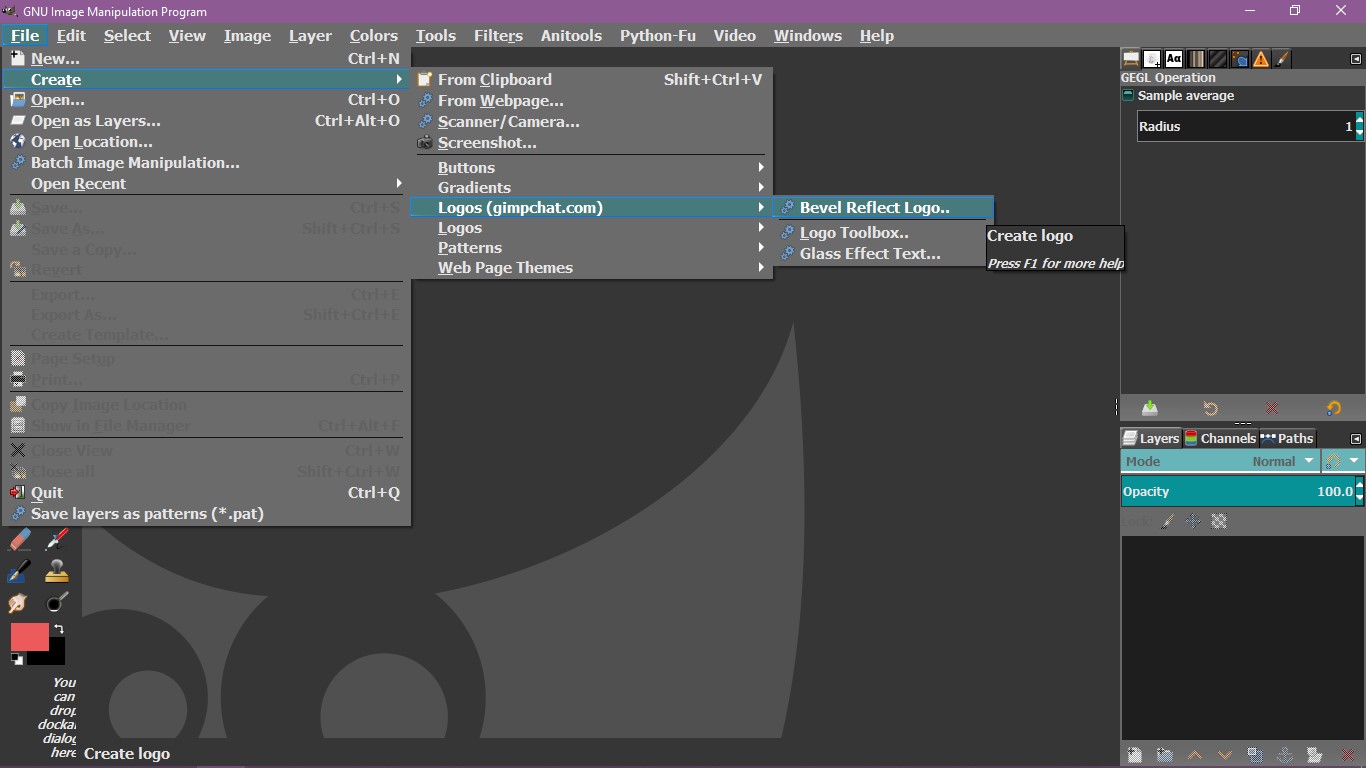
Peter, this is the layout that I have in Alpha to Logo.
This one is to apply BRL to any active selection. Have you done a selection to apply the bevel? Does it work?
The one for texts is found in File - Create - Logos (gimpchat)
Also, set the MLBavelReflect.py file into plug/ins folder, just in case. Remove yours (don't throw it) and try mine. Refresh everything and try it.
Also, I have this script in my list. I post it just in case.
Please, let me know.


Attachments:
bevel-reflect-logo.7z [8.22 KiB]
Downloaded 101 times
MLBevelReflect.zip [15.55 KiB]
Downloaded 130 times
Layout.jpg
Layout.jpg [ 65.4 KiB | Viewed 2721 times ]

_________________
Image

Gimp 2.10.30(samj) portable _ OS Windows 10 Home_ 64bits
Don’t be afraid to start over. It’s a new chance to rebuild what you want.
Top
 Post subject: Re: Peter's Gallery
PostPosted: Wed Jan 23, 2019 11:49 pm  (#76) 
Offline
GimpChat Member
User avatar

Joined: May 13, 2018
Posts: 270
Location: Oregon, USA
Isabella:
You said to "set the MLBavelReflect.py file into plug/ins folder."
I do not have a file by that name.
Still can't get anything to work.

_________________
Image


Top
 Post subject: Re: Peter's Gallery
PostPosted: Thu Jan 24, 2019 1:13 am  (#77) 
Peter I have my MLBevelReflect as an application and not as a .py. The location I have it is in: File> Create> Logos.

Image


Top
 Post subject: Re: Peter's Gallery
PostPosted: Thu Jan 24, 2019 2:01 am  (#78) 
Offline
GimpChat Member
User avatar

Joined: Mar 01, 2014
Posts: 14154
Location: Spain, Aragón
Peter, I have MLBevelReflect file in plug-ins folder and it works all right in my gimp.
My excuses if I explained wrong the name "file" perhaps I should have said item. Anyway, I have it installed in that folder.
Pocholo, I have the one you describe for texts. But I think that Peter is asking for bevel any active selection not texts.


Attachments:
MLBevelReflect_installed in plug-ins.jpg
MLBevelReflect_installed in plug-ins.jpg [ 29.8 KiB | Viewed 2697 times ]

_________________
Image

Gimp 2.10.30(samj) portable _ OS Windows 10 Home_ 64bits
Don’t be afraid to start over. It’s a new chance to rebuild what you want.
Top
 Post subject: Re: Peter's Gallery
PostPosted: Fri Jan 25, 2019 10:29 am  (#79) 
Offline
GimpChat Member
User avatar

Joined: Mar 01, 2014
Posts: 14154
Location: Spain, Aragón
Peter, have you tested if your selection is converted to BRL alright?
I post these results following your tutorial. :tyspin


Attachments:
Yellow roses_Peter tutorial_Issa.jpg
Yellow roses_Peter tutorial_Issa.jpg [ 150.69 KiB | Viewed 2681 times ]
pink-peonies-and-white-jasmine-basket-Peter_Tut_Issa.jpg
pink-peonies-and-white-jasmine-basket-Peter_Tut_Issa.jpg [ 691.74 KiB | Viewed 2681 times ]

_________________
Image

Gimp 2.10.30(samj) portable _ OS Windows 10 Home_ 64bits
Don’t be afraid to start over. It’s a new chance to rebuild what you want.
Top
 Post subject: Re: Peter's Gallery
PostPosted: Fri Jan 25, 2019 7:31 pm  (#80) 
Offline
GimpChat Member
User avatar

Joined: May 13, 2018
Posts: 270
Location: Oregon, USA
Issabella: To answer your question, yes my selection is converted to BRL on my desk top computer, but the BRL filter does not work at all on my portable version of GIMP. I think I'm going to have to just give up. No matter what I try on the portable version, it just won't work.

So moving on... the pictures of the flowers you posted are ABSOLUTELY BEAUTIFUL. I really really like them. They're just stunning. You did a great job. :clap :paint :bump

_________________
Image


Top
Post new topic Reply to topic  [ 122 posts ]  Go to page Previous  1, 2, 3, 4, 5, 6, 7  Next

All times are UTC - 5 hours [ DST ]


* Login  


Powered by phpBB3 © phpBB Group