It is currently Thu Sep 24, 2026 12:44 am


All times are UTC - 5 hours [ DST ]


Post new topic Reply to topic  [ 14 posts ] 
Author Message
 Post subject: Another problem photo
PostPosted: Thu Apr 18, 2019 3:41 pm  (#1) 
Offline
New Member

Joined: Apr 18, 2019
Posts: 3
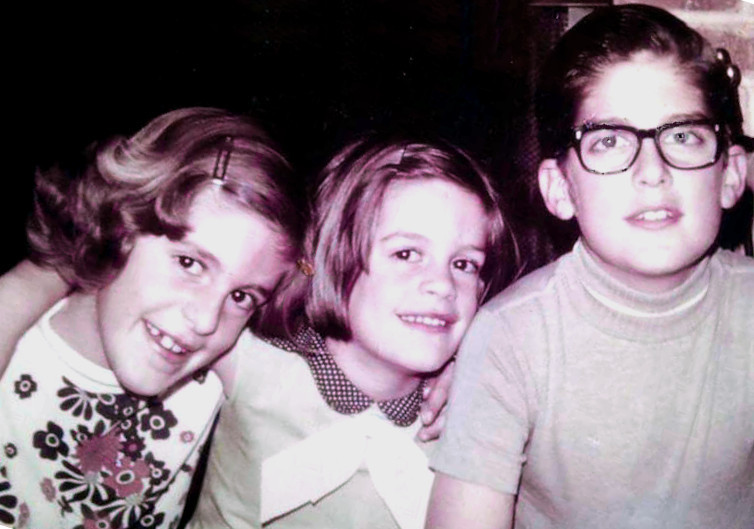
Here is a photo I've tried to improve with little success. I generally resort to curves to fix color problems, but this one I can't seem to get right; it's as if there's not enough color information in the picture.


Attachments:
Jane Margaret David.jpg
Jane Margaret David.jpg [ 60.24 KiB | Viewed 15529 times ]
Share on Facebook Share on Twitter Share on Orkut Share on Digg Share on MySpace Share on Delicious Share on Technorati
Top
 Post subject: Re: Another problem photo
PostPosted: Fri Apr 19, 2019 1:54 am  (#2) 
Offline
GimpChat Member
User avatar

Joined: Mar 28, 2016
Posts: 312
Location: Netherlands
A bit difficult to edit, maybe it can be improved:
Image
This time I used:
GIMP>Colors>Color Balance
G'MIC>Colors>Mixer [PCA]
G'MIC>Colors>Color Grading
G'MIC>Testing>Garagecoder>LMS Adjustment
G'MIC>Colors>Curves
G'MIC>Colors>Saturation EQ
G'MIC>Details>Equalize Local Histograms


Top
 Post subject: Re: Another problem photo
PostPosted: Fri Apr 19, 2019 8:15 am  (#3) 
Offline
New Member

Joined: Apr 18, 2019
Posts: 3
iarga wrote:
A bit difficult to edit, maybe it can be improved:


Better than I've been able to do!


Top
 Post subject: Re: Another problem photo
PostPosted: Fri Apr 19, 2019 5:17 pm  (#4) 
Offline
GimpChat Member

Joined: May 12, 2015
Posts: 4693
I used white balance then fill rotate to straighten out the picture. Did not have time to work with reflections red eyes or glare.


Attachments:
Pic for Tomc.jpg
Pic for Tomc.jpg [ 450.79 KiB | Viewed 15402 times ]
Top
 Post subject: Re: Another problem photo
PostPosted: Sat Apr 20, 2019 9:03 pm  (#5) 
Offline
GimpChat Member
User avatar

Joined: Jul 04, 2015
Posts: 256
I took iarga's version and worked a little further. Forgot to keep track of my changes. Sorry. :oops:


Attachments:
mytry.jpg
mytry.jpg [ 728.95 KiB | Viewed 15362 times ]
Top
 Post subject: Re: Another problem photo
PostPosted: Sat Apr 20, 2019 9:16 pm  (#6) 
Offline
GimpChat Member
User avatar

Joined: Jul 04, 2015
Posts: 256
A bit of wavelet denoise and some small healing tool work.


Attachments:
mytry.jpg
mytry.jpg [ 701.49 KiB | Viewed 15362 times ]
Top
 Post subject: Re: Another problem photo
PostPosted: Sat Apr 20, 2019 9:50 pm  (#7) 
Offline
GimpChat Member
User avatar

Joined: Jul 04, 2015
Posts: 256
Last one, I promise. Hue and Saturation brought out more color in the skin. Not so washed out by the flash.


Attachments:
mytry.jpg
mytry.jpg [ 749.66 KiB | Viewed 15357 times ]
Top
 Post subject: Re: Another problem photo
PostPosted: Sat Apr 20, 2019 10:49 pm  (#8) 
Offline
Global Moderator
User avatar

Joined: Apr 01, 2012
Posts: 8471
Location: On the other side of your screen
I couldn't be bothered straightening it up like others did beautifully.
Was a challenge just to get the colour right. I hope I did anyhow.
Image
Tried it again straightening and cropping this time
Image

_________________
Image
Free Fun Photo Editing & resources
Poems from the Lord
Gimp Newby
Gimp version 3.2.4 and GMIC-Qt 4.0.2 OS :- Windows 10 Home 64


Last edited by sallyanne on Wed Nov 27, 2019 8:02 am, edited 1 time in total.

Top
 Post subject: Re: Another problem photo
PostPosted: Sun Apr 21, 2019 12:17 am  (#9) 
Offline
New Member

Joined: Apr 18, 2019
Posts: 3
steven8 wrote:
A bit of wavelet denoise and some small healing tool work.


I like this one. The most frustrating thing is getting the red right for the skin tones without making the kids look like they've just run a 5K. Yes, clearly the flash is a problem, and this is definitely derived from film (these people are all middle-aged now).


Top
 Post subject: Re: Another problem photo
PostPosted: Mon Apr 22, 2019 4:29 am  (#10) 
Offline
GimpChat Member
User avatar

Joined: May 17, 2014
Posts: 1571
Edit: Removed my outcome. Didn't like it myself :mrgreen:

_________________
Ella's gallery - YouTube


Last edited by Ella on Fri Apr 26, 2019 2:46 am, edited 1 time in total.

Top
 Post subject: Re: Another problem photo
PostPosted: Thu Apr 25, 2019 6:19 am  (#11) 
Offline
GimpChat Member

Joined: Dec 19, 2018
Posts: 164
Is there any known technique for dealing with this kind of image improvement?
Some methodology that defines a better approximation, sequence of steps, etc.

I think if there was a more scientific approach to the treatment of these types of images the editing would be less labor intensive (I'm not talking about restoration, which aims to remove blemishes, ripped parts of the photos, etc).

Iarga exhibited a number of used G'MICs filters, even tried it, but I had no idea how to use them, it would take more time to learn to use those filters than to finish editing this image. :roll:

Without a methodology, just exploring possibilities for now was the best I could get.
Attachment:
Jane Margaret DavidTry02.jpg
Jane Margaret DavidTry02.jpg [ 168.93 KiB | Viewed 10329 times ]


Below, original image - Post #1
Image


Top
 Post subject: Re: Another problem photo
PostPosted: Thu Apr 25, 2019 4:04 pm  (#12) 
Offline
GimpChat Member

Joined: May 12, 2015
Posts: 4693
Krikor, you have done a beautiful job! The coloring of the kid's faces is the best and clothing colors also. If I may ask, what did you do to get such a fantastic result? I have several old photos with a heavy red cast that I cannot do a very good job fixing. Maybe your method would work. I am willing to try most anything.


Top
 Post subject: Re: Another problem photo
PostPosted: Thu Sep 19, 2019 8:25 pm  (#13) 
Offline
GimpChat Member

Joined: Nov 14, 2018
Posts: 45
CtrlAltDel wrote:
The filters were from Fx-Foundry. In particular:

Auto contrast correction
Lasm's Lab Wow
Eg Separate Lights and Shadows
Diffusion Filter


I'm not seeing these in Fx-Foundry. Help?


Top
 Post subject: Re: Another problem photo
PostPosted: Thu Sep 19, 2019 10:49 pm  (#14) 
Offline
GimpChat Member
User avatar

Joined: Oct 10, 2018
Posts: 191
Location: Charlottesville Virginia
Just to clarify: Do you have any FX-Foundry plugins available in your setup? If you do, there should be a separate menu item at the top of the work area [File, Edit, Select, View Image ... etc.] If you don't see the menu item, you may not have any FX-Foundry scripts at all.

They are still available on the web, but the FX-Foundry scripts collection was put together for earlier versions of GIMP. Many of those scripts will not work "out of the box" in contemporary versions. Many have been rewritten (some for python instead of scheme) under other names and are no longer under an FX-Foundry listing.

Paul Sherman maintains a number of updated versions of many older GIMP SCM scripts at gimphelp.org.


Top
Post new topic Reply to topic  [ 14 posts ] 

All times are UTC - 5 hours [ DST ]


* Login  


Powered by phpBB3 © phpBB Group