It is currently Thu Sep 24, 2026 6:42 am


All times are UTC - 5 hours [ DST ]


Post new topic Reply to topic  [ 1444 posts ]  Go to page Previous  1 ... 68, 69, 70, 71, 72, 73  Next
Author Message
 Post subject: Re: For lovers of photography
PostPosted: Tue Nov 12, 2019 11:35 am  (#1401) 
Offline
GimpChat Member
User avatar

Joined: Mar 01, 2014
Posts: 14198
Location: Spain, Aragón
A current Pyrenees view. :)


Attachments:
5298f372-9f6f-4337-a7b0-32dd47e99630.JPG
5298f372-9f6f-4337-a7b0-32dd47e99630.JPG [ 763.84 KiB | Viewed 16913 times ]

_________________
Image

Gimp 2.10.36 (samj) portable _ OS Windows 10 Home_ 64bits
Don’t be afraid to start over. It’s a new chance to rebuild what you want.
Top
 Post subject: Re: For lovers of photography
PostPosted: Wed Nov 20, 2019 11:31 am  (#1402) 
Offline
GimpChat Member
User avatar

Joined: Nov 15, 2014
Posts: 875
Revision time! I have been looking through all of this thread and its partner of GL. I realise how much I have forgotten, including techniques I have used myself in the past.
One of the things I wanted to retry was a treatment of a black & white photograph.

I have "borrowed" one of Issabella's pictures.
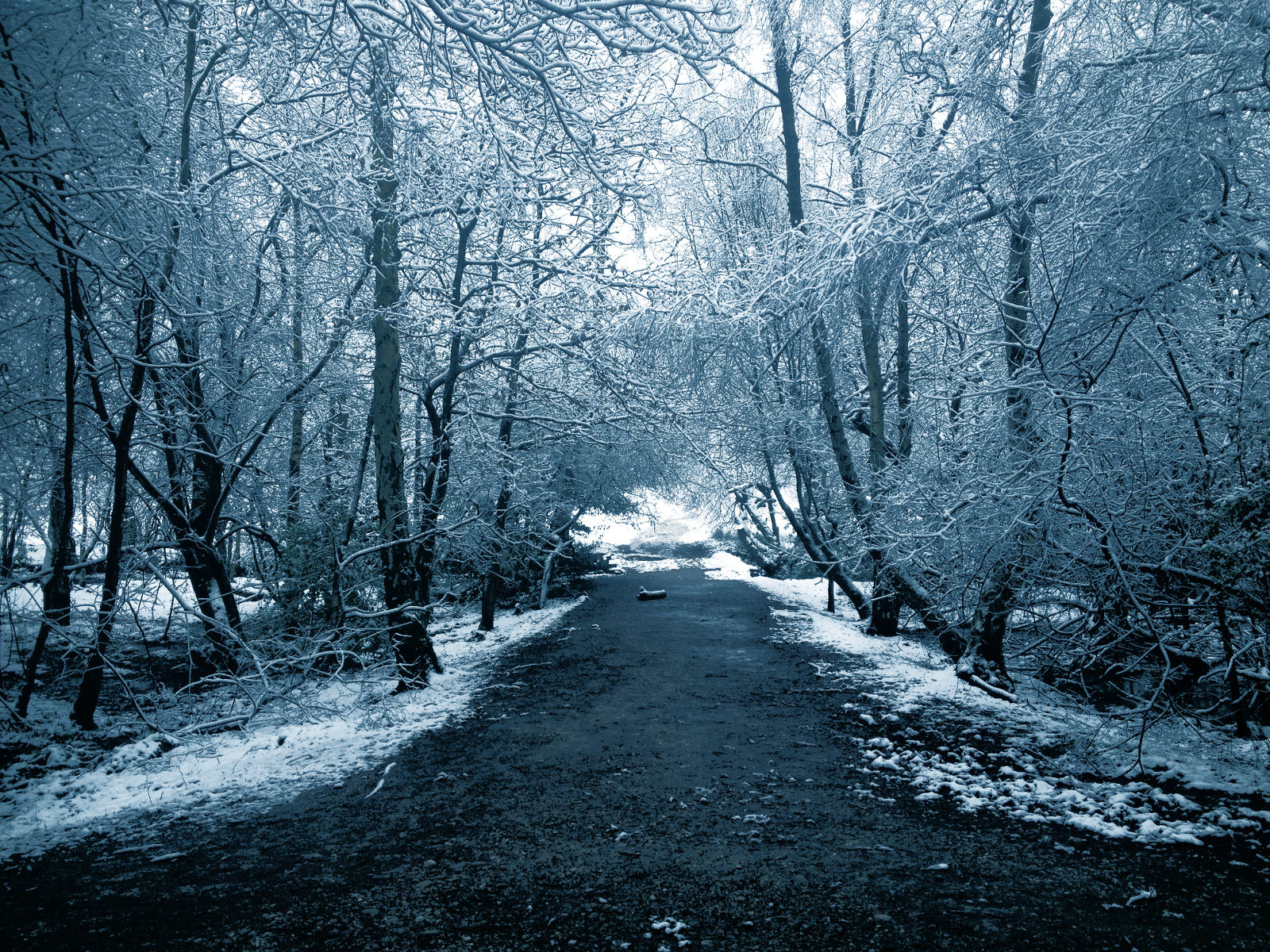
The photo was desaturated, duplicated, and the upper layer converted to a totally black & white image using Threshold. The opacity was reduced to a low value. Above this was put a blue layer in overlay mode, again at a low opacity.

david.


Attachments:
winter_forest.JPG
winter_forest.JPG [ 4.06 MiB | Viewed 15349 times ]
winter_forest_1.JPG
winter_forest_1.JPG [ 4.7 MiB | Viewed 15349 times ]
Top
 Post subject: Re: For lovers of photography
PostPosted: Thu Nov 21, 2019 1:40 am  (#1403) 
Offline
GimpChat Member
User avatar

Joined: Mar 01, 2014
Posts: 14198
Location: Spain, Aragón
David, I like your result a lot. I'll try your method because I find it to be very interesting. Thanks for sharing it. :paint :tyspin

_________________
Image

Gimp 2.10.36 (samj) portable _ OS Windows 10 Home_ 64bits
Don’t be afraid to start over. It’s a new chance to rebuild what you want.


Top
 Post subject: Re: For lovers of photography
PostPosted: Thu Nov 21, 2019 6:38 am  (#1404) 
Offline
GimpChat Member
User avatar

Joined: Nov 15, 2014
Posts: 875
Continuing the experiment on the last photograph.
The previous result was not what I required, because the blue overlay made the black parts of the image to become blue.

This time I desaturated the original and duplicated it. I added a new layer and filled it with blue and changed the mode to overlay. The top two layers (the blue overlay and the desaturated) were inverted. The blue layer became yellow and the desaturated, a negative. I merged these layers and inverted again. I duplicated the base layer and used threshold to make it totally black and white (default settings). The opacity of the threshold and coloured layers were then adjusted (reduced) to give the desired result.

Using this method, blacks remain totally black and white completely white - only the mid (grey) tones acquire a bluer cast.

I look forward to comments!

david.


Attachments:
winter_forest_4.jpg
winter_forest_4.jpg [ 4.57 MiB | Viewed 15000 times ]
Top
 Post subject: Re: For lovers of photography
PostPosted: Mon Nov 25, 2019 12:22 pm  (#1405) 
Offline
GimpChat Member

Joined: May 12, 2015
Posts: 4693
I like this last photo enhancement most. Thank you, David for sharing your methods with us.


Top
 Post subject: Re: For lovers of photography
PostPosted: Mon Nov 25, 2019 1:52 pm  (#1406) 
Offline
GimpChat Member
User avatar

Joined: Mar 01, 2014
Posts: 14198
Location: Spain, Aragón
David, I like both results. Perhaps this last bluish one gives more winter cold feeling. Well done! :bump

_________________
Image

Gimp 2.10.36 (samj) portable _ OS Windows 10 Home_ 64bits
Don’t be afraid to start over. It’s a new chance to rebuild what you want.


Top
 Post subject: Re: For lovers of photography
PostPosted: Wed Nov 27, 2019 9:30 am  (#1407) 
Offline
Global Moderator
User avatar

Joined: Apr 01, 2012
Posts: 8471
Location: On the other side of your screen
Thought I'd try something different.
I used mostly GMIC for this picture - turned it into a black and white photo.
Photo is too big to upload here - so I will just leave a Flickr link https://www.flickr.com/photos/115367823 ... 8/sizes/l/

_________________
Image
Free Fun Photo Editing & resources
Poems from the Lord
Gimp Newby
Gimp version 3.2.4 and GMIC-Qt 4.0.2 OS :- Windows 10 Home 64


Top
 Post subject: Re: For lovers of photography
PostPosted: Wed Nov 27, 2019 11:18 am  (#1408) 
Offline
GimpChat Member
User avatar

Joined: Nov 15, 2014
Posts: 875
sallyanne,
Nice photograph.

Issabella, Pat,

The method I used on the images (above) I have turned into a Python script - my first real one, and without stealing too much from anyone else!

To use the script first select a foreground colour, then run the script - desat_col_cast - which you will find at Python-Fu/Desat with Colour Cast...
When it has run, you can adjust the opacity of the Threshold and Colcast layers to change the "starkness" and the colour content.

One example with low colour content and high threshold setting.

david.

Edit: I have updated the script so that it can add a colour-cast to greyscale images.


Attachments:
desat_col_cast.zip [1.59 KiB]
Downloaded 305 times
forest.JPG
forest.JPG [ 992.07 KiB | Viewed 14194 times ]
forest_1.JPG
forest_1.JPG [ 1.21 MiB | Viewed 14194 times ]


Last edited by david on Sat Nov 30, 2019 9:19 am, edited 1 time in total.
Top
 Post subject: Re: For lovers of photography
PostPosted: Wed Nov 27, 2019 1:41 pm  (#1409) 
Offline
GimpChat Member
User avatar

Joined: Aug 16, 2012
Posts: 4271
Location: Göteborg, Sweden
Sallyanne: I've been hoping you'd post an image soon, I've missed them :)! Nice job on that photo.
David: Congrats on the plug-in, that's an achievement. The winter forest images came out great too. I like using layer opacity to tune an effect, so of course I had to try your method "manually" and it worked well. I used curves instead of threshold and used separate layers for black and white, but it's basically the same process. I liked how I could easily bring out the details in the photo with this method.
Image


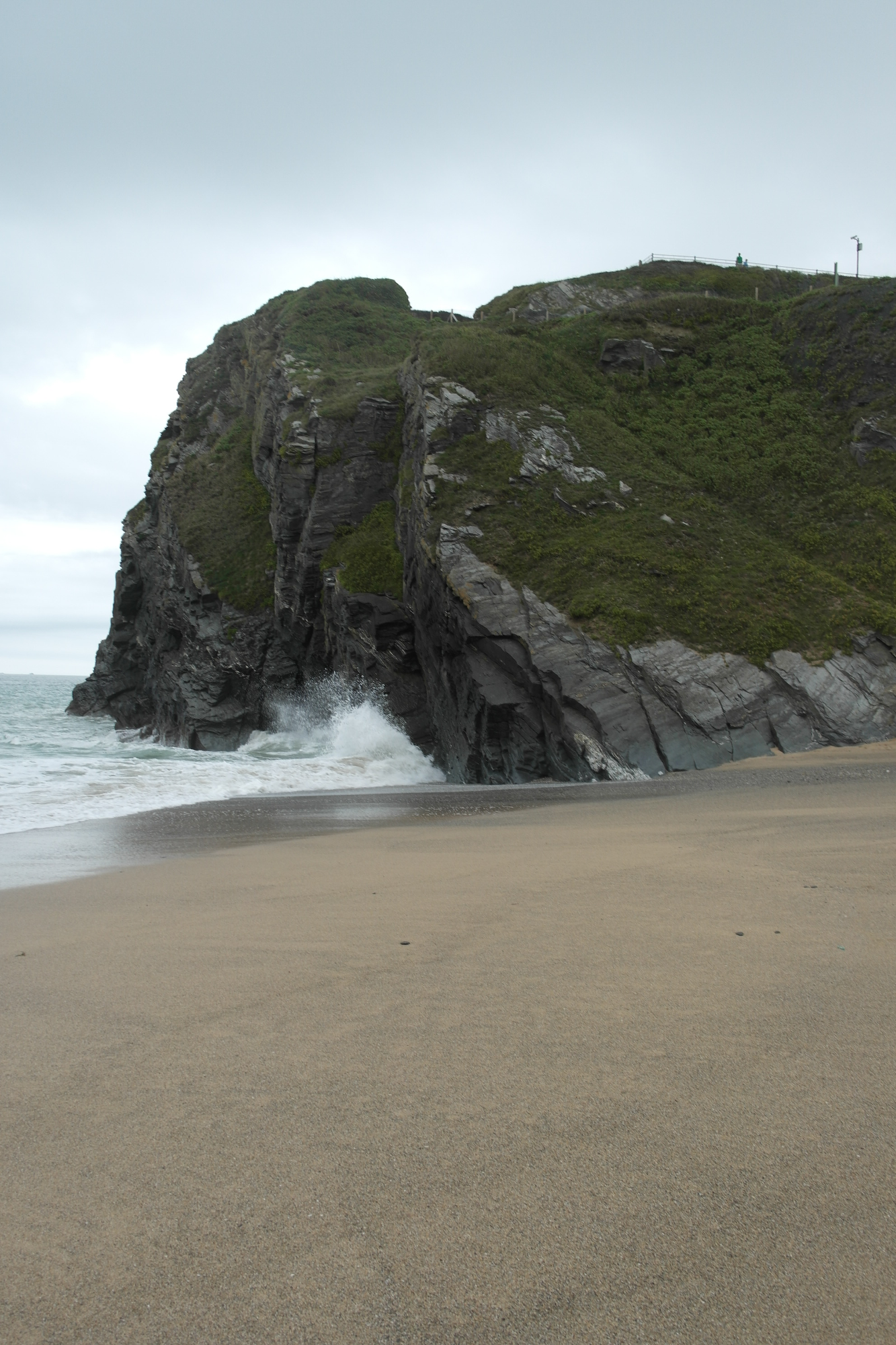
I'll make a new try to upload Cornwall photos - these are smaller than the last and they're jpg:s, but at least the ppi and colours haven't been messed with. I hope at least some people like playing with photos of water as much as I do :).
Image Image Image

_________________


Top
 Post subject: Re: For lovers of photography
PostPosted: Wed Nov 27, 2019 3:32 pm  (#1410) 
Offline
GimpChat Member
User avatar

Joined: Nov 15, 2014
Posts: 875
Here is a totally different result using the same script. This time with the desaturated layer turned off.

david.


Attachments:
forest_2.JPG
forest_2.JPG [ 1.28 MiB | Viewed 12258 times ]
Top
 Post subject: Re: For lovers of photography
PostPosted: Wed Nov 27, 2019 4:01 pm  (#1411) 
Offline
GimpChat Member
User avatar

Joined: Nov 15, 2014
Posts: 875
AnMal,

The first of your photos. I agree that water always deserves special treatment. Perhaps I have overdone it this time?

david.


Attachments:
2116_SurferCornwall2_1.jpg
2116_SurferCornwall2_1.jpg [ 303.86 KiB | Viewed 12382 times ]
Top
 Post subject: Re: For lovers of photography
PostPosted: Thu Nov 28, 2019 12:16 am  (#1412) 
Offline
Global Moderator
User avatar

Joined: Apr 01, 2012
Posts: 8471
Location: On the other side of your screen
Thanks guys.
I enjoy looking at all the lovely images on these pages but unfortunately many of them are too large for me to downlown and work on. They crash my gimp.
I have a larger computer now but it seems to have filled up faster and is much slower already.

_________________
Image
Free Fun Photo Editing & resources
Poems from the Lord
Gimp Newby
Gimp version 3.2.4 and GMIC-Qt 4.0.2 OS :- Windows 10 Home 64


Top
 Post subject: Re: For lovers of photography
PostPosted: Thu Nov 28, 2019 2:41 am  (#1413) 
Offline
Global Moderator
User avatar

Joined: Apr 01, 2012
Posts: 8471
Location: On the other side of your screen
Surf for Anmal. You did pretty good David. I think I gave mine too much texture but then I was trying to show all the ripples in the ocean,
Image

_________________
Image
Free Fun Photo Editing & resources
Poems from the Lord
Gimp Newby
Gimp version 3.2.4 and GMIC-Qt 4.0.2 OS :- Windows 10 Home 64


Top
 Post subject: Re: For lovers of photography
PostPosted: Thu Nov 28, 2019 2:48 am  (#1414) 
Offline
GimpChat Member
User avatar

Joined: Mar 01, 2014
Posts: 14198
Location: Spain, Aragón
Sallyanne, I like your enhancement on those nice AnMal's images.
Colour and sharpness are evident in your result. Well done!

_________________
Image

Gimp 2.10.36 (samj) portable _ OS Windows 10 Home_ 64bits
Don’t be afraid to start over. It’s a new chance to rebuild what you want.


Top
 Post subject: Re: For lovers of photography
PostPosted: Thu Nov 28, 2019 3:16 am  (#1415) 
Offline
GimpChat Member
User avatar

Joined: Nov 15, 2014
Posts: 875
sallyanne,

Great result on the surfer photograph. How did you get all the ripples to stand out so well?

david.


Top
 Post subject: Re: For lovers of photography
PostPosted: Thu Nov 28, 2019 4:22 am  (#1416) 
Offline
GimpChat Member
User avatar

Joined: Nov 15, 2014
Posts: 875
The other two Cornwall photographs.

david.


Attachments:
2116_SurferCornwall1_1.jpg
2116_SurferCornwall1_1.jpg [ 730.25 KiB | Viewed 12361 times ]
2116_BeachCornwall_1.jpg
2116_BeachCornwall_1.jpg [ 721.15 KiB | Viewed 12361 times ]
Top
 Post subject: Re: For lovers of photography
PostPosted: Thu Nov 28, 2019 4:46 am  (#1417) 
Offline
GimpChat Member
User avatar

Joined: Jan 20, 2013
Posts: 14835
Location: roma, italy
I like to partecipate me too in this game:
Attachment:
2116_BeachCornwall-dn1.png
2116_BeachCornwall-dn1.png [ 3.61 MiB | Viewed 12357 times ]

Attachment:
2116_SurferCornwall1-dn1.png
2116_SurferCornwall1-dn1.png [ 3.09 MiB | Viewed 12357 times ]

_________________
"Where am I ?"


Top
 Post subject: Re: For lovers of photography
PostPosted: Thu Nov 28, 2019 5:16 am  (#1418) 
Offline
GimpChat Member
User avatar

Joined: Jan 20, 2013
Posts: 14835
Location: roma, italy
The third one:

Attachment:
2116_SurferCornwall2-dn1.png
2116_SurferCornwall2-dn1.png [ 2.77 MiB | Viewed 12356 times ]

_________________
"Where am I ?"


Top
 Post subject: Re: For lovers of photography
PostPosted: Sat Nov 30, 2019 1:04 am  (#1419) 
Offline
Global Moderator
User avatar

Joined: Apr 01, 2012
Posts: 8471
Location: On the other side of your screen
Thank you Isabella
david wrote:
sallyanne,

Great result on the surfer photograph. How did you get all the ripples to stand out so well?
Thanks David, I mostly use the tools in the GMIC plugin under details. For colour photos I nearly always go to 'equalize local historgrams' now and then go through the different contrasts (usually only picking one) and if I feel it still needs I might go magic detail.
I think I played around with the colour with that one though as well under 'colours'


_________________
Image
Free Fun Photo Editing & resources
Poems from the Lord
Gimp Newby
Gimp version 3.2.4 and GMIC-Qt 4.0.2 OS :- Windows 10 Home 64


Top
 Post subject: Re: For lovers of photography
PostPosted: Sat Nov 30, 2019 8:56 am  (#1420) 
Offline
GimpChat Member
User avatar

Joined: Nov 15, 2014
Posts: 875
sallyanne,

Thanks for the information. I have attached an attempt of using your ideas on my previous photograph.
These photographs of AnnMal's also provided the opportunity to try out my new script - david1_lum_mask.py - for the first time on real pictures. While it is not ideal, I was surprised as to how well it worked.
Of course, all credit must go to Tim Tran for coding my original idea in a form which even I could understand! That made it possible for me to change it to have ten channels to be more selective.

david.


Attachments:
2116_SurferCornwall2_2.jpg
2116_SurferCornwall2_2.jpg [ 354.5 KiB | Viewed 12870 times ]
Top
Post new topic Reply to topic  [ 1444 posts ]  Go to page Previous  1 ... 68, 69, 70, 71, 72, 73  Next

All times are UTC - 5 hours [ DST ]


cron

* Login  


Powered by phpBB3 © phpBB Group