It is currently Wed Aug 12, 2026 11:31 pm


All times are UTC - 5 hours [ DST ]


Post new topic Reply to topic  [ 10 posts ] 
Author Message
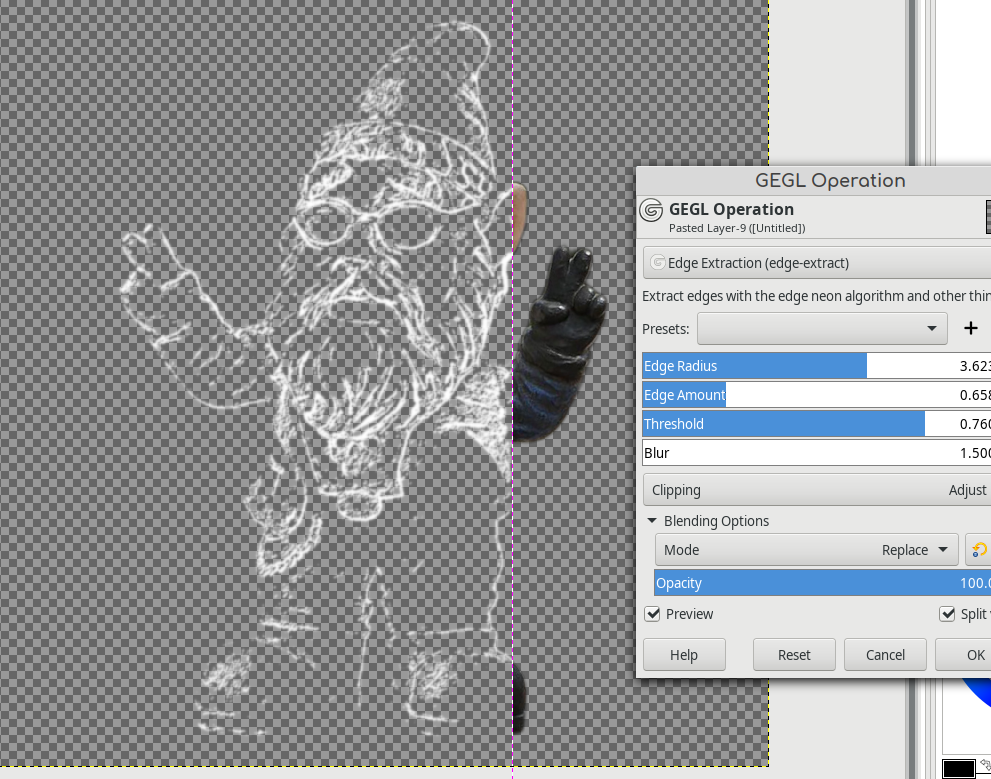
 Post subject: GEGL Edge Extract - Edge Neon's algorithm in transparent background
PostPosted: Tue May 17, 2022 11:39 am  (#1) 
Offline
GimpChat Member
User avatar

Joined: Oct 31, 2020
Posts: 2013
Unless I get help or learn more this is my final filter. There are things I know GEGL can do but I don't know how to make a GUI of it.
I hope everybody enjoyed my filters and I hope other GEGL authors show up and make a difference. There is a high chance that @MareroQ will chime in with a Windows build. So all you need to do is put the dll or .so files in /gegl-0.4/plug-ins

https://github.com/LinuxBeaver/gegl-edge-extract

Image


Share on Facebook Share on Twitter Share on Orkut Share on Digg Share on MySpace Share on Delicious Share on Technorati
Top
 Post subject: Re: GEGL Edge Extract - Edge Neon's algorithm in transparent backgroun
PostPosted: Tue May 17, 2022 12:17 pm  (#2) 
Offline
GimpChat Member
User avatar

Joined: Jan 13, 2011
Posts: 2648
Location: Poland
Version for Gimp-2.10.30 Win 64 Bit attached.
Place the file in Gegl plugins in a directory: ... \lib\gegl-0.4\

In menu Tools➤GEGL Operation➤Edge Extraction

Edit: an out-of-date attachment has been removed.

_________________
Image


Last edited by MareroQ on Fri Jul 08, 2022 8:47 am, edited 1 time in total.

Top
 Post subject: Re: GEGL Edge Extract - Edge Neon's algorithm in transparent backgroun
PostPosted: Tue May 17, 2022 2:50 pm  (#3) 
Offline
GimpChat Member
User avatar

Joined: Oct 31, 2020
Posts: 2013
I am experimenting with edge sobel and I realize it does a better job. there is a high chance I will swap edge-neon with edge-sobel.


Poor MareroQ will have to recompile for Windows.


Top
 Post subject: Re: GEGL Edge Extract - Edge Neon's algorithm in transparent backgroun
PostPosted: Tue May 17, 2022 3:13 pm  (#4) 
Offline
GimpChat Member
User avatar

Joined: Oct 31, 2020
Posts: 2013
Okay the algorithm has been swapped with edge sobel. This made a considerable difference in quality. If I knew more I could include all five edge detection algorithms gimp has.


Top
 Post subject: Re: GEGL Edge Extract - Edge Neon's algorithm in transparent backgroun
PostPosted: Tue May 17, 2022 4:39 pm  (#5) 
Offline
GimpChat Member
User avatar

Joined: Oct 31, 2020
Posts: 2013
MareroQ wrote:
Version for Gimp-2.10.30 Win 64 Bit attached.
Place the file in Gegl plugins in a directory: ... \lib\gegl-0.4\

In menu Tools➤GEGL Operation➤Edge Extraction

The filter had an update that changed the algorithm.


Top
 Post subject: Re: GEGL Edge Extract - Edge Neon's algorithm in transparent backgroun
PostPosted: Wed May 18, 2022 9:54 am  (#6) 
Offline
GimpChat Member
User avatar

Joined: Jan 13, 2011
Posts: 2648
Location: Poland
Why don't other users who can compile it want to do it? :hoh
New version in attachment.

Edit: an out-of-date attachment has been removed.

_________________
Image


Last edited by MareroQ on Fri Jul 08, 2022 8:48 am, edited 1 time in total.

Top
 Post subject: Re: GEGL Edge Extract - Edge Neon's algorithm in transparent backgroun
PostPosted: Wed May 18, 2022 4:17 pm  (#7) 
Offline
Script Coder
User avatar

Joined: Jun 22, 2010
Posts: 1171
Location: Here and there
MareroQ wrote:
Why don't other users who can compile it want to do it?


Perhaps because we haven't any idea how to go about compiling it.

Maybe you could write a guide to compiling GEGL plugins, then maybe you'll get some assistance.

Kevin


Top
 Post subject: Re: GEGL Edge Extract - Edge Neon's algorithm in transparent backgroun
PostPosted: Thu May 19, 2022 2:03 am  (#8) 
Offline
GimpChat Member
User avatar

Joined: Jan 13, 2011
Posts: 2648
Location: Poland
Hi Kevin.

The question was for those who can (i know how), but do not want to be active. :hehe
I do not want to persuade anyone to publish - I am only interested in the reason for such a decision (I know, but only for myself :mrgreen: ).
Sufficient information for compilation is provided in the file source link.

_________________
Image


Top
 Post subject: Re: GEGL Edge Extract - Edge Neon's algorithm in transparent backgroun
PostPosted: Wed Jul 06, 2022 11:13 pm  (#9) 
Offline
GimpChat Member
User avatar

Joined: Oct 31, 2020
Posts: 2013
Filter got an update and now has a blur that goes up to 6.5 (originally it stopped at 3) and it can change line colors. This goes good with blend modes like softlight and hslcolor.
Image


Top
 Post subject: Re: GEGL Edge Extract - Edge Neon's algorithm in transparent backgroun
PostPosted: Fri Jul 08, 2022 8:49 am  (#10) 
Offline
GimpChat Member
User avatar

Joined: Jan 13, 2011
Posts: 2648
Location: Poland
Update version for Gimp-2.10.30/32 Win 64 bit in attachment.


Attachments:
edgeextract_Win64bit_update.zip [35.85 KiB]
Downloaded 68 times

_________________
Image
Top
Post new topic Reply to topic  [ 10 posts ] 

All times are UTC - 5 hours [ DST ]


* Login  


Powered by phpBB3 © phpBB Group