It is currently Thu Nov 19, 2026 5:55 am


All times are UTC - 5 hours [ DST ]


Post new topic Reply to topic  [ 4 posts ] 
Author Message
 Post subject: GGR FILES
PostPosted: Sat Jun 11, 2022 2:38 am  (#1) 
Offline
GimpChat Member
User avatar

Joined: Apr 26, 2014
Posts: 3843
Location: belgium
i want to make gradients but,how can i convert a png or jpg to ggr
thanks in advance, gimper66


Share on Facebook Share on Twitter Share on Orkut Share on Digg Share on MySpace Share on Delicious Share on Technorati
Top
 Post subject: Re: GGR FILES
PostPosted: Sat Jun 11, 2022 2:44 am  (#2) 
Offline
Global Moderator
User avatar

Joined: Apr 01, 2012
Posts: 8508
Location: On the other side of your screen
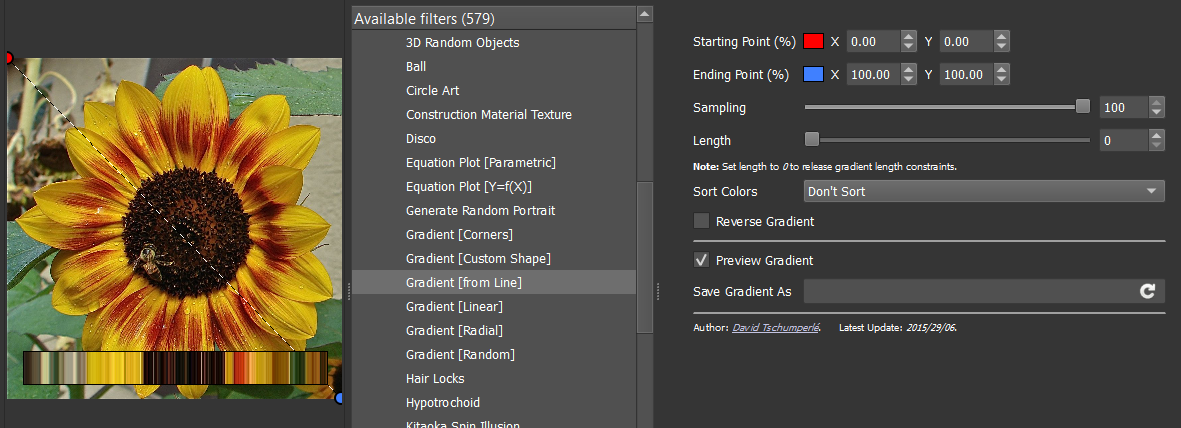
Do you have the plugin GMIC.
You can create a gradient from a line in there. Should be for any picture gimp can open.
Have a look under 'rendering'.

_________________
Image
Free Fun Photo Editing & resources
Poems from the Lord
Gimp Newby
Gimp version 3.2.8 and GMIC-Qt 4.0.2 OS :- Windows 10 Home 64


Top
 Post subject: Re: GGR FILES
PostPosted: Sat Jun 11, 2022 3:06 am  (#3) 
Offline
Global Moderator
User avatar

Joined: Apr 01, 2012
Posts: 8508
Location: On the other side of your screen
Image
You are given many options. Including start and end of your line. To show or not to show your gradient. To sort or not to sort your gradient among others. also to name it. Gradients from there should be added to your gimp gradients for now.

_________________
Image
Free Fun Photo Editing & resources
Poems from the Lord
Gimp Newby
Gimp version 3.2.8 and GMIC-Qt 4.0.2 OS :- Windows 10 Home 64


Top
 Post subject: Re: GGR FILES
PostPosted: Sat Jun 11, 2022 4:30 am  (#4) 
Offline
GimpChat Member

Joined: Mar 04, 2011
Posts: 2629
As sallyanne recommends, gmic is probably the best bet.

For completeness, it is possible with Gimp tools only.
Right click in Palettes dock and Import Palette
Right click in Palettes dock and Palette to Gradient

Example: Palettes & Gradient docks detached so you can see what is going on. https://i.imgur.com/WjJISnM.mp4


Top
Post new topic Reply to topic  [ 4 posts ] 

All times are UTC - 5 hours [ DST ]


* Login  


Powered by phpBB3 © phpBB Group