It is currently Mon Jun 15, 2026 12:15 pm


All times are UTC - 5 hours [ DST ]


Post new topic Reply to topic  [ 7 posts ] 
Author Message
 Post subject: Reusable Templates - a strategy for GIMP 3
PostPosted: Thu Dec 05, 2024 4:28 pm  (#1) 
Offline
GimpChat Member
User avatar

Joined: Oct 31, 2020
Posts: 2012
Automate in GIMP using templates

Attachment:
2024-12-05_16-13.png
2024-12-05_16-13.png [ 952.28 KiB | Viewed 3697 times ]


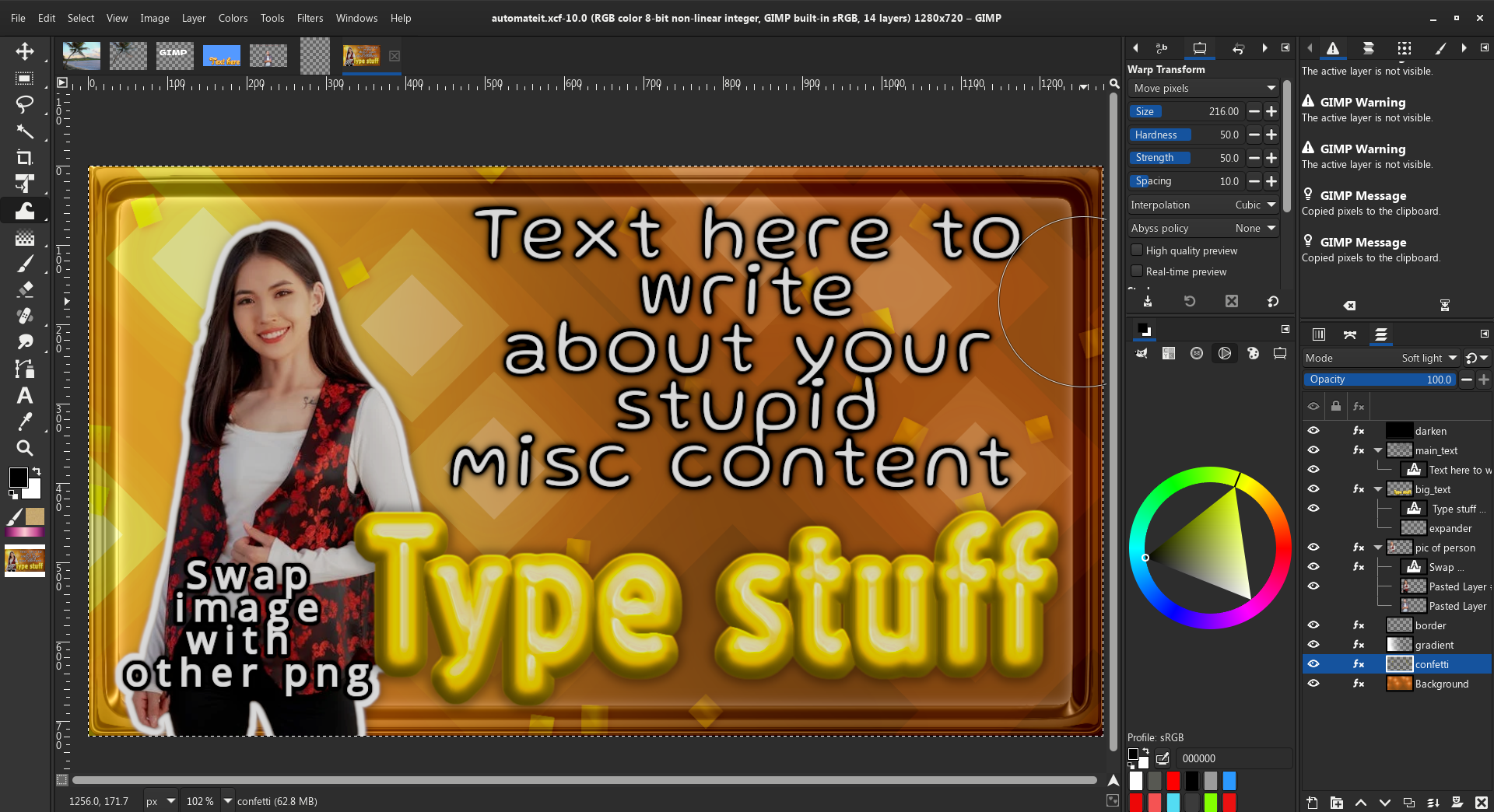
See this image that is Youtube Thumbnail size at 1280x720, its called a template.
The .xcf file can be re-opened and anything can replace the original image, just by
putting different layers in layer groups. You just type text, paste other people/objects in layer groups
and go. This is the future of GIMP workflows

Attachment:

pasted_image002.png
pasted_image002.png [ 828.81 KiB | Viewed 3697 times ]


So now that I've shown a generic business template can be easily turned into an edgy meme
I wonder what else the future holds. In this thread we can share thoughts on GIMP templates


Share on Facebook Share on Twitter Share on Orkut Share on Digg Share on MySpace Share on Delicious Share on Technorati
Top
 Post subject: Re: Reusable Templates - a strategy for GIMP 3
PostPosted: Thu Dec 05, 2024 8:29 pm  (#2) 
Offline
GimpChat Member
User avatar

Joined: May 24, 2021
Posts: 859
Location: SEA - South East Asia
contrast_ wrote:
Automate in GIMP using templates

And "Smart object" https://www.reddit.com/r/GIMP/comments/ ... _geglload/

_________________
Patrice


Top
 Post subject: Re: Reusable Templates - a strategy for GIMP 3
PostPosted: Fri Dec 06, 2024 2:57 am  (#3) 
Offline
Global Moderator
User avatar

Joined: May 16, 2010
Posts: 16028
Gimp is growing up. :)

_________________
Image


Top
 Post subject: Re: Reusable Templates - a strategy for GIMP 3
PostPosted: Fri Dec 06, 2024 3:51 pm  (#4) 
Offline
GimpChat Member
User avatar

Joined: Oct 31, 2020
Posts: 2012
Attachment:
text_here.png
text_here.png [ 1.11 MiB | Viewed 3628 times ]


Another example of my plugins being used in templates. I can send anyone the template if they are interested.


Top
 Post subject: Re: Reusable Templates - a strategy for GIMP 3
PostPosted: Fri Dec 06, 2024 4:20 pm  (#5) 
Offline
Script Coder
User avatar

Joined: May 07, 2014
Posts: 4469
Location: Canada
How is this different from GIMP 2.10 .xcf where you can replace any layers with anything else? I am confused.

_________________
TinT
My GIMP 2.10 plug-in writer Fiverr Gig
Plaid Community Forum
Imageplaid-patterns.com


Top
 Post subject: Re: Reusable Templates - a strategy for GIMP 3
PostPosted: Fri Dec 06, 2024 5:21 pm  (#6) 
Offline
GimpChat Member
User avatar

Joined: Oct 31, 2020
Posts: 2012
trandoductin wrote:
How is this different from GIMP 2.10 .xcf where you can replace any layers with anything else? I am confused.


The layer group has filters on it (inner glow, outline and drop shadow)

and putting content in the layer group transfers those effects to whatever is inside of it, content can also include text. In example the pic of the woman above with sun glasses has the filters exposure, cartoon and dropshadow on a layer group that she is in. Anything else I paste in that layer group will acquire those 3 filters. I don't have to reapply those 3 filters, they auto apply when putting content in a layer group.


Top
 Post subject: Re: Reusable Templates - a strategy for GIMP 3
PostPosted: Fri Dec 06, 2024 5:31 pm  (#7) 
Offline
Script Coder
User avatar

Joined: May 07, 2014
Posts: 4469
Location: Canada
ah that's cool.

_________________
TinT
My GIMP 2.10 plug-in writer Fiverr Gig
Plaid Community Forum
Imageplaid-patterns.com


Top
Post new topic Reply to topic  [ 7 posts ] 

All times are UTC - 5 hours [ DST ]


* Login  


Powered by phpBB3 © phpBB Group