It is currently Thu Sep 24, 2026 5:15 am


All times are UTC - 5 hours [ DST ]


Post new topic Reply to topic  [ 52 posts ]  Go to page Previous  1, 2, 3  Next
Author Message
 Post subject: Re: Batcher - Batch Image Processing Plug-in for GIMP 3
PostPosted: Wed Apr 09, 2025 8:00 am  (#21) 
Offline
GimpChat Member
User avatar

Joined: Jan 13, 2011
Posts: 2648
Location: Poland
Just a few questions:
- will old settings (from loaded settings file) work in the next version,
- a bit more preview (x3),
- displaying the name of the loaded file from Settings?

What are your plans for this?

_________________
Image


Top
 Post subject: Re: Batcher - Batch Image Processing Plug-in for GIMP 3
PostPosted: Wed Apr 09, 2025 9:23 am  (#22) 
Offline
GimpChat Member
User avatar

Joined: Oct 31, 2020
Posts: 2014
Bugs found on Linux with Batcher 1.0.2


1. When applied on two or more layers it applies to all layers
2. when applied on layer groups it applies to all layers even ones outside the group


Top
 Post subject: Re: Batcher - Batch Image Processing Plug-in for GIMP 3
PostPosted: Wed Apr 09, 2025 10:03 am  (#23) 
Offline
GimpChat Member
User avatar

Joined: Oct 31, 2020
Posts: 2014
No matter what I do "edit layers" applies edits to all layers in the .xcf, not just the one selected. It is only solved by choosing "Selected in GIMP"


Top
 Post subject: Re: Batcher - Batch Image Processing Plug-in for GIMP 3
PostPosted: Sun Apr 13, 2025 3:03 pm  (#24) 
Offline
New Member

Joined: Apr 02, 2025
Posts: 2
kb wrote:
Out of curiosity, what are your use cases? E.g. whether you are trying to programmatically add new procedures, modify existing parameter values, ...


I have written a few bash scripts that generate .bimp files for use with bimp. They generate all the procedures needed and the number of procedures they generate depends on the resolution of each image.


Top
 Post subject: Re: Batcher - Batch Image Processing Plug-in for GIMP 3
PostPosted: Tue Apr 22, 2025 9:28 am  (#25) 
Offline
New Member

Joined: Apr 22, 2025
Posts: 1
I just used the plugin and IT IS AWESOME! Thank you so much Kamil!!!


Top
 Post subject: Re: Batcher - Batch Image Processing Plug-in for GIMP 3
PostPosted: Tue Apr 29, 2025 1:22 pm  (#26) 
Offline
New Member

Joined: Apr 20, 2014
Posts: 3
Awesome, seems to work brilliantly here.

I'm still learning the new stuff in the new version of Gimp 3 (Linux Flatpak).

Anyone knows how to add the procedure "Colors > Levels > Auto Levels" ?


Top
 Post subject: Re: Batcher - Batch Image Processing Plug-in for GIMP 3
PostPosted: Tue Apr 29, 2025 11:34 pm  (#27) 
Offline
GimpChat Member
User avatar

Joined: Jan 13, 2011
Posts: 2648
Location: Poland
What is the problem?

Image

_________________
Image


Top
 Post subject: Re: Batcher - Batch Image Processing Plug-in for GIMP 3
PostPosted: Wed Apr 30, 2025 9:32 am  (#28) 
Offline
New Member

Joined: Apr 20, 2014
Posts: 3
MareroQ wrote:
What is the problem?

Exactly! Yes, that !
You solved my problem.
Many thanks :)


Top
 Post subject: Re: Batcher - Batch Image Processing Plug-in for GIMP 3
PostPosted: Wed Apr 30, 2025 8:02 pm  (#29) 
Offline
GimpChat Member
User avatar

Joined: Jul 06, 2013
Posts: 2663
Location: California
Where in GIMP 3.0 is Batcher located in order to use it?


Top
 Post subject: Re: Batcher - Batch Image Processing Plug-in for GIMP 3
PostPosted: Wed Apr 30, 2025 9:36 pm  (#30) 
Offline
GimpChat Member
User avatar

Joined: Jan 13, 2011
Posts: 2648
Location: Poland
This plugin has a great description of how to install it, where the modules are in the menu, and how to use it.
Unless you uses the rule: :hehe

Image

_________________
Image


Top
 Post subject: Re: Batcher - Batch Image Processing Plug-in for GIMP 3
PostPosted: Thu May 01, 2025 8:36 pm  (#31) 
Offline
GimpChat Member
User avatar

Joined: Jul 06, 2013
Posts: 2663
Location: California
MareroQ wrote:
This plugin has a great description of how to install it, where the modules are in the menu, and how to use it.
Unless you uses the rule: :hehe

[ Image ]


As a Windows 10 user, I found Batcher in GIMP3.0. It's located under File as "Batch Convert".


Top
 Post subject: Re: Batcher - Batch Image Processing Plug-in for GIMP 3
PostPosted: Thu May 01, 2025 9:11 pm  (#32) 
Offline
GimpChat Member
User avatar

Joined: Jan 13, 2011
Posts: 2648
Location: Poland
Eeeeeek

Image

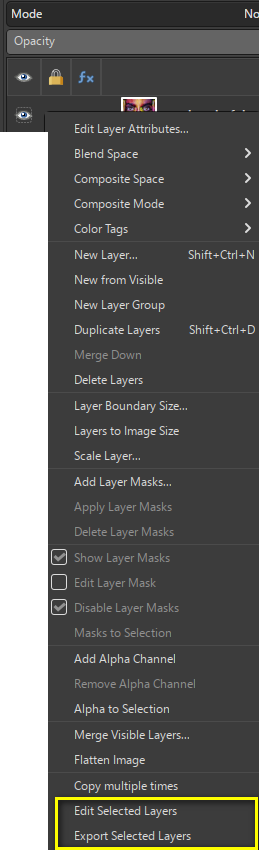
And also in the context menu in the Layers dock:

Image

_________________
Image


Last edited by MareroQ on Sat May 03, 2025 10:04 pm, edited 1 time in total.

Top
 Post subject: Re: Batcher - Batch Image Processing Plug-in for GIMP 3
PostPosted: Thu May 01, 2025 9:55 pm  (#33) 
Offline
GimpChat Member
User avatar

Joined: Jul 06, 2013
Posts: 2663
Location: California
MareroQ wrote:
Eeeeeek

[ Image ]


Thanks for posting the image. Batcher appears exactly like that. :)


Top
 Post subject: Re: Batcher - Batch Image Processing Plug-in for GIMP 3
PostPosted: Sun May 04, 2025 3:47 am  (#34) 
Offline
GimpChat Member

Joined: Mar 19, 2025
Posts: 8
Some GIMP tools such as the mentioned stretching of levels are difficult to find in the procedure browser as there is apparently no way to obtain the menu path for tools (only for plug-ins and layer effects). I can improve the search by also matching against the description.

@slick123_ @bulevardi Thanks. :)

MareroQ wrote:
Just a few questions:
- will old settings (from loaded settings file) work in the next version,
- a bit more preview (x3),
- displaying the name of the loaded file from Settings?

What are your plans for this?

Yes, settings from previous versions will still work. They are automatically updated to the latest version. This applies to both the default settings and .json files. The default settings are saved automatically when running a new version of Batcher, while the .json file is kept intact after loading from it (i.e. you'll have to manually save the settings to that file again).

Regarding the default preview size, as I mentioned, I'll make it larger by default, although 3x the current size may be too much (particularly given the current GUI layout).

I plan to make a multitude of changes to loading/saving settings, including displaying the currently loaded file, in a future version (currently planned to be in 1.2 - I prioritized refurbishing existing and adding new built-in procedures).

contrast_ wrote:
Bugs found on Linux with Batcher 1.0.2


1. When applied on two or more layers it applies to all layers
2. when applied on layer groups it applies to all layers even ones outside the group

This is the expected behavior of Edit Layers - it is meant for batch-editing all layers at once. As you found out, adding `Selected in GIMP` will apply the edits to the selected layer(s) only. I'll make sure this constraint is displayed when first running Edit Layers or after reset so that the behavior of Edit Layers is clearer.

When applying to group Layers (by unchecking the `Layers` constraint), Edit Layers works differently - it creates a copy of the group layer instead of modifying it in-place. Now that I think about it, and now that many layer effects can be applied to group layers, I think I should change this behavior so that the groups are modified in place by default.

helixarch wrote:
I have written a few bash scripts that generate .bimp files for use with bimp. They generate all the procedures needed and the number of procedures they generate depends on the resolution of each image.

I see, that is indeed cumbersome to do in the Batcher GUI. I'll see what I can do to make the format simpler.

I've been toying with the idea of creating a command-line wrapper for Batcher (something akin to ImageMagick), although I'm not sure how much effort that would involve.


Top
 Post subject: Re: Batcher - Batch Image Processing Plug-in for GIMP 3
PostPosted: Thu May 15, 2025 6:37 am  (#35) 
Offline
GimpChat Member
User avatar

Joined: Jan 13, 2011
Posts: 2648
Location: Poland
Gimp 3 will likely receive two features in a some release that are currently exclusive to Batcher
https://discuss.pixls.us/t/weekly-recap ... 25/50026/4

How many times can you reinvent the wheel?
Sure, for a bicycle you need two
:hehe

_________________
Image


Top
 Post subject: Re: Batcher - Batch Image Processing Plug-in for GIMP 3
PostPosted: Wed May 28, 2025 12:26 pm  (#36) 
Offline
New Member

Joined: May 28, 2025
Posts: 2
Hello everybody,

I must be doing something wrong with my GIMP +Bather. I am trying to load multiple DDS files then re export them but with Mipmaps. No other operations needed. However after setting up my batcher and hitting run all images are resized to the size of the first one or to a very low size. I need them each to remain untouched size/resolution wise. The scale parameter is not active.
It looks like this:
Image

Thanks for help if possible.


Top
 Post subject: Re: Batcher - Batch Image Processing Plug-in for GIMP 3
PostPosted: Thu May 29, 2025 11:16 am  (#37) 
Offline
GimpChat Member

Joined: Mar 19, 2025
Posts: 8
zaelu wrote:
Hello everybody,

I must be doing something wrong with my GIMP +Bather. I am trying to load multiple DDS files then re export them but with Mipmaps. No other operations needed. However after setting up my batcher and hitting run all images are resized to the size of the first one or to a very low size. I need them each to remain untouched size/resolution wise. The scale parameter is not active.
It looks like this:
[ Image ]

Thanks for help if possible.

I see you set "If a file already exists:" to "Rename existing file". This means that if you run batch processing a second time, it will perform processing on the files exported from the first run, since the original files get renamed. Check if the files added in Batcher are the ones you intend to process (the ones presumably without mipmaps).

I tested this within GIMP and it seems that DDS in GIMP always exports only the last layer of an image, if the image has multiple layers. This can occur when loading a DDS image with mipmaps, where, apparently, the last layer is the smallest one. You can try adding the `Merge visible layers` procedure, which will remove any invisible layers (all downscaled versions of the image are invisible). Perhaps the files that were processed already had mipmaps in them (or some of them)?


Top
 Post subject: Re: Batcher - Batch Image Processing Plug-in for GIMP 3
PostPosted: Thu May 29, 2025 2:56 pm  (#38) 
Offline
New Member

Joined: May 28, 2025
Posts: 2
kb wrote:
I see you set "If a file already exists:" to "Rename existing file". .


Thanks for reply. I have found the problem. I needed to chose "all layers" and not "selected layer" which comes default.

And although I am using rename existing file it doesn't nothing as I am exporting in a different folder. I think I've set it now to overwrite or ask just in case but I am exporting always in a different folder. Now it works. Thanks!


Top
 Post subject: Re: Batcher - Batch Image Processing Plug-in for GIMP 3
PostPosted: Sun Jun 01, 2025 9:55 pm  (#39) 
Offline
New Member

Joined: Jun 01, 2025
Posts: 1
Just a word of caution, we ran in to some oddities about having different permissions to read/write inside of the /User folder, outside of it, and on secondary drives in GIMP 3. Before you dive in to limiting file location information, be sure to test in the different areas to make sure it's actually working everywhere. I was working with the Almost Autosave guy, and we ran in to issues because I use a secondary drive to save everything. We got it sorted out, but I figured if you knew that beforehand, it might be easier for you. :)


Top
 Post subject: Re: Batcher - Batch Image Processing Plug-in for GIMP 3
PostPosted: Mon Jun 16, 2025 8:41 am  (#40) 
Offline
GimpChat Member
User avatar

Joined: Jan 13, 2011
Posts: 2648
Location: Poland
Image

:tyspin

A lot of new stuff:
https://kamilburda.github.io/batcher/news/1.1-released/

One of my comments about Color Correction:
Image

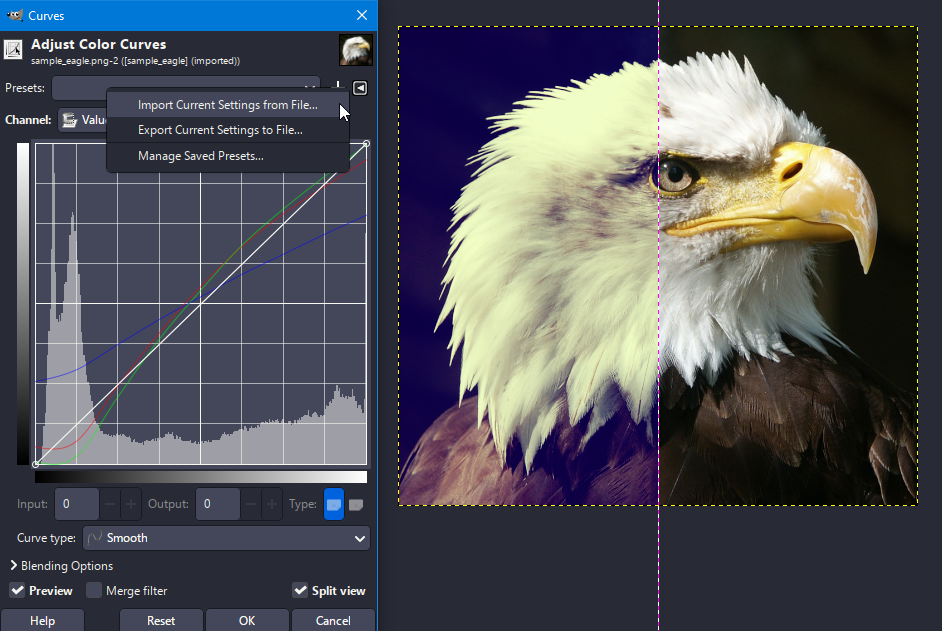
Adjust Color Curves in Gimp3 supports old and new curve formats.
Batcher only accepts the new format, so a simple operation is needed: import the old file format and export as new:

Image

_________________
Image


Top
Post new topic Reply to topic  [ 52 posts ]  Go to page Previous  1, 2, 3  Next

All times are UTC - 5 hours [ DST ]


* Login  


Powered by phpBB3 © phpBB Group