It is currently Mon Jun 15, 2026 5:17 am


All times are UTC - 5 hours [ DST ]


Post new topic Reply to topic  [ 17 posts ] 
Author Message
 Post subject: GIMP 3.0 non-destructive editing does not support all filters
PostPosted: Fri Jan 24, 2025 3:11 am  (#1) 
Offline
GimpChat Member
User avatar

Joined: Apr 25, 2011
Posts: 121
Location: Taiwan
In this Photoshop tutorial
Photoshop Game-Changer! GRAIN SHADED GRADIENT MAPS

This was done with GIMP 2.10.38
Image
It needs to merge the layers before applying the filter
But its final effect depends on some adjustments, so it may require frequent use UnDo.

So I tried using GIMP 3.0 instead.
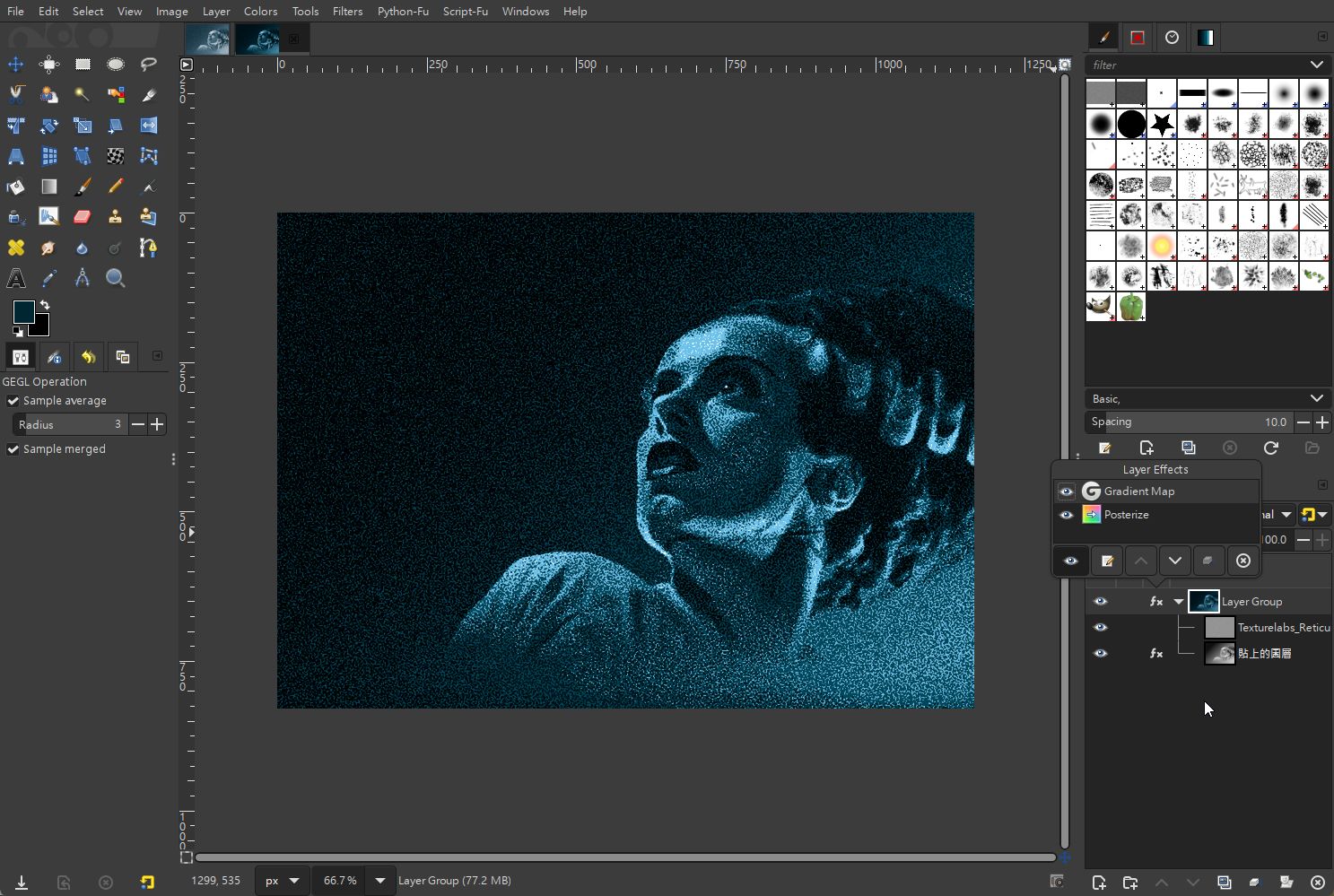
But in the last step Gradient Map, I got this
Image
It's so frustrating

_________________
Sorry for my poor English, I use Google Translate.
There may be something wrong, Please understand.

GIMP 2.10.38 rev1 portable+GAP+G'MIC+nufraw+Beautify+MathMap+...


Share on Facebook Share on Twitter Share on Orkut Share on Digg Share on MySpace Share on Delicious Share on Technorati
Top
 Post subject: Re: GIMP 3.0 non-destructive editing does not support all filters
PostPosted: Fri Jan 24, 2025 4:13 am  (#2) 
Offline
GimpChat Member

Joined: Apr 11, 2024
Posts: 298
It'll work one day. I'm sure about it.
NDE is just at the beginning. Let's be grateful for its implementation so far.
Originally, it wasn't even planned for 3.0.
So let's just be patient.

And if it's too frustrating - you can always pay for PS, can't you?


Top
 Post subject: Re: GIMP 3.0 non-destructive editing does not support all filters
PostPosted: Fri Jan 24, 2025 4:20 am  (#3) 
Offline
Global Moderator
User avatar

Joined: May 16, 2010
Posts: 16028
I noticed that your opacity level in 2.10 was set at 100. Maybe turn that down a bit?

_________________
Image


Top
 Post subject: Re: GIMP 3.0 non-destructive editing does not support all filters
PostPosted: Fri Jan 24, 2025 5:09 am  (#4) 
Offline
GimpChat Member

Joined: Mar 04, 2011
Posts: 2603
At the moment, NDE only supports GEGL filters. Gradient Map is a "legacy" plugin. You can see it better in Gimp 2.10 where the GEGL filters have a G against the menu entry. The G has been dropped in GIMP 3.0

Edit: Sorry I do not watch YT videos anymore, too many advertisements.
You will just have to find other ways: Here two NDE filters that are still editable + a gradient but that relies on a Layer Mode.

Attachment:
map.jpg
map.jpg [ 93.34 KiB | Viewed 15128 times ]


Top
 Post subject: Re: GIMP 3.0 non-destructive editing does not support all filters
PostPosted: Fri Jan 24, 2025 6:11 am  (#5) 
Offline
GimpChat Member
User avatar

Joined: Apr 25, 2011
Posts: 121
Location: Taiwan
rich2005 wrote:
At the moment, NDE only supports GEGL filters. Gradient Map is a "legacy" plugin. You can see it better in Gimp 2.10 where the GEGL filters have a G against the menu entry. The G has been dropped in GIMP 3.0

Edit: Sorry I do not watch YT videos anymore, too many advertisements.
You will just have to find other ways: Here two NDE filters that are still editable + a gradient but that relies on a Layer Mode.

Attachment:
map.jpg


Thank you for your reminder
I find Gradient Map in GEGL operation
Image

And I use Firefox+AdBlock to watch YT videos, it block any advertisements

_________________
Sorry for my poor English, I use Google Translate.
There may be something wrong, Please understand.

GIMP 2.10.38 rev1 portable+GAP+G'MIC+nufraw+Beautify+MathMap+...


Top
 Post subject: Re: GIMP 3.0 non-destructive editing does not support all filters
PostPosted: Fri Jan 24, 2025 11:54 am  (#6) 
Offline
Script Coder
User avatar

Joined: Oct 25, 2010
Posts: 4812
JamesH wrote:
In this Photoshop tutorial
Photoshop Game-Changer! GRAIN SHADED GRADIENT MAPS

This was done with GIMP 2.10.38
[ Image ]
It needs to merge the layers before applying the filter
But its final effect depends on some adjustments, so it may require frequent use UnDo.

So I tried using GIMP 3.0 instead.
But in the last step Gradient Map, I got this
[ Image ]
It's so frustrating


There has been a discussion about the "Merge" choice of filters, and it has been pointed out that some filters, having no dialog, don't give the choice.

_________________
Image


Top
 Post subject: Re: GIMP 3.0 non-destructive editing does not support all filters
PostPosted: Sat Jan 25, 2025 2:59 am  (#7) 
Offline
GimpChat Member
User avatar

Joined: Apr 25, 2011
Posts: 121
Location: Taiwan
ofnuts wrote:
JamesH wrote:
In this Photoshop tutorial
Photoshop Game-Changer! GRAIN SHADED GRADIENT MAPS

This was done with GIMP 2.10.38
[ Image ]
It needs to merge the layers before applying the filter
But its final effect depends on some adjustments, so it may require frequent use UnDo.

So I tried using GIMP 3.0 instead.
But in the last step Gradient Map, I got this
[ Image ]
It's so frustrating


There has been a discussion about the "Merge" choice of filters, and it has been pointed out that some filters, having no dialog, don't give the choice.


I think if the official version(final release) cannot replace those unsupported filters, it would be better to have a clear label to explain it.

quietreader wrote:
It'll work one day. I'm sure about it.
NDE is just at the beginning. Let's be grateful for its implementation so far.
Originally, it wasn't even planned for 3.0.
So let's just be patient.

And if it's too frustrating - you can always pay for PS, can't you?

Why do you mention PS?
I'm a programmer, not an artist, and I'm retired too.
Using GIMP is purely to get more people to use free software.
If it's really depressing, then I'll just stop using any image processing software, that's it.
Besides, I have already made it with GIMP 2.10.38
If GIMP 3.0 RC2 disappoints me, Then I'll just stick with 2.10, Isn't it?

_________________
Sorry for my poor English, I use Google Translate.
There may be something wrong, Please understand.

GIMP 2.10.38 rev1 portable+GAP+G'MIC+nufraw+Beautify+MathMap+...


Last edited by JamesH on Sat Jan 25, 2025 8:40 pm, edited 1 time in total.

Top
 Post subject: Re: GIMP 3.0 non-destructive editing does not support all filters
PostPosted: Sat Jan 25, 2025 3:18 am  (#8) 
Offline
Script Coder
User avatar

Joined: Oct 25, 2010
Posts: 4812
You are using a "Release candidate", which means things aren't finished yet.

Don't throw the baby with the bath water.

_________________
Image


Top
 Post subject: Re: GIMP 3.0 non-destructive editing does not support all filters
PostPosted: Sat Jan 25, 2025 3:49 am  (#9) 
Offline
Global Moderator
User avatar

Joined: May 16, 2010
Posts: 16028
ofnuts wrote:
You are using a "Release candidate", which means things aren't finished yet.

Don't throw the baby with the bath water.


Dont throw the baby out with the bath water. I wonder where that thought came from. Who would discard a baby?

_________________
Image


Top
 Post subject: Re: GIMP 3.0 non-destructive editing does not support all filters
PostPosted: Sat Jan 25, 2025 10:41 am  (#10) 
Offline
GimpChat Member

Joined: Dec 28, 2023
Posts: 67
ofnuts wrote:
There has been a discussion about the "Merge" choice of filters, and it has been pointed out that some filters, having no dialog, don't give the choice.


The challenge is how to do this without negatively impacting people's workflows. For instance, if Invert is automatically applied non-destructively, then people will wonder what their brush color is inverted (and they'll have to do extra steps to merge it down each time).

One idea would be to make a separate GUI-based version of those filters (like a dialogue that lets you choose which type of Invert to apply) so people could choose either the destructive or non-destructive version based on their needs. Still needs more design and testing though.


Top
 Post subject: Re: GIMP 3.0 non-destructive editing does not support all filters
PostPosted: Sat Jan 25, 2025 2:19 pm  (#11) 
Offline
GimpChat Member
User avatar

Joined: Oct 31, 2020
Posts: 2012
CmykStudent wrote:
ofnuts wrote:
There has been a discussion about the "Merge" choice of filters, and it has been pointed out that some filters, having no dialog, don't give the choice.


The challenge is how to do this without negatively impacting people's workflows. For instance, if Invert is automatically applied non-destructively, then people will wonder what their brush color is inverted (and they'll have to do extra steps to merge it down each time).

One idea would be to make a separate GUI-based version of those filters (like a dialogue that lets you choose which type of Invert to apply) so people could choose either the destructive or non-destructive version based on their needs. Still needs more design and testing though.

I could easily make an invert filter with a GUI that has all 3 inverts in a drop down list.


Top
 Post subject: Re: GIMP 3.0 non-destructive editing does not support all filters
PostPosted: Thu Apr 17, 2025 5:37 pm  (#12) 
Offline
GimpChat Member

Joined: Nov 23, 2024
Posts: 22
JamesH wrote:
Thank you for your reminder
I find Gradient Map in GEGL operation


Hello, can I ask you where can I find the Gradient Map in GEGL Operation ?
because the (Colors > Map > Gradient Map) gives me the same problem as yours!


Top
 Post subject: Re: GIMP 3.0 non-destructive editing does not support all filters
PostPosted: Thu Apr 17, 2025 8:48 pm  (#13) 
Offline
GimpChat Member
User avatar

Joined: Apr 25, 2011
Posts: 121
Location: Taiwan
twix-four4 wrote:
JamesH wrote:
Thank you for your reminder
I find Gradient Map in GEGL operation


Hello, can I ask you where can I find the Gradient Map in GEGL Operation ?
because the (Colors > Map > Gradient Map) gives me the same problem as yours!

gegl-workshop.dll was provided by GIMP 3.0 RC1, but has been removed since RC2
You can copy this file from RC1 yourself, or if you feel more confident you can download the file I attached.
Put the file into the xxxxxxxx\GIMP 3\lib\gegl-0.4 folder


Attachments:
File comment: Gradient Map in GEGL operation(from RC1)
gegl-workshop.zip [53.12 KiB]
Downloaded 1121 times

_________________
Sorry for my poor English, I use Google Translate.
There may be something wrong, Please understand.

GIMP 2.10.38 rev1 portable+GAP+G'MIC+nufraw+Beautify+MathMap+...
Top
 Post subject: Re: GIMP 3.0 non-destructive editing does not support all filters
PostPosted: Sat Apr 19, 2025 2:53 pm  (#14) 
Offline
GimpChat Member
User avatar

Joined: Oct 31, 2020
Posts: 2012
JamesH, I already solved that problem and don't recommend your method.

You can download gradient map and all other hidden native GEGL filters here as plugins.
https://github.com/LinuxBeaver/GEGL-GIM ... s/releases

Its a lot safer then that .dll modification trick. Because they are installing as a GEGL plugin


Top
 Post subject: Re: GIMP 3.0 non-destructive editing does not support all filters
PostPosted: Mon Apr 21, 2025 6:35 am  (#15) 
Offline
GimpChat Member

Joined: Nov 23, 2024
Posts: 22
JamesH wrote:
gegl-workshop.dll was provided by GIMP 3.0 RC1, but has been removed since RC2
You can copy this file from RC1 yourself, or if you feel more confident you can download the file I attached.
Put the file into the xxxxxxxx\GIMP 3\lib\gegl-0.4 folder

contrast_ wrote:
You can download gradient map and all other hidden native GEGL filters here as plugins.
https://github.com/LinuxBeaver/GEGL-GIM ... s/releases
Its a lot safer then that .dll modification trick. Because they are installing as a GEGL plugin


thank you both so much for your help, I really appreciate it!
from what I've noticed in this plugin I can add up to 5 colors to it right ? so it can generate a gradient map of up to a 5-colored-gradient no more. right ?


Top
 Post subject: Re: GIMP 3.0 non-destructive editing does not support all filters
PostPosted: Wed Apr 23, 2025 1:24 am  (#16) 
Offline
GimpChat Member
User avatar

Joined: Apr 25, 2011
Posts: 121
Location: Taiwan
twix-four4 wrote:
JamesH wrote:
gegl-workshop.dll was provided by GIMP 3.0 RC1, but has been removed since RC2
You can copy this file from RC1 yourself, or if you feel more confident you can download the file I attached.
Put the file into the xxxxxxxx\GIMP 3\lib\gegl-0.4 folder

contrast_ wrote:
You can download gradient map and all other hidden native GEGL filters here as plugins.
https://github.com/LinuxBeaver/GEGL-GIM ... s/releases
Its a lot safer then that .dll modification trick. Because they are installing as a GEGL plugin


thank you both so much for your help, I really appreciate it!
from what I've noticed in this plugin I can add up to 5 colors to it right ? so it can generate a gradient map of up to a 5-colored-gradient no more. right ?


Yes, here is a example
Image

_________________
Sorry for my poor English, I use Google Translate.
There may be something wrong, Please understand.

GIMP 2.10.38 rev1 portable+GAP+G'MIC+nufraw+Beautify+MathMap+...


Top
 Post subject: Re: GIMP 3.0 non-destructive editing does not support all filters
PostPosted: Fri Apr 25, 2025 12:20 pm  (#17) 
Offline
GimpChat Member

Joined: Nov 23, 2024
Posts: 22
JamesH wrote:
Yes, here is a example
[ Image ]


exactly! thanks a lot for your help.


Top
Post new topic Reply to topic  [ 17 posts ] 

All times are UTC - 5 hours [ DST ]


* Login  


Powered by phpBB3 © phpBB Group