It is currently Thu Aug 06, 2026 5:29 pm


All times are UTC - 5 hours [ DST ]


Post new topic Reply to topic  [ 8 posts ] 
Author Message
 Post subject: "Perspective" in batch mode
PostPosted: Tue Jan 20, 2026 10:01 am  (#1) 
Offline
GimpChat Member

Joined: Jan 19, 2026
Posts: 5
GIMP Version: 2.8.14
Operating System: Windows
GIMP Experience: New User


Good afternoon everyone
New in Gimp, trying to learn how to do it.

I'm, sort to speak, "addicted" to comics and I often have to use various methods to improve image quality, and I use "Perspective" to "straighten" the corners of the strips.

I learned on my own how to use Perspective to stretch the image so that it aligns with the guides that appear automatically.

My question is if there is any way to do this in batch mode (for example with Bimp), without having to drag the image to make it coincide with the guides for each page, because I have most of the times several pages to do it

I use GIMP 2.8.22 on Windows XP.

Sorry for my bad English
Thank you in advance for your possible help.

Ar


Share on Facebook Share on Twitter Share on Orkut Share on Digg Share on MySpace Share on Delicious Share on Technorati
Top
 Post subject: Re: "Perspective" in batch mode
PostPosted: Thu Jan 22, 2026 4:44 am  (#2) 
Offline
Global Moderator
User avatar

Joined: Apr 01, 2012
Posts: 8448
Location: On the other side of your screen
Welcome to Gimp Chat Ar. You may have to upgrade to Gimp version 3 to batch anything your images.

_________________
Image
Free Fun Photo Editing & resources
Poems from the Lord
Gimp Newby
Gimp version 3.2.4 and GMIC-Qt 4.0.2 OS :- Windows 10 Home 64


Top
 Post subject: Re: "Perspective" in batch mode
PostPosted: Thu Jan 22, 2026 4:27 pm  (#3) 
Offline
GimpChat Member

Joined: Jan 19, 2026
Posts: 5
Thank you Sallyanme.

In this moment I use Gimp with "Bimp" in W7, option "colors"+"curves" to improve image quality.

But my question was if there is any option to use "perspective in batch mode,

Some sort of possibility to strech the corners of the images.


Top
 Post subject: Re: "Perspective" in batch mode
PostPosted: Thu Jan 22, 2026 4:44 pm  (#4) 
Offline
Global Moderator
User avatar

Joined: Apr 01, 2012
Posts: 8448
Location: On the other side of your screen
Yes I know what your question was. I was just mentioning that you should probably update to version 3 of gimp. Hopefully someone will beable to answer your question fully.

_________________
Image
Free Fun Photo Editing & resources
Poems from the Lord
Gimp Newby
Gimp version 3.2.4 and GMIC-Qt 4.0.2 OS :- Windows 10 Home 64


Top
 Post subject: Re: "Perspective" in batch mode
PostPosted: Fri Jan 23, 2026 3:59 am  (#5) 
Offline
GimpChat Member

Joined: Apr 11, 2024
Posts: 306
Probably no chance to update GIMP to V3 on a Win7 Machine.

Probably possible with BIMP (at least worth a try):
First perform your transformation as wanted and note the values of that matrix.

Then in BIMP:
click on Add, Other GIMP Procedure (or similar),
in the search field type matrix,
choose gimp-drawable-transform-matrix and enter the values

If that works - fine, if not, no further idea.


Top
 Post subject: Re: "Perspective" in batch mode
PostPosted: Tue Jan 27, 2026 2:30 pm  (#6) 
Offline
GimpChat Member

Joined: Jan 19, 2026
Posts: 5
Thank you I am going to try.


Top
 Post subject: Re: "Perspective" in batch mode
PostPosted: Wed Jan 28, 2026 4:23 pm  (#7) 
Offline
GimpChat Member
User avatar

Joined: Nov 04, 2015
Posts: 1461
G'MIC has a perspective filter in the 'Deformations' section. If you have a Gimp plug-in version of G'MIC you can 'apply to all layers'. With the standalone version you can see the command at the top RHS (Copy G'MIC command to clipboard). Then put the command in a batch file.

Image


Top
 Post subject: Re: "Perspective" in batch mode
PostPosted: Thu Jan 29, 2026 3:47 am  (#8) 
Offline
GimpChat Member

Joined: Mar 04, 2011
Posts: 2610
I looked at this, right at the beginning, and the obvious is Gimp is not intelligent and can not automatically determine the amount of correction required. However if it is consistent over the images and not excessive, it might be possible.

I found a problem (at least with my try-outs) when using the transformation matrix. It is four decimal points and BIMP truncates to two dp. Strangely, if you upgrade to Gimp 3 the Batcher plugin does the same. I never managed to get a good result.

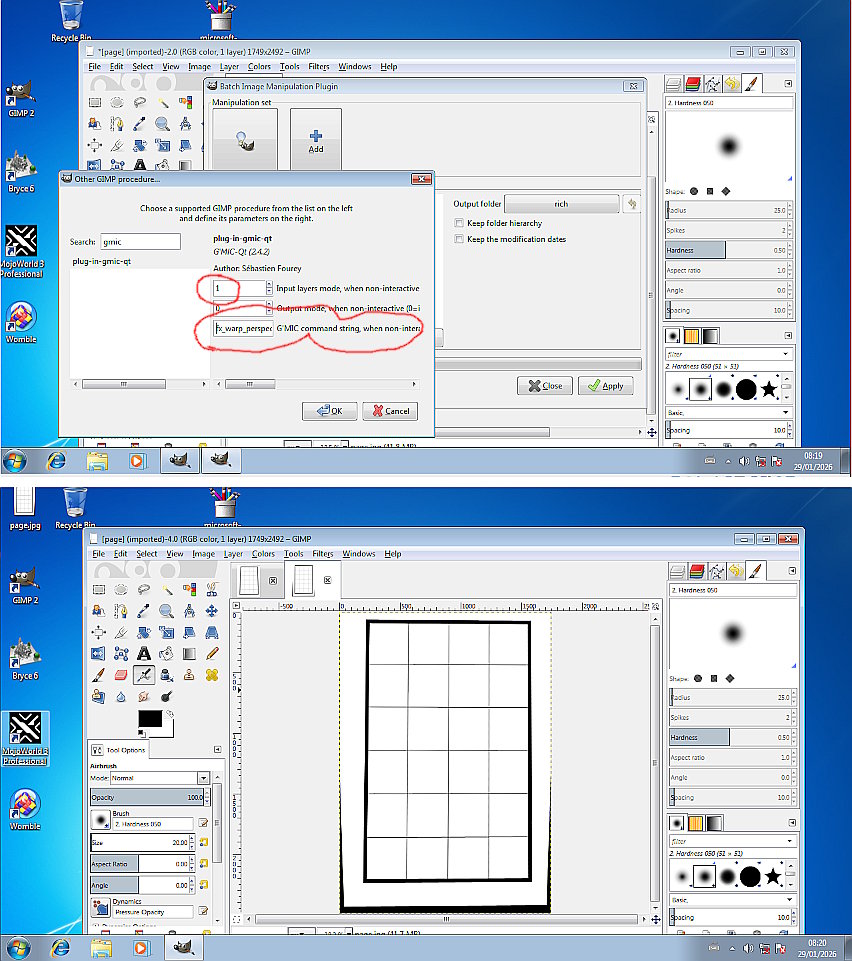
Like Tasmamnia it fell back to using the gmic plugin. The next problem is just "old-stuff" I did the following in a 32 bit Win 7 VM Gimp 2.8.20 and gimp_gmic_qt 2.4.2 The gmic perspective filter. Fortunately I did not delete all the files so ;)
This is the gmic filter, the only settings required are the x angle and boundary = transparent, That gives a gmic string. You can edit that first term (-0.096) depending on image.
fx_warp_perspective -0.096,0,1,50,50,0,0,0

Attachment:
01-old.jpg
01-old.jpg [ 92.07 KiB | Viewed 1504 times ]


It goes into BIMP like as shown. Bottom is the result.

Attachment:
02-old.jpg
02-old.jpg [ 190.49 KiB | Viewed 1504 times ]


Best of luck.


Top
Post new topic Reply to topic  [ 8 posts ] 

All times are UTC - 5 hours [ DST ]


* Login  


Powered by phpBB3 © phpBB Group
