MissAmy wrote:
...snip....
Here’s the thing though I have to print it out on an 8 x 8 vinyl banner and then cut little peices to affix to crafts and the craft size is 1 inch in length and approx 1/8 inch in width so the leopard print would need to be very small .
.....snip...
I always shudder when a user wants something 1/8 inch. Gimp always works in pixels even though you can set up for printing in inches.
The leopard pattern is very small 64 x 62 pixels and how that renders for printing depends on the image pixels-per-inch (ppi)
My guess is since you are coming from an old Gimp, you set up your 8" x 8" canvas using a small ppi, Gimp 2.8 typically used 72 ppi and the pattern looks corresponding large.
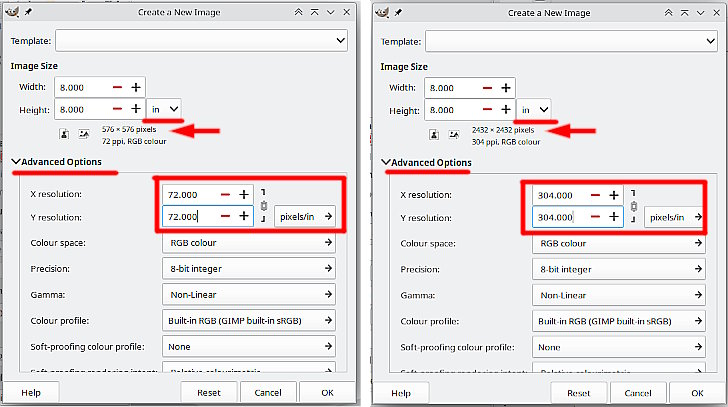
For quality printing you need something round about 300 ppi but also divisible by 8 for that 0.125" width. Possible values 288 / 304 / 320 ppi
In File -> New you can set up sizes in inches and under the Advanced Options set a printing resolution. This example left side is 72 ppi and right is 304 ppi.
Attachment:
 setup-canvas.jpg [ 65.66 KiB | Viewed 15006 times ]
Using the pattern in those sizes and a 0.125 x 1.0 inch section and you can see the difference.
Attachment:
 compare.jpg [ 48.94 KiB | Viewed 15006 times ]
When you decide what sort of pattern size you want, come back and we can look at a gradient overlay.
 Login
Login Register
 Tweets
 FAQ
FAQ Advanced Search


