It is currently Sat Oct 03, 2026 1:24 am


All times are UTC - 5 hours [ DST ]


Post new topic Reply to topic  [ 13 posts ] 
Author Message
 Post subject: KompoZer - preveiously known as NVU - Can someone help?
PostPosted: Sun Aug 15, 2010 12:45 am  (#1) 
Offline
GimpChat Member

Joined: Aug 10, 2010
Posts: 16
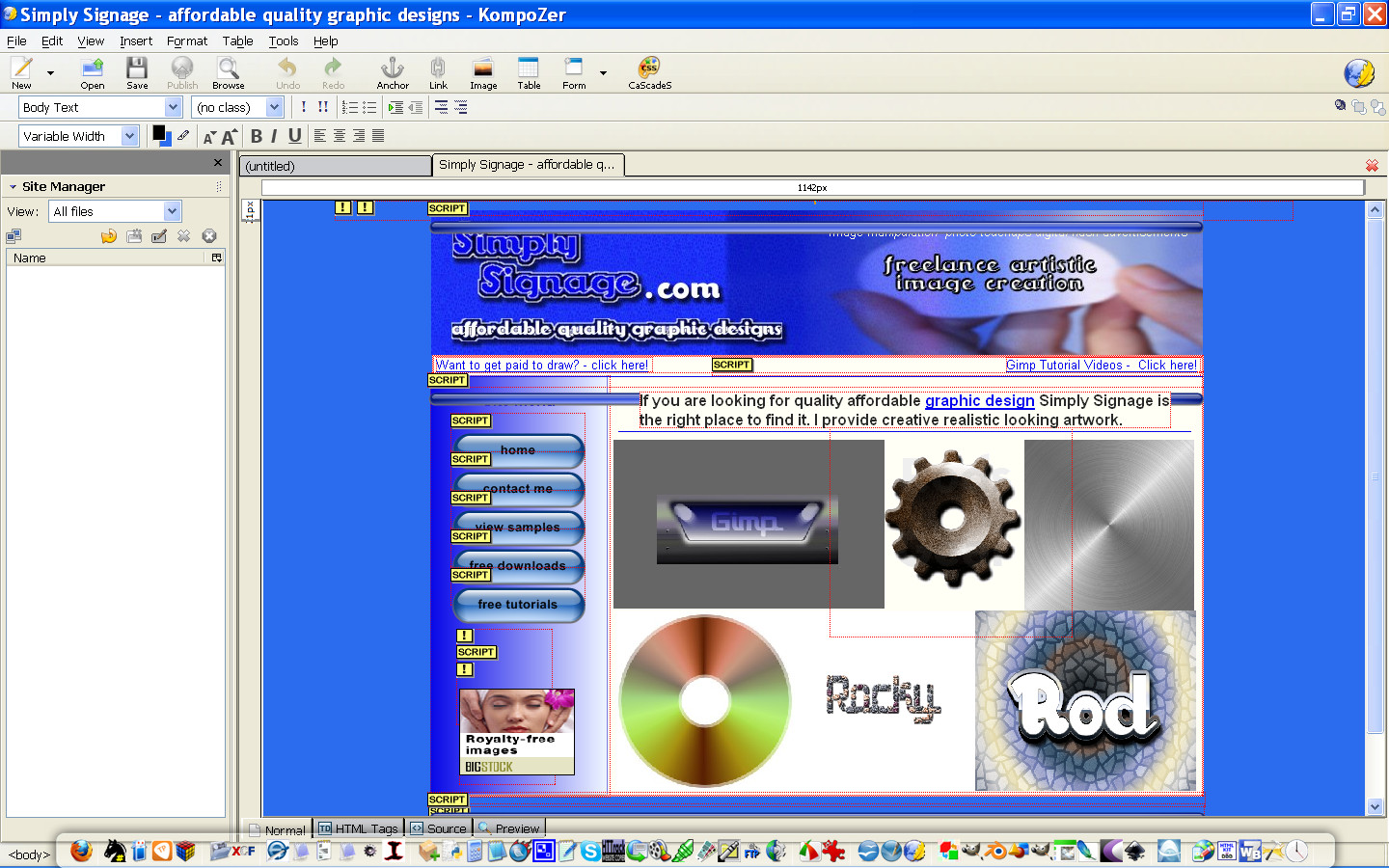
I just downloaded KompoZer and started on my first page. I dont know HTML. But I have managed to insert images and banner (made with Gimp).

However, I am having a frustrating issue with the text in the contents as it is not really a WYSIWYG. The placement of text does not seemed to be the same in

the "Browse" (I believe browser). So if someone who knows NVU or HTML - can you kindly help. I post my yahoo messenger in profile. Thank you.

:gaah


Share on Facebook Share on Twitter Share on Orkut Share on Digg Share on MySpace Share on Delicious Share on Technorati
Top
 Post subject: Re: KompoZer - preveiously known as NVU - Can someone help?
PostPosted: Sun Aug 15, 2010 12:59 am  (#2) 
Offline
GimpChat Founder
User avatar

Joined: May 22, 2008
Posts: 5241
Location: Gimpville
Greetings,

I'm familiar with Kompozer (previously nvu). If you can you be more specific as to exactly what issues you are having with text, I might be able to help. I'll be happy to take a look at the live website or you can attach the html file here. As with most wysiwyg html editors, I find that they require a bit of manual tweaking as you go.

I am a Linux user but that shouldn't make any difference in terms of the generated HTML code.

_________________
“If you reach for the stars, you just might land on a decently sized hill.” - Stuart Hill


Top
 Post subject: Re: KompoZer - preveiously known as NVU - Can someone help?
PostPosted: Sun Aug 15, 2010 11:01 am  (#3) 
Offline
Global Moderator
User avatar

Joined: May 16, 2010
Posts: 16180
You know when you create a new document File/New
In that dialog you can type any web address and use it for a template. =)

Image


Top
 Post subject: Re: KompoZer - preveiously known as NVU - Can someone help?
PostPosted: Sun Aug 15, 2010 12:56 pm  (#4) 
Offline
GimpChat Member
User avatar

Joined: Apr 30, 2010
Posts: 1937
Location: Missouri
Kompozer doesn't do absolute placement in WYIWYG, if that's what you mean.

_________________
Image
The last time I kept an open mind,
my brain fell out and the dog grabbed it.
Now it's full of dirt, toothmarks, and dog slobber.
No more open minds or dogs for me.


Top
 Post subject: Re: KompoZer - preveiously known as NVU - Can someone help?
PostPosted: Sun Aug 15, 2010 4:04 pm  (#5) 
Offline
GimpChat Member

Joined: Aug 10, 2010
Posts: 16
Hello all,

Thank you for your replies. I am still learning.

1) I learnt that font has no font size in numbers grading - only smaller, small, medium, large, larger ..........:(
2) I could not format font size before I typed in text in the content area.
After I typed in text in content area, i had to format it (in my case to Arial) and then I had to backspace and forward space to reposition text.
3) After some 4-5 paragraps in content area and inserted images, my page looked good and well aligned in the Kompozer window (design window) but
if i switched to look at it in BROWSE mode ie. Browser - it was haywire! Images and text were not as it should be in the Kompozer window.
4) Then I tried to work it in the Kompozer window to make it look good in the Browser and now it gone the other way. It looked okay in the Browser now
but it is badly aligned in the Kompozer Design window. I also see alot of this sign(**nbs) like it said i was using the backspace key.
5) I set up link on the bottom of the page, but the links dont work even though i have set up 2 pages by now - ie. one is the index.html (homepage)
and other is the features.html (feature page). got a 404 error i think.
6) I am not giving up!!! I got to conquer this hill.

Thank you Rod for your great help on the Arrow Brushes and the html codings. I am still looking at it. (Wish I can send you some cupcakes !!!)


Top
 Post subject: Re: KompoZer - preveiously known as NVU - Can someone help?
PostPosted: Sun Aug 15, 2010 4:50 pm  (#6) 
Offline
GimpChat Member
User avatar

Joined: Apr 30, 2010
Posts: 1937
Location: Missouri
Have you made web pages before? There are some tricks to it.

_________________
Image
The last time I kept an open mind,
my brain fell out and the dog grabbed it.
Now it's full of dirt, toothmarks, and dog slobber.
No more open minds or dogs for me.


Top
 Post subject: Re: KompoZer - preveiously known as NVU - Can someone help?
PostPosted: Mon Aug 16, 2010 3:20 am  (#7) 
Offline
GimpChat Member

Joined: Aug 10, 2010
Posts: 16
To Gms9810 -

"Have you made web pages before? There are some tricks to it."

No i have not. This is my first effort and I am really really struggling. Can ya share those tricks?

I dont know HTML - i do know a wee bit about tags but not in depth. And I am not sure what you mean about absolute placement - is that a reference to "absolute" as in achored inthe
index.html page?


Top
 Post subject: Re: KompoZer - preveiously known as NVU - Can someone help?
PostPosted: Mon Aug 16, 2010 5:06 am  (#8) 
Offline
Global Moderator
User avatar

Joined: May 16, 2010
Posts: 16180
You are most welcome pixelbean, just holler if you need more help with your CSS or anything else. =)
mmmMMMmmm ... cupcakes sound good.


Top
 Post subject: Re: KompoZer - preveiously known as NVU - Can someone help?
PostPosted: Mon Aug 16, 2010 8:07 pm  (#9) 
Offline
GimpChat Member
User avatar

Joined: Apr 08, 2010
Posts: 5420
Location: Northwest Ohio
pixelbean wrote:
To Gms9810 -

"Have you made web pages before? There are some tricks to it."

No i have not. This is my first effort and I am really really struggling. Can ya share those tricks?

I dont know HTML - i do know a wee bit about tags but not in depth. And I am not sure what you mean about absolute placement - is that a reference to "absolute" as in achored inthe
index.html page?

I am very interested in this very same thing, and have no experience, so I hope there will be lots of hints posted here!


Top
 Post subject: Re: KompoZer - preveiously known as NVU - Can someone help?
PostPosted: Tue Aug 17, 2010 3:24 am  (#10) 
Offline
GimpChat Member

Joined: Aug 10, 2010
Posts: 16
Hiya All - Sorry to be boring you with Kompozer questions again....

1. When i first open Kompozer to do a new site, I open it to max screen(ie "Maximise" button
at top of Right hand Corner. The Kompozer window now measure 1616px which is really
really large. The Banner that i have chosen can only fill half the size of this window space.
If i drag it to fill the full page, will that be the normal thing to do?

Is there a way to fix the ruler width of the Kompozer window without it changing again?

2. Can i set padding size to Left and Right margins ? And how do i do that?
I am now using backspace and enter key to move text around but i think i am doing it the
wrong way.

3. How do i use Anchor and what does it do for the item that it is anchored to ? does it work like a link?
Can you explain a similar scenario (an example)?

Thank you again for your kind attention.


Top
 Post subject: Re: KompoZer - preveiously known as NVU - Can someone help?
PostPosted: Tue Aug 17, 2010 12:06 pm  (#11) 
Offline
Global Moderator
User avatar

Joined: May 16, 2010
Posts: 16180
Never upscale an image which is exactly what you will be doing if you drag it bigger.
Just create the banner about 1124 in width and whatever height looks good, that will be good enough for most monitors. =) Just use the code i gave you. (to center it)

Anchors:
http://www.internet4classrooms.com/chp_anchor.htm

Komposer guide online:
http://www.charlescooke.me.uk/web/kz-ug-home.htm

You can learn a lot there too about Komposer and its tools.More than i could ever show you. =)


Top
 Post subject: Re: KompoZer - preveiously known as NVU - Can someone help?
PostPosted: Tue Aug 17, 2010 7:05 pm  (#12) 
Offline
GimpChat Member

Joined: Aug 10, 2010
Posts: 16
Thank you Rod,

I am looking into those websites you have highlighted.

Yes - i did remember your advice about upscaling. So it means i have to make a really large banner again.

:(

Kind regards.


Top
 Post subject: Re: KompoZer - preveiously known as NVU - Can someone help?
PostPosted: Wed Aug 18, 2010 1:47 pm  (#13) 
Offline
Global Moderator
User avatar

Joined: May 16, 2010
Posts: 16180
Gimp can handle some real huge images so that shouldn't be any problem.
There is the liquid rescale plug-in, supposed to scale up or down with very little quality effect, but i recommend just remaking the banner to get the best quality you can.Quality and sharpness is a big thing when it comes to website development.

But like i said before, you need any more help you just holler at me, ill come running! =)


Top
Post new topic Reply to topic  [ 13 posts ] 

All times are UTC - 5 hours [ DST ]


* Login  


Powered by phpBB3 © phpBB Group