It is currently Tue Aug 11, 2026 5:52 am


All times are UTC - 5 hours [ DST ]


Post new topic Reply to topic  [ 6 posts ] 
Author Message
 Post subject: Script request
PostPosted: Thu Dec 01, 2011 8:09 pm  (#1) 
Offline
Global Moderator
User avatar

Joined: May 16, 2010
Posts: 16155
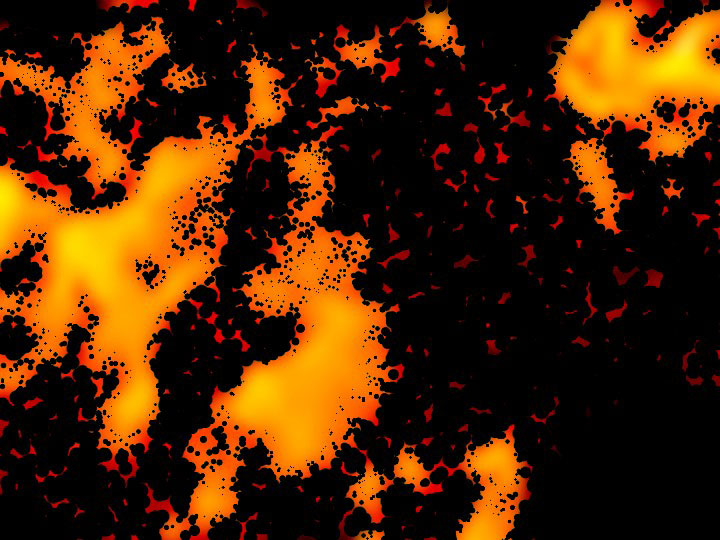
I was wondering if someone here could write a script to produce the Kirby Dots effect?
The old comic book explosion effect style.Here is something similar.
Image

There is a 8BF plugin to produce this effect , but i can not get it to work in either XnView or Chasys Draw.
The script should work on a already added white design/brush on a black bg layer.
You would create a design with a white brush on a black bg and then run the filter.
The script would select the white area, and fill with dots and add the gradient, noise, blur.
Basically it has 4 settings -
1) Dissolve amount (noise spread around dots edge)
2) Size of dots
3) Add gradient fill
4) Blur amount
Possibly color fill also?

Any takers? :)

_________________
Image


Share on Facebook Share on Twitter Share on Orkut Share on Digg Share on MySpace Share on Delicious Share on Technorati
Top
 Post subject: Re: Script request
PostPosted: Fri Dec 02, 2011 2:19 am  (#2) 
Offline
GimpChat Member
User avatar

Joined: Oct 06, 2010
Posts: 4050
Did you try in Linux as well.Is the 8bf free? I found it at http://www.theycamefromhollywood.com/oc ... orial.html

I have it working on Ubuntu via XnView

_________________
"In order to attain the impossible, one must attempt the absurd."
~ Miguel de Cervantes


Top
 Post subject: Re: Script request
PostPosted: Fri Dec 02, 2011 6:41 am  (#3) 
Offline
Global Moderator
User avatar

Joined: May 16, 2010
Posts: 16155
I could only get it to work through Photo Filter Factory, and then it would send the image back untouched.
Glad you got it working though.It works grand if i just use Photo Filter Factory by itself.
XnView throws an error when i run it.PhotoShop CS5 Extended runs the filter flawlessly of course.

Be nice to have a scm or python script for it in Gimp/code though. :)
It is a cool effect.

_________________
Image


Top
 Post subject: Re: Script request
PostPosted: Fri Dec 02, 2011 1:01 pm  (#4) 
Offline
GimpChat Member
User avatar

Joined: Oct 06, 2010
Posts: 4050
I'm having a hard time getting the filter to do anything spectacular (like in the comics) because I was expecting the dots to be more round and not grainy. I even accounted for the optimal settings (as the site suggested). Maybe xnview doesn't like it or distorts it somehow, not sure.

_________________
"In order to attain the impossible, one must attempt the absurd."
~ Miguel de Cervantes


Top
 Post subject: Re: Script request
PostPosted: Fri Dec 02, 2011 4:46 pm  (#5) 
Offline
Global Moderator
User avatar

Joined: May 16, 2010
Posts: 16155
It has to be real blurry white on black image to start i know that much.
But using Paint Engine (8bf through PSPI), i can pretty much do what the Kirby Dots filter does. :)
Just quirk the settings a bit on any white brush on black bg image.Then go to Color>Map with gradient (French Flag works well on radial).
I believe Impressionist will probably do the same.

I have no idea why Kirby Dots PS filter doesn't work through PSPI.Maybe a missing Microsoft DLL file?
PSPI does not like this filter at all.It doesn't even throw an access error, it just immediately crashes PSPI. :)

_________________
Image


Top
 Post subject: Re: Script request
PostPosted: Fri Dec 02, 2011 7:13 pm  (#6) 
Offline
GimpChat Member

Joined: Apr 12, 2010
Posts: 5870
i like the filter page
no i have no idea how emulate also because i have no still clear what exactly does

_________________
My 3D Gallery on Deviantart http://photocomix2.deviantart.com/
Main gallery http://www.flickriver.com/photos/photocomix-mandala/
Mandala and simmetry http://www.flickriver.com/photos/photocomix_mandala/

Image

Mrs Wilbress


Top
Post new topic Reply to topic  [ 6 posts ] 

All times are UTC - 5 hours [ DST ]


cron

* Login  


Powered by phpBB3 © phpBB Group
