It is currently Fri Aug 07, 2026 10:25 am


All times are UTC - 5 hours [ DST ]


Post new topic Reply to topic  [ 84 posts ]  Go to page 1, 2, 3, 4, 5  Next
Author Message
 Post subject: Introducing Gimp 2.7.5
PostPosted: Fri Dec 23, 2011 10:54 am  (#1) 
Offline
GimpChat Member

Joined: Mar 14, 2011
Posts: 998
Hi All,

Just uploaded the latest builds of Gimp 2.7.5 (Unofficial). All builds have been updated on my website (www.partha.com). Also, updated G'MIC 1.5.0.7.

Please let me know if you have issues and we can work through it.

Useful Plugins
In case, you missed it, the plugins on the website (included by default in the portable versions!) are:
1. Aumask
2. Satequalizer
3. fix-ca.c (See: kcd.sourceforge.net/fix-ca.php)
4. dbp (David's Batch Processor)
5. Exif-browser
6. Liquid Scaling
7. wavelet-decompose
8. wavelet-denoise
9. wavelet-sharpen
10. Separate+
11. Resynthesizer
12. Bi-Lateral
13. Texture-Ops
15. Advanced Tone Mapping
15. Shadow-highlight
16. ShellOut
17. Save and Export

Hope you like this build and Happy Holidays. :)

Thanks,
Partha


Last edited by partha on Fri Dec 23, 2011 11:36 am, edited 1 time in total.

Share on Facebook Share on Twitter Share on Orkut Share on Digg Share on MySpace Share on Delicious Share on Technorati
Top
 Post subject: Re: Introducing Gimp 2.7.5
PostPosted: Fri Dec 23, 2011 11:26 am  (#2) 
Offline
Global Moderator
User avatar

Joined: May 16, 2010
Posts: 16152
If you add the LayerFX.py plugin to the portable folks that tops it off in my opinion. :)

Thanks for another great release Partha!

_________________
Image


Top
 Post subject: Re: Introducing Gimp 2.7.5
PostPosted: Fri Dec 23, 2011 11:42 am  (#3) 
Offline
GimpChat Member

Joined: Aug 05, 2011
Posts: 606
Location: limestone,ny
I 've been using this version for a couple days and it's working Great
thanks Partha

Denim splash made with 2.7.5 fencepost tut

Image


Top
 Post subject: Re: Introducing Gimp 2.7.5
PostPosted: Fri Dec 23, 2011 11:56 am  (#4) 
Offline
GimpChat Member
User avatar

Joined: Apr 07, 2010
Posts: 14182
Love your splash alc. I did that tutorial a couple years ago. It was a great tute.

Nice job.

_________________
Image


Top
 Post subject: Re: Introducing Gimp 2.7.5
PostPosted: Fri Dec 23, 2011 1:47 pm  (#5) 
Offline
Global Moderator
User avatar

Joined: May 16, 2010
Posts: 16152
Partha i just noticed that Gimp-2.7.5 will not open an animated png file as layers.
That is to say not Open as layers but open it as an animation with layers.

_________________
Image


Top
 Post subject: Re: Introducing Gimp 2.7.5
PostPosted: Fri Dec 23, 2011 2:31 pm  (#6) 
Offline
GimpChat Member

Joined: Mar 14, 2011
Posts: 998
Rod wrote:
Partha i just noticed that Gimp-2.7.5 will not open an animated png file as layers.
That is to say not Open as layers but open it as an animation with layers.

Hey Rod,

I don't have the apng plugin anymore since it was more of a hassle and broke others things. PC can probably tell you more about it.


Top
 Post subject: Re: Introducing Gimp 2.7.5
PostPosted: Fri Dec 23, 2011 2:32 pm  (#7) 
Offline
GimpChat Member

Joined: Mar 14, 2011
Posts: 998
alc59 wrote:
I 've been using this version for a couple days and it's working Great
thanks Partha

Denim splash made with 2.7.5 fencepost tut

Image

Hey alc59,

Thanks. Let me know if things break or anything.

Nice splash! :)

Partha


Top
 Post subject: Re: Introducing Gimp 2.7.5
PostPosted: Fri Dec 23, 2011 2:33 pm  (#8) 
Offline
GimpChat Member
User avatar

Joined: Jan 13, 2011
Posts: 2648
Location: Poland
Thanks Partha!
I expected a present - and this is the best.
Works better than I thought.
Heartfelt thanks.
The wishes of Merry Christmas.

_________________
Image


Top
 Post subject: Re: Introducing Gimp 2.7.5
PostPosted: Fri Dec 23, 2011 3:01 pm  (#9) 
Offline
GimpChat Member

Joined: Mar 14, 2011
Posts: 998
MareroQ wrote:
Thanks Partha!
I expected a present - and this is the best.
Works better than I thought.
Heartfelt thanks.
The wishes of Merry Christmas.

Thanks so much!! Really appreciate the kind words. :)


Top
 Post subject: Re: Introducing Gimp 2.7.5
PostPosted: Fri Dec 23, 2011 3:19 pm  (#10) 
Offline
Global Moderator
User avatar

Joined: May 16, 2010
Posts: 16152
Thanks Partha.
I will figure out a way to add it to Gimp-2.7.5 manually. :)

_________________
Image


Top
 Post subject: Re: Introducing Gimp 2.7.5
PostPosted: Fri Dec 23, 2011 3:30 pm  (#11) 
Offline
GimpChat Member
User avatar

Joined: Aug 07, 2011
Posts: 69
hi,
thank u very much Partha :tyspin
it's been a while since I await your version :bigthup


Top
 Post subject: Re: Introducing Gimp 2.7.5
PostPosted: Fri Dec 23, 2011 3:57 pm  (#12) 
Offline
GimpChat Member

Joined: Mar 14, 2011
Posts: 998
Rod wrote:
Thanks Partha.
I will figure out a way to add it to Gimp-2.7.5 manually. :)

Now that you have compiled 2.7.5, you need to compile apng. First you will have to patch your PNG if you have not already done so.


Top
 Post subject: Re: Introducing Gimp 2.7.5
PostPosted: Fri Dec 23, 2011 5:38 pm  (#13) 
Offline
Global Moderator
User avatar

Joined: May 16, 2010
Posts: 16152
No need Partha i got it to work in your version with the available apng zip download for Windows.
http://sourceforge.net/projects/gimp-ap ... t/download :)
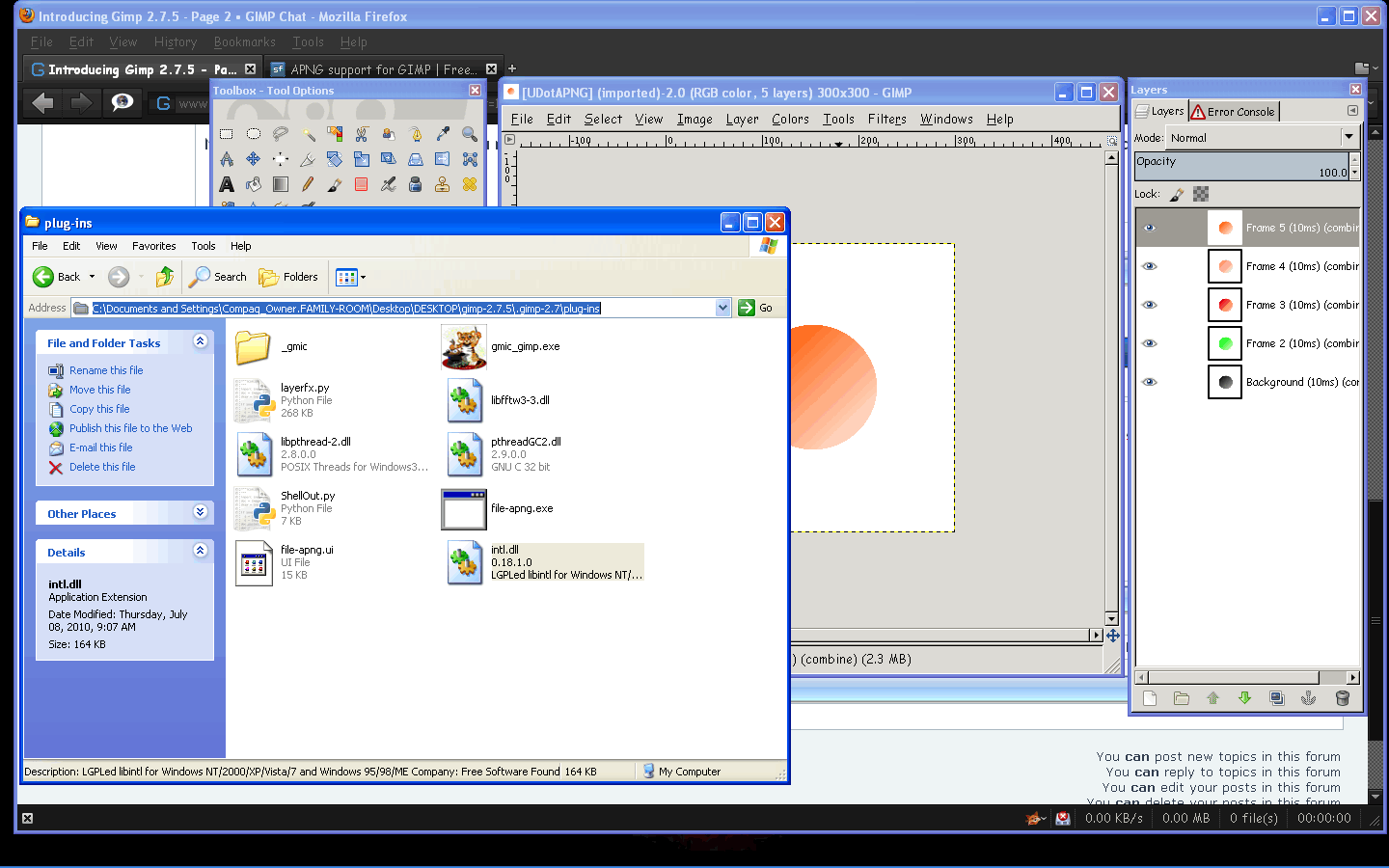
I just took out the original file-png from the portable lib/gimp/2.0/plug-ins directory.
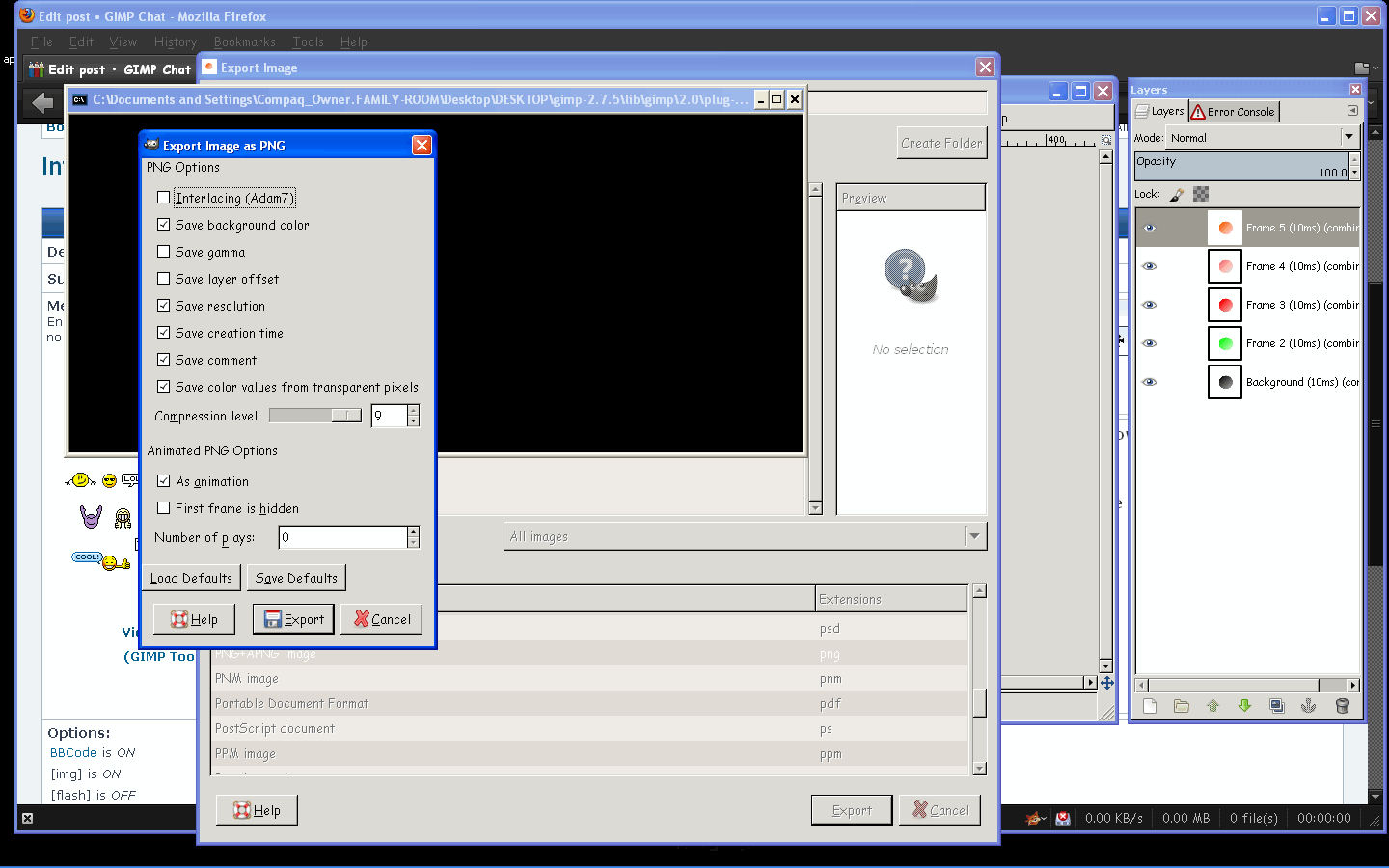
Then i copied and placed the intl.dll file from gimp-2.6.11 bin folder, file-png and ui from the apng download zip folder in the portable lib/gimp/2.0/plug-ins folder.
Fired right up! :)

Image

Image

I am happy.

_________________
Image


Top
 Post subject: Re: Introducing Gimp 2.7.5
PostPosted: Fri Dec 23, 2011 7:05 pm  (#14) 
Offline
GimpChat Member

Joined: Apr 12, 2010
Posts: 5870
Rod the main problem with the Apng plugin come to use as replacement for the default png plugin...that will not work well

But you may just add it at binary level, just don't rename as png, a lot of script and plugin expect the standard file-png plugin, and replace it will break them all

_________________
My 3D Gallery on Deviantart http://photocomix2.deviantart.com/
Main gallery http://www.flickriver.com/photos/photocomix-mandala/
Mandala and simmetry http://www.flickriver.com/photos/photocomix_mandala/

Image

Mrs Wilbress


Top
 Post subject: Re: Introducing Gimp 2.7.5
PostPosted: Fri Dec 23, 2011 7:10 pm  (#15) 
Offline
GimpChat Member

Joined: Apr 12, 2010
Posts: 5870
@Partha
why compile gmic if not to add directly at least in the portable version ?

About gmic
1) you should remove a file( bashcompletation.exe)
Oh well you may even keep the file but is for the command line version of gmic, and should not be included with the plugin

2)GMiC maximize button doesn't work with 2,7

The splashscreen is really cool and everything else seems working fine

_________________
My 3D Gallery on Deviantart http://photocomix2.deviantart.com/
Main gallery http://www.flickriver.com/photos/photocomix-mandala/
Mandala and simmetry http://www.flickriver.com/photos/photocomix_mandala/

Image

Mrs Wilbress


Top
 Post subject: Re: Introducing Gimp 2.7.5
PostPosted: Fri Dec 23, 2011 7:42 pm  (#16) 
Offline
GimpChat Member
User avatar

Joined: Sep 29, 2011
Posts: 120
Location: Texas
Thank you so much Partha!!! Merry Christmas!

_________________
“There´s tools and colours for all of us,
to lend from nature to make the world
more understandable and beautiful”.

Image


Top
 Post subject: Re: Introducing Gimp 2.7.5
PostPosted: Fri Dec 23, 2011 10:36 pm  (#17) 
Offline
GimpChat Member

Joined: Mar 14, 2011
Posts: 998
PhotoComix wrote:
@Partha
why compile gmic if not to add directly at least in the portable version ?

2 reasons -
1. David does not provide the 64-bit version which has been the main reason why I started building Gimp in the first place and I wanted G'mic.
2. I don't know if everyone wants G'mic. So, giving them an option.
Quote:
About gmic
1) you should remove a file( bashcompletation.exe)

I did - it's no longer in the 7z download from my website and in the case of the installer, it's put in the main bin directory and so it does not interfere with the plugins.
Quote:
Oh well you may even keep the file but is for the command line version of gmic, and should not be included with the plugin

2)GMiC maximize button doesn't work with 2,7

Something like this? It works on my machine for 64-bit Gimp.
Attachment:
File comment: Gmic Maximized
gmic-max.png
gmic-max.png [ 303.19 KiB | Viewed 2880 times ]

Do you get an error or nothing happens?
Quote:
The splashscreen is really cool and everything else seems working fine

Thanks PC and thanks for testing! :)
Partha


Top
 Post subject: Re: Introducing Gimp 2.7.5
PostPosted: Fri Dec 23, 2011 10:38 pm  (#18) 
Offline
GimpChat Member

Joined: Mar 14, 2011
Posts: 998
Jorden wrote:
Thank you so much Partha!!! Merry Christmas!

You are welcome. :)

Merry Christmas.


Top
 Post subject: Re: Introducing Gimp 2.7.5
PostPosted: Fri Dec 23, 2011 11:32 pm  (#19) 
Offline
GimpChat Member

Joined: Apr 12, 2010
Posts: 5870
yes i mean that
no error but nothing happens

_________________
My 3D Gallery on Deviantart http://photocomix2.deviantart.com/
Main gallery http://www.flickriver.com/photos/photocomix-mandala/
Mandala and simmetry http://www.flickriver.com/photos/photocomix_mandala/

Image

Mrs Wilbress


Top
 Post subject: Re: Introducing Gimp 2.7.5
PostPosted: Sat Dec 24, 2011 7:53 am  (#20) 
Offline
GimpChat Member

Joined: Mar 14, 2011
Posts: 998
PhotoComix wrote:
yes i mean that
no error but nothing happens

Does the same thing happen with the 32-bit version from the G'mic website?


Top
Post new topic Reply to topic  [ 84 posts ]  Go to page 1, 2, 3, 4, 5  Next

All times are UTC - 5 hours [ DST ]


* Login  


Powered by phpBB3 © phpBB Group