It is currently Sat Oct 10, 2026 4:22 am


All times are UTC - 5 hours [ DST ]


Post new topic Reply to topic  [ 121 posts ]  Go to page Previous  1, 2, 3, 4, 5, 6, 7  Next
Author Message
 Post subject: Re: How to set up your Gimp to accept apng format in Windows
PostPosted: Mon Dec 26, 2011 10:07 pm  (#41) 
Offline
GimpChat Member

Joined: Dec 15, 2011
Posts: 129
I have both 2.6.11 and 2.7.5, but don't see it in the 2.7.5.
Thanks


Top
 Post subject: Re: How to set up your Gimp to accept apng format in Windows
PostPosted: Mon Dec 26, 2011 10:10 pm  (#42) 
Offline
GimpChat Member

Joined: Mar 14, 2011
Posts: 998
Slide wrote:
I have both 2.6.11 and 2.7.5, but don't see it in the 2.7.5.
Thanks

I mean, use the technique that Rod outlined. Does that work for you with Gimp 2.7.5?


Top
 Post subject: Re: How to set up your Gimp to accept apng format in Windows
PostPosted: Mon Dec 26, 2011 11:07 pm  (#43) 
Offline
Global Moderator
User avatar

Joined: May 16, 2010
Posts: 16200
Slide wrote:
Maybe I don't know the steps to export them. I bring up 3, or 4 layers and save them as test.png. It saves (1 frame)with nothing as far as save as animation. What are the steps please?
Thanks


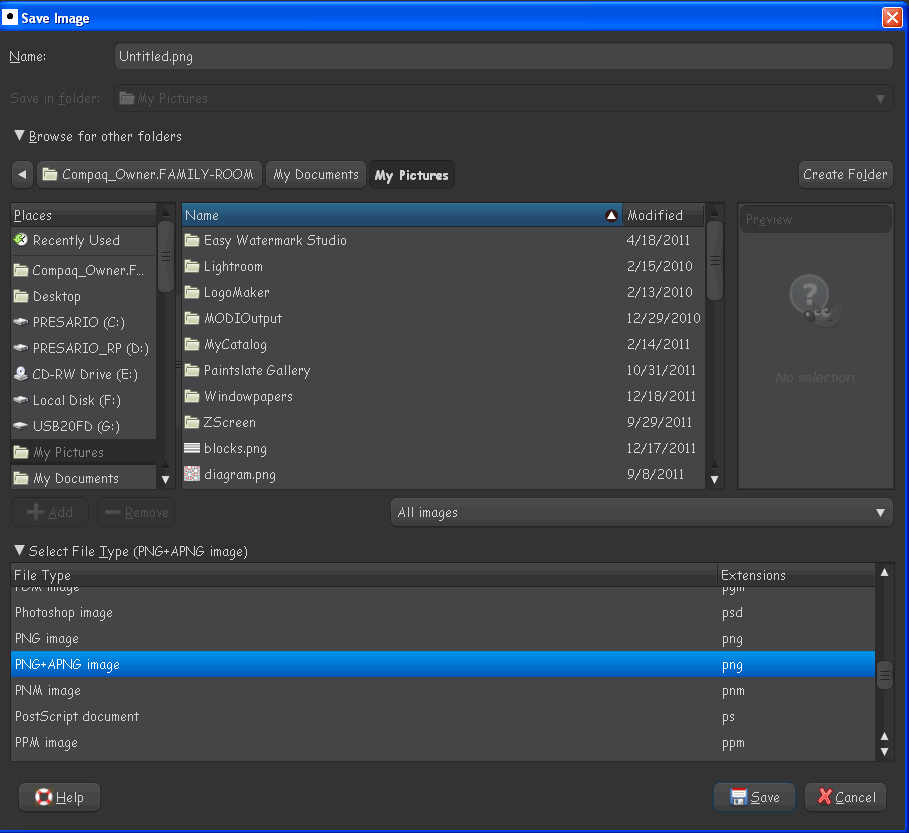
Slide when you save the image make sure to open the drop down menu (bottom left of the save dialog window)
In that drop down is a whole list of extensions Gimp understands.

Image

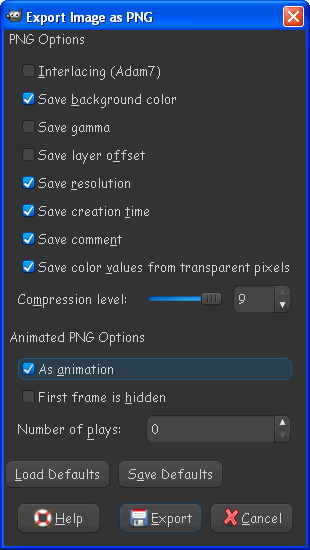
Select png-apng and a dialog like this will open -
Image

Be sure and click as animation and then select Export.
Your image will be saved as a animated png file.

To re-open that same file you have to open Gimp, go to File>Open, and use the same drop down menu and open your animated PNG AS png-apng to see the layers. :)

Hope that helps you.


Top
 Post subject: Re: How to set up your Gimp to accept apng format in Windows
PostPosted: Mon Dec 26, 2011 11:10 pm  (#44) 
Offline
GimpChat Member

Joined: Dec 15, 2011
Posts: 129
I finally found Rob's post. Thanks to everyone else that helped.
viewtopic.php?f=7&t=3387&start=10
It works.
Thanks


Top
 Post subject: Re: How to set up your Gimp to accept apng format in Windows
PostPosted: Mon Dec 26, 2011 11:22 pm  (#45) 
Offline
GimpChat Member

Joined: Dec 15, 2011
Posts: 129
Rod wrote:
Slide wrote:
Maybe I don't know the steps to export them. I bring up 3, or 4 layers and save them as test.png. It saves (1 frame)with nothing as far as save as animation. What are the steps please?
Thanks


Slide when you save the image make sure to open the drop down menu (bottom left of the save dialog window)
In that drop down is a whole list of extensions Gimp understands.
Select png-apng and a dialog like this will open -
Image

Be sure and click as animation and then select Export.
Your image will be saved a s a animated png file.

To re-open that same file you have to open Gimp, go to File>Open, and use the same drop down menu and open your animated PNG AS png-apng to see the layers. :)

Hope that helps you.

Thanks Rob. I finally figured out where to put the files. I was using .gimp\plug-ins as the dir. Not the GIMP-2.0\lib\gimp\2.0\plug-ins dir like you said in the other post. It's working.
Thanks


Top
 Post subject: Re: How to set up your Gimp to accept apng format in Windows
PostPosted: Tue Dec 27, 2011 12:06 am  (#46) 
Offline
GimpChat Member

Joined: May 15, 2010
Posts: 64
I'm working on the new version of APNG plugin.

Hopefully it will be ready for 2.8


Top
 Post subject: Re: How to set up your Gimp to accept apng format in Windows
PostPosted: Tue Dec 27, 2011 12:18 am  (#47) 
Offline
GimpChat Member

Joined: Dec 15, 2011
Posts: 129
Great!
Thanks


Top
 Post subject: Re: How to set up your Gimp to accept apng format in Windows
PostPosted: Tue Dec 27, 2011 10:38 am  (#48) 
Offline
Global Moderator
User avatar

Joined: May 16, 2010
Posts: 16200
MaxSt wrote:
I'm working on the new version of APNG plugin.

Hopefully it will be ready for 2.8


I do not see why it wouldn't work the way it is now Max.
Adding it to the newest dev version presented no problems for me.
And that is the next best thing to Gimp-2.8

As long as you add the intl.dll file from Gimp-2.6.11, the downloaded UI, and the file-png.exe it works fine in all versions.
Does for me anyways.

Maybe you could just package those three files together and call it good?
The main problem is you have to do this on every update as the files have to be in the lib/gimp/2.0/plug-ins folder or they do not work.Fix that and it will be good to go in my opinion.


Top
 Post subject: Re: How to set up your Gimp to accept apng format in Windows
PostPosted: Tue Dec 27, 2011 10:54 am  (#49) 
Offline
GimpChat Member
User avatar

Joined: Apr 07, 2010
Posts: 14182
In Partha's version of 1.7.4 I have the Apng files in C:\Users\Molly\.gimp-2.7\plug-ins works perfectly.

I did the same thing in Gimp 2.6.11 C:\Users\Molly\.gimp-2.0\plug-ins (doesn't work.) I also tried them in lib-2.0-plug-ins but that doesn't work either. I used about 3 diffferent versions of the plug-in, (at least from 3 different places)

_________________
Image


Top
 Post subject: Re: How to set up your Gimp to accept apng format in Windows
PostPosted: Tue Dec 27, 2011 11:13 am  (#50) 
Offline
Global Moderator
User avatar

Joined: May 16, 2010
Posts: 16200
Molly did you remove the old file-png and UI files first?
The old UI file must be replaced also with the new UI file from the apng zip folder.
I have those files in the USERFOLDER/gimp-2.6/plug-ins folder.

I only use the program directory path "gimp-2.7/lib/gimp/2.0/plug-ins" for gimp-2.7
Placing all the files from the downloaded apng zip folder in the user directory for gimp-2.6.11 should work as Gimp calls those files first.Gimp-2.6.11 already has the intl.dll file in the gimp-2.0/bin folder.


Top
 Post subject: Re: How to set up your Gimp to accept apng format in Windows
PostPosted: Tue Dec 27, 2011 11:18 am  (#51) 
Offline
GimpChat Member
User avatar

Joined: Apr 07, 2010
Posts: 14182
Yes I got rid of the file.png a long time ago. Since a few months back when I deleted gimp 2.6.11 and did a fresh install, I haven't been able to make the apng work. I wrote the tute over a year ago of what to do but it just doesn't work for me anymore. I place both the ui and the exe in the C:\Users\Molly\.gimp-2.0\plug-ins, I also tried putting them in lib, doesn't work there either.

_________________
Image


Top
 Post subject: Re: How to set up your Gimp to accept apng format in Windows
PostPosted: Tue Dec 27, 2011 12:57 pm  (#52) 
Offline
GimpChat Member

Joined: Dec 15, 2011
Posts: 129
C:\Program Files (x86)\GIMP-2.0\lib\gimp\2.0\plug-ins It's finally working for me Molly. ;)
Thanks
PS forgot the Program Files (x86)


Last edited by Slide on Tue Dec 27, 2011 1:27 pm, edited 1 time in total.

Top
 Post subject: Re: How to set up your Gimp to accept apng format in Windows
PostPosted: Tue Dec 27, 2011 1:17 pm  (#53) 
Offline
GimpChat Member
User avatar

Joined: Jan 13, 2011
Posts: 2648
Location: Poland
Since last update JamesH version works - without need to removal file-png.exe
http://www.box.com/shared/vjk6f3ajgbtolp8876p2
For XP 32 File location:
C:\Program Files\GIMP-2.7\lib\gimp\2.0\plug-ins\file-apng.exe
C:\Program Files\GIMP-2.7\lib\gimp\2.0\plug-ins\libpng15-15.dll
C:\Documents and Settings\USER - Name of Your Login\.gimp-2.7\plug-ins\plug-in-file-apng.ui

_________________
Image


Top
 Post subject: Re: How to set up your Gimp to accept apng format in Windows
PostPosted: Tue Dec 27, 2011 1:23 pm  (#54) 
Offline
GimpChat Member
User avatar

Joined: Dec 03, 2011
Posts: 149
I have it showing up in GIMP but for some reason it doesnt actually save as an animation am i supposed to put a numbe rin the number of plays box?
Image


Top
 Post subject: Re: How to set up your Gimp to accept apng format in Windows
PostPosted: Tue Dec 27, 2011 1:34 pm  (#55) 
Offline
GimpChat Member
User avatar

Joined: Apr 07, 2010
Posts: 14182
MareroQ, I also have it working in Gimp 2.7, but it doesn't work for me in Gimp 2.6.11
I didn't get any libpng15-15.dll in my downloads, just the exe and the ui files.

_________________
Image


Top
 Post subject: Re: How to set up your Gimp to accept apng format in Windows
PostPosted: Tue Dec 27, 2011 1:40 pm  (#56) 
Offline
GimpChat Member

Joined: Dec 15, 2011
Posts: 129
Jamie990 wrote:
I have it showing up in GIMP but for some reason it doesnt actually save as an animation am i supposed to put a numbe rin the number of plays box?
Image

Go back one page and look for the way Rod shows how to save the files.


Top
 Post subject: Re: How to set up your Gimp to accept apng format in Windows
PostPosted: Tue Dec 27, 2011 1:56 pm  (#57) 
Offline
GimpChat Member
User avatar

Joined: Jan 13, 2011
Posts: 2648
Location: Poland
The latest version JamesH is only for Gimp> 2.7
(include libpng15-15.dll)
For Gimp 2.6 the only way to Rod.
All the hope in MaxSt
http://www.gimpchat.com/viewtopic.php?f=23&t=218&start=40#p43160

_________________
Image


Top
 Post subject: Re: How to set up your Gimp to accept apng format in Windows
PostPosted: Tue Dec 27, 2011 2:47 pm  (#58) 
Offline
GimpChat Member

Joined: May 15, 2010
Posts: 64
What I really want to change in the plugin (besides fixing a couple of well-known bugs) is to include automatic frame optimization into saving procedure, and automatic unoptimization into loading procedure.

I already finished the loading part.


Top
 Post subject: Re: How to set up your Gimp to accept apng format in Windows
PostPosted: Tue Dec 27, 2011 3:17 pm  (#59) 
Offline
GimpChat Member
User avatar

Joined: Apr 07, 2010
Posts: 14182
Keep up the good work Max.

_________________
Image


Top
 Post subject: Re: How to set up your Gimp to accept apng format in Windows
PostPosted: Tue Dec 27, 2011 5:39 pm  (#60) 
Offline
GimpChat Member
User avatar

Joined: Dec 03, 2011
Posts: 149
Slide wrote:
Jamie990 wrote:
I have it showing up in GIMP but for some reason it doesnt actually save as an animation am i supposed to put a numbe rin the number of plays box?
Image

Go back one page and look for the way Rod shows how to save the files.


i did it that way selecting it in the drop down menu then clicking animation.


Top
Post new topic Reply to topic  [ 121 posts ]  Go to page Previous  1, 2, 3, 4, 5, 6, 7  Next

All times are UTC - 5 hours [ DST ]


* Login  


Powered by phpBB3 © phpBB Group