It is currently Sat Sep 26, 2026 6:27 pm


All times are UTC - 5 hours [ DST ]


Post new topic Reply to topic  [ 35 posts ]  Go to page Previous  1, 2
Author Message
 Post subject: Re: Letter Brushes
PostPosted: Thu Jan 19, 2012 6:42 pm  (#21) 
Offline
Script Coder
User avatar

Joined: Feb 18, 2011
Posts: 4826
Location: Bendigo Vic. Australia
Rod I had no problems insalling the photofont plugin, just directed the installer to my
.gimp2.6>plugins>Photoshop Plugins folder, then started gimp and it was under Filters

Image

_________________
Image
No matter how much you push the envelope, it'll still be stationery.


Top
 Post subject: Re: Letter Brushes
PostPosted: Fri Jan 20, 2012 8:30 am  (#22) 
Offline
Global Moderator
User avatar

Joined: May 16, 2010
Posts: 16175
That is what i do now.I have one dedicated folder for new 8bf files.
Anytime i add a new adobe filter i toss it in there and it usually works.If it doesn't i just move it to Xnview. :)
Then i use Rob A's Shellout to get to it. (Thanks Rob!)
Much easier than adding a new path through PSPI each time.

Now it's time to create some phf files. :bigthup


Top
 Post subject: Re: Letter Brushes
PostPosted: Fri Jan 20, 2012 9:45 am  (#23) 
Offline
GimpChat Member
User avatar

Joined: Aug 24, 2011
Posts: 1785
Location: Dallas, TX
It's becoming clearer now. Yes I can almost see it. Yep, there it is clear as can be. I can see a lot of phf posts in the near future. This Photofont is really cool. just need to learn how to make those phf files so I can install them and play some more. I threw this together this morning after setting everything up.


Attachments:
Sunrise.jpg
Sunrise.jpg [ 221.1 KiB | Viewed 2930 times ]

_________________
Image
Top
 Post subject: Re: Letter Brushes
PostPosted: Fri Jan 20, 2012 10:06 am  (#24) 
Offline
GimpChat Member
User avatar

Joined: Sep 24, 2010
Posts: 12849
Rod wrote:
That is what i do now.I have one dedicated folder for new 8bf files.
Anytime i add a new adobe filter i toss it in there and it usually works.If it doesn't i just move it to Xnview. :)
Then i use Rob A's Shellout to get to it. (Thanks Rob!)
Much easier than adding a new path through PSPI each time.

Now it's time to create some phf files. :bigthup


Except for Impressionist, I never had to add entries to the PSPI file in order for PS filters to be recognized Rod (done automagically). :)

_________________
Lyle

Psalm 109:8

Image


Top
 Post subject: Re: Letter Brushes
PostPosted: Fri Jan 20, 2012 2:58 pm  (#25) 
Offline
Global Moderator
User avatar

Joined: May 16, 2010
Posts: 16175
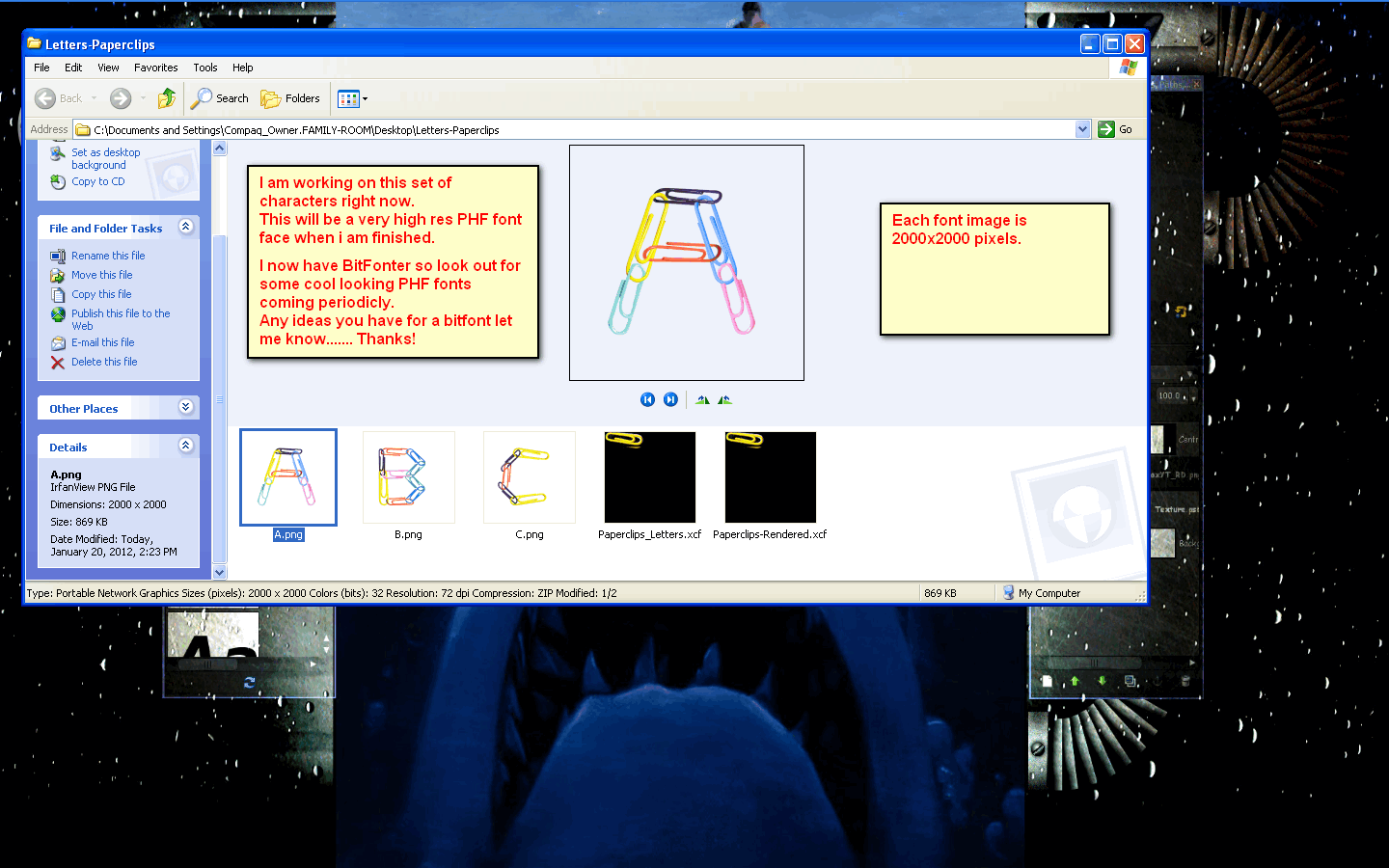
Working on this one now. :)

Image


Top
 Post subject: Re: Letter Brushes
PostPosted: Fri Jan 20, 2012 4:04 pm  (#26) 
Offline
GimpChat Member
User avatar

Joined: Aug 24, 2011
Posts: 1785
Location: Dallas, TX
Rod wrote:
Working on this one now. :)

Image


Yo....Animal....What program are you using to create the file, Inkscape or can you create right there in Photofont? In the pic of your file folder I see a paperclip font.xcf file. Did you start in gimp?

_________________
Image


Top
 Post subject: Re: Letter Brushes
PostPosted: Fri Jan 20, 2012 4:24 pm  (#27) 
Offline
Global Moderator
User avatar

Joined: May 16, 2010
Posts: 16175
The xcf file is where i am creating the font images for the Photofont i will design the PHF file inside of Bitfonter itself. :)


Top
 Post subject: Re: Letter Brushes
PostPosted: Fri Jan 20, 2012 4:36 pm  (#28) 
Offline
GimpChat Member
User avatar

Joined: Sep 24, 2010
Posts: 12849
If you are using the trial version of Bitfonter, it will distort 50% of your characters as I recall the reading. If you have the full version, then I believe I'm a lost relative of yours Rod and could use some cash. lol

:)

_________________
Lyle

Psalm 109:8

Image


Top
 Post subject: Re: Letter Brushes
PostPosted: Fri Jan 20, 2012 4:40 pm  (#29) 
Offline
GimpChat Member
User avatar

Joined: Aug 24, 2011
Posts: 1785
Location: Dallas, TX
Just looked up Bitfonter and found a lot of sites with key gen downloads. Don't know if I trust any of them though. Hey Rod, can I borrow the keys to the car tonight? I promise I'll put gas in it.

Well, I figured as long as me and Lyle were gonna be your new relatives we might at least share. LOL!

_________________
Image


Top
 Post subject: Re: Letter Brushes
PostPosted: Fri Jan 20, 2012 9:26 pm  (#30) 
Offline
GimpChat Member
User avatar

Joined: Apr 08, 2010
Posts: 5420
Location: Northwest Ohio
so how do you make these custom fonts? What list of programs do you use in what sequence?


Top
 Post subject: Re: Letter Brushes
PostPosted: Wed Feb 22, 2012 8:14 pm  (#31) 
Offline
Global Moderator
User avatar

Joined: May 16, 2010
Posts: 16175
I am currently working on setting up a PHF/XML file that will be usable for any new PHF font you create.
My goal is to have one (PHF file you use with EVERY new font) that you can place in the same directory with your glyph images (they will have to be named correctly), and then just install the PHF in the PhotoFont software.
The software will call all the extra images through the PHF code i hope. :)
After much study on refering with href images in XML i think i may have it.

I was able to install my PHF into PhotoFont Start but the images wouldn't show up.Hence the need to study image referencing code.If it works i will post the PHF file code.Then all you need do is create your font image glyphs and throw the PHF in there with them.Then install it into PhotoFont Start.


Top
 Post subject: Re: Letter Brushes
PostPosted: Wed Feb 22, 2012 8:49 pm  (#32) 
Offline
GimpChat Member
User avatar

Joined: Sep 24, 2010
Posts: 12849
I don't really understand PHP but know it's used for URL based programs but if you can make it simple enough to just place properly named images for PhotoFont that would be cool. :)

_________________
Lyle

Psalm 109:8

Image


Top
 Post subject: Re: Letter Brushes
PostPosted: Wed Feb 22, 2012 10:12 pm  (#33) 
Offline
GimpChat Member
User avatar

Joined: Jan 20, 2012
Posts: 583
lylejk wrote:
I don't really understand PHP but know it's used for URL based programs but if you can make it simple enough to just place properly named images for PhotoFont that would be cool. :)

Did I miss something here? Where did PHP come into play, last time I checked I don't think PHP can generate XML? Last time I looked it runs off of XML linking still learning. Would be nice of an awesome programmer to create a very useful program to auto generate the XML for you after entering in the values based on the API you know?

_________________


"In the face of adversity, there's three things: fly, freeze or fight; We're choosing to fight..."- Guy Boucher, Tampa Bay Lighting Head Coach


Top
 Post subject: Re: Letter Brushes
PostPosted: Wed Feb 22, 2012 10:49 pm  (#34) 
Offline
GimpChat Member

Joined: Dec 15, 2011
Posts: 129
There are XML generators all over out there. Here's an example of one.
Thanks
Click-> XML-Generator


Top
 Post subject: Re: Letter Brushes
PostPosted: Thu Feb 23, 2012 12:47 pm  (#35) 
Offline
Global Moderator
User avatar

Joined: May 16, 2010
Posts: 16175
Not PHP --- PHF :lol
Big difference :)

PHP is a databased language for website MySQL and such.
PHF is a Photofont which is a type of bitmap image font, but has or can have transparency around the outline.

Thanks for the XML gen link Slide.
I use komodo - by active state which is free.

Image


Top
Post new topic Reply to topic  [ 35 posts ]  Go to page Previous  1, 2

All times are UTC - 5 hours [ DST ]


* Login  


Powered by phpBB3 © phpBB Group