It is currently Tue Oct 13, 2026 4:42 am


All times are UTC - 5 hours [ DST ]


Post new topic Reply to topic  [ 13 posts ] 
Author Message
 Post subject: Not sure what to do....
PostPosted: Sat Sep 15, 2012 8:26 am  (#1) 
Offline
GimpChat Member
User avatar

Joined: Dec 11, 2011
Posts: 532
i am a little down today :( ...and here is why,,,for the longest i have been wanting to paint like Bob Ross with my gimp....and for those who don't know who he is, here is a small video showing you who i am talking about...

http://www.youtube.com/watch?v=MghiBW3r65M

Bob Ross painted with oil paints and a canvas. now i have done some paintings very similar to this type of painting he does with my gimp, but i cannot seem to find the right brush to do the trees or bushes with....i have tried my best to make my own brush, but can't seem to find that one that works just right...here is a picture of a painting that i did with gimp, and you can see how awful the trees look.....i am very happy with my mountains but not so happy with my trees...

Attachment:
ARTWORK25-1-1.png
ARTWORK25-1-1.png [ 1023.8 KiB | Viewed 2284 times ]


i am doing my best to find a way to paint trees and bushes but i do not want a brush that already has the tree already shaped..if you know what i am getting at. to me that is not painting.... here is another one i have done and i have been learning to do the water a little better...but i wanted to add some trees to this picture but because i am so bad with trees i left them out...

Attachment:
mypainting.jpg
mypainting.jpg [ 23.39 KiB | Viewed 2284 times ]


i just wished someone on here could help me find the right brush or technique to get the result i want...maybe what i want is impossible...but i hope i am wrong to assume that...anyways any help from you guys will be appreciated. like i said i am not looking for a brush to where the tree is already made for me...and i guess what i am really looking for is a brush or technique that will help me paint the leaves on the trees with...

_________________
Image


Share on Facebook Share on Twitter Share on Orkut Share on Digg Share on MySpace Share on Delicious Share on Technorati
Top
 Post subject: Re: Not sure what to do....
PostPosted: Sat Sep 15, 2012 8:53 am  (#2) 
Offline
GimpChat Member

Joined: Apr 19, 2012
Posts: 80
Location: Australia
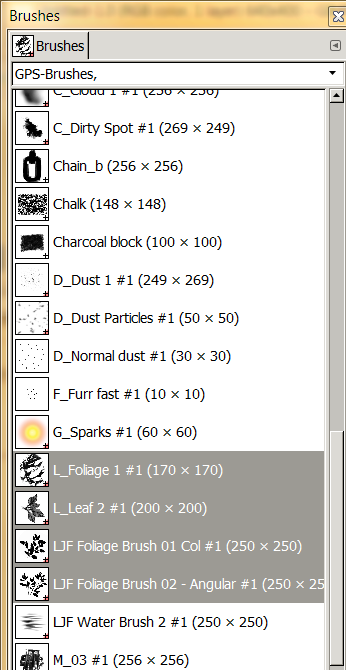
Do you have Gimp Paint Studio (GPS) loaded?
Image


Top
 Post subject: Re: Not sure what to do....
PostPosted: Sat Sep 15, 2012 9:10 am  (#3) 
Offline
GimpChat Member
User avatar

Joined: Dec 11, 2011
Posts: 532
yes i do...

_________________
Image


Top
 Post subject: Re: Not sure what to do....
PostPosted: Sat Sep 15, 2012 9:30 am  (#4) 
Offline
GimpChat Member
User avatar

Joined: Apr 07, 2010
Posts: 14182
I think you did a very nice job on your trees, the trunks are very well done and I don't see anything wrong with your leaves except maybe you could have more lights and darks in the greens to show which ones the lights are hitting on. If you look outside at the trees you will see many shades, (colour values) in the leaves. The deeper you look into the tree the darker the green. Don't know if this helps but it might.

_________________
Image


Top
 Post subject: Re: Not sure what to do....
PostPosted: Sat Sep 15, 2012 9:35 am  (#5) 
Offline
GimpChat Member
User avatar

Joined: Aug 16, 2012
Posts: 4271
Location: Göteborg, Sweden
what effect are you after with the leaves? i agree with molly that you did a good job on them already. but, after all, you're not out to please us :). the trees look a bit clip-arty, i think, and the rest of the picture is a bit softer. are you aiming for something more like my birch leaves in this clip?

Attachment:
birch1.png
birch1.png [ 72.73 KiB | Viewed 2258 times ]

for this i used three layers and four different brushes. i changed the size and spacing on the brushes so i got more variation and more air in the picture. i changed layer mode on the top layer to get the colouring right. was that of any at all help?

_________________


Top
 Post subject: Re: Not sure what to do....
PostPosted: Sat Sep 15, 2012 9:36 am  (#6) 
Offline
GimpChat Member
User avatar

Joined: Dec 11, 2011
Posts: 532
molly wrote:
I think you did a very nice job on your trees, the trunks are very well done and I don't see anything wrong with your leaves except maybe you could have more lights and darks in the greens to show which ones the lights are hitting on. If you look outside at the trees you will see many shades, (colour values) in the leaves. The deeper you look into the tree the darker the green. Don't know if this helps but it might.


thanks molly,, i understand what you are saying..thats what i am trying my best to do...i have trouble with leaves... can't seem to make them look right or natural...maybe one day it will hit me...so i guess it is a work in progress...

_________________
Image


Top
 Post subject: Re: Not sure what to do....
PostPosted: Sat Sep 15, 2012 9:47 am  (#7) 
Offline
GimpChat Member
User avatar

Joined: Dec 11, 2011
Posts: 532
AnMal wrote:
what effect are you after with the leaves? i agree with molly that you did a good job on them already. but, after all, you're not out to please us :). the trees look a bit clip-arty, i think, and the rest of the picture is a bit softer. are you aiming for something more like my birch leaves in this clip?
Attachment:
The attachment birch1.png is no longer available

for this i used three layers and four different brushes. i changed the size and spacing on the brushes so i got more variation and more air in the picture. i changed layer mode on the top layer to get the colouring right. was that of any at all help?


well i wasn't really painting a certain type of tree for this piece of work...i guess that sounds really strange..cause i guess it helps to know what kind of tree...but i was just trying to paint trees more realistic cause i felt like my mountains looked better and the trees just messed up the picture..they look to much like a cartoon to go with the picture...if you can see what i am trying to say...but here is the type of trees i would love to be able to produce..this is a painting from bob ross...

Attachment:
trees.JPG
trees.JPG [ 60.62 KiB | Viewed 2256 times ]

_________________
Image


Top
 Post subject: Re: Not sure what to do....
PostPosted: Sat Sep 15, 2012 9:56 am  (#8) 
Offline
GimpChat Member
User avatar

Joined: Mar 23, 2012
Posts: 7388
Location: Göteborg at last!
You've done a really good job. Strangely enough I find trees really difficult and haven't yet painted one that I'm satisfied with. I'll work on this and see what I can come up with.


Top
 Post subject: Re: Not sure what to do....
PostPosted: Sat Sep 15, 2012 9:58 am  (#9) 
Offline
GimpChat Member
User avatar

Joined: Apr 07, 2010
Posts: 14182
When I was doing oil paintings, then changed to water colours, most of the time I dry brushed my leaves with a fan brush so I could pick up different shades with the brush then dab them on. BUT I am not a digital painter so wouldn't know the best way to do what you want.
I know there are several leaf brushes out there. If you are using a tablet, you could use more pressure where you want them heavy and less if you want them light.
Griatch has some great tutorials out there for trees, or you could even ask him what brushes he uses. My guess would be all or just a few of the basic brushes.

_________________
Image


Top
 Post subject: Re: Not sure what to do....
PostPosted: Sat Sep 15, 2012 10:00 am  (#10) 
Offline
GimpChat Member
User avatar

Joined: Dec 11, 2011
Posts: 532
i found this..maybe this can help..i posted this so maybe others can get benefit from it

http://www.gimptalk.com/index.php?/topi ... e-in-gimp/

_________________
Image


Top
 Post subject: Re: Not sure what to do....
PostPosted: Sat Sep 15, 2012 10:04 am  (#11) 
Offline
GimpChat Member
User avatar

Joined: Mar 23, 2012
Posts: 7388
Location: Göteborg at last!
rdgracer71 wrote:
i found this..maybe this can help..i posted this so maybe others can get benefit from it

http://www.gimptalk.com/index.php?/topi ... e-in-gimp/


Thank you. That'll be useful.


Top
 Post subject: Re: Not sure what to do....
PostPosted: Sat Sep 15, 2012 10:08 am  (#12) 
Offline
GimpChat Member
User avatar

Joined: Feb 14, 2012
Posts: 426
Image

I would make a rough tree selection and then in Quick Mask I would blur it like #1 above. Then I would use the Vegitation02 Brush in Gimp 2.8 and draw a black background like #2. Then I would use the same brush two more times first with dark green and then light green to achieve a tree or bush type of effect. And experiment with different brush sizes. This would be done on its own transparent layer of course.

Alan


Top
 Post subject: Re: Not sure what to do....
PostPosted: Sat Sep 15, 2012 10:10 am  (#13) 
Offline
GimpChat Member
User avatar

Joined: Apr 07, 2010
Posts: 14182
Thats just the Grriatch link I was talking about. I tried a search but my search isn't working because of a Javascript issue but if you follow that, you will be very pleased.

_________________
Image


Top
Post new topic Reply to topic  [ 13 posts ] 

All times are UTC - 5 hours [ DST ]


* Login  


Powered by phpBB3 © phpBB Group