It is currently Tue Aug 11, 2026 2:31 pm


All times are UTC - 5 hours [ DST ]


Post new topic Reply to topic  [ 5 posts ] 
Author Message
 Post subject: Egg Scene
PostPosted: Tue Dec 07, 2010 8:20 pm  (#1) 
Offline
Former Member
User avatar

Joined: Nov 17, 2010
Posts: 618
Location: Rockford, IL
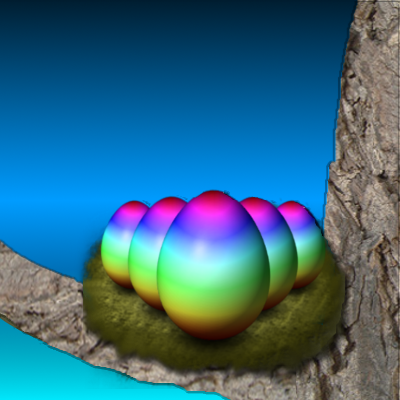
It's been awhile sense my last design, and I'm a little rusty, but I'm working on getting back into flow with everything, but yeah I know Christmas is right around the corner, but this is a gift to the Aviary Community as well as the developers for all their hard work, and great web apps.

So this is what I made yesterday in about 8-10 minutes.
Attachment:
eggscene.png
eggscene.png [ 167.92 KiB | Viewed 2256 times ]

Now today I wanted to expand it, and make it better before I show the Aviary community, and I'm planning on making a small scene with clouds, sun, tree, etc: etc: So I drew the small template, but I'm still fairly new to painting, and don't know how to make a decent tree from here.
Attachment:
eggsceneprogress.png
eggsceneprogress.png [ 116.18 KiB | Viewed 2256 times ]

If anyone has any tips on how I can make this better, and tutorials or anything to improve painting I'd love to hear it, thanks!


Share on Facebook Share on Twitter Share on Orkut Share on Digg Share on MySpace Share on Delicious Share on Technorati
Top
 Post subject: Re: Egg Scene
PostPosted: Tue Dec 07, 2010 8:43 pm  (#2) 
Offline
Global Moderator
User avatar

Joined: May 16, 2010
Posts: 16155
Try grabbing some bark images and paste them into the tree shape with a bark cutout. =)
First you need to create a tree shape - render out the bark image - alpha to select your tree shape - select your bark layer - edit/copy ---- select tree shape layer edit/paste into - anchor layer
make sure the new bark layer is above the tree shape layer.
this effectively creates a quick cutout of the exact tree shape.
make the original bark layer invisible so you only have the tree shape bark - use overlay or whatever layer mode that works best for you. - use masks for touch up's..whatever.
create shadows highlights what not for effects.

I used this effect for this image...

Image

_________________
Image


Top
 Post subject: Re: Egg Scene
PostPosted: Tue Dec 07, 2010 9:11 pm  (#3) 
Offline
GimpChat Member
User avatar

Joined: Apr 08, 2010
Posts: 5420
Location: Northwest Ohio
Those are great eggs! I have tried using Raven on Aviary to learn how to do vector images....ginormous FAIL


Top
 Post subject: Re: Egg Scene
PostPosted: Tue Dec 07, 2010 9:26 pm  (#4) 
Offline
Global Moderator
User avatar

Joined: May 16, 2010
Posts: 16155
Here is one i whipped out real quick, but i am sure you can find better looking bark. =)

Image

_________________
Image


Top
 Post subject: Re: Egg Scene
PostPosted: Tue Dec 07, 2010 11:31 pm  (#5) 
Offline
Former Member
User avatar

Joined: Nov 17, 2010
Posts: 618
Location: Rockford, IL
My goal for this painting as well as many others I wanna get to do is not to use ANY stocks, just paint it using only gimp with the mouse, and sometimes use filters, depending on the project. I know I can do it though, it just takes practice.

I see what you're getting at though, I'll give it a try, but painting it, no stocks :) I may look at a reference image though for some help.

As for Raven it's very easy to use, like InkScape imo. I'm not big into vector editing, but I got the basics, and that down, but don't ask me to create characters, as that'll be a huge fail, but logos, and icons I can do.


Top
Post new topic Reply to topic  [ 5 posts ] 

All times are UTC - 5 hours [ DST ]


* Login  


Powered by phpBB3 © phpBB Group