It is currently Thu Aug 13, 2026 4:48 am


All times are UTC - 5 hours [ DST ]


Post new topic Reply to topic  [ 51 posts ]  Go to page 1, 2, 3  Next
Author Message
 Post subject: New pictures made old.
PostPosted: Sun Feb 06, 2011 7:31 pm  (#1) 
Offline
GimpChat Member

Joined: Feb 06, 2011
Posts: 342
I did these photos was following an old tut and well got lost along the way because i have the newer version but i manage to figure it out. This happens alot to me with older tuts. :( The pics are placed in a frame meshed for IMVU. I have not figured out how to do frames on gimp yet. but the wood color I created from a picture of english oak I resized and fixed up.

Liana


Attachments:
File comment: I found this pic of an old mill.
ye ole mill.jpg
ye ole mill.jpg [ 6.18 KiB | Viewed 2944 times ]
File comment: My cows on my farm. :)
old cowpic100x80.jpg
old cowpic100x80.jpg [ 2.7 KiB | Viewed 2944 times ]
Share on Facebook Share on Twitter Share on Orkut Share on Digg Share on MySpace Share on Delicious Share on Technorati
Top
 Post subject: Re: New pictures made old.
PostPosted: Sun Feb 06, 2011 8:56 pm  (#2) 
Offline
GimpChat Member
User avatar

Joined: Apr 17, 2010
Posts: 12
Location: Upstate New York
Very nice pics! I'd like to try something like that when I have some time. The color you used is lovely. :bigthup


Top
 Post subject: Re: New pictures made old.
PostPosted: Sun Feb 06, 2011 11:35 pm  (#3) 
Offline
Global Moderator
User avatar

Joined: May 16, 2010
Posts: 16158
Oh i love old pictures. :)
Very nice Lianam.

_________________
Image


Top
 Post subject: Re: New pictures made old.
PostPosted: Mon Feb 07, 2011 12:34 am  (#4) 
Offline
GimpChat Member
User avatar

Joined: Oct 06, 2010
Posts: 4050
As for making picture frames, check in Filters/Decor on your GIMP menu to see if you have Add Mat and Add Frame listed. Those are two very powerful scripts that work quickly and easily. I usually have it leave copies of the bumps so that I can improvise if I don't think the settings are enough.

A mat and frame I made using the above filters:
Image


Then there is another powerful Python plug-in that works extremely well, called Line Border, which can be found here:

http://registry.gimp.org/node/24784

This requires you to have Python installed and working with GIMP. A tutorial for doing that can be found here:

http://photocomix-resources.deviantart. ... r-74889017

and another tutorial found here (I actually used this one before I was aware of the link above):

http://www.gimpusers.com/tutorials/inst ... ndows.html

_________________
"In order to attain the impossible, one must attempt the absurd."
~ Miguel de Cervantes


Top
 Post subject: Re: New pictures made old.
PostPosted: Mon Feb 07, 2011 3:14 am  (#5) 
Offline
GimpChat Member
User avatar

Joined: Oct 06, 2010
Posts: 4050
Another picture frame possibility (comes with a learning curve for first time users) is WrapMap (this requires Python being installed with GIMP, just like Line Border on previous post - follow those links to install Python), the WrapMap plug-in can be found here:

http://registry.gimp.org/node/24754

I used WrapMap to create this frame:

Image

I used G'MIC to make it look old:

Image


If you don't have G'MIC, you can get that here:

http://sourceforge.net/projects/gmic/files/

G'MIC also has a very active community on Flickr, found here:

http://www.flickr.com/groups/gmic/discuss

_________________
"In order to attain the impossible, one must attempt the absurd."
~ Miguel de Cervantes


Top
 Post subject: Re: New pictures made old.
PostPosted: Mon Feb 07, 2011 4:53 am  (#6) 
Offline
GimpChat Member
User avatar

Joined: Apr 07, 2010
Posts: 14182
That is great mahvin. I love it. I use that filter also to make frames but how do you get it to look beveled? To me it looks like each ridge is bumped and in 3D.
BTW, Penguins feet looks just like two egg yolks. cute!

_________________
Image


Top
 Post subject: Re: New pictures made old.
PostPosted: Mon Feb 07, 2011 4:59 am  (#7) 
Offline
GimpChat Member
User avatar

Joined: Oct 06, 2010
Posts: 4050
Molly: I am currently working on a tutorial for using WrapMap for making frames, probably won't be ready until tomorrow night.

_________________
"In order to attain the impossible, one must attempt the absurd."
~ Miguel de Cervantes


Top
 Post subject: Re: New pictures made old.
PostPosted: Mon Feb 07, 2011 6:34 am  (#8) 
Offline
GimpChat Member
User avatar

Joined: Apr 07, 2010
Posts: 14182
Thank you muchly Mahvin,
I don't have any problems making the frames but getting them in 3D is the poser. :geek:

_________________
Image


Top
 Post subject: Re: New pictures made old.
PostPosted: Mon Feb 07, 2011 11:42 am  (#9) 
Offline
Global Moderator
User avatar

Joined: May 16, 2010
Posts: 16158
Chisel would work nicely for it too. :)
Playing with bevel and emboss from LayerFX script can get nice results also.
add mat and add frame can be found here.
http://gimpguru.org/tutorials/matsandframes/

_________________
Image


Top
 Post subject: Re: New pictures made old.
PostPosted: Mon Feb 07, 2011 11:56 am  (#10) 
Offline
GimpChat Member

Joined: Feb 06, 2011
Posts: 342
I have GIMP version 2.6.10 and i did not find the plugin for add map or add frame. I have the plugin to make 'old picture', make 'fuzzy border', and 'add a border'. I found a few tutorials online for gimp i was having difficulty following either due to lack of steps included or old version of gimp used like 7 years ago. I will try to make sure my python is working correctly or i have it updated and get some of those plugins u suggested. :) Thanks the pictures look great.

Liana


Top
 Post subject: Re: New pictures made old.
PostPosted: Mon Feb 07, 2011 1:01 pm  (#11) 
Offline
Global Moderator
User avatar

Joined: May 16, 2010
Posts: 16158
I posted a link to that SCM script add frames - add mat up there Lianam.
Just thought i would give it a try myself. :hehe

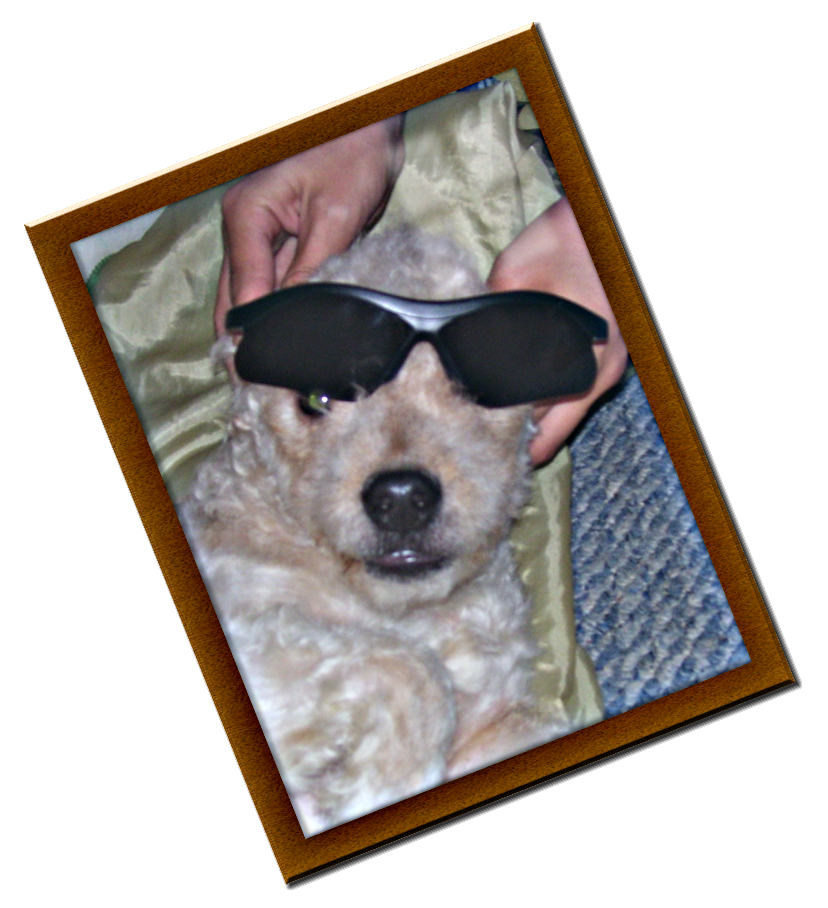
Image

Isn't Zeusifer a ham? :rofl

_________________
Image


Top
 Post subject: Re: New pictures made old.
PostPosted: Mon Feb 07, 2011 1:39 pm  (#12) 
Offline
GimpChat Member
User avatar

Joined: Jul 04, 2010
Posts: 2253
Location: Retired Moderator Slowly Returning to the Living.
I don't have the scm for the matt and frames. I don't see the link to the scm, but I can look that up myself.
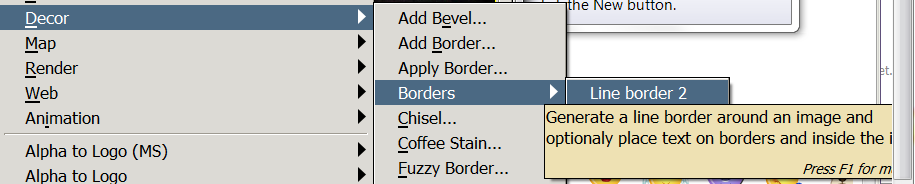
I put in the python for line borders and I have an option in Filters >Decor > Borders > Line Border 2, but when I click on it, it does nothing at all. It doesn't show up in undo, but in Filters it shows Repeat "Line Border 2" and Re-Show "Line Border 2".

_________________
Artists aren't crazy! We're eccentric! ~G.M. Ross

Image

My Sigs = My Photos
Check out my work at http://www.flickr.com/photos/photomastergreg.


Top
 Post subject: Re: New pictures made old.
PostPosted: Mon Feb 07, 2011 1:57 pm  (#13) 
Offline
GimpChat Member
User avatar

Joined: Jul 04, 2010
Posts: 2253
Location: Retired Moderator Slowly Returning to the Living.
I went back and found the link you posted, but it is for 2.2 and when I installed it in 2.6, it doesn't even show up in the menus. :gaah

_________________
Artists aren't crazy! We're eccentric! ~G.M. Ross

Image

My Sigs = My Photos
Check out my work at http://www.flickr.com/photos/photomastergreg.


Top
 Post subject: Re: New pictures made old.
PostPosted: Mon Feb 07, 2011 2:02 pm  (#14) 
Offline
GimpChat Member
User avatar

Joined: Oct 06, 2010
Posts: 4050
Did you read the comments in Line Borders on the Registry, PM? I had a similar problem (and others, too) and it required libglade. Read the comments toward the bottom.

_________________
"In order to attain the impossible, one must attempt the absurd."
~ Miguel de Cervantes


Top
 Post subject: Re: New pictures made old.
PostPosted: Mon Feb 07, 2011 3:12 pm  (#15) 
Offline
GimpChat Member
User avatar

Joined: Apr 07, 2010
Posts: 14182
mahvin, there is a file in there called lineborder.glade. Is that what you mean by libglade? If so, where do you put glade files" and there are a couple more in that folder too. do they go into the plug-in folder? :roll:
?Image

_________________
Image


Top
 Post subject: Re: New pictures made old.
PostPosted: Mon Feb 07, 2011 3:18 pm  (#16) 
Offline
GimpChat Member
User avatar

Joined: Oct 06, 2010
Posts: 4050
Molly, is it working for you? Can you run Line Border? If yes, you need not worry about it. If no, then read http://registry.gimp.org/node/24503

_________________
"In order to attain the impossible, one must attempt the absurd."
~ Miguel de Cervantes


Top
 Post subject: Re: New pictures made old.
PostPosted: Mon Feb 07, 2011 5:44 pm  (#17) 
Offline
GimpChat Member
User avatar

Joined: Apr 07, 2010
Posts: 14182
I couldn't find it under filters, so I put them all into the plug-in folder. It now comes in under filters > borders > Line border 2. The only problem is, when I click it, nothing happens. drats.Image
Yes, I did have an image open....

_________________
Image


Top
 Post subject: Re: New pictures made old.
PostPosted: Mon Feb 07, 2011 7:14 pm  (#18) 
Offline
GimpChat Member
User avatar

Joined: Oct 06, 2010
Posts: 4050
For Windows, you need glade. I provided the link that explains it. I have nothing else to offer, you could always ask the author on the Registry for more information. I installed glade and got mine to work following the same instructions provided by the link (using xp install) If you already have Python installed you probably only need to perform steps 9-10:

Installation notes
Windows XP users:

1. install Python 2.6.6
2. restart system
3. install pycairo-1.8.6-py26 (http://www.pygtk.org/downloads.html)
4. install pygobject-2.20.0-py26
5. install pygtk-2.16-0+glade.win32-py26 (this one differs from earlier installation notes, there are two versions of it: one with and one without glade, use the one with glade: http://ftp.gnome.org/pub/GNOME/binaries ... ygtk/2.16/)
6. restart system (most times not necessary)
7. install gimp 2.6.10/2.6.11
8. Unzip the contents of the zip file into 'drive':\Documents and Settings\'user'\.gimp-2.6\plug-ins\ folder
9. copy "libglade-2.0-0.dll" into the Gimp's bin folder (http://ftp.acc.umu.se/pub/gnome/binaries/win32/libglade/2.6/ or search it on your system)
10. restart system (most times not necessary)
11. enjoy line border

_________________
"In order to attain the impossible, one must attempt the absurd."
~ Miguel de Cervantes


Top
 Post subject: Re: New pictures made old.
PostPosted: Mon Feb 07, 2011 7:41 pm  (#19) 
Offline
GimpChat Member
User avatar

Joined: Oct 06, 2010
Posts: 4050
One thing about Add mat and Add frame is if you have FX Foundry loaded, it will be there under Image Effects.

_________________
"In order to attain the impossible, one must attempt the absurd."
~ Miguel de Cervantes


Top
 Post subject: Re: New pictures made old.
PostPosted: Mon Feb 07, 2011 9:01 pm  (#20) 
Offline
GimpChat Member
User avatar

Joined: Jul 04, 2010
Posts: 2253
Location: Retired Moderator Slowly Returning to the Living.
I never looked at the scripts to see where they were to appear. I thought they were in decor? They are working for me!

I followed your instructions for Line Border, to the tee, but still not working.

_________________
Artists aren't crazy! We're eccentric! ~G.M. Ross

Image

My Sigs = My Photos
Check out my work at http://www.flickr.com/photos/photomastergreg.


Top
Post new topic Reply to topic  [ 51 posts ]  Go to page 1, 2, 3  Next

All times are UTC - 5 hours [ DST ]


* Login  


Powered by phpBB3 © phpBB Group