It is currently Tue Aug 25, 2026 6:15 am


All times are UTC - 5 hours [ DST ]


Post new topic Reply to topic  [ 13 posts ] 
Author Message
 Post subject: Custom Font Outliner for Gimp 2.10 version 0.00
PostPosted: Sun Jun 24, 2018 3:35 pm  (#1) 
Offline
GimpChat Member
User avatar

Joined: Aug 08, 2016
Posts: 2861
Location: East Midlands of England
I needed to add an outline to a set of custom font layers and, after adding the twentieth outline to the 98 layers in the custom font file, I decided that scripting would probably save me from a bad case of RSI in the wrist region. This filter is the result - it may be of some use to other Custom Fonters. I am fairly sure (although I no longer have a copy of Gimp 2.8) that it will only work on Gimp 2.10.

Attachment:
Custom_Font_Outliner_For_2_point_10.zip [3.63 KiB]
Downloaded 357 times


Attachment:
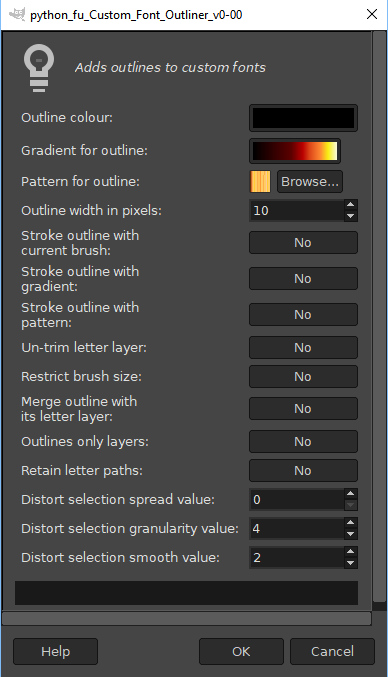
Filter_Dialog.jpg
Filter_Dialog.jpg [ 136.81 KiB | Viewed 4123 times ]


You can use it to add outlines to an existing custom font file i.e. a file where the layers are named as separate letter layers or layers with letters and with the .png extension added. Other layers (including space/space.png) are ignored.

The outlines can be kept as a separate layer above the existing one, merged with the existing layer or used to replace the original layer.

The filter can produce four different types of outlines -

1) Simple outline: With all the stroke options set to ‘No’ the filter will use the outline colour from the dialog to create an outline at the specified width.

2) Gradient outline: The filter will use the currently selected gradient and its related options to colour the outline.

3. Pattern outline: The filter will use the currently selected gradient and its related options to colour the outline.

4. Brushed outline: The filter will use the currently selected brush and its related options to colour the outline. A good range of effects can be created by experimenting with the dynamics options – especially the random brush size, opacity, colour and spacing dynamics settings.

The three distort settings provide values to use with the plug-in like those that can be accessed with ‘Distort’ option from the Select menu. When the spread value is set to a number greater than zero the outline will be given a random path to follow. It is probably better to use lower values or the outline will stray beyond the boundaries of the original letter layer and leave gaps. Higher values can, however, produce some interesting outline only letter designs.

Tips for using the filter:

If the filter fails in your version of Gimp 2.10 with an error message "Unable to run GimpPdbProgress callback. The corresponding plug-in may have crashed." please download the version without the outline colour selector from post #6 - this is exactly the same plugin but it just uses the currently selected foreground colour as the border colour.

Try out different effects on a small test file that contains only one or two letter layers.

The ‘Undo’ key combination is definitely your friend - especially when using the distort options of this filter.

If the original letters disappear, leaving an empty layer, check the layer visibility in the layers dialog. If the layer has no content then try setting the ‘Un-trim letter layer’ option.

When using the brush to stroke the outlines option keep one eye on the default size of brushes - especially when you change brushes. If the brush is much larger than the outline width it can overwhelm the letter shape. If the brushed stroke looks much fuzzier than you were expecting, try increasing the hardness of the brush.

If the outline layer shows a clipped effect it may be that the original letter layer does not have enough space at its left and right margins. Either use a smaller brush size or increase the size of layer to resolve the clipped effect. There is an option to restrict the size of the brush to the outline width, but this may produce too small a stroke.

Edit: Post #6 fix for error message reported by Blighty II

Some sample outputs:

Attachment:
Samples.jpg
Samples.jpg [ 936.07 KiB | Viewed 4123 times ]

_________________
Image
"Let no one steal your dreams."
Paul Cookson

Custom Font Links
2.10 Tools
Character Paths
White Bases


Last edited by Skinnyhouse on Mon Jun 25, 2018 8:57 am, edited 1 time in total.

Share on Facebook Share on Twitter Share on Orkut Share on Digg Share on MySpace Share on Delicious Share on Technorati
Top
 Post subject: Re: Custom Font Outliner for Gimp 2.10 version 0.00
PostPosted: Mon Jun 25, 2018 3:53 am  (#2) 
Offline
GimpChat Member

Joined: Sep 23, 2016
Posts: 317
Hi Skinnyhouse

I have downloaded your script, but have run into a problem. I am trying to outline the font in a colour other than black, or use the brush with a colour other than black. But when I click on the first option, (Outline colour), it crashes with the following message:
"Unable to run GimpPdbProgress callback. The corresponding plug-in may have crashed."
Outlining or painting with black works fine.

I am using Gimp 2.10.2 from the gimp.org site. And windows 10 64 bit.


Top
 Post subject: Re: Custom Font Outliner for Gimp 2.10 version 0.00
PostPosted: Mon Jun 25, 2018 4:37 am  (#3) 
Offline
GimpChat Member
User avatar

Joined: Aug 08, 2016
Posts: 2861
Location: East Midlands of England
Thank you for the feedback Blighty. I am running 2.10.0 because my JoinedUp Text filter refuses to start on Gimp.org's 2.10.2 but works fine on Partha's and SamJ's portables of 2.10.2. Will try my best to look into it.

_________________
Image
"Let no one steal your dreams."
Paul Cookson

Custom Font Links
2.10 Tools
Character Paths
White Bases


Top
 Post subject: Re: Custom Font Outliner for Gimp 2.10 version 0.00
PostPosted: Mon Jun 25, 2018 6:19 am  (#4) 
Offline
Script Coder
User avatar

Joined: Jun 22, 2010
Posts: 1171
Location: Here and there
That's a know bug in GIMP: https://gitlab.gnome.org/GNOME/gimp/issues/1438


Top
 Post subject: Re: Custom Font Outliner for Gimp 2.10 version 0.00
PostPosted: Mon Jun 25, 2018 7:10 am  (#5) 
Offline
GimpChat Member

Joined: Sep 23, 2016
Posts: 317
paynekj wrote:


Is this possible as a workaround?
Use the FG colour and do away with the colour picker in the script?


Top
 Post subject: Re: Custom Font Outliner for Gimp 2.10 version 0.00
PostPosted: Mon Jun 25, 2018 7:33 am  (#6) 
Offline
GimpChat Member
User avatar

Joined: Aug 08, 2016
Posts: 2861
Location: East Midlands of England
Thanks to paynekj for his advice.

Blighty:

That option also works on my Gimp 2.10 so here is a version that just uses the currently selected foreground colour - if you would like to try it out.

Attachment:
Custom_Font_Outliner_No_Colour_Selector.zip [3.65 KiB]
Downloaded 184 times


Screen shot attached:

Attachment:
poss_update_test.jpg
poss_update_test.jpg [ 451.04 KiB | Viewed 4046 times ]

_________________
Image
"Let no one steal your dreams."
Paul Cookson

Custom Font Links
2.10 Tools
Character Paths
White Bases


Top
 Post subject: Re: Custom Font Outliner for Gimp 2.10 version 0.00
PostPosted: Mon Jun 25, 2018 8:41 am  (#7) 
Offline
GimpChat Member

Joined: Sep 23, 2016
Posts: 317
Skinnyhouse wrote:
That option also works on my Gimp 2.10 so here is a version that just uses the currently selected foreground colour - if you would like to try it out.

Thanks Skinnyhouse - working perfectly.


Top
 Post subject: Re: Custom Font Outliner for Gimp 2.10 version 0.00
PostPosted: Mon Jun 25, 2018 9:14 am  (#8) 
Offline
GimpChat Member
User avatar

Joined: Apr 15, 2017
Posts: 1837
FYI, the original script works just fine here using Gimp 2.10.3 AppImage in Linux.


Top
 Post subject: Re: Custom Font Outliner for Gimp 2.10 version 0.00
PostPosted: Mon Jun 25, 2018 10:31 am  (#9) 
Offline
GimpChat Member
User avatar

Joined: Aug 08, 2016
Posts: 2861
Location: East Midlands of England
Thanks Racer - always useful to know - funny old thing the Gimp it is!

_________________
Image
"Let no one steal your dreams."
Paul Cookson

Custom Font Links
2.10 Tools
Character Paths
White Bases


Top
 Post subject: Re: Custom Font Outliner for Gimp 2.10 version 0.00
PostPosted: Mon Jun 25, 2018 5:02 pm  (#10) 
Offline
GimpChat Member
User avatar

Joined: Aug 08, 2016
Posts: 2861
Location: East Midlands of England
And this is the custom font I had the original idea for - without any shining up or bevel added. Save that fun for another day.

Attachment:
Gorgeous_Bokeh_Example.jpg
Gorgeous_Bokeh_Example.jpg [ 874.34 KiB | Viewed 4015 times ]

_________________
Image
"Let no one steal your dreams."
Paul Cookson

Custom Font Links
2.10 Tools
Character Paths
White Bases


Top
 Post subject: Re: Custom Font Outliner for Gimp 2.10 version 0.00
PostPosted: Wed Jun 27, 2018 8:57 am  (#11) 
Offline
Script Coder
User avatar

Joined: May 07, 2014
Posts: 4528
Location: Canada
Hey that's a funky looking font! :D

_________________
TinT


Top
 Post subject: Re: Custom Font Outliner for Gimp 2.10 version 0.00
PostPosted: Wed Jun 27, 2018 3:22 pm  (#12) 
Offline
GimpChat Member
User avatar

Joined: Aug 08, 2016
Posts: 2861
Location: East Midlands of England
Thanks Tim - funky is good. Just finished adding shine and chisel to sample letters and have to decide which I like best.

_________________
Image
"Let no one steal your dreams."
Paul Cookson

Custom Font Links
2.10 Tools
Character Paths
White Bases


Top
 Post subject: Re: Custom Font Outliner for Gimp 2.10 version 0.00
PostPosted: Thu Jun 28, 2018 4:03 pm  (#13) 
Offline
GimpChat Member
User avatar

Joined: Aug 08, 2016
Posts: 2861
Location: East Midlands of England
Looking at including calls to shine and chisel or carve filters so that they can do their stuff on each layer. Have a version that works - chugged out 98 layers for me. Two problems however.

1. I use a very old release of the Shine script - v 0.01 so would have to include these scripts along with my own.

2. Lots of script parameters to handle - see screenshot for my down and dirty text entry method that surpisingly worked first time - so I will have to think about which are the really important parameters that affect custom font appearance and just add those to the dialog interface. Otherwise the dialog will go way off the screen - and result in another scolding.

Any views are welcome.

Attachment:
snippet_parameters.jpg
snippet_parameters.jpg [ 100.87 KiB | Viewed 1594 times ]

_________________
Image
"Let no one steal your dreams."
Paul Cookson

Custom Font Links
2.10 Tools
Character Paths
White Bases


Top
Post new topic Reply to topic  [ 13 posts ] 

All times are UTC - 5 hours [ DST ]


* Login  


Powered by phpBB3 © phpBB Group