It is currently Mon Jun 15, 2026 9:36 pm


All times are UTC - 5 hours [ DST ]


Post new topic Reply to topic  [ 19 posts ] 
Author Message
 Post subject: Can you stop automatic updates?
PostPosted: Tue Aug 13, 2024 7:56 am  (#1) 
Offline
GimpChat Member

Joined: May 29, 2015
Posts: 20
Hi guys. It seems to me that GIMP is doing updates every couple of weeks. It downloads automatically whether I it to or not. The problem is that all the settings reset and I have to go back through and change everything. It's time consuming and a pain. Is there a way to turn off automatic updates so I can choose when I have time to play with settings? Or is there a way to make settings stick between downloads?

Thanks


Share on Facebook Share on Twitter Share on Orkut Share on Digg Share on MySpace Share on Delicious Share on Technorati
Top
 Post subject: Re: Can you stop automatic updates?
PostPosted: Tue Aug 13, 2024 8:11 am  (#2) 
Offline
GimpChat Member
User avatar

Joined: May 24, 2021
Posts: 859
Location: SEA - South East Asia
There is no GIMP dev here, (there are some time to time but that's not the place to post that type of question/request)
It is over-there > https://gitlab.gnome.org/GNOME/gimp/-/issues or go to the top GIMP menu Help > Bug Reports & feature Requests.

Having said that; where did you downloaded your GIMP? Because I don't think that this kind of behavior looks like an official GIMP, GIMP won't update without asking you and most important GIMP will always keep your profile AKA your settings.
What is your operating system?
If you go to report to the official GIMP (link above), you will need to specify the questions I asked above.

_________________
Patrice


Top
 Post subject: Re: Can you stop automatic updates?
PostPosted: Tue Aug 13, 2024 8:32 am  (#3) 
Offline
GimpChat Member

Joined: Apr 11, 2024
Posts: 298
What's your GIMP version? Where did you get it from?
What's your OS?

Honestly .... my GIMP (Panda Jim PPA on Linux Mint 20.1) has never done any harm to my settings when updating.
And not every few days . Last time was in February if I remember correctly.

For questions to the developers, go here:
https://discourse.gnome.org/tag/gimp


Last edited by quietreader on Tue Aug 13, 2024 12:52 pm, edited 1 time in total.

Top
 Post subject: Re: Can you stop automatic updates?
PostPosted: Tue Aug 13, 2024 9:05 am  (#4) 
Offline
Global Moderator
User avatar

Joined: Apr 01, 2012
Posts: 8366
Location: On the other side of your screen
I have had gimp since version 2.6 and it has never 'updated'. You have to download a new one to have an updated version.
Only thing that ever has done is the GMIC plugin. I am not sure if it still does.

_________________
Image
Free Fun Photo Editing & resources
Poems from the Lord
Gimp Newby
Gimp version 3.2.0 and GMIC-Qt 3.7.5 OS :- Windows 10 Home 64


Top
 Post subject: Re: Can you stop automatic updates?
PostPosted: Tue Aug 13, 2024 5:21 pm  (#5) 
Offline
Script Coder
User avatar

Joined: Oct 25, 2010
Posts: 4812
CapellaM44 wrote:
Hi guys. It seems to me that GIMP is doing updates every couple of weeks. It downloads automatically whether I it to or not. The problem is that all the settings reset and I have to go back through and change everything. It's time consuming and a pain. Is there a way to turn off automatic updates so I can choose when I have time to play with settings? Or is there a way to make settings stick between downloads?

Thanks


What OS? How did you install it?

This said, Gimp isn't updated every couple of weeks. More like twice a year these days. And an update doesn't reset your user profile.

_________________
Image


Top
 Post subject: Re: Can you stop automatic updates?
PostPosted: Wed Aug 14, 2024 1:02 am  (#6) 
Offline
Global Moderator
User avatar

Joined: May 16, 2010
Posts: 16029
Yeah your gimprc file should keep your settings the same even after uninstall and reinstall. It resides in a special folder that does not change unless you remove the rc file itself., or edit the gimprc file yourself.
Gimp updating on its own, daily? Never. My advice is to uninstall your version and reinstall from http://www.gimp.org

_________________
Image


Top
 Post subject: Re: Can you stop automatic updates?
PostPosted: Wed Aug 14, 2024 7:45 am  (#7) 
Offline
GimpChat Member

Joined: May 29, 2015
Posts: 20
Sorry I forgot to give information. I did this way too early in the morning. I've downloaded my GIMP from www.gimp.org Version 2.10.36 as of the latest update. I'm running Mac OS 13.6.9

When I open gimp, I occasionally get a pop up window that says "There's a new version of gimp available." When I get this message, I know that GIMP will download again. and everything will reset. The background is dark gray, I have the lighter background, the tools use groups, I hate tool groups, so I have to reset that. And so on.

I will have to take a screenshot of the message next time I get it. Seeing as it just updated today, I will have to wait another week or two because it seems to update every week or two.

Thanks.


Top
 Post subject: Re: Can you stop automatic updates?
PostPosted: Wed Aug 14, 2024 8:30 am  (#8) 
Offline
GimpChat Member

Joined: Apr 11, 2024
Posts: 298
The last official release for MAC on their site was in May:
Quote:
Updated on 2024-05-22: GIMP 2.10.38 DMG revision 1

see: https://www.gimp.org/downloads/


Top
 Post subject: Re: Can you stop automatic updates?
PostPosted: Thu Aug 15, 2024 8:41 pm  (#9) 
Offline
GimpChat Member

Joined: May 29, 2015
Posts: 20
Very interesting I'm anxious now to get a pop up window so I can post it. Because it keeps resetting every couple of weeks. The last time I updated from the gimp web site, I went to gimp.org, clicked on download, then selected download gimp for intel directly. I'll update the post when I get a picture of the pop up window I get. Thanks.


quietreader wrote:
The last official release for MAC on their site was in May:
Quote:
Updated on 2024-05-22: GIMP 2.10.38 DMG revision 1

see: https://www.gimp.org/downloads/


Top
 Post subject: Re: Can you stop automatic updates?
PostPosted: Fri Aug 16, 2024 10:48 am  (#10) 
Offline
Global Moderator
User avatar

Joined: Apr 01, 2012
Posts: 8366
Location: On the other side of your screen
Thats very interesting. I thought it was very hard to get an official Mac gimp. Are you sure it isn't just your OS that is being updated? It wouldn't normally mess with your gimp either.

By the way, if you do not want anything to change dont update it with the pop up window. For a long time now;
You need to uninstall your current gimp then install the new one - your other settings/user folders will not be changed. I'm not sure how you uninstall in Mac. I use windows.

_________________
Image
Free Fun Photo Editing & resources
Poems from the Lord
Gimp Newby
Gimp version 3.2.0 and GMIC-Qt 3.7.5 OS :- Windows 10 Home 64


Top
 Post subject: Re: Can you stop automatic updates?
PostPosted: Wed Aug 21, 2024 7:28 am  (#11) 
Offline
GimpChat Member

Joined: May 29, 2015
Posts: 20
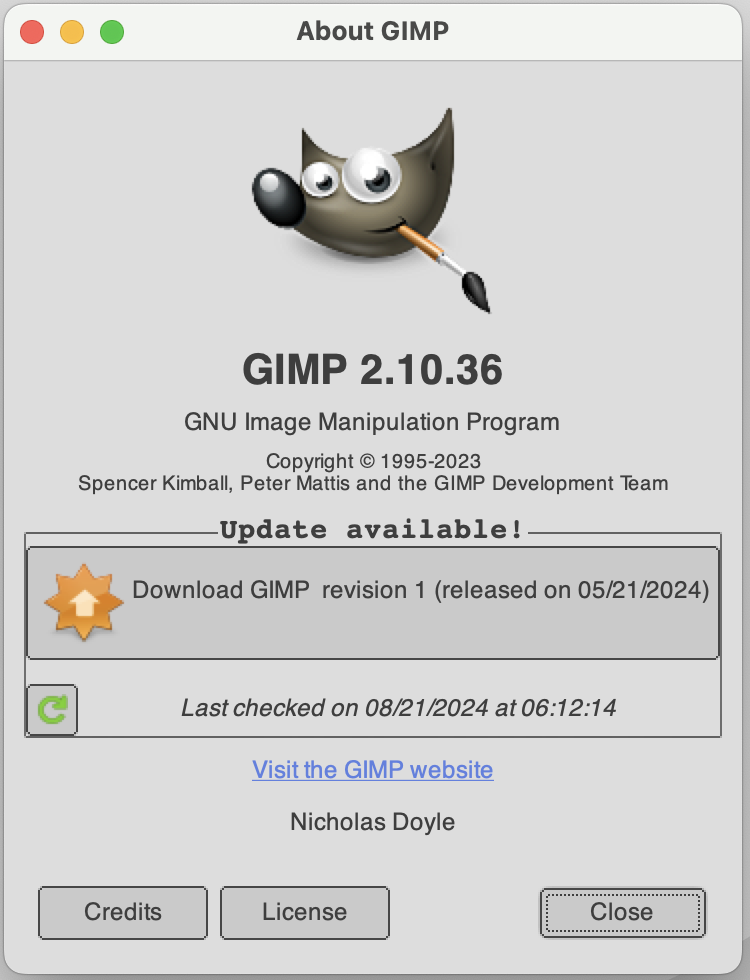
Hi guys, I finally got the little message that I get every couple of weeks. There doesn't appear to be any real option. Now that I've received this message, the ver next time I open GIMP, everything will be reset. If there is a way to turn this off, please let me know. Thank you. https://drive.google.com/file/d/1XlfUyj ... share_link


Top
 Post subject: Re: Can you stop automatic updates?
PostPosted: Wed Aug 21, 2024 8:37 am  (#12) 
Offline
GimpChat Member

Joined: Apr 11, 2024
Posts: 298
without a google account we can't access your drive.
Please attach it here directly.


Top
 Post subject: Re: Can you stop automatic updates?
PostPosted: Wed Aug 21, 2024 2:30 pm  (#13) 
Offline
GimpChat Member

Joined: May 29, 2015
Posts: 20
Image

Sorry about that. Here's another working link (fingers crossed)


Top
 Post subject: Re: Can you stop automatic updates?
PostPosted: Thu Aug 22, 2024 1:04 am  (#14) 
Offline
Global Moderator
User avatar

Joined: May 16, 2010
Posts: 16029
I would just close the window and not update. Could be a bug reinstalling the same version.

_________________
Image


Top
 Post subject: Re: Can you stop automatic updates?
PostPosted: Thu Aug 22, 2024 1:44 am  (#15) 
Offline
GimpChat Member

Joined: Apr 11, 2024
Posts: 298
You could try to find out where your personal GIMP settings folder is.
See here: https://www.gimp.org/tutorials/GIMPProfile/
Copy that as a backup to some safe location.
After the update ... if things got reset, just copy that backuped folder back.
(Make backups of that folder again from time to time to be safe)


Top
 Post subject: Re: Can you stop automatic updates?
PostPosted: Thu Aug 22, 2024 2:06 am  (#16) 
Offline
Global Moderator
User avatar

Joined: Apr 01, 2012
Posts: 8366
Location: On the other side of your screen
Most of us get that pop-up Capella. Do as Rod suggests. It's really just to let you know there is an update. You do have a choice to not update.

_________________
Image
Free Fun Photo Editing & resources
Poems from the Lord
Gimp Newby
Gimp version 3.2.0 and GMIC-Qt 3.7.5 OS :- Windows 10 Home 64


Top
 Post subject: Re: Can you stop automatic updates?
PostPosted: Thu Aug 22, 2024 8:14 am  (#17) 
Offline
GimpChat Member

Joined: May 29, 2015
Posts: 20
That's the problem. There isn't any choice not to update. If I select "close" it updates the next time I open the program. If I click the x to close the window, it uploads the next time I start the program. Really those are the only 2 options other than to go directly to the website to download. If I go to the website, but do not download, it still updates when I restart the program.

I'll create a back up folder so I can just go in and change things in a click. I'll see about reporting it as a bug too. I know others who use both Mac and Gimp so I'll see if they have similar issues.


Top
 Post subject: Re: Can you stop automatic updates?
PostPosted: Thu Aug 22, 2024 9:56 am  (#18) 
Offline
GimpChat Member

Joined: Apr 11, 2024
Posts: 298
I guess this is something your MAC system does.
So probably you'll have to search for the topic on a MAC forum.


Top
 Post subject: Re: Can you stop automatic updates?
PostPosted: Thu Aug 22, 2024 10:29 am  (#19) 
Offline
GimpChat Member

Joined: Mar 04, 2011
Posts: 2603
CapellaM44 wrote:
That's the problem. There isn't any choice not to update. If I select "close" it updates the next time I open the program. If I click the x to close the window, it uploads the next time I start the program. Really those are the only 2 options other than to go directly to the website to download. If I go to the website, but do not download, it still updates when I restart the program.

I'll create a back up folder so I can just go in and change things in a click. I'll see about reporting it as a bug too. I know others who use both Mac and Gimp so I'll see if they have similar issues.


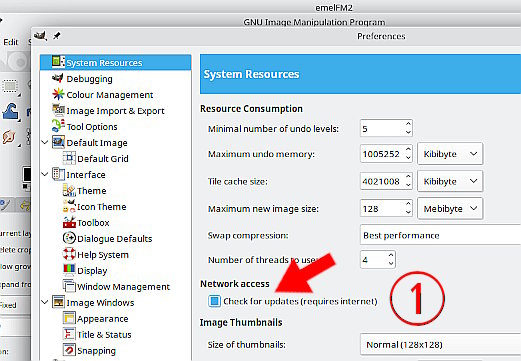
Who knows with MacOS. In older Gimp versions there was an option in the Preferences menu that you could toggle on / off (1)

Attachment:
01.jpg
01.jpg [ 56.34 KiB | Viewed 6776 times ]


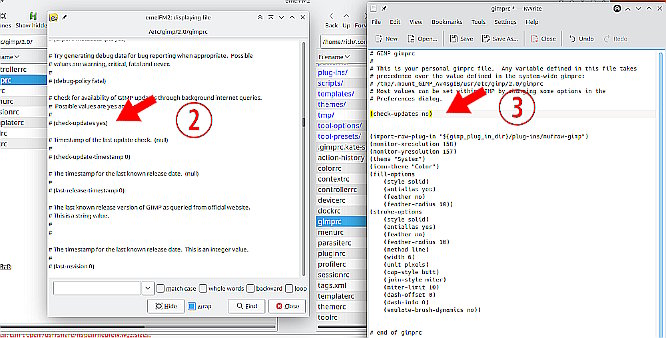
An up-to-date Gimp in the system gimprc file, (which gets transferred to the user profile on a new install) has that disabled (2)

If you can find that in your MacOS system remove the # and change yes to no
or
In your User profile gimprc file add a line (check-updates no) (3)

Attachment:
02.jpg
02.jpg [ 70.85 KiB | Viewed 6776 times ]


might work / should work


Top
Post new topic Reply to topic  [ 19 posts ] 

All times are UTC - 5 hours [ DST ]


* Login  


Powered by phpBB3 © phpBB Group