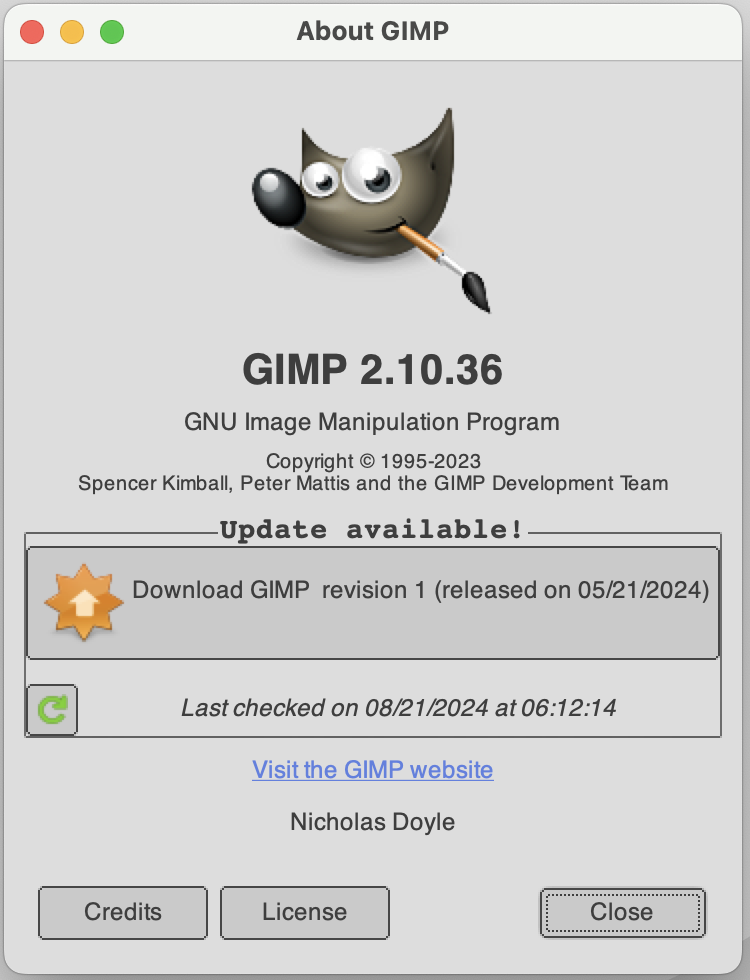
CapellaM44 wrote:
That's the problem. There isn't any choice not to update. If I select "close" it updates the next time I open the program. If I click the x to close the window, it uploads the next time I start the program. Really those are the only 2 options other than to go directly to the website to download. If I go to the website, but do not download, it still updates when I restart the program.
I'll create a back up folder so I can just go in and change things in a click. I'll see about reporting it as a bug too. I know others who use both Mac and Gimp so I'll see if they have similar issues.
Who knows with MacOS. In older Gimp versions there was an option in the Preferences menu that you could toggle on / off (1)
Attachment:
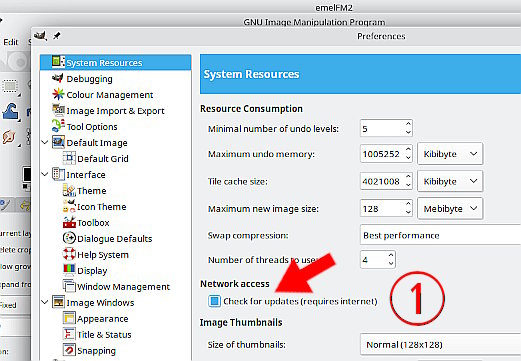 01.jpg [ 56.34 KiB | Viewed 7937 times ]
An up-to-date Gimp in the system gimprc file, (which gets transferred to the user profile on a new install) has that disabled (2)
If you can find that in your MacOS system remove the # and change yes to no
or
In your User profile gimprc file add a line (check-updates no) (3)
Attachment:
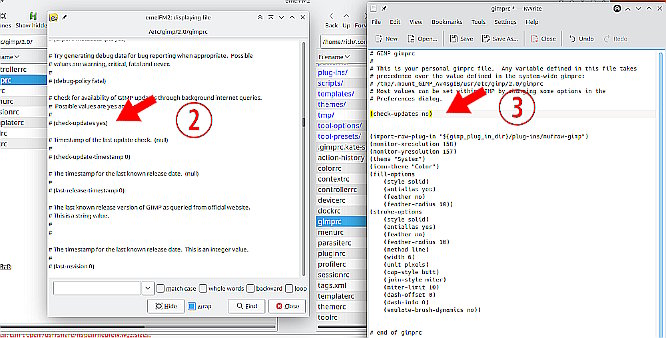 02.jpg [ 70.85 KiB | Viewed 7937 times ]
might work / should work
 Login
Login Register
 Tweets
 FAQ
FAQ Advanced Search